Freelance invoicing: create invoices and get paid
Learn how freelance invoicing helps you create clear invoices and get paid on time.
Written by Jotika Teli—Certified Public Accountant with 24 years of experience. Read Jotika's full bio
Published Wednesday 22 April 2026
Table of contents
Key takeaways
- Include all essential details on every invoice, such as your business information, client details, a unique invoice number, clear service descriptions, and specific payment terms, to avoid delays and get processed quickly.
- Set shorter payment terms like Net 7 or Net 14 instead of the standard Net 30 to encourage clients to pay faster and keep your cash flow steady.
- Request a 50% deposit upfront before starting any project to protect your income and keep clients committed throughout the work.
- Follow up on overdue invoices with a polite reminder email on the first day after the due date, then make a phone call in the second week to resolve any payment issues promptly.
Why freelancers need invoices
A freelance invoice is a formal payment request you send to clients after completing work. It documents what you delivered, how much you're owed, and when payment is due, which is especially important since you must file a tax return if your net earnings from self-employment were $400 or more. Here's why invoices matter for freelancers:
- Protect yourself legally: Create official payment records that support your case in disputes
- Stay tax compliant: Track income accurately for tax reporting. Reporting requirements now apply to annual payments exceeding $600, and the IRS requires freelancers to keep records for at least four years
- Manage cash flow: Set clear payment terms that help you predict and plan your income
- Build your professional image: Send well-designed invoices that establish client trust and respect
When to send your invoice
Invoice timing directly affects how quickly you get paid. The right schedule depends on your project type and payment structure.
Here are common invoicing schedules to consider:
- Project completion: Send immediately after delivering the final work
- Retainer clients: Invoice monthly on a consistent date
- Long-term projects: Bill at agreed milestones throughout the project
- Hourly contracts: Invoice weekly or bi-weekly based on logged hours
Send invoices as soon as work is complete or milestones are reached. Waiting until the end of the month delays your payment timeline.
What to include in your freelance invoice
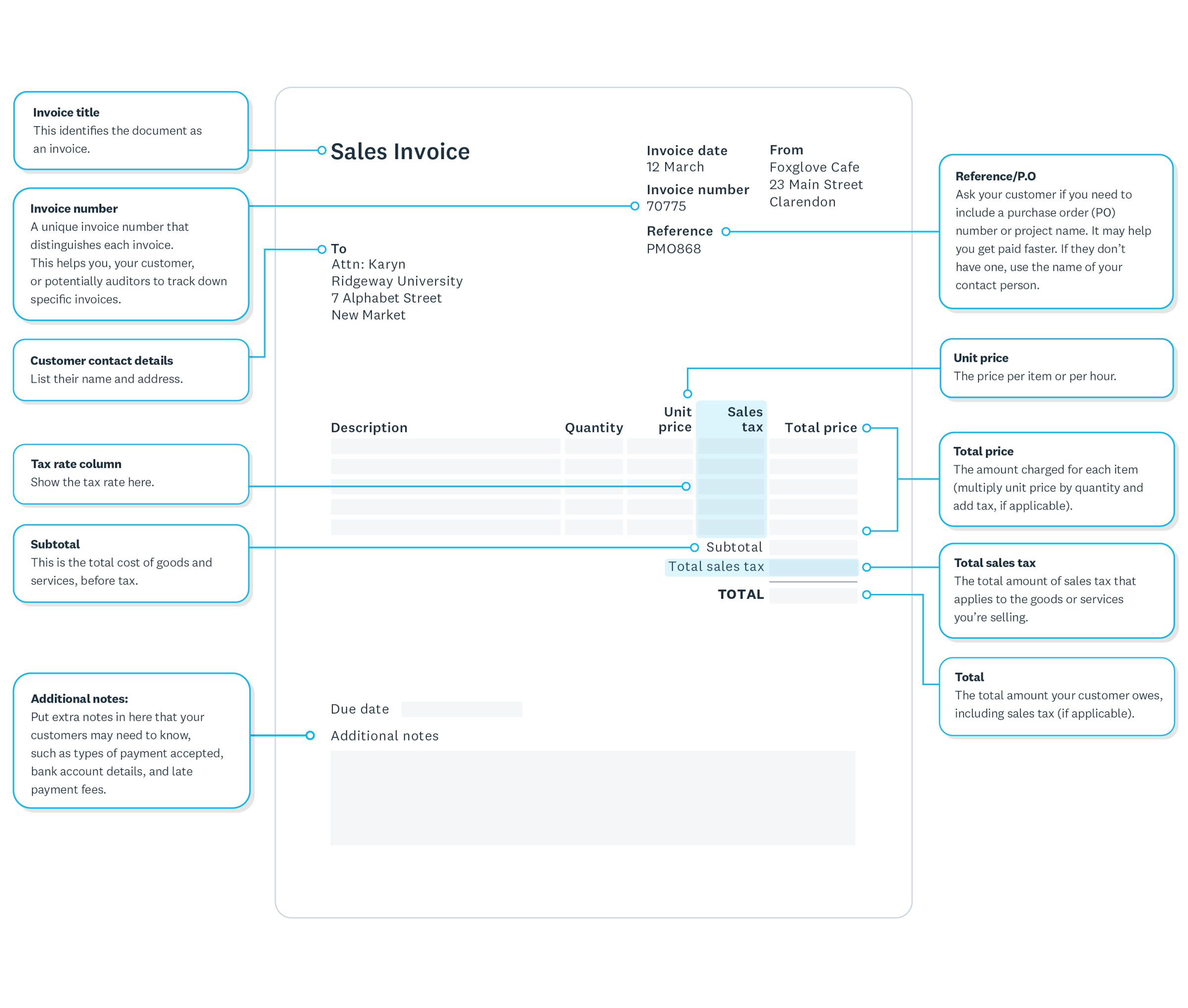
Complete invoices get paid faster. Missing or inaccurate information causes payment delays. Every freelance invoice must include these essential elements:
- Your business information: Include your name, address, and contact details
- Client information: Add the company name, billing address, and contact person
- Invoice specifics: Assign a unique number, issue date, and payment due date
- Service details: Describe the work you completed clearly
- Payment terms: State the amount due, accepted payment methods, and late fees
Use a consistent template to avoid errors and speed up your invoicing process.
How to create a freelance invoice
Creating a freelance invoice takes just a few steps. You can start from scratch, use a template, or use invoicing software to speed up the process.
Follow these steps to create your invoice:
Step 1: Add your business details
Include your complete information so clients know exactly who to pay:
- use your legal business name: add your registered business or personal name
- list your complete address: include street address, city, state, and ZIP code
- provide contact information: add your phone number and email address
Step 2: Include client information
Accurate client details ensure your invoice reaches the right person and gets processed quickly:
- use the legal business name: enter the official company name, not just the brand name
- confirm the billing address: verify the correct address for invoice processing
- send to the right contact: direct invoices to accounts payable, not your project contact
- double-check before sending: verify all details before submitting your first invoice
Step 3: Assign an invoice number
Give each invoice a unique number to help you track payments.
Step 4: List your services
Clearly describe the work you completed, breaking it down into individual line items if needed.
Step 5: Calculate the total
Add up the cost of all services and include any taxes to get the final amount due.
Step 6: Set the payment due date
This is the most critical element of your invoice. Clear deadlines drive faster payment.
Here are the most common payment term options:
- Net 7: Payment due within seven days (fastest collection)
- Net 14: Payment due within 14 days (good balance)
- Net 30: Payment due within 30 days (industry standard)
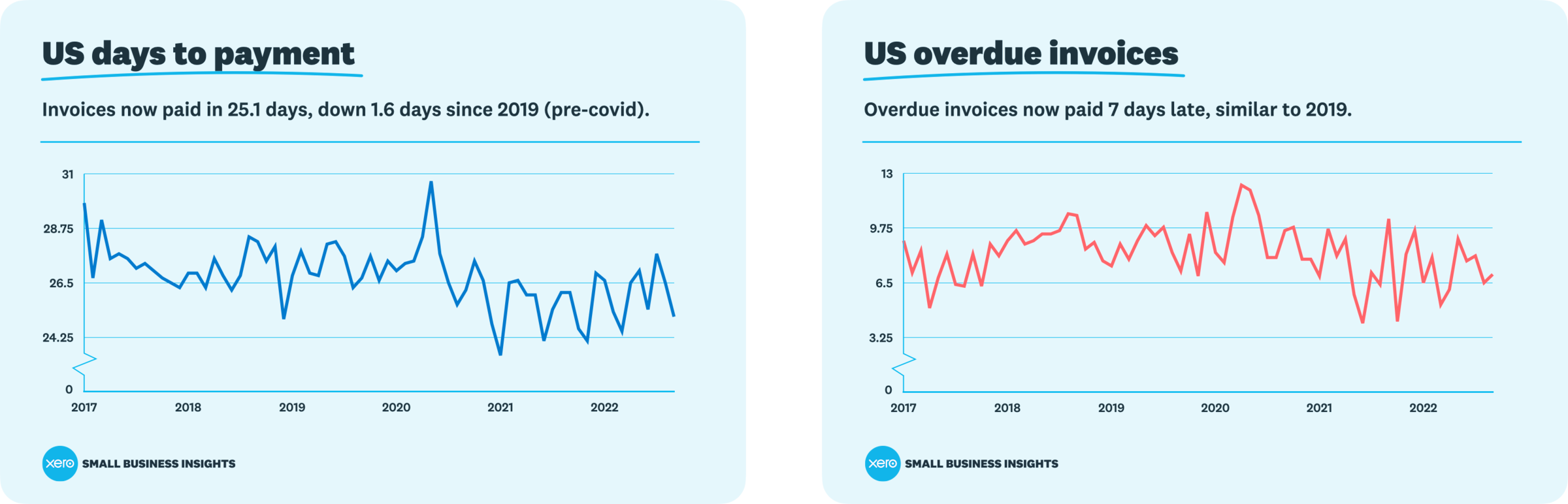
Shorter payment terms result in faster payments, according to Xero data. Always include both the invoice date and due date.
Freelance invoice templates and tools
Invoice templates and software save time and reduce errors. You don't have to create a new invoice from scratch every time.
You have several options to streamline your invoicing process:
- Invoice templates: Download a free invoice template that includes all necessary fields, then fill in the details for each new job
- Invoicing software: Use Xero to automate the entire process, from creating and sending invoices to tracking opens and sending automatic payment reminders
Set clear invoice terms
Invoice terms are the payment conditions you set with clients before starting work. Clear terms prevent payment delays and disputes.
Here are the essential terms to establish with clients:
- Set your payment schedule: Choose weekly, monthly, or milestone-based invoicing
- Define payment deadlines: Specify Net 15, Net 30, or custom timeframes
- List accepted payment methods: Include bank transfer, credit card, or check options
- State late payment fees: Outline penalties for overdue invoices
For large projects, invoice monthly instead of waiting until completion to improve your cash flow.
Common invoicing mistakes to avoid
Small invoicing errors can delay payment or damage client relationships. Avoid these common mistakes:
- Sending to the wrong person: Direct invoices to accounts payable, not your project contact
- Missing invoice numbers: Use a consistent numbering system to track all invoices
- Vague service descriptions: Describe exactly what work you completed and when
- Incorrect calculations: Double-check your math, especially for taxes and totals
- Unclear payment terms: State exactly when payment is due and which methods you accept
- Forgetting to send: Track your invoices and confirm delivery
- Inconsistent formatting: Use the same professional template for every invoice
- Not keeping records: Save copies of all sent invoices for tax and legal purposes, as you may need to keep records for three years or more depending on your filing situation
Avoiding these errors helps your invoices get processed quickly and professionally.
Get paid faster with shorter payment terms
Setting shorter payment terms is one of the most effective ways to improve your cash flow. The standard Net 30 payment term often results in delayed payments, while shorter terms like Net 7 or Net 14 encourage clients to prioritize your invoice.
Consider your client relationships and project types when setting payment terms. New clients or smaller projects may warrant shorter payment periods, while established relationships might allow for more flexibility. Always communicate your payment terms clearly before starting any work to avoid confusion or disputes later.
Make invoicing easier with Xero
Xero's online invoicing software lets you build professional invoices from customizable templates, send them directly to clients, and accept online payments, all from one place. And because Xero connects your invoicing with your bank feeds and accounting, your books stay up to date without extra data entry.
Ready to simplify your invoicing? Try Xero and get one month free.
FAQs on freelance invoicing
Here are answers to common questions about freelance invoicing:
What information must be on a freelance invoice?
Every invoice should include your business name and contact information, client details, a unique invoice number, the date, a clear description of services provided, the amount due, payment terms, and your accepted payment methods.
When should I send my invoice?
Send your invoice as soon as you complete the work or reach an agreed milestone. For retainer clients, invoice on the same date each month. The sooner you send your invoice, the sooner you'll receive payment.
How can I get paid faster?
Set shorter payment terms like Net 7 or Net 14, request partial payment upfront, send invoices immediately upon completing work, and follow up promptly on overdue payments. Using invoicing software can also speed up the process.
What should I do if a client doesn't pay on time?
Send a polite reminder email on the first day after the due date. If payment still doesn't arrive, make a phone call within the second week to discuss any issues. Keep all communication professional and document every interaction.
Do I need invoicing software as a freelancer?
While not required, invoicing software saves time, reduces errors, and helps you track payments more efficiently. It can automate reminders and provide insights into your cash flow patterns.
Disclaimer
Xero does not provide accounting, tax, business or legal advice. This guide has been provided for information purposes only. You should consult your own professional advisors for advice directly relating to your business or before taking action in relation to any of the content provided.
Get 90% off for 6 months
Get 90% off for 6 months on any Xero plan.