What is a chart of accounts?
Learn how a chart of accounts organizes your finances and simplifies reporting.
Published Thursday 23 July 2026
Table of contents
Key takeaways
- A chart of accounts is a complete list of every financial account in your general ledger, organized into categories like assets, liabilities, equity, revenue, and expenses. It acts as the backbone of your bookkeeping and financial reporting.
- Setting up a clear numbering system and keeping your chart of accounts simple helps you track transactions accurately, prepare tax filings, and make confident business decisions.
- Reviewing your chart of accounts regularly and removing unused accounts keeps your financial data clean. Clean data means faster reporting and fewer errors at tax time.
- Cloud accounting software like Xero comes with a default chart of accounts you can customize, so you don't have to build one from scratch.
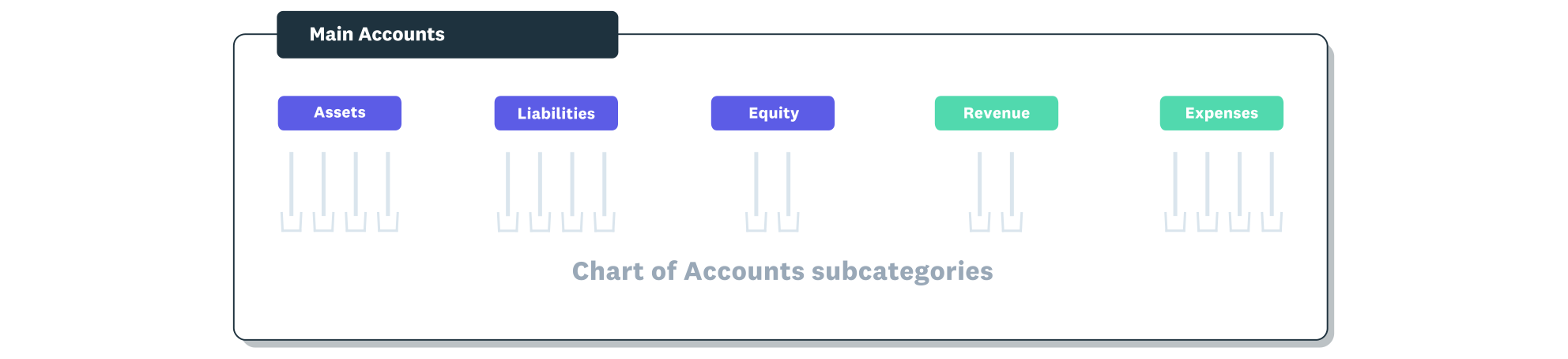
The chart of accounts is organized under the five main account types.
What is a chart of accounts?
A chart of accounts (COA) is a complete index of every financial account in your general ledger. Think of it as a filing system that organizes all your business transactions into named categories so you can find, sort, and report on your financial data.
Each account in the chart has a unique name and number. When you record a transaction, you assign it to the right account so it flows into the correct category. This structure is what makes it possible to produce accurate financial statements like a profit and loss statement or balance sheet.
For small businesses, a chart of accounts doesn't need to be complicated. A straightforward list of 30 to 50 accounts is usually enough to capture your day-to-day transactions and give you a clear picture of your finances.
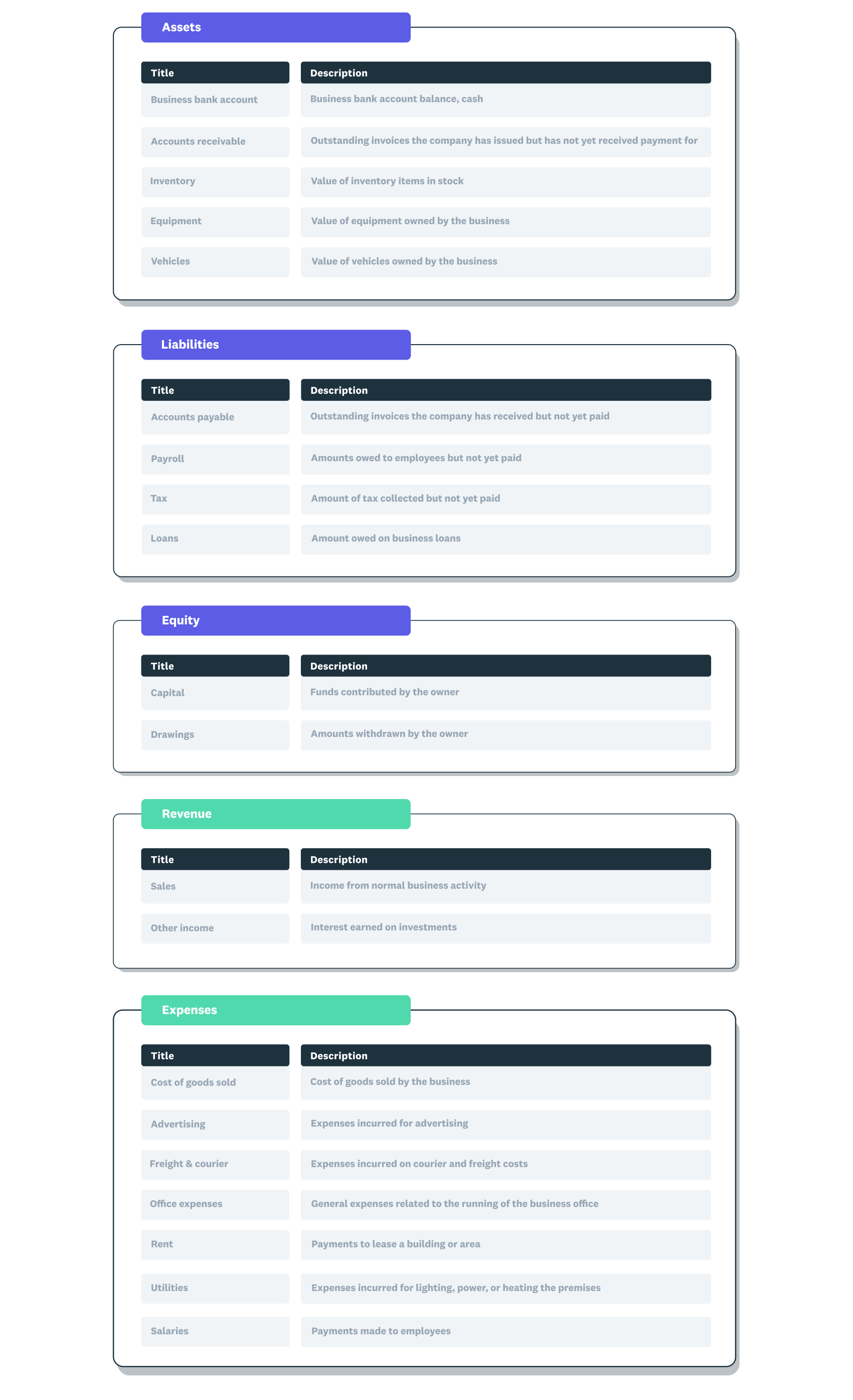
A chart of accounts example showing the five main account types with subcategories within each.
Why a chart of accounts matters for your business
Your chart of accounts is the foundation of every financial report your business produces. Without a well-organized COA, your bookkeeping can quickly become inconsistent, making it harder to understand where your money is going.
Here's why it matters for your business:
- Accurate financial reporting: a properly structured COA feeds directly into your profit and loss statement, balance sheet, and cash flow reports. These reports help you track profitability and spot trends.
- Smarter decision-making: when your transactions are categorized consistently, you can compare performance across months or years. This makes it easier to set budgets, cut unnecessary costs, and plan for growth.
- Tax compliance: a clear COA helps you identify deductible expenses and income categories, so preparing your IRS filings is faster and less stressful.
- Audit readiness: if the IRS or a lender reviews your books, a clean chart of accounts shows that your financial records are organized and reliable.
- Consistency across your team: when everyone, including your accountant or bookkeeper, uses the same account categories, there's less room for errors or misclassified transactions.
5 main account types in a chart of accounts
Every chart of accounts is built around 5 core account types. Understanding these categories helps you assign transactions to the right place and keep your financial records accurate.
The 5 main account types are:
- Assets: these are the resources your business owns or controls. Examples include cash in the bank, accounts receivable, inventory, equipment, and prepaid expenses. Assets are typically numbered in the 1000 range.
- Liabilities: these represent what your business owes to others. Examples include accounts payable, credit card balances, loans, and accrued expenses. Liabilities usually fall in the 2000 range.
- Equity: this is the owner's stake in the business after subtracting liabilities from assets. Examples include owner's capital, retained earnings, and owner's draws. Equity accounts are often numbered in the 3000 range.
- Revenue: also called income, these accounts track the money your business earns. Examples include sales revenue, service income, and interest income. Revenue accounts typically use the 4000 range.
- Expenses: these track the costs of running your business. Examples include rent, utilities, payroll, office supplies, and marketing costs. Expense accounts usually sit in the 5000 range.
Together, these 5 types cover every transaction your business records. Assets, liabilities, and equity feed into your balance sheet, while revenue and expenses appear on your profit and loss statement.
With US small business sales growth averaging just 2.4% year-over-year in 2025, according to Xero Small Business Insights, having clearly defined revenue and expense accounts helps you spot trends quickly when conditions shift.
Tracking accounts receivable in your asset accounts is particularly valuable. According to Xero Small Business Insights, US small businesses waited an average of 27.9 days to be paid in Q4 2025. Organizing your chart of accounts to separate receivable categories can help you monitor payment patterns and manage cash flow.
How to structure your chart of accounts
A logical structure makes your chart of accounts easier to use and scale as your business grows. The key is to use a consistent numbering system that groups related accounts together.
Most small businesses follow a standard numbering convention:
- 1000 to 1999: assets
- 2000 to 2999: liabilities
- 3000 to 3999: equity
- 4000 to 4999: revenue
- 5000 to 5999: expenses
Within each range, you can create sub-categories. For example, under expenses (5000), you might have 5100 for rent, 5200 for utilities, and 5300 for office supplies. Leaving gaps between numbers gives you room to add new accounts later without disrupting the order.
Keep your structure as simple as your business needs. A freelance graphic designer might only need 20 to 30 accounts, while a retail business with inventory could need 50 or more. The goal is enough detail to track your finances accurately without creating so many accounts that bookkeeping becomes overwhelming.
How to set up a chart of accounts
Setting up a chart of accounts is straightforward, especially if you're using accounting software that includes a default template. Follow these steps to create a COA that fits your business.
1. Start with a default template
Most accounting software comes with a pre-built chart of accounts based on your industry or business type. Starting with a template saves time and gives you a solid foundation. You can then customize it to match how your business actually operates.
2. Review and customize your accounts
Go through the default list and remove any accounts that don't apply to your business. Add accounts for income streams or expenses that are specific to your operations. For example, if you run a consulting business, you might add an account for "subcontractor fees" under expenses.
3. Assign account numbers
Apply a consistent numbering system using the 1000 to 5999 ranges outlined above. Leave gaps between account numbers so you can insert new accounts later without renumbering everything.
4. Map accounts to your financial statements
Confirm that each account feeds into the correct financial report. Asset, liability, and equity accounts should appear on your balance sheet. Revenue and expense accounts should flow into your profit and loss statement.
5. Set up tracking categories
If you need to analyze income or expenses by department, location, or project, set up tracking categories in your accounting software. This adds another layer of detail without creating extra accounts in your COA.
6. Get input from your accountant
Before you finalize your chart of accounts, ask your accountant or bookkeeper to review it. They can spot missing categories, suggest accounts that simplify tax preparation, and confirm the structure aligns with IRS reporting requirements.
Chart of accounts best practices
Once your chart of accounts is set up, these practices help you keep it clean, useful, and accurate over time.
- Keep it simple: only create accounts you'll actually use. Too many accounts make data entry slower and reports harder to read.
- Use descriptive account names: names like "office supplies" or "consulting revenue" are clearer than generic labels like "miscellaneous" or "other income." Specific names reduce misclassification.
- Review your COA quarterly: as your business changes, some accounts may become irrelevant while new ones are needed. A quarterly review keeps your chart of accounts aligned with your current operations.
- Archive unused accounts instead of deleting them: if an account has historical transactions, archive it rather than deleting it. This preserves your past financial records while keeping your active list tidy.
- Standardize account use across your team: create a brief guide that explains which account to use for common transactions. This prevents different team members from coding the same expense to different accounts.
- Limit who can add new accounts: restrict the ability to create new accounts to 1 or 2 people, such as you and your bookkeeper. This prevents duplicate or unnecessary accounts from cluttering your COA.
Common chart of accounts mistakes to avoid
Even a well-intentioned chart of accounts can create problems if certain pitfalls aren't addressed. Watch out for these common mistakes.
- Creating too many accounts: adding a separate account for every minor expense makes your reports cluttered and hard to analyze. Group similar costs together under broader categories.
- Using vague account names: names like "miscellaneous" or "general expenses" make it difficult to track where money is going. Be specific so every transaction has a clear home.
- Ignoring your COA after setup: a chart of accounts isn't a set-and-forget tool. Failing to update it as your business evolves leads to outdated categories and inaccurate reporting.
- Mixing personal and business transactions: recording personal expenses in your business accounts makes your financial statements unreliable and complicates tax filings. Keep personal and business finances separate.
- Not aligning with tax categories: your chart of accounts should map to the categories on your IRS tax forms. When it doesn't, preparing your return takes longer and increases the risk of errors.
Simplify your chart of accounts with Xero
Setting up and managing a chart of accounts is simpler with the right tools. Xero's cloud accounting software gives you a default chart of accounts you can customize to fit your business, with the flexibility to add, edit, or archive accounts as your needs change.
With features like automated bank feeds, real-time reporting, and built-in tracking categories, Xero helps you keep your financial data organized and your reports accurate. You can also collaborate with your accountant or bookkeeper in real time, so your COA stays aligned with your business goals. Get one month free.
FAQs on chart of accounts
Here are answers to frequently asked questions about chart of accounts.
What's the difference between a chart of accounts and a general ledger?
A chart of accounts is the list of account names and numbers that define your financial categories. The general ledger is where the actual transactions are recorded under those accounts.
How many accounts should a small business have in its chart of accounts?
Most small businesses do well with 30 to 60 accounts. The right number depends on your industry and how much financial detail you need for reporting and tax preparation.
Can you change your chart of accounts after you set it up?
Yes, you can add, rename, or archive accounts at any time. It's good practice to review and update your COA regularly so it reflects how your business currently operates.
Does accounting software come with a chart of accounts?
Yes, most accounting software includes a default chart of accounts based on your business type. You can customize it by adding or removing accounts to match your specific needs.
What happens if you don't have a chart of accounts?
Without a chart of accounts, your transactions won't be categorized consistently. This makes it much harder to produce accurate financial reports, prepare tax filings, or track your business performance over time.
Handy resources
Advisor directory
You can search for experts in our advisor directory
Xero Small Business Guides
Discover resources to help you do better business
Online accounting with Xero
Automate your accounting in the cloud
Disclaimer
This glossary is for small business owners. The definitions are written with their requirements in mind. More detailed definitions can be found in accounting textbooks or from an accounting professional. Xero does not provide accounting, tax, business or legal advice.