Automatic bank reconciliation software by JAX
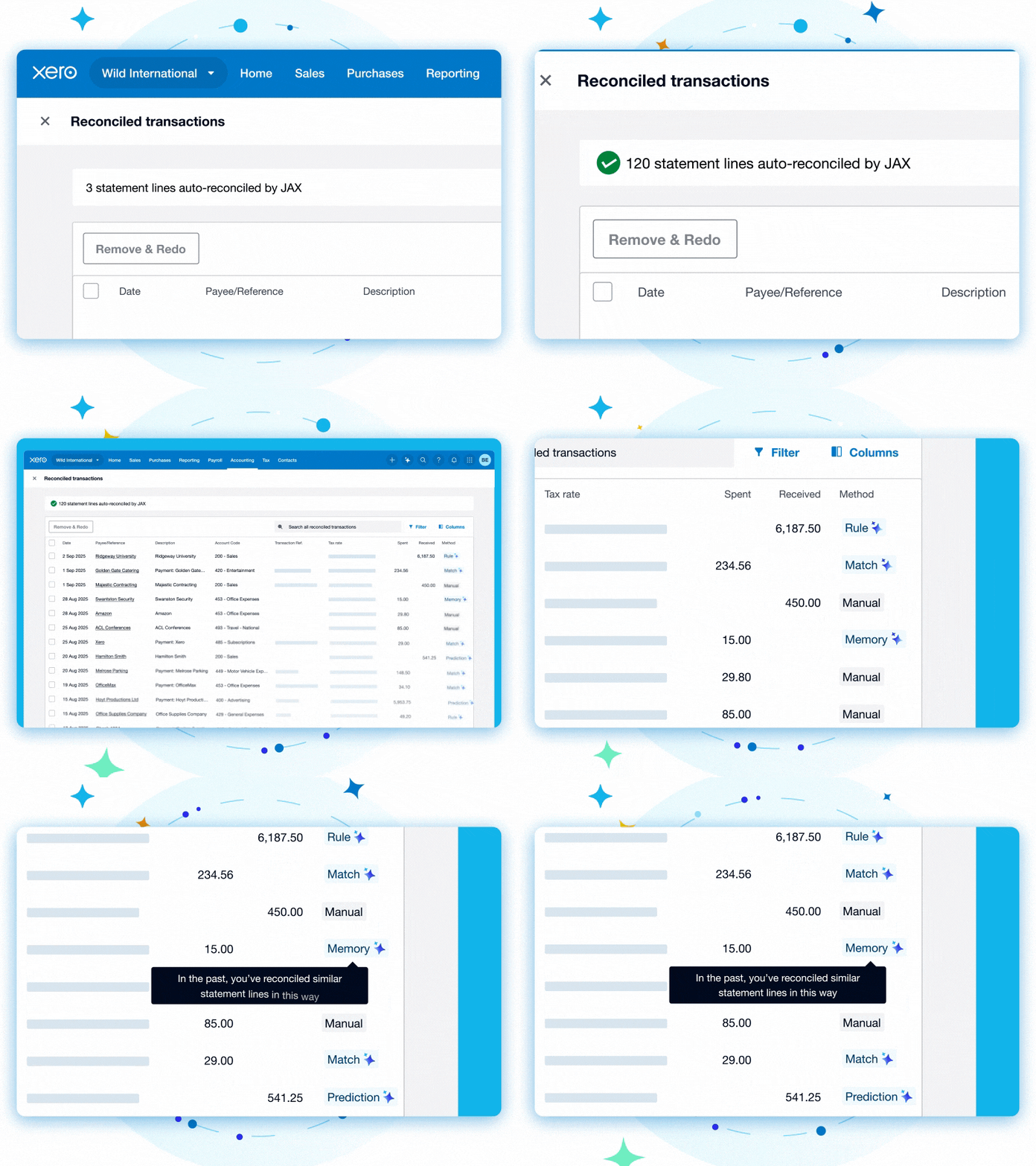
Want to skip admin? JAX, your AI finance partner, reconciles your transactions for you. Connect your bank accounts to Xero. Let JAX categorize and match transactions while you’re busy with your real work. Then check the page in a spare minute. Available on the Growing price plan and above.
Pay your bills at no extra cost
Free standard ACH bill payments are now included in Xero business plans.*
Early
for the first 6 months
Then $25 per month
An easy financial foundation - track cash flow with the essentials.
- Send quotes and 20 invoices†
- Accept online invoice payments^
- 5 bills
- Reconcile bank transactions
- Smart Document Capture
- View real-time reports
- W-9 + 1099 management
- Sales tax
- Visualize performance with basic graphs
- 30 day cash flow forecast
- Make online bill payments (Domestic - Free ACH)
- Make online bill payments (Cross Border)

Growing
for the first 6 months
Then $55 per month
Go beyond the basics - automate tasks and access performance dashboards.
- Send invoices and quotes
- Accept online invoice payments^
- Automate bill entry and track bills
- Auto-reconcile bank transactions
- Smart Document Capture
- View real-time reports
- W-9 + 1099 management
- Sales tax
- Visualize performance with graphs
- 60 day cash flow forecast
- Make online bill payments (Domestic - Free ACH)
- Make online bill payments (Cross Border)
- Customize performance dashboards
- Tailored financial health scorecards
- Budget with smart suggestions
Forecast with clarity
Forecast with clarity
Established
for the first 6 months
Then $90 per month
Future proof your scaling business - with advanced tools and analytics.
- Send invoices and quotes
- Accept online invoice payments^
- Automate bill entry and track bills
- Auto-reconcile bank transactions
- Smart Document Capture
- View real-time reports
- W-9 + 1099 management
- Sales tax
- Visualize performance with graphs
- 180 day cash flow forecast
- Make online bill payments (Domestic - Free ACH)
- Make online bill payments (Cross Border)
- Customize performance dashboards
- Tailored financial health scorecards
- Analyze KPIs and ratios
- Use multiple currencies
- Track time and costs for projects
- Employee expense and mileage claims
- Benchmark against the industry
- Make online bill payments (International)
- Budget with smart suggestions
Smart automatic bank reconciliation with JAX
Xero’s AI feature, JAX, reconciles your transactions automatically. Ditch the repetitive admin and do more with your days.
Get highly accurate transaction matching
JAX uses four reconciliation methods – Rule, Match, Memory, and Prediction – for a sophisticated approach.
Review only what needs your attention
Double-check matches and easily make adjustments on the spot.
Reconcile transactions in bulk
Use bank rules and code in bulk alongside JAX’s automation – and fly through the admin!
An easier way to reconcile your transactions
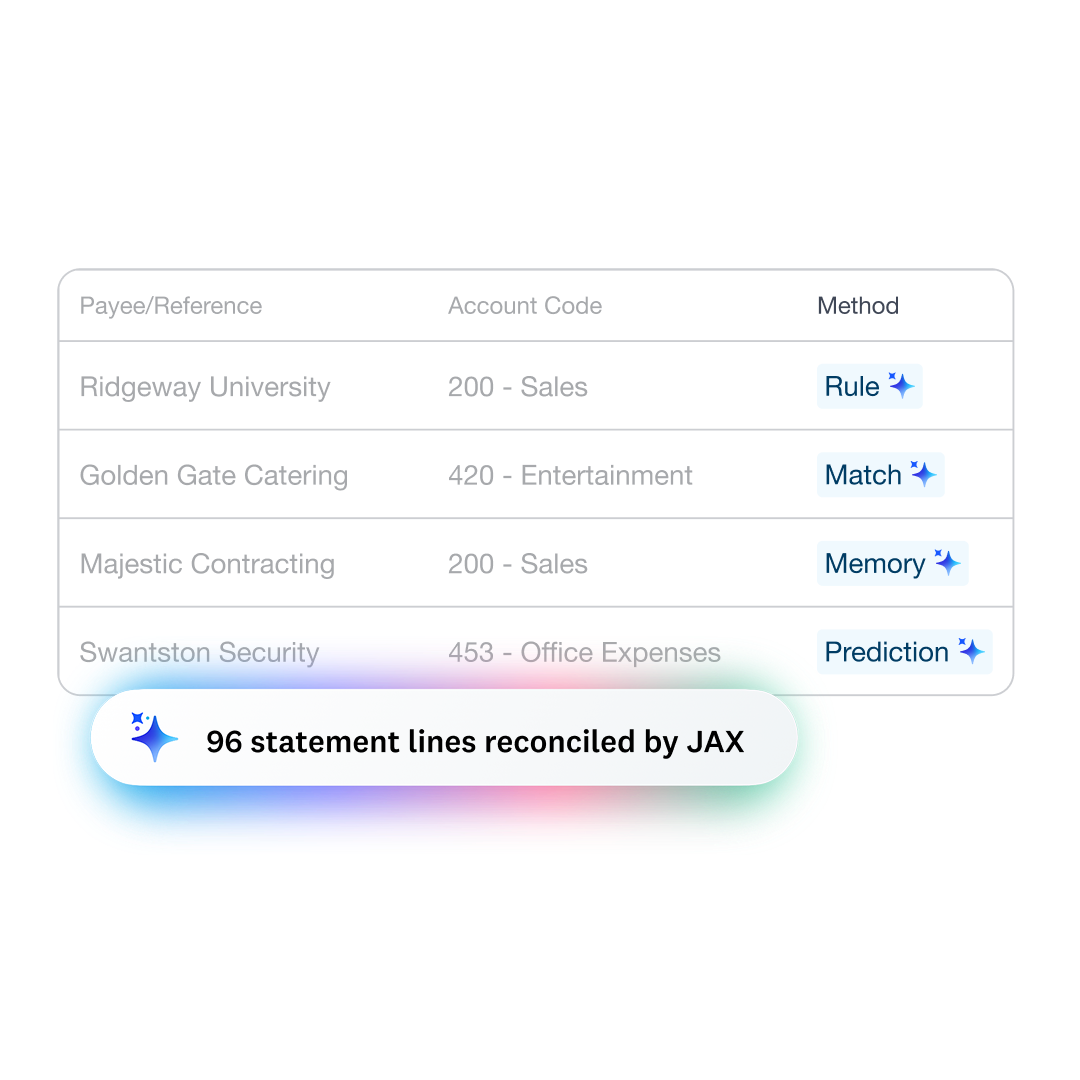
JAX uses four reconciliation methods: Rule, Match, Memory, and Prediction. When highly confident, JAX goes ahead and matches. If JAX isn’t sure, it suggests a match but gives you the final say. And the more you use JAX, the smarter it gets – saving you even more time.
- Rule – one of your bank rules is applied
- Match – a bank transaction matches an existing Xero record
- Memory – JAX decides based on how you’ve reconciled similar transactions
- Prediction – JAX suggests based on how other Xero users reconciled similar transactions
Full visibility and total control
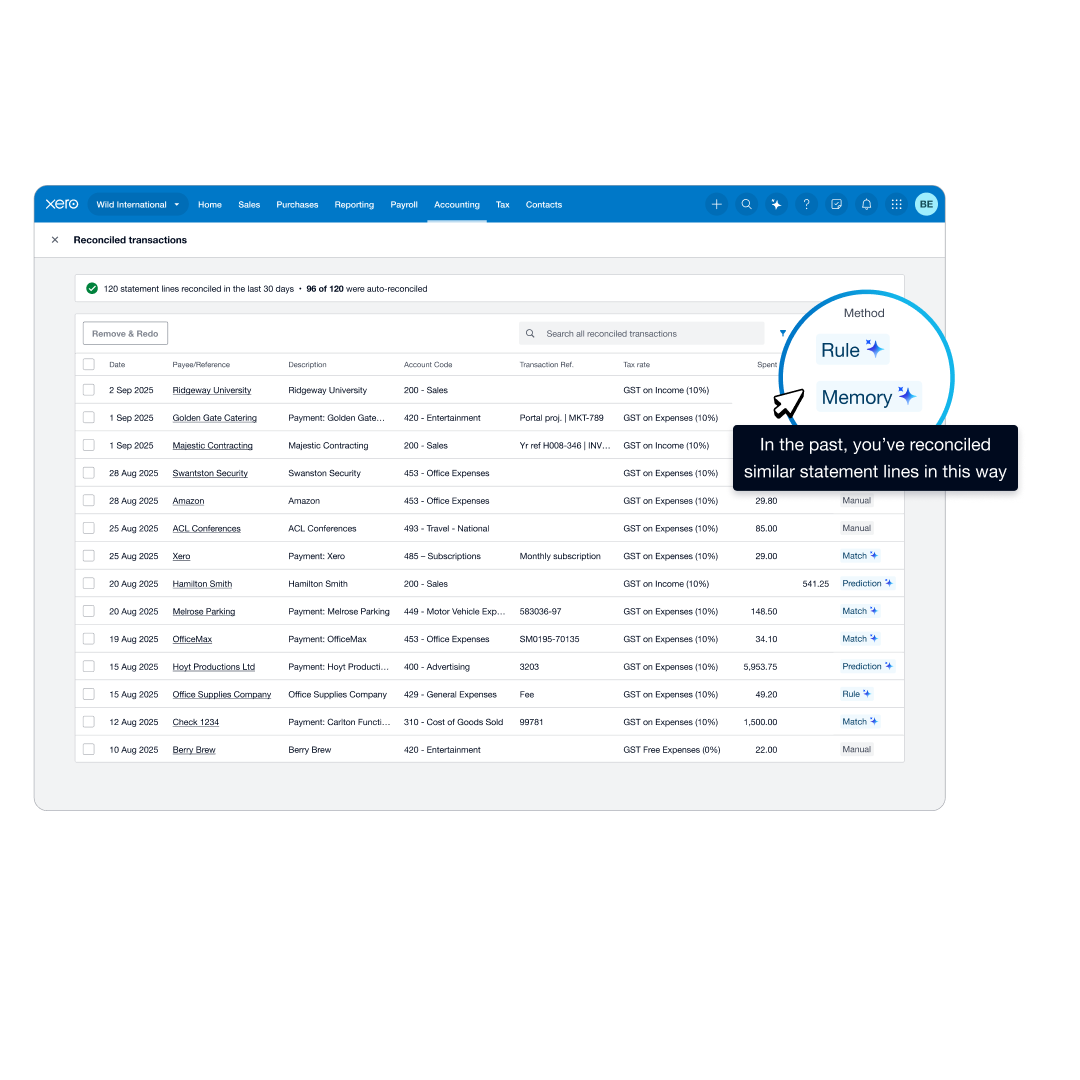
Xero’s online bank reconciliation feature gives you control of everything JAX reconciles. See bank and accounting details in a single view, understand exactly why each transaction was reconciled, and fix any errors straight away.
- Turn JAX’s automation on or off at any time for each bank account
- Easily spot the transactions that need your attention
- Find receipts and add relevant documents in Xero’s Reconcile tab
- Make any corrections right there on the page for a fast process
Process multiple transactions faster
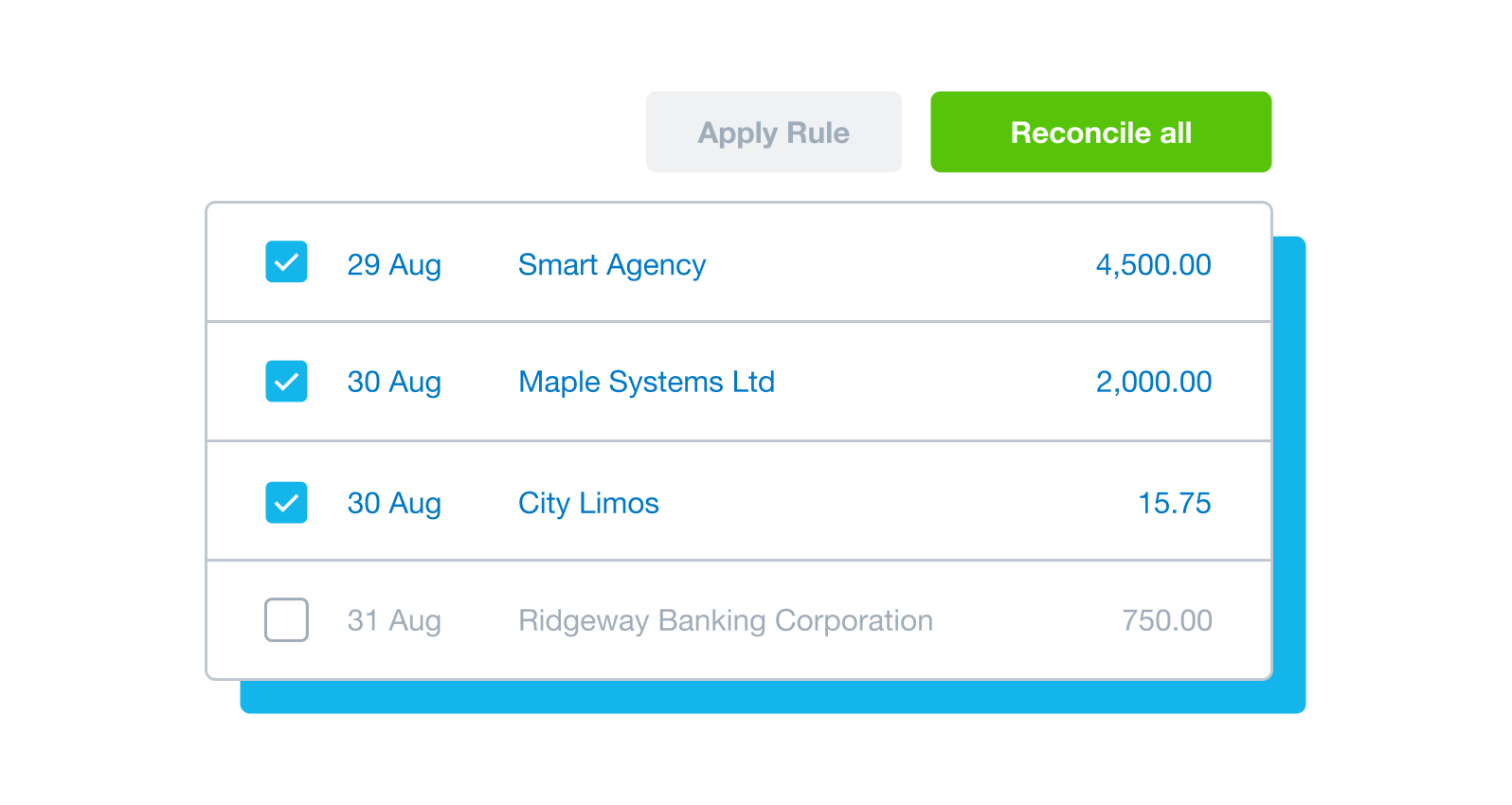
Save time and manual effort with Xero’s bulk reconciliation and cash coding. Process many transactions at once, sorting and coding similar transactions together.
- Let Xero sort and group similar transactions – like daily sales – then reconcile them all in one go
- Get Xero to use your transaction history to suggest matches for recurring payments like invoices and bills
- Create bank rules to automatically treat groups of similar transactions the same way every time
- Cash coding works alongside JAX for a smooth system
How to use JAX for your reconciliations
Connect your business bank accounts to your Xero organization so your financial data is automatically pulled through. If your bank doesn’t connect to Xero, you can manually import your transaction data.
Then turn on JAX for each bank account.
Connect your business bank accounts to your Xero organization so your financial data is automatically pulled through. If your bank doesn’t connect to Xero, you can manually import your transaction data.
Then turn on JAX for each bank account.
As soon as a new statement line imports into Xero, JAX gets to work. When JAX is highly confident in a match, it goes ahead and reconciles the transactions. If there’s any doubt, JAX suggests a match but leaves you to have the final say.
You can either accept JAX’s suggestion or reconcile the transaction manually.
As soon as a new statement line imports into Xero, JAX gets to work. When JAX is highly confident in a match, it goes ahead and reconciles the transactions. If there’s any doubt, JAX suggests a match but leaves you to have the final say.
You can either accept JAX’s suggestion or reconcile the transaction manually.
All your reconciled transactions appear in a list. Apply a filter to quickly see the transactions that need your attention.
Whenever you have a minute, just log in to Xero and zip through the admin to keep your finances up to date.
You can also organize your financial records by attaching source documents directly to the Reconciled transactions screen.
All your reconciled transactions appear in a list. Apply a filter to quickly see the transactions that need your attention.
Whenever you have a minute, just log in to Xero and zip through the admin to keep your finances up to date.
You can also organize your financial records by attaching source documents directly to the Reconciled transactions screen.
Easily manage your bank accounts from the Xero dashboard. Each account has its own panel that shows the bank statement balance, the balance in Xero, and the number of statement lines to be reconciled.
Easily manage your bank accounts from the Xero dashboard. Each account has its own panel that shows the bank statement balance, the balance in Xero, and the number of statement lines to be reconciled.
When your reconciliation is up to date, you can see accurate bank account balances, cash flow figures, your monthly profit, and more.
And to remind you of any unreconciled transactions, just check your Xero dashboard.
When your reconciliation is up to date, you can see accurate bank account balances, cash flow figures, your monthly profit, and more.
And to remind you of any unreconciled transactions, just check your Xero dashboard.
When you reconcile, Xero alerts you if your actual bank balance and the balance of the bank account in Xero aren’t the same.
If they don’t match, the bank reconciliation summary makes it easy to check for missing, deleted, or duplicated bank transactions.
When you reconcile, Xero alerts you if your actual bank balance and the balance of the bank account in Xero aren’t the same.
If they don’t match, the bank reconciliation summary makes it easy to check for missing, deleted, or duplicated bank transactions.
What Xero customers say about automatic bank reconciliation

G2
Connery J
G2
Katherine
G2
Verified user
See how automatic bank reconciliation works in Xero
FAQs on Xero’s account reconciliation software
Xero’s automatic bank reconciliation is powered by JAX. When new statement lines arrive in Xero, JAX aims to reconcile them using one of four methods:
- Rule – one of your bank rules is applied
- Match – a transaction matches an existing Xero document
- Memory –JAX decides based on how you’ve reconciled similar transactions
- Prediction – JAX suggests based on how other Xero users reconciled similar transactions
JAX only automatically reconciles when it’s highly confident. And in all cases, you can challenge or reject JAX’s matches.
Xero’s automatic bank reconciliation is powered by JAX. When new statement lines arrive in Xero, JAX aims to reconcile them using one of four methods:
- Rule – one of your bank rules is applied
- Match – a transaction matches an existing Xero document
- Memory –JAX decides based on how you’ve reconciled similar transactions
- Prediction – JAX suggests based on how other Xero users reconciled similar transactions
JAX only automatically reconciles when it’s highly confident. And in all cases, you can challenge or reject JAX’s matches.
You need to have Xero’s Growing plan or above to use JAX. Once you’re logged into Xero, go to the bank account page and turn on JAX automation.
You need to have Xero’s Growing plan or above to use JAX. Once you’re logged into Xero, go to the bank account page and turn on JAX automation.
Yes, Xero’s reporting and analytics capabilities help you prepare and submit your returns so you don’t miss a deadline. Your accounting records will be accurate and all stored in one secure place.
Yes, Xero’s reporting and analytics capabilities help you prepare and submit your returns so you don’t miss a deadline. Your accounting records will be accurate and all stored in one secure place.
For sure – Xero partners with Gusto for a full-service payroll solution. Gusto saves you time on all aspects of your payroll – including calculating employee pay and deductions – thanks to its clever automations.
For sure – Xero partners with Gusto for a full-service payroll solution. Gusto saves you time on all aspects of your payroll – including calculating employee pay and deductions – thanks to its clever automations.
It depends on your needs and business vision. Xero’s accounting software has flexible plans so you can adjust your subscriptions to access the features you need as your business grows.
And if you need specific or niche tools, connect third-party apps from the Xero App Store to your Xero organization.
It depends on your needs and business vision. Xero’s accounting software has flexible plans so you can adjust your subscriptions to access the features you need as your business grows.
And if you need specific or niche tools, connect third-party apps from the Xero App Store to your Xero organization.
No – Xero is based in the cloud, so all you need is an internet connection. But you need a multi-factor authentication (MFA) app to log in to Xero. MFA adds an extra layer of security by checking if it’s really you when you log in.
No – Xero is based in the cloud, so all you need is an internet connection. But you need a multi-factor authentication (MFA) app to log in to Xero. MFA adds an extra layer of security by checking if it’s really you when you log in.
Yes, the Xero App Store has hundreds of apps to help manage your business, including apps specifically designed for your industry and for doing business in the USA.
Yes, the Xero App Store has hundreds of apps to help manage your business, including apps specifically designed for your industry and for doing business in the USA.
Try reconciling with JAX
Connect your US bank to Xero and see how JAX can help you sail through your bank reconciliation.
*Fees apply for other payment methods.