How to calculate sales tax for your small business
Learn how to calculate sales tax in four steps, with worked examples, 2026 state rates and a free worksheet.

Written by Lena Hanna—Trusted CPA Guidance on Accounting and Tax. Read Lena's full bio
Published Tuesday 6 October 2026
Table of contents
Key takeaways
- To calculate sales tax, convert the combined rate to a decimal and multiply it by the taxable amount. Add the result to the price for the total cost.
- Your combined rate includes state and local taxes. Rates vary by address and can change during the year, so check them regularly.
- Selling across states means tracking each state’s tax rules, exemptions, and nexus thresholds. Your obligations start once you have a physical or economic presence there.
- The downloadable sales tax worksheet lets you run forward and reverse calculations. Accounting software can then apply current rates to every sale automatically.
What is sales tax and why does it matter to your business?
Sales tax is a consumption tax that state and local governments add to the price of goods and services at the point of sale. Knowing how it works helps you stay compliant and avoid costly penalties.
Your business acts as a tax collector on behalf of the government. You charge sales tax on qualifying sales and collect it from your customers. Then you remit it to the correct tax authority on a set schedule.
Some products are exempt. Exemptions vary by state and often cover groceries and prescription medications. If you sell exempt products, keep documentation such as resale or exemption certificates on file.
Sales tax also applies to online sales when you have nexus (a business presence) in a state. Nexus can be physical, such as a storefront or warehouse, or economic, based on your sales volume in that state.
Sales tax calculation formula
The sales tax formula has two parts: you find the tax amount, then add it to the original price. Here are the formulas you need:
- Sales tax amount = item price × sales tax rate (as a decimal)
- Total cost = item price + sales tax amount
Both formulas use the tax rate as a decimal, so a 7% rate becomes 0.07. The steps below show how to find and convert the right rate for any sale.
How to calculate sales tax step by step
You can work out the sales tax on any sale in four steps. Once you know the rate for the sale location, the rest is simple math.
1. Find the combined sales tax rate
Look up the combined rate for the address where the sale takes place. This rate adds the state rate to any local taxes from cities, counties, or special districts.
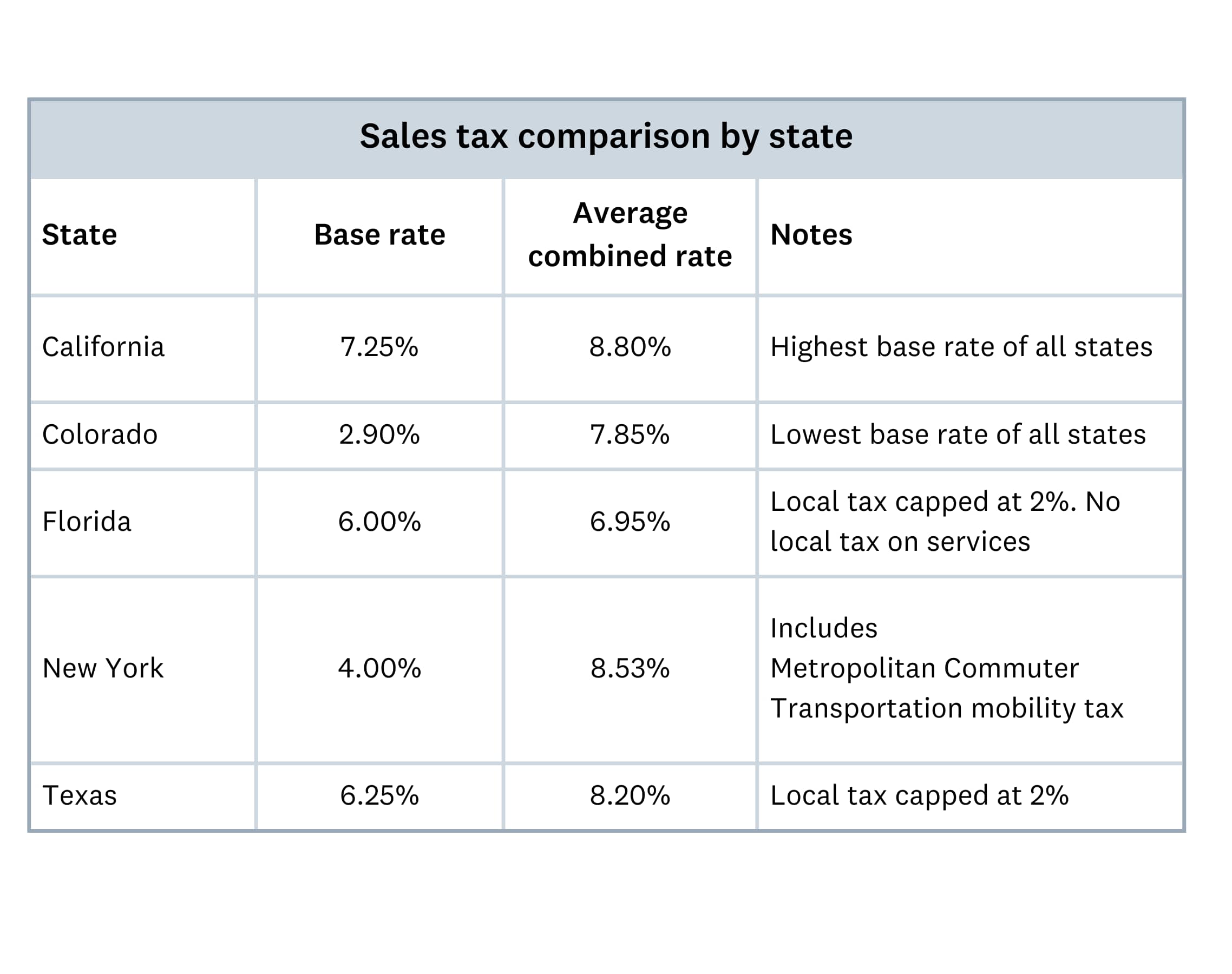
For example, Texas rates can reach 8.25% when local taxes are added to the 6.25% state rate. In New York, a business pays a 4% state rate plus a local rate that varies by location. Similarly, California businesses combine a state base rate with district taxes that differ by county.
2. Convert the rate to a decimal
Divide the combined rate by 100 to turn it into a decimal. A 6.25% rate becomes 0.0625, and an 8.25% rate becomes 0.0825.
Moving the decimal point two places to the left gives the same result. It’s a quick way to check your work.
3. Multiply the rate by the taxable amount
The taxable amount is the price of the product or service before tax, after any discounts or promotions. Leave out any exempt items in the sale.
Multiply the taxable amount by the decimal rate to get the sales tax. Round the result to the nearest cent.
4. Add the tax to the price
Add the sales tax to the taxable amount to get the total your customer pays. Show the tax as its own line on your invoices and receipts so customers can see what they’re paying.
Here’s how the four steps work at 2026 combined rates from the Tax Foundation’s midyear data.
$50 item in Houston, Texas
Houston’s combined rate is 8.25%: the 6.25% Texas state rate plus 2% in local taxes. As a decimal, that’s 8.25 ÷ 100 = 0.0825.
Multiply the price by the decimal rate: $50 × 0.0825 = $4.125, which rounds to $4.13 in sales tax. Add the tax to the price for a total of $50 + $4.13 = $54.13.
$120 item in Chicago, Illinois
The Tax Foundation cites a combined state and local rate of 10.25% for Chicago. As a decimal, that’s 10.25 ÷ 100 = 0.1025.
Multiply the price by the decimal rate: $120 × 0.1025 = $12.30 in sales tax. Add the tax to the price for a total of $120 + $12.30 = $132.30.
$1,250 order in New York City
New York City combines the 4% state rate with 4.875% in local taxes, for a combined rate of 8.875%. As a decimal, that’s 8.875 ÷ 100 = 0.08875.
Multiply the order value by the decimal rate: $1,250 × 0.08875 = $110.9375, which rounds to $110.94 in sales tax. Add the tax to the price for a total of $1,250 + $110.94 = $1,360.94.
To run these numbers on your own sales, download the sales tax worksheet. It’s a spreadsheet with a forward calculation tab and a reverse calculation tab, prefilled with the three examples above.
How to calculate sales tax from a total price
Sometimes you need to work backward from a total price to find the original sale price and the tax amount. This reverse calculation comes up when receipts show only the total or when you set tax-inclusive prices.
Use these formulas to separate the sale price from the total:
- Sale price = total price ÷ (1 + tax rate as a decimal)
- Sales tax amount = total price − sale price
Here’s how it works step by step:
- Convert the tax rate to a decimal. For example, 6% becomes 0.06.
- Add 1 to the decimal rate. For example, 1 + 0.06 = 1.06.
- Divide the total price by that number. For a $53 total, $53 ÷ 1.06 = $50.
- Subtract the sale price from the total to find the tax. In this case, $53 − $50 = $3 in sales tax.
This reverse calculation helps you check receipts and reconcile your records. It also helps you set tax-inclusive prices for your customers.
Sales tax rates by state and locality
Sales tax rates vary by state and locality across the US, and the rate you charge depends on where the sale takes place. Most states set a base rate, then cities, counties, or special districts can add local taxes on top.
The state rate applies statewide, while each local rate applies only within its city, county, or district. Together they make up the combined rate, which is the total you charge your customer.
Each range below runs from the state rate to the highest combined state and local rate, excluding special resort-area taxes. The figures come from the Tax Foundation’s midyear 2026 data and are current as of July 1, 2026. Your actual rate depends on the exact address of the sale.
- Alabama: 4%–12%
- Alaska: 0%–7.85% (no state sales tax; local rates only)
- Arizona: 5.6%–10.9%
- Arkansas: 6.5%–12.63%
- California: 7.25%–12.5%
- Colorado: 2.9%–12%
- Connecticut: 6.35% statewide (no local sales tax)
- Delaware: 0% (no state or local sales tax)
- District of Columbia: 6% citywide (no local sales tax)
- Florida: 6%–8%
- Georgia: 4%–9%
- Hawaii: 4%–4.5%
- Idaho: 6%–9%
- Illinois: 6.25%–11%
- Indiana: 7% statewide (no local sales tax)
- Iowa: 6%–7%
- Kansas: 6.5%–10.75%
- Kentucky: 6% statewide (no local sales tax)
- Louisiana: 5%–12%
- Maine: 5.5% statewide (no local sales tax)
- Maryland: 6% statewide (no local sales tax)
- Massachusetts: 6.25% statewide (no local sales tax)
- Michigan: 6% statewide (no local sales tax)
- Minnesota: 6.875%–9.875%
- Mississippi: 7%–8%
- Missouri: 4.23%–10.48%
- Montana: 0% (no state or local sales tax)
- Nebraska: 5.5%–7.5%
- Nevada: 6.85%–8.38%
- New Hampshire: 0% (no state or local sales tax)
- New Jersey: 3.3125%–6.625% (reduced rate in Urban Enterprise Zones and Salem County)
- New Mexico: 4.875%–9.44%
- New York: 4%–8.875%
- North Carolina: 4.75%–8.25%
- North Dakota: 5%–8.75%
- Ohio: 5.75%–8%
- Oklahoma: 4.5%–11.5%
- Oregon: 0% (no state or local sales tax)
- Pennsylvania: 6%–8%
- Rhode Island: 7% statewide (no local sales tax)
- South Carolina: 6%–9%
- South Dakota: 4.2%–8.7%
- Tennessee: 7%–9.75%
- Texas: 6.25%–8.25%
- Utah: 6.1%–10.8%
- Vermont: 6%–7%
- Virginia: 5.3%–8%
- Washington: 6.5%–10.7%
- West Virginia: 6%–7.4%
- Wisconsin: 5%–7.9%
- Wyoming: 4%–7%
Five states have no statewide sales tax: Alaska, Delaware, Montana, New Hampshire, and Oregon. Alaska lets its local governments charge sales tax, so check the local rate for any sale there.
Local taxes can widen the gap between the state rate and what you charge. For example, Missouri’s local sales taxes can lift its 4.23% state rate to 10.48%. New Jersey’s statewide rate has no local add-ons, and sales in Urban Enterprise Zones and Salem County get a reduced rate.
If you sell in multiple states, you need to track the correct rate for each location. In 2025 alone, there were 681 combined sales tax rate changes across the US, according to Vertex. That included 12,414 new and updated tax jurisdictions at the city, county, district, and state levels.
Common sales tax mistakes to avoid
Small sales tax errors can lead to penalties or an audit. Each habit below helps you avoid a mistake small business owners often make:
- Use the combined rate for where the sale happens, which may differ from your business address, and confirm it before each filing period
- Track your sales in each state so you know when you cross its economic nexus threshold and need to register
- Review your rates every quarter, since they can change several times a year, or use software that updates them automatically
- Check how each state classifies your products, because an item that’s taxable in one state may be exempt in another
- Keep invoices, receipts, exemption certificates, and tax filings in an organized system so filing and audits go smoothly
Building these habits early saves you time and stress at tax time. If your sales tax situation is complex, a tax professional or accountant can help.
Who needs to collect sales tax?
Whether you need to collect sales tax depends on where and how you sell. The key concept is nexus, which means having a sufficient business connection to a state.
You have nexus in a state, and need to collect sales tax there, when you have:
- a physical presence, such as a store, office, warehouse, or employees working in the state
- sales above the state’s economic nexus threshold, often $100,000 a year, even without a physical presence
Online sellers should pay close attention to economic nexus. Since the 2018 Supreme Court decision in South Dakota v. Wayfair, most states can require out-of-state sellers to collect sales tax once they meet these thresholds.
If you’re unsure about your obligations, check each state’s tax department website or talk to a tax advisor. Registering and collecting from the start helps you steer clear of back taxes, interest, and penalties.
Simplify sales tax calculations with Xero
Working out sales tax by hand takes time, and the chance of errors grows as you sell into more states. Automating your calculations helps you stay accurate and compliant with less admin work.
Xero Accounting Software integrates with Avalara and can help automate your sales tax process. The integration can apply current tax rates for any location and calculate sales tax on invoices. It can also generate compliance reports showing exemptions and filing deadlines.
Use the worksheet to check your numbers today, then let Xero Accounting Software handle the day-to-day calculations as your sales grow. Choose a plan and get one month free to see how much easier managing your business finances can be.
FAQs on calculating sales tax
Here are answers to common questions about calculating sales tax for your business.
What’s the difference between state and local sales taxes?
State sales tax is a base rate that applies across the whole state, while cities, counties, and special districts add local sales tax on top. Because local districts overlap, two addresses in the same ZIP code can have different combined rates.
How often should I update my sales tax rates?
Review your rates at least once a quarter, or use Xero Accounting Software with the Avalara integration to update them automatically. In the first half of 2025, states made 408 sales tax rate changes, a 24% increase on the same period in 2024.
What happens if I collect the wrong sales tax amount?
If you under-collect, your business owes the difference plus possible penalties and interest. Research from Anrok found noncompliant businesses lose an average of 4.3% of revenue to penalties and fines, and over 11% in New York.
How do I handle sales tax for tax-exempt products or services?
Check whether each product or service qualifies for an exemption in every state where you sell. Collect resale or exemption certificates from eligible customers and keep them on file in case of an audit.
Do I have to collect sales tax on my online transactions?
Yes, in any state where you have nexus, including economic nexus from online sales alone. If you sell through a marketplace such as Amazon or Etsy, most states require the marketplace to collect and remit the tax for you.
How do I calculate sales tax for bundled products or services?
If items in a bundle have different tax rules, you may need to tax each item separately. Some states let you apply a single rate to the whole bundle, so check your state’s rules before you set the price.