Accounting system for small businesses: types and setup
Learn how the right accounting system can save time, cut admin, and help your small business grow.
Written by Lena Hanna—Trusted CPA Guidance on Accounting and Tax. Read Lena's full bio
Published Wednesday 22 April 2026
Table of contents
Key takeaways
- Separate your personal and business finances by opening a dedicated business bank account as your first step, which simplifies tax preparation, builds business credit, and provides legal protection.
- Choose your accounting method based on your business size: use cash accounting if you run a small operation with simple transactions, or switch to accrual accounting as you grow, take on inventory, or extend credit to customers.
- Set up a general ledger with five account types (assets, liabilities, revenue, equity, and expenses) to organize every transaction and produce accurate financial reports for lenders and tax compliance.
- Use accounting software to automate data entry, connect directly to your bank accounts, and generate real-time financial reports, saving time and reducing the manual errors that come with spreadsheets or paper records.
Key takeaways
- Establish a dedicated business bank account as your first step to separate personal and business finances, which simplifies tax preparation, builds business credit, and provides legal protection.
- Choose between cash accounting (records transactions when money changes hands) and accrual accounting (records when transactions occur regardless of payment timing) based on your business size and complexity.
- Implement a general ledger system with five primary account types (assets, liabilities, revenue, equity, and expenses) to organize all financial transactions and generate accurate reports for lenders and tax compliance.
- Utilize accounting software to automate bookkeeping tasks, integrate with your bank accounts, and generate professional financial statements that save time and reduce manual errors.
What is small business accounting?
Small business accounting is the process of recording, tracking, and analyzing your business's financial activities. An accounting system is the method you use to manage this process, whether that's a paper ledger, spreadsheet, or cloud-based software.
Your accounting system helps you understand your financial health, make informed decisions, and stay compliant with tax laws, such as the requirement to retain employment tax records for at least four years. It's the story of your business, told through numbers.
With the right system in place, you can plan for growth and manage cash flow with confidence, so you can focus on running your business, not just your books.
Basic accounting terms you need to know
Understanding basic accounting terms makes managing your finances easier. Here are the key terms that form the foundation of your accounting system:
- Assets: What your business owns, like cash, equipment, or inventory
- Liabilities: What your business owes, such as loans or bills to suppliers
- Equity: The value of your business after subtracting liabilities from assets
- Revenue: The income your business earns from sales of goods or services
- Expenses: The costs of running your business, like rent, salaries, and supplies
Types of accounting systems
You have a few options for managing your finances. The right choice depends on the size of your business and how many transactions you process.
Manual and paper-based systems
Manual systems use physical ledgers and paper receipts to track income and expenses. While this method is inexpensive to start, it takes a lot of time and increases the risk of human error. It's generally only suitable for very small hobby businesses.
Spreadsheet-based systems
Many new business owners start by tracking their finances in a spreadsheet. This is a step up from paper, allowing for basic calculations and digital record keeping. However, spreadsheets don't scale well as your business grows and lack automated features like bank feeds.
Accounting software systems
Modern accounting software automates the heavy lifting of bookkeeping. Cloud-based platforms connect directly to your bank account, categorize transactions, and generate real-time reports. This is the most efficient way to manage your business finances and prepare for tax time, ensuring you catch obligations like filing Schedule SE when your net earnings from self-employment exceed the $400 threshold.
Understanding double-entry vs single-entry accounting
Single-entry accounting is like keeping a checkbook register; you record each transaction once as either income or an expense. Double-entry accounting is more robust, recording every transaction twice (as a debit and a credit) to keep your books balanced and catch errors early. Most accounting software uses the double-entry method automatically.
Why your small business needs an accounting system
An accounting system is your business's financial record-keeping foundation that tracks all money coming in and going out. This organized approach helps you understand your business performance and make informed decisions.
Your small business needs an accounting system for these reasons:
- Financial clarity: See exactly how much money you're making and spending
- Strategic planning: Use accurate data to plan for growth and challenges
- Tax compliance: Maintain organized records for easier tax preparation, which is essential since you generally must make estimated payments if you expect to owe tax of $1,000 or more.
- Loan applications: Provide lenders with profit and loss statements, balance sheets, and cash flow reports
- Audit readiness: Quickly provide documentation to the IRS when needed
- Smarter decisions: Identify profitable areas and cost-cutting opportunities
Advantages of using accounting software
Accounting software automates time-consuming bookkeeping tasks and generates professional financial reports instantly.
Accounting software offers several key advantages for small businesses:
- Time savings: Automate data entry, calculations, and report generation
- Professional reports: Create balance sheets and income statements in minutes
- Stakeholder ready: Produce lender and investor-quality financial documents
- Real-time insights: Access current financial data anytime, anywhere
Modern accounting software also offers these capabilities:
- Bank integration: Automatically import transactions from your business accounts to eliminate manual data entry and reduce errors
- Cloud access: Check your business finances from any device, anywhere, with mobile apps for on-the-go access
- Payroll integration: Handle employee payments, tax calculations, and compliance reporting automatically
- Tax preparation: Streamline income tax filing with organized records and easy access to deductions
- Financial forecasting: View summary reports that show trends in your income and spending
How to choose the right accounting system for your business
Selecting the right accounting system sets your business up for long-term success. Follow these steps to find the best fit for your needs.
- Consider your business size and transaction volume: If you process dozens of transactions a week, you need a system that automates data entry to save time.
- Evaluate features you need now and later: Look for tools that handle your current requirements, like invoicing and expense tracking, but can also scale to offer payroll and inventory management as you grow.
- Assess your budget and return on investment: While free spreadsheets cost nothing upfront, the hours you spend on manual entry have a hidden cost. Weigh the monthly subscription of software against the time you'll save.
- Match the system to your technical expertise: Choose a platform with a clean, intuitive interface. You want a system that makes sense to everyday users, not just accountants.
Choose your accounting method: cash vs accrual
Choose between two main accounting methods based on your business size and needs.
Cash accounting records transactions only when money changes hands. You track income when customers pay you and expenses when you pay bills.
- Best for: Small businesses with simple operations and immediate payments
- Key benefit: Easier to understand and matches your actual cash flow
Accrual accounting records transactions when they happen, regardless of payment timing. You track income when you send invoices and expenses when you receive bills.
- Best for: Larger businesses, those with inventory, or companies extending credit
- Key benefit: More accurate picture of business performance and profitability
What is a general ledger?
A general ledger is the master record that contains all your business's financial transactions in one organized system. Setting up your general ledger early helps you track every dollar and maintain accurate financial records.
Modern general ledgers use accounting software instead of paper books. The digital format provides the same organized record-keeping with added benefits like automatic calculations and instant reporting.
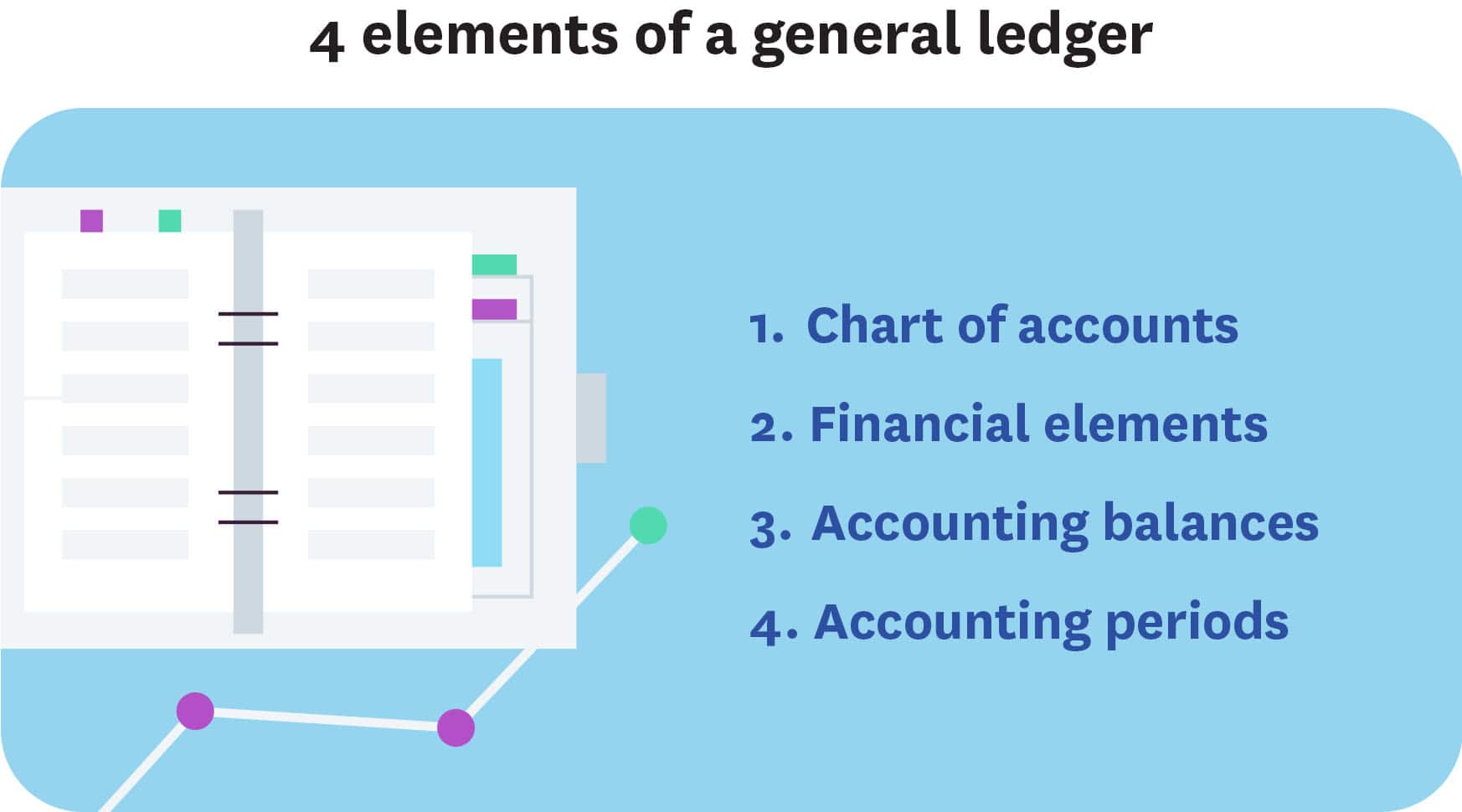
Your general ledger contains four essential elements:
- Chart of accounts: Complete list of categories for organizing all business transactions
- Financial transactions: Records of money exchanges with customers, vendors, and lenders
- Account balances: Running totals that show current amounts in each account
- Accounting periods: Time frames for financial reporting, such as monthly, quarterly, or annually
Features of a chart of accounts
A chart of accounts is a complete list of all the financial accounts in your general ledger, organized into logical categories. It serves as the framework for tracking every transaction in your business.
Each business needs different account categories based on industry and business model. A restaurant tracks food costs while a consulting firm focuses on professional services. Consider consulting an accounting professional to set up accounts that align with your specific business needs and tax requirements. These requirements can vary widely if you operate in states with community property laws.
5 primary account types
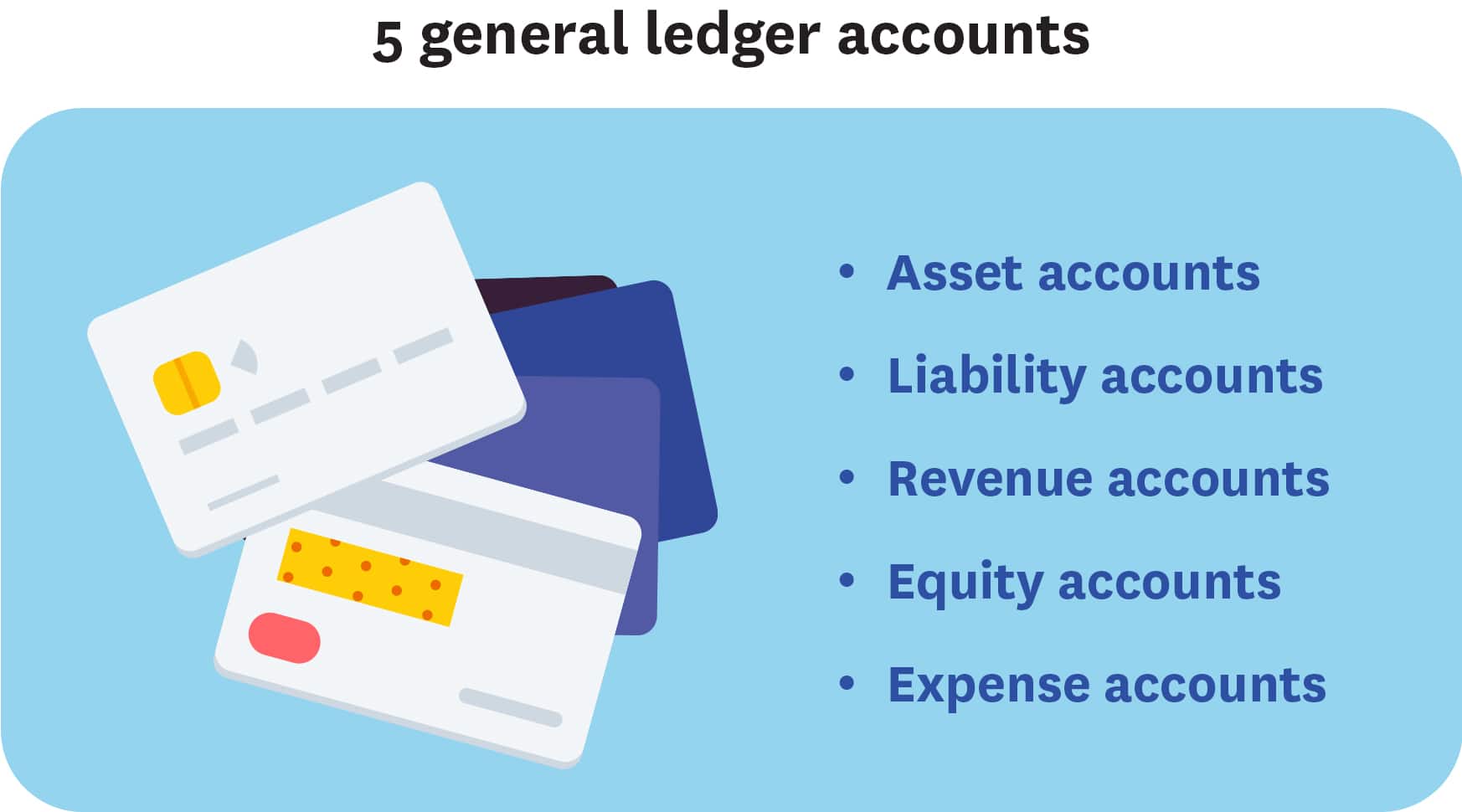
Five primary account types organize all your business's financial information:
- Asset accounts: Track what your business owns, such as cash, equipment, inventory, and property
- Liability accounts: Track what your business owes, such as loans, credit cards, accounts payable, and taxes
- Revenue accounts: Track income your business earns, such as sales, service fees, and interest income
- Expense accounts: Track costs of running your business, such as rent, utilities, salaries, and office supplies
- Equity accounts: Track owner investment and retained earnings that represent ownership value
FAQs on small business accounting
Here are answers to common questions about building and managing a small business accounting system.
What's the difference between bookkeeping and accounting?
Bookkeeping is the day-to-day recording of financial transactions, while accounting involves analyzing and interpreting that financial data to make business decisions.
Do I need accounting software if my business is small?
Even small businesses benefit from accounting software. It saves time, reduces errors, and helps you stay organized for tax time. As your business grows, you'll already have a solid system in place.
How often should I update my accounting records?
Update your accounting records at least weekly, or daily if you have high transaction volume. Regular updates help you catch errors early and maintain accurate cash flow visibility.
Can I switch from cash to accrual accounting later?
Yes, you can switch accounting methods, but you'll need to notify the IRS by filing Form 3115. Many businesses start with cash accounting and move to accrual as they grow and their operations become more complex.
Disclaimer
Xero does not provide accounting, tax, business or legal advice. This guide has been provided for information purposes only. You should consult your own professional advisors for advice directly relating to your business or before taking action in relation to any of the content provided.
Get 90% off for 6 months
Get 90% off for 6 months on any Xero plan.