Easy record-keeping with Xero’s Smart Document capture
Want a fast way to organize your bookkeeping digitally? Xero lets you automatically extract data from your receipts and documents. Then, whenever you need an expense record, just jump into Xero’s cloud-based software. Simple!

How Xero’s Smart Document capture simplifies your admin
Xero gives you one single workflow for recording your financial documents.
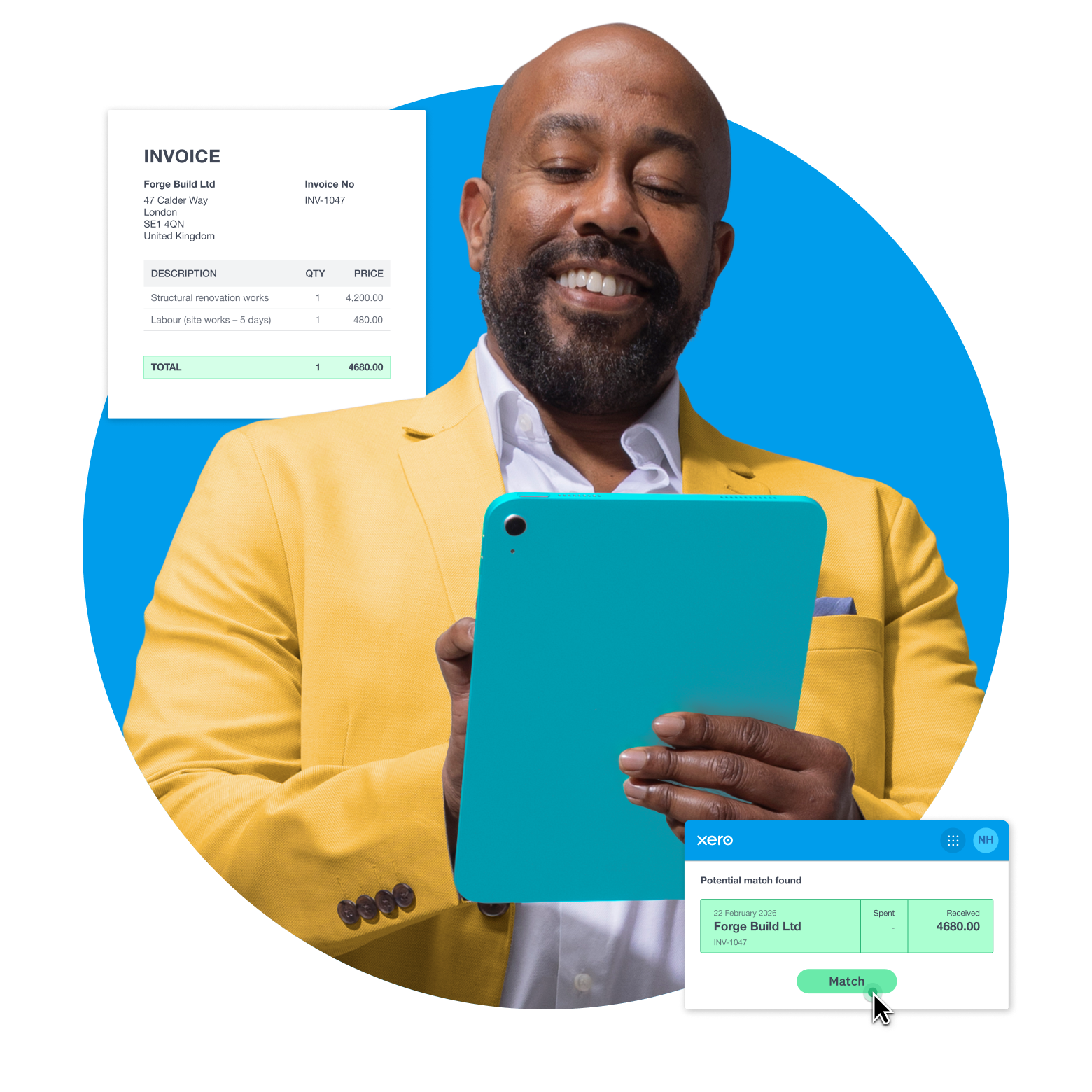
Capture data from anywhere
Use your phone to snap a receipt or forward it to your Xero email, from wherever you are. Do admin on the fly!
Stay accurate with your records
Let Xero scan your documents and prepopulate your records – forget the typing.
Keep your documents in the cloud
After you review and publish a record, it's stored online in Xero so you can access it from anywhere, anytime.
Match transactions the smart way
No more duplicates. Xero cross-references your extracted data with your bank records, then highlights matches.
Capture documents – your way
Xero’s data capture software gives you flexible ways to record your documents. Forward a supplier’s bill to your Xero email, say. And snap a dinner receipt on your phone. However you do it, breeze through your record-keeping in no time.
- Use the Xero Accounting app to photograph a physical receipt – Xero records the details for you
- Double-check and approve the info before Xero creates a financial record
- Quickly capture your invoices, bills, and other paperwork in one easy digital workflow
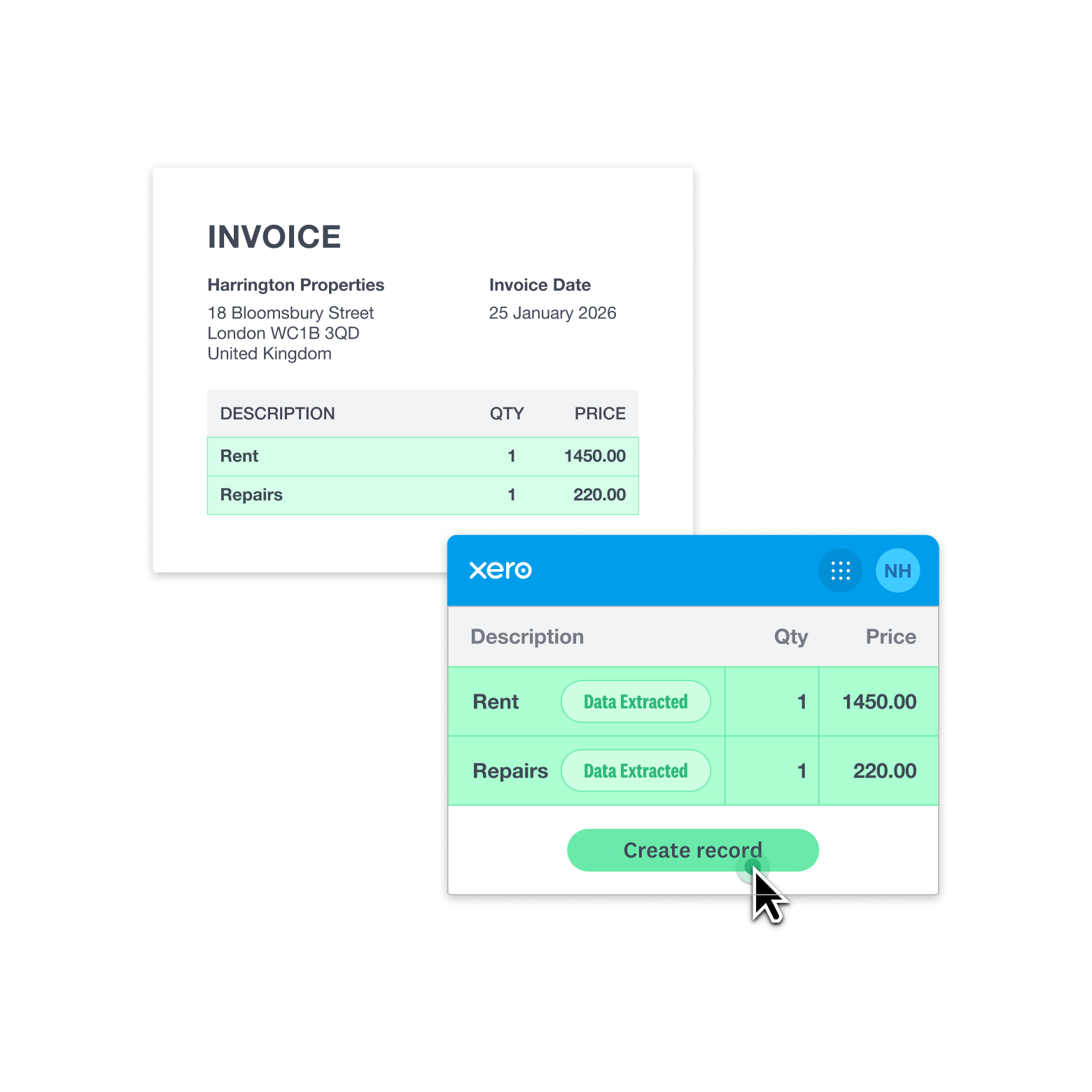
Get super-accurate with your record keeping
How? Xero uses advanced AI technology to read your receipts, invoices, and rent statements before the data flows into your Xero organization, ready for your IRS reporting. No spreadsheets or typing – just a reliable way to handle your admin.
- The Xero Accounting app extracts your scanned documents in under 20 seconds
- See your original doc next to the Xero data-entry screen so you can double-check the info
- Xero attaches the original photo or file to the digital record for your IRS compliance
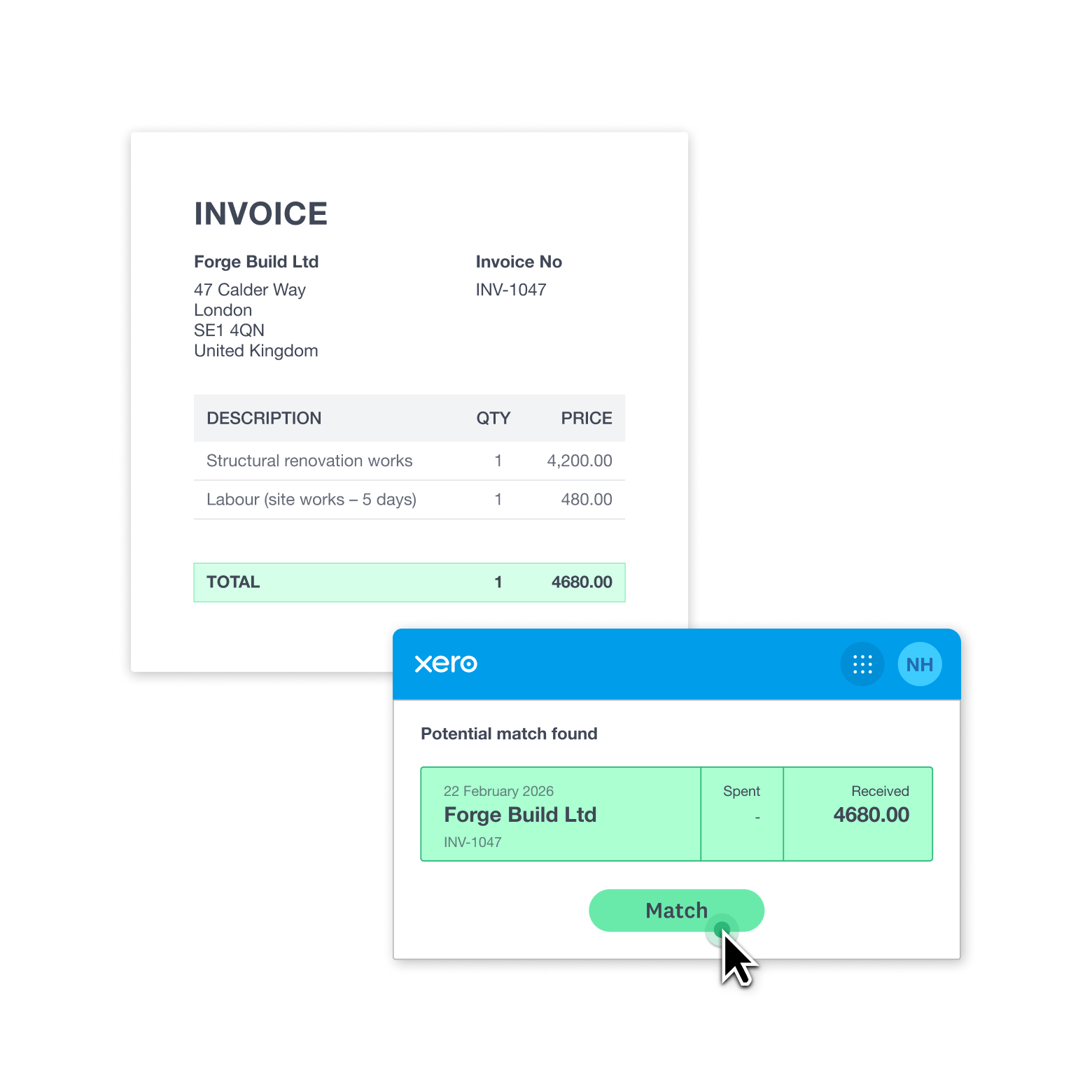
Win back time with smart transaction matching
Xero extracts the data and uploads it to your Xero organization. Xero then cross-references it with your existing bank records and highlights matches for you to review and tap to post. Then just like that, your digital trail is complete!
- A Xero pop-up suggests a potential match – just accept or reject it
- Xero spots if you mistakenly upload a document twice, so you avoid duplicate records
- Xero helps sort your financial admin while you stay in control
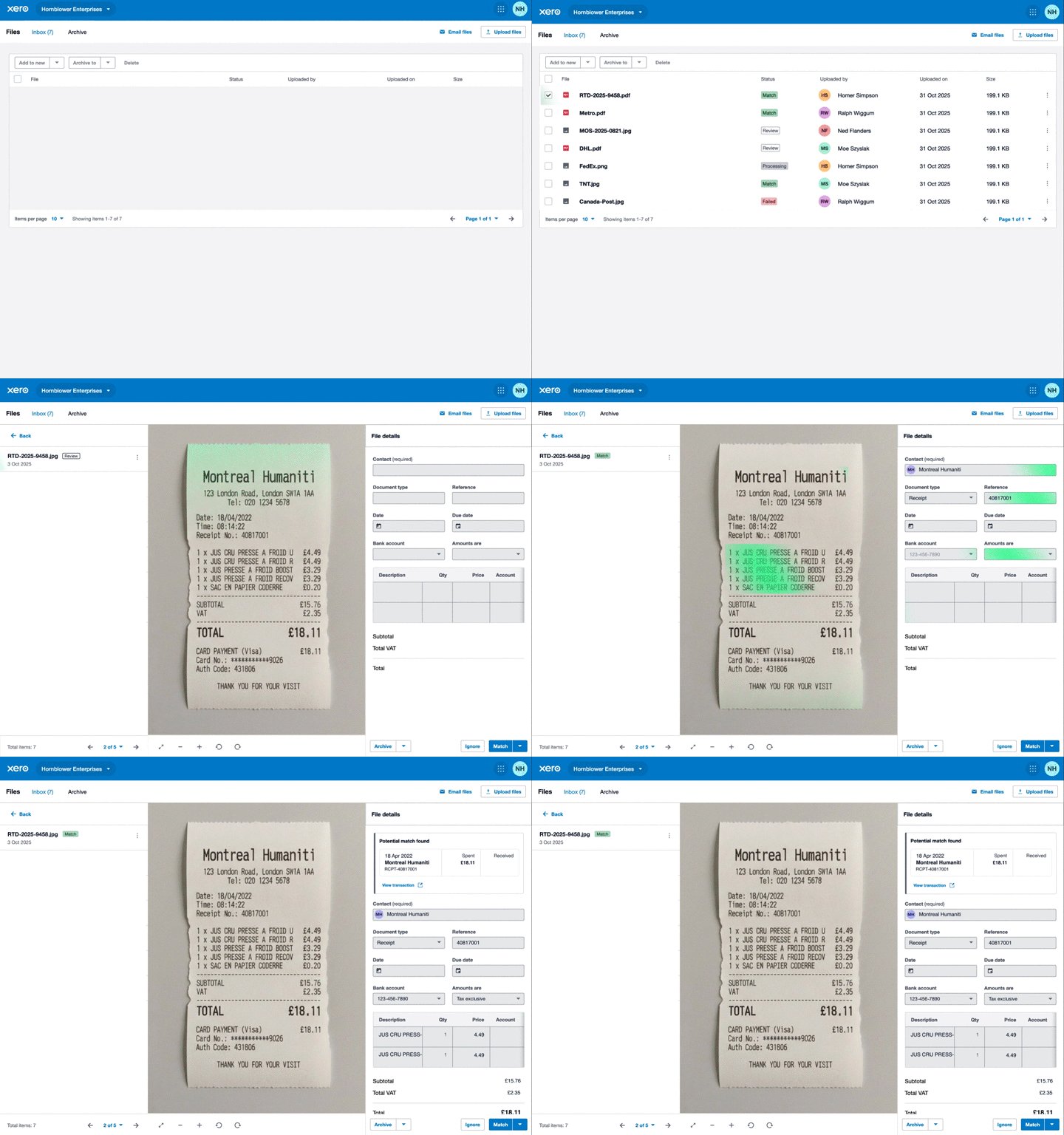
Store your documents online and get organized
Xero’s accounting software and online file management work hand in glove, meaning you keep all your records in one place. Pull up that precise bill or invoice from months back. And share documents online with your team so they can always get on with a job.
- Store your files digitally – no more damaged or lost paper records
- Nimbly find and filter documents in Xero’s user-friendly software
- Access your Xero records wherever you have an internet connection and handle admin while away from your desk
FAQs on Xero’s Smart Document capture
No – you can use the Xero Smart Document capture feature for free, whatever your small business pricing plan. You can automatically capture the data of your receipts and other business documents, store them in Xero’s cloud-based software, and process them as part of your wider bookkeeping workflow.
No – you can use the Xero Smart Document capture feature for free, whatever your small business pricing plan. You can automatically capture the data of your receipts and other business documents, store them in Xero’s cloud-based software, and process them as part of your wider bookkeeping workflow.
Absolutely! Photograph a paper receipt with the Xero Accounting app on your phone or tablet. Xero then captures the amount, date, and other details automatically. You can also send documents to your Xero email address, or drag and drop files over the web.
Absolutely! Photograph a paper receipt with the Xero Accounting app on your phone or tablet. Xero then captures the amount, date, and other details automatically. You can also send documents to your Xero email address, or drag and drop files over the web.
You can capture your business receipts, bills, invoices, and rent statements. Xero’s online file storage supports a range of file types – including image formats like JPG, PNG, PDFs, and Word documents. This lets you work with different suppliers and customers – for instance, you can manage paper bills, emailed invoices, and physical receipts in one system.
You can capture your business receipts, bills, invoices, and rent statements. Xero’s online file storage supports a range of file types – including image formats like JPG, PNG, PDFs, and Word documents. This lets you work with different suppliers and customers – for instance, you can manage paper bills, emailed invoices, and physical receipts in one system.
Xero gives you a fast, secure way to turn physical records – and emails with PDFs – into accessible digital records. Everything is organized together in one central place, ready for your next IRS tax return or another financial admin job.
Xero gives you a fast, secure way to turn physical records – and emails with PDFs – into accessible digital records. Everything is organized together in one central place, ready for your next IRS tax return or another financial admin job.
Very. The Xero smart document capture feature uses clever AI technology that is highly accurate when documents are visually clear – receipts aren’t damaged, for instance – and in standard document formats. You can easily double-check all the captured details before you create your financial records, so you’re in full control of the process.
Very. The Xero smart document capture feature uses clever AI technology that is highly accurate when documents are visually clear – receipts aren’t damaged, for instance – and in standard document formats. You can easily double-check all the captured details before you create your financial records, so you’re in full control of the process.
See how Xero works for your business
Sort files online, monitor your cash flow, and add apps for extra functionality. Xero has features to fit your business type and industry.

Grow your business with app integrations
Get even more out of Xero accounting software by integrating apps with Xero to do more in one place.

G2
Connery J
G2
Katherine
G2
Verified user
Pay your bills at no extra cost
Free standard ACH bill payments are now included in Xero business plans.*
Early
for the first 3 months
Then $27 per month
An easy financial foundation - track cash flow with the essentials.
- Send quotes and 20 invoices†
- Accept online invoice payments^
- 5 bills
- Reconcile bank transactions
- Smart Document Capture
- View real-time reports
- W-9 + 1099 management
- Sales tax
- Visualize performance with basic graphs
- 30 day cash flow forecast
- Make online bill payments (Domestic - Free ACH)
- Make online bill payments (Cross Border)

Growing
for the first 3 months
Then $59 per month
Go beyond the basics - automate tasks and access performance dashboards.
- Send invoices and quotes
- Accept online invoice payments^
- Automate bill entry and track bills
- Reconcile bank transactions
- Smart Document Capture
- View real-time reports
- W-9 + 1099 management
- Sales tax
- Visualize performance with graphs
- 60 day cash flow forecast
- Make online bill payments (Domestic - Free ACH)
- Make online bill payments (Cross Border)
- Customize performance dashboards
- Tailored financial health scorecards
- Budget with smart suggestions
- Auto-reconcile transactions
Forecast with clarity
Forecast with clarity
Established
for the first 3 months
Then $97 per month
Future proof your scaling business - with advanced tools and analytics.
- Send invoices and quotes
- Accept online invoice payments^
- Automate bill entry and track bills
- Reconcile bank transactions
- Smart Document Capture
- View real-time reports
- W-9 + 1099 management
- Sales tax
- Visualize performance with graphs
- 180 day cash flow forecast
- Make online bill payments (Domestic - Free ACH)
- Make online bill payments (Cross Border)
- Customize performance dashboards
- Tailored financial health scorecards
- Analyze KPIs and ratios
- Use multiple currencies
- Track time and costs for projects
- Employee expense and mileage claims
- Benchmark against the industry
- Make online bill payments (International)
- Budget with smart suggestions
- Auto-reconcile transactions
*Fees apply for other payment methods.