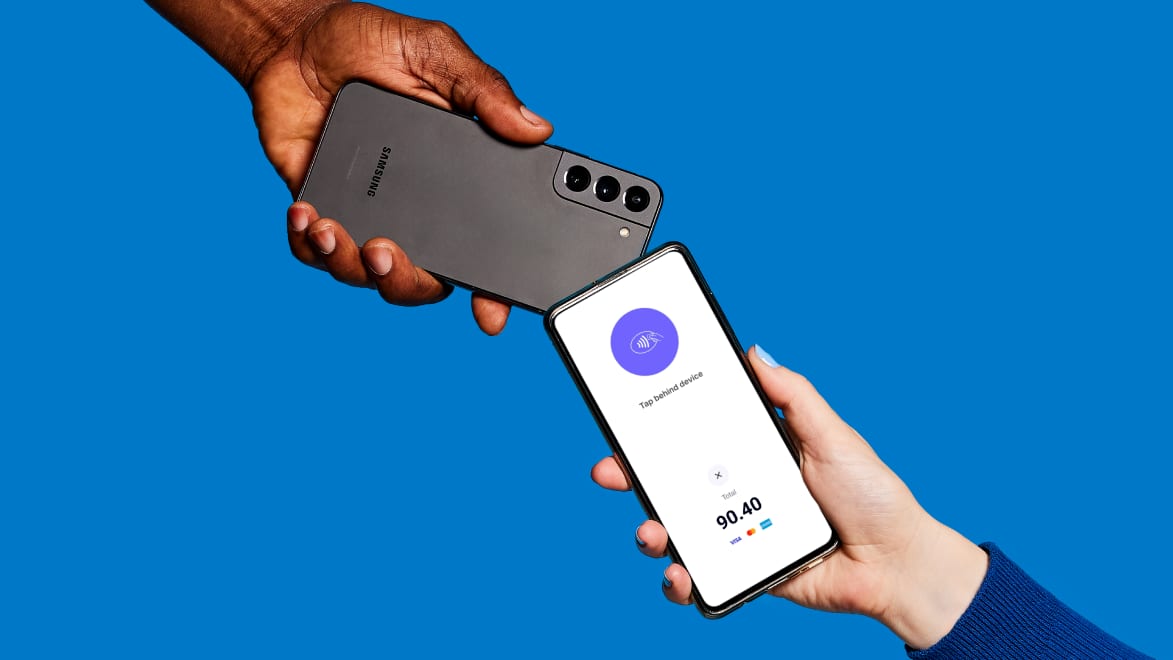
Accept payments on the spot with Tap to Pay, powered by Stripe, on Android
Pay up to 30% less than QuickBooks with 0% fewer users.‡
Tap into a better way to get paid
Accept payments on the spot
Spend less time chasing payments and more time managing cash flow.
No physical terminal needed
Receive payments via Stripe using the Xero Accounting app on your mobile.
Less transactional admin
Invoices are automatically marked as paid, ready for reconciliation.
Another secure way to get paid
With more ways for your customers to pay, you’re more likely to get paid on time.
Using Tap to Pay is easy
Powered by Stripe, your customers can pay with a physical card, digital wallet, or a wearable device like a smartwatch.
1. Take payment
Create an invoice in the Xero Accounting app and select ‘Take payment’. The customer pays you through Stripe.
2. Optionally, send a receipt
After payment, you can send a receipt to your customer.
3. Reconcile the paid invoice
The invoice is automatically marked as paid in Xero, ready for reconciliation.
Pay your bills at no extra cost
Free standard ACH bill payments are now included in Xero business plans.*
Early
for the first 6 months
Then $27 per month
An easy financial foundation - track cash flow with the essentials.
- Send quotes and 20 invoices†
- Accept online invoice payments^
- 5 bills
- Reconcile bank transactions
- Smart Document Capture
- View real-time reports
- W-9 + 1099 management
- Sales tax
- Visualize performance with basic graphs
- 30 day cash flow forecast
- Make online bill payments (Domestic - Free ACH)
- Make online bill payments (Cross Border)

Growing
for the first 6 months
Then $59 per month
Go beyond the basics - automate tasks and access performance dashboards.
- Send invoices and quotes
- Accept online invoice payments^
- Automate bill entry and track bills
- Reconcile bank transactions
- Smart Document Capture
- View real-time reports
- W-9 + 1099 management
- Sales tax
- Visualize performance with graphs
- 60 day cash flow forecast
- Make online bill payments (Domestic - Free ACH)
- Make online bill payments (Cross Border)
- Customize performance dashboards
- Tailored financial health scorecards
- Budget with smart suggestions
- Auto-reconcile transactions
Forecast with clarity
Forecast with clarity
Established
for the first 6 months
Then $97 per month
Future proof your scaling business - with advanced tools and analytics.
- Send invoices and quotes
- Accept online invoice payments^
- Automate bill entry and track bills
- Reconcile bank transactions
- Smart Document Capture
- View real-time reports
- W-9 + 1099 management
- Sales tax
- Visualize performance with graphs
- 180 day cash flow forecast
- Make online bill payments (Domestic - Free ACH)
- Make online bill payments (Cross Border)
- Customize performance dashboards
- Tailored financial health scorecards
- Analyze KPIs and ratios
- Use multiple currencies
- Track time and costs for projects
- Employee expense and mileage claims
- Benchmark against the industry
- Make online bill payments (International)
- Budget with smart suggestions
- Auto-reconcile transactions
Frequently asked questions
Tap to Pay on Android is available to all businesses with Android devices. A Stripe account is required, and can be setup within the Xero Accounting app. Tap to Pay allows them to offer their customers more ways to pay, including in-person payments with physical cards, digital wallets (on Android or iPhones) or wearable devices.
Tap to Pay on Android is available to all businesses with Android devices. A Stripe account is required, and can be setup within the Xero Accounting app. Tap to Pay allows them to offer their customers more ways to pay, including in-person payments with physical cards, digital wallets (on Android or iPhones) or wearable devices.
Tap to Pay is free to set up, with no ongoing monthly or subscription fees. There is, however, a processing fee once a customer makes payment. The fees are 2.7% + $0.15 per transaction for domestic cards, and 4.2% + $0.15 per transaction for international cards.
Tap to Pay is free to set up, with no ongoing monthly or subscription fees. There is, however, a processing fee once a customer makes payment. The fees are 2.7% + $0.15 per transaction for domestic cards, and 4.2% + $0.15 per transaction for international cards.
We’re launching Tap to Pay in partnership with Stripe, so you’ll need a Stripe account and the Xero Accounting app on your mobile phone. Both Stripe and the Xero Accounting app are free to download and easy to set up. Tap to Pay isn't currently available for users with multiple Stripe accounts connected to their organization. Tap to Pay also requires your location settings to be switched on in your mobile phone. Please turn on your location settings by visiting your phone settings.
We’re launching Tap to Pay in partnership with Stripe, so you’ll need a Stripe account and the Xero Accounting app on your mobile phone. Both Stripe and the Xero Accounting app are free to download and easy to set up. Tap to Pay isn't currently available for users with multiple Stripe accounts connected to their organization. Tap to Pay also requires your location settings to be switched on in your mobile phone. Please turn on your location settings by visiting your phone settings.
Yes, you can sign up to Stripe within the Xero Accounting app in a few simple steps to start using Tap to Pay.
Yes, you can sign up to Stripe within the Xero Accounting app in a few simple steps to start using Tap to Pay.
Tap to Pay is available with the following Android devices, as long as the operating system is Android 11 and above: Google Pixel, Samsung Galaxy, Oppo, OnePlus, Xiaomi.
See more details on compatible device modelsTap to Pay is available with the following Android devices, as long as the operating system is Android 11 and above: Google Pixel, Samsung Galaxy, Oppo, OnePlus, Xiaomi.
See more details on compatible device modelsTap to Pay supports payments made using physical cards, a digital wallet or a wearable device.
Tap to Pay supports payments made using physical cards, a digital wallet or a wearable device.
Tap to Pay is a great option for small business owners who invoice customers and accept in-person payments, for example, those working in construction, retail or professional services.
Tap to Pay is a great option for small business owners who invoice customers and accept in-person payments, for example, those working in construction, retail or professional services.
Tap to Pay works a bit differently to most payment terminals as you need to create an invoice before you can take payment. It’s a great option for small business owners who invoice their customers and prefer to take in-person payments. Examples include plumbers and tradespeople who do house visits and can collect payment on site; fitness instructors who are off site and need to take payment at the end of class; and hair stylists who need a backup solution for their usual point-of-sale system.
Tap to Pay works a bit differently to most payment terminals as you need to create an invoice before you can take payment. It’s a great option for small business owners who invoice their customers and prefer to take in-person payments. Examples include plumbers and tradespeople who do house visits and can collect payment on site; fitness instructors who are off site and need to take payment at the end of class; and hair stylists who need a backup solution for their usual point-of-sale system.
Yes, Tap to Pay needs an internet connection to work. It could be a mobile signal or wi-fi. Tap to Pay will not work offline.
Yes, Tap to Pay needs an internet connection to work. It could be a mobile signal or wi-fi. Tap to Pay will not work offline.
Tap to Pay is only available with Stripe.
Tap to Pay is only available with Stripe.
Get the Android app
The Xero Accounting app is included as part of your Xero subscription and free to download.
*Fees apply for other payment methods.
‡Based on published list prices for software subscription only. Plans differ in other respects.