Gross margin calculator
Calculate your gross profit margin with this simple calculator. Just punch in costs and revenue.
- Calculate gross margin
- See profit percentages in an instant
- Use it to help set prices
Margin Calculator
Calculate your margin on a particular product or service, or across everything you sell.
Your gross margin 0%
Xero serves up the numbers you need to track profits and manage your margins. Get one month free
Plans for growing businesses
Ignite
for the first 6 months
Then £18 per month
An easy financial foundation - track cash flow with the essentials.
- Send quotes and 20 invoices†
- Accept online invoice payments^
- MTD for Income Tax ready
- Reconcile transactions
- Smart document capture
- View real-time reports
- Enter 10 bills
- Submit VAT returns to HMRC
- Automate subcontractor CIS calculations and reports
- Make online bill and payroll payments (domestic) for £0.20 per payment††
- Payroll for £1.50 per person
- 30 day cash flow forecast
- Visualise performance with basic graphs
- Company accounts and tax (optional £120 excl. Vat billed annually)

Grow
for the first 6 months
Then £39 per month
Go beyond the basics - automate tasks and access performance dashboards.
- Send invoices and quotes
- Accept online invoice payments^
- MTD for Income Tax ready
- Reconcile transactions
- Smart document capture
- View real-time reports
- Automate bill entry and track bills
- Submit VAT returns to HMRC
- Automate subcontractor CIS calculations and reports
- Make online bill and payroll payments (domestic) for up to 5 payments
- Payroll for 1 person
- 60 day cash flow forecast
- Visualise performance with graphs
- Customise performance dashboards
- Claim expenses and mileage for 1 user
- Company accounts and tax (optional £120 excl. Vat billed annually)
Comprehensive
for the first 6 months
Then £55 per month
Optimise profitability - tailor your insights for greater control.
- Send invoices and quotes
- Accept online invoice payments^
- MTD for Income Tax ready
- Reconcile transactions
- Smart document capture
- View real-time reports
- Automate bill entry and track bills
- Submit VAT returns to HMRC
- Automate subcontractor CIS calculations and reports
- Make online bill and payroll payments (domestic) for up to 10 payments
- Payroll for 5 people
- 90 day cash flow forecast
- Visualise performance with graphs
- Customise performance dashboards
- Claim expenses and mileage for 5 users
- Use multiple currencies
- Tailored financial health scorecards
- Make online bill payments (International) - Optional add-on
- Company accounts and tax (optional £120 excl. Vat billed annually)
- Budget with smart suggestions
Ultimate
for the first 6 months
Then £70 per month
Future proof your scaling business - with advanced tools and analytics.
- Send invoices and quotes
- Accept online invoice payments^
- MTD for Income Tax ready
- Reconcile transactions
- Smart document capture
- View real-time reports
- Automate bill entry and track bills
- Submit VAT returns to HMRC
- Automate subcontractor CIS calculations and reports
- Make online bill and payroll payments (domestic) for up to 15 payments
- Payroll for 10 people
- 180 day cash flow forecast
- Visualise performance with graphs
- Customise performance dashboards
- Claim expenses and mileage for 10 users
- Use multiple currencies
- Tailored financial health scorecards
- Make online bill payments (International) - Optional add-on
- Track time and costs for projects for 10 users
- Analyse KPIs and ratios
- Benchmark against the industry
- Company accounts and tax (optional £120 excl. Vat billed annually)
- Budget with smart suggestions
Not VAT registered? See plans for simpler business needs.View plans
How to use this gross margin calculator
Enter the revenue earned from a particular product or service and the costs of providing that product or service (known as cost of sales). The gross margin calculator does the rest. Prices and costs change over time so using revenue and cost data from longer periods – like a quarter or a year – will give you a more accurate picture of margin.
Learn about cost of sales (glossary)Enter the revenue earned from a particular product or service and the costs of providing that product or service (known as cost of sales). The gross margin calculator does the rest. Prices and costs change over time so using revenue and cost data from longer periods – like a quarter or a year – will give you a more accurate picture of margin.
Learn about cost of sales (glossary)Enter your total sales revenue and total cost of sales for a given time period. The gross margin calculator will spit out your profit percentage. Try to use revenue and cost data from longer time periods – like a quarter or a year – as that will give a more reliable picture of your gross margin.
Learn about cost of sales (glossary)Enter your total sales revenue and total cost of sales for a given time period. The gross margin calculator will spit out your profit percentage. Try to use revenue and cost data from longer time periods – like a quarter or a year – as that will give a more reliable picture of your gross margin.
Learn about cost of sales (glossary)Enter a proposed sale price for a product or service and the costs of providing that product or service to the customer. The calculator will tell you what margin you’d make at that price.
Enter a proposed sale price for a product or service and the costs of providing that product or service to the customer. The calculator will tell you what margin you’d make at that price.
Gross margin FAQs
Margin (short for gross margin) is the percentage of sales revenue that’s left after a business has paid for the products or services its customers bought. It’s sometimes called profit percentage.
Margin (short for gross margin) is the percentage of sales revenue that’s left after a business has paid for the products or services its customers bought. It’s sometimes called profit percentage.
Gross profit / Revenue x 100 = Gross profit margin. To calculate gross margin you need to know your gross profit, which is revenue minus cost of sales. You divide that gross profit by the revenue and multiply it by 100 to see what percentage of revenue is gross profit. Or you could just enter your revenue and cost into the profit margin calculator on this page.
Learn about gross profit (glossary)Gross profit / Revenue x 100 = Gross profit margin. To calculate gross margin you need to know your gross profit, which is revenue minus cost of sales. You divide that gross profit by the revenue and multiply it by 100 to see what percentage of revenue is gross profit. Or you could just enter your revenue and cost into the profit margin calculator on this page.
Learn about gross profit (glossary)Margin and markup refer to the same thing – your gross profit – but from different perspectives. Margin shows gross profit as a percentage of revenue. Markup shows gross profit as a percentage of costs. So markup is the percentage you add to the cost of a product or service to arrive at a sale price.
Learn about margin vs markup (glossary)Margin and markup refer to the same thing – your gross profit – but from different perspectives. Margin shows gross profit as a percentage of revenue. Markup shows gross profit as a percentage of costs. So markup is the percentage you add to the cost of a product or service to arrive at a sale price.
Learn about margin vs markup (glossary)Gross profit is the money left after paying for the products or services you sell. This bucket of money will be used to pay for general costs like rent, utilities, insurance and so on. Only once all those additional costs are paid can you think about pocketing a net profit – which is the money your business gets to keep. Gross margin is therefore critical to the viability of your business. If gross margins are too tight, you may not generate enough gross profit to meet your general costs and bank a net profit.
Learn the difference between gross and net profit (glossary)Gross profit is the money left after paying for the products or services you sell. This bucket of money will be used to pay for general costs like rent, utilities, insurance and so on. Only once all those additional costs are paid can you think about pocketing a net profit – which is the money your business gets to keep. Gross margin is therefore critical to the viability of your business. If gross margins are too tight, you may not generate enough gross profit to meet your general costs and bank a net profit.
Learn the difference between gross and net profit (glossary)
How to get the margin you want
Do you know how to achieve a 20% margin? Hint: it’s not by marking up an item by 20%.
Margin is smaller than the markup
So you’ll need a 25% markup to get that 20% margin. Use this table to figure out what markup is required to achieve the margin you want.
.1694476055872.svg)
How to increase margin
Growing your profit percentages
You have two options.
- Increase prices (or estimates) so you have more wiggle room
- Lower your costs and bank the savings
- OK, three options… you can do a little of both
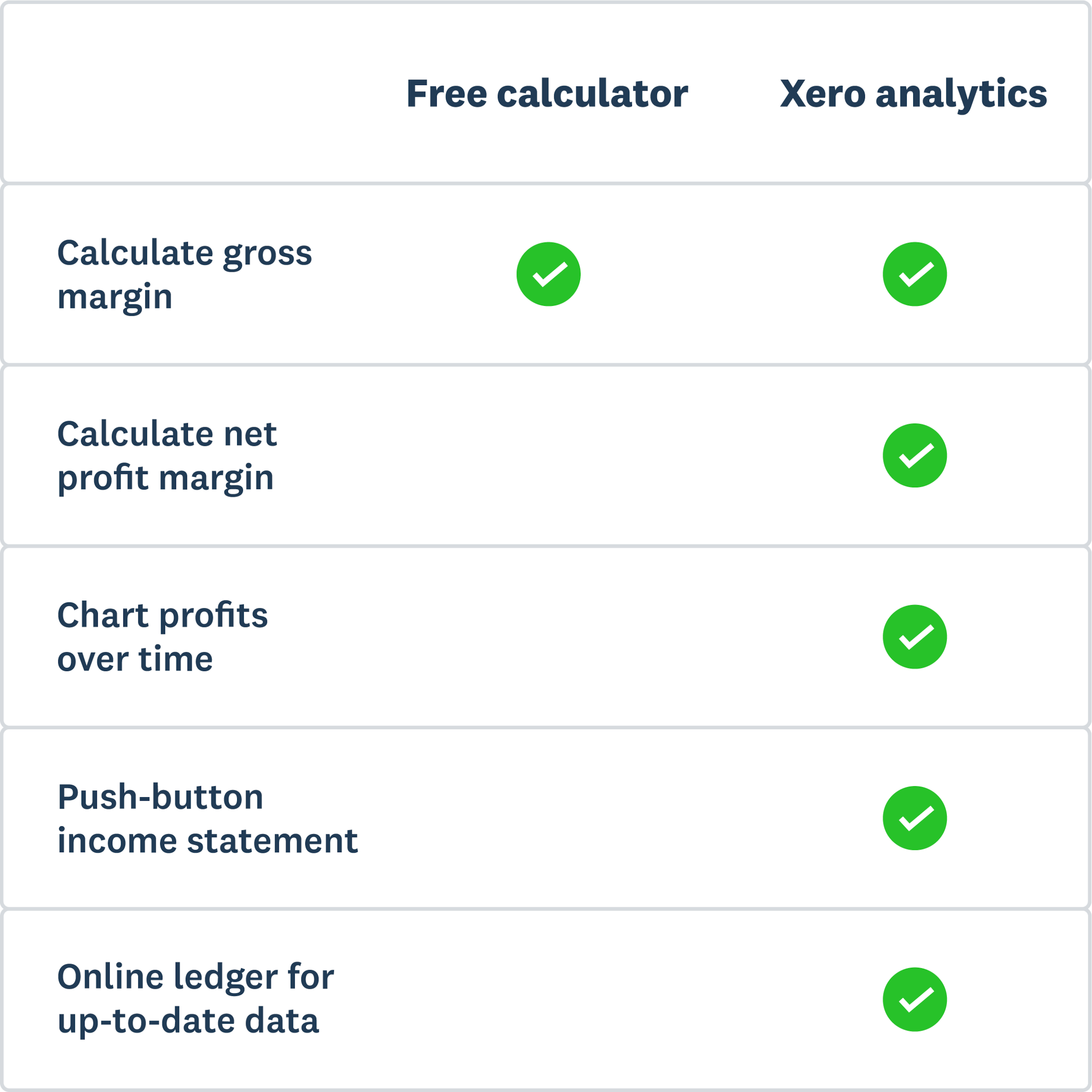
Profitability tools from Xero
Xero serves up the numbers you need to track profitability and manage your margins.
- Get a snapshot of your gross or net profit margins at any time (Xero does the maths for you)
- Simply click to compare time periods and see how profits are trending
- Share reports online with advisors and partners to start key conversations
Disclaimer
Xero does not provide accounting, tax, business or legal advice. This calculator has been provided for information purposes only. You should consult your own professional advisors for advice directly relating to your business.
Get one month free
Purchase any Xero plan, and we will give you the first month free.