Payslip template for UK employers, free to download
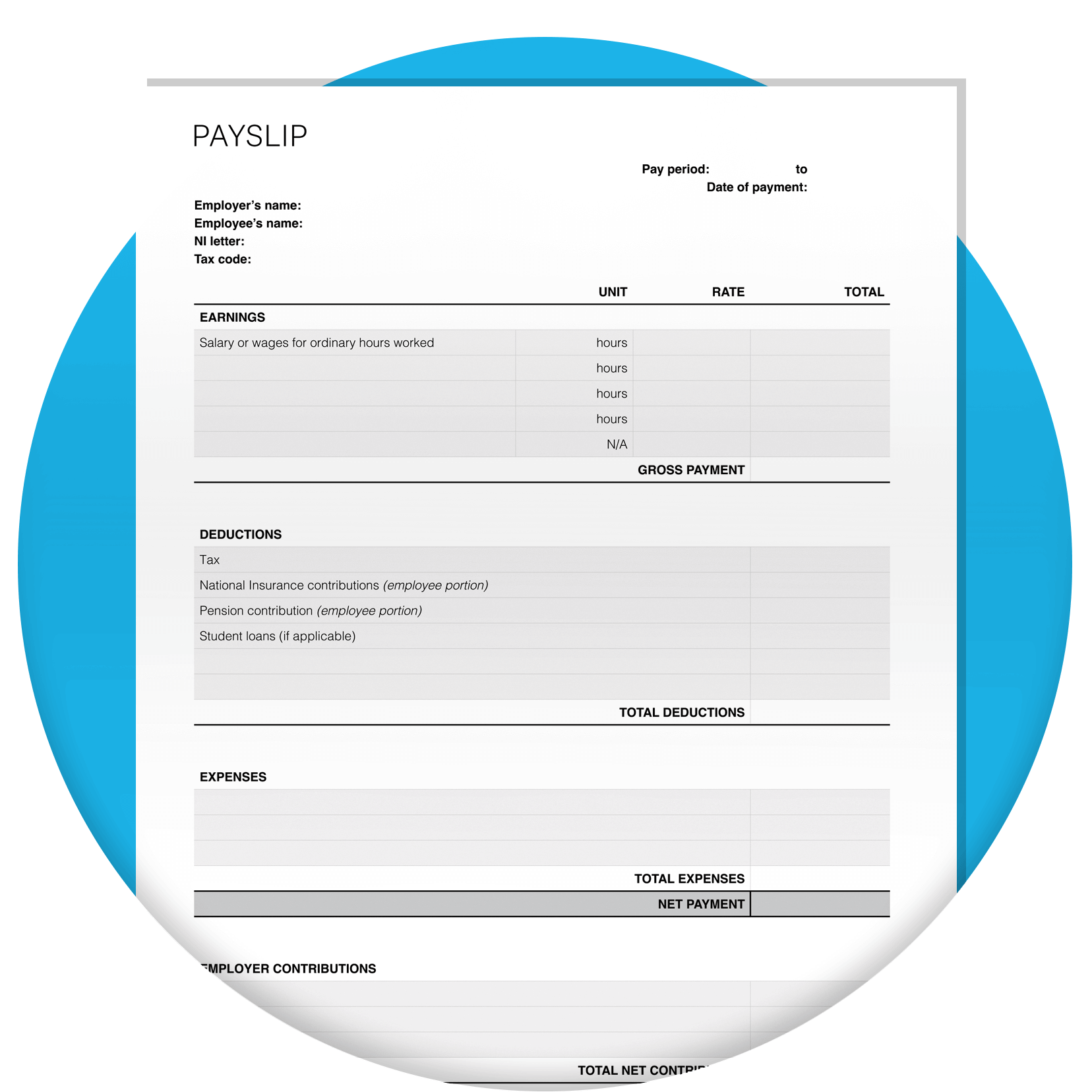
Get a free payslip template as an editable PDF. It's an instant download, with no form to fill in.
Last updated: October, 2026
Download the payslip template
Fill in the form to get a free payslip template as an editable PDF. We’ll throw in a guide to help you use it.
How to fill in your payslip template
Follow the how-to guide and filled-out example, then work through each pay period:
- Enter what your employee earned.
- Take off deductions like tax, National Insurance (NI) and pension.
- Add any expenses you're paying back.
- Show their take-home pay.
- Use the same template for weekly or monthly pay, and for salaried or hourly staff.
Prefer to work online?
You can also create payslips on screen with the Xero payslip generator.
Go to the download
What your payslip needs to include
UK law sets out what goes on an employee's payslip. It must show:
- pay before deductions
- pay after deductions
- deductions that can change each payday, such as tax and NI
- hours worked, if pay depends on time worked
Give each payslip on or before payday. Printed and electronic copies both count.

Your payslip checklist before payday
A quick check before you share each payslip helps you catch errors early. Make sure:
- hours worked match your records
- overtime hours and rate match what you've recorded
- holiday taken fits each person's entitlement
- bank holidays are counted correctly against holiday entitlement
Almost all workers get 5.6 weeks' paid holiday a year. For a 5-day week, that's 28 days.
How bank holidays fit in
You can count bank holidays towards statutory leave, and they don't have to be extra paid days.

Year to date, tax period and payroll number
Payslips can show these labels.
- Year-to-date (YTD) totals show pay, tax, NI and pension since the tax year began on 6 April.
- The tax period number shows the part of the tax year a payslip covers. For monthly pay, 01 is April and 12 is March.
- Some businesses identify each employee by payroll number.
Each tax year runs from 6 April to 5 April.

Make payday easier with Xero Payroll
Upgrade to Xero Payroll and spend payday on your business, with payslips handled for you. Run payroll and your bookkeeping together, all in one place.

Payslips ready every pay run
Xero Payroll creates payslips automatically. Employees view them, and their P60s, in the Xero Me app.
Pay and deductions worked out for you
Each pay run calculates pay, tax, NI, pensions and leave entitlements automatically.
HMRC-recognised payroll software
Send Real Time Information (RTI) to HMRC after every pay run, straight from Xero Payroll.
Free payslip template vs Xero Payroll features
| Free template | Xero Payroll | |
|---|---|---|
| Create a payslip for an employee | ||
| Give staff online access to payslips and P60s | ||
| Calculate tax and NI deductions | ||
| Track holiday and other leave balances | ||
| Assess and enrol staff into a workplace pension | ||
| Report pay to HMRC in real time | ||
| Manage payroll and bookkeeping in one place |
FAQs on payslip templates
Start from a template so every payslip has the same layout and legal details. Fill one in for each employee every pay period, and check the figures against your records first.
Start from a template so every payslip has the same layout and legal details. Fill one in for each employee every pay period, and check the figures against your records first.
Download the free template and add your employee's pay, deductions and take-home pay. Keep a copy of each payslip with your payroll records.
Download the free template and add your employee's pay, deductions and take-home pay. Keep a copy of each payslip with your payroll records.
Yes, for employees and workers. Contractors and freelancers don't need a payslip from you.
Yes, for employees and workers. Contractors and freelancers don't need a payslip from you.
Besides pay and changing deductions, explain fixed deductions too. Show them on each payslip or in a separate written statement that you update every year.
Besides pay and changing deductions, explain fixed deductions too. Show them on each payslip or in a separate written statement that you update every year.
Gross pay is the full amount earned before anything comes off. Net pay is what your employee takes home after tax, NI, pension and other deductions.
Gross pay is the full amount earned before anything comes off. Net pay is what your employee takes home after tax, NI, pension and other deductions.
Watch for missing legal details, an out-of-date tax code, missed variable deductions like NI, and payslips that arrive after payday.
Watch for missing legal details, an out-of-date tax code, missed variable deductions like NI, and payslips that arrive after payday.
Related payroll resources
Spend less time on payslips with Xero
Let Xero Payroll take care of payslips and HMRC filing each pay run, so you can run your business, not your books.
Disclaimer
Xero does not provide accounting, tax, business or legal advice. This template has been provided for information purposes only. You should consult your own professional advisors for advice directly relating to your business.