What is payroll?
Learn what payroll is, how it works, and how to process it for your small business.
Published Thursday 9 July 2026
Table of contents
Key takeaways
- Payroll is the process of calculating and distributing employee wages, withholding the right taxes, and filing required forms with government agencies.
- As an employer, you're responsible for paying your share of Federal Insurance Contributions Act (FICA) taxes and Federal Unemployment Tax Act (FUTA) taxes on top of each employee's wages.
- Processing payroll involves 6 core steps, from tracking hours worked to filing tax deposits, and you can handle it manually, with software, or by outsourcing to a provider.
- Staying on top of payroll deadlines and recordkeeping helps you avoid IRS penalties and keeps your business compliant with federal and state labor laws.
What is payroll?
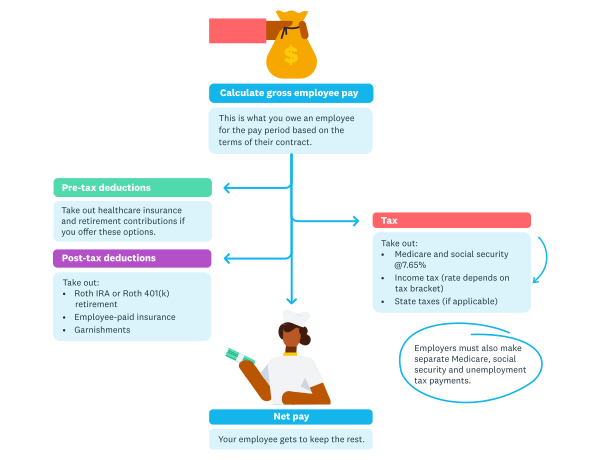
Payroll is what happens each payday and involves sending the right amounts of money to the employee, but also to a number of other locations.
Payroll is the process of paying your employees for the work they've done, including calculating wages, withholding taxes, and distributing payments. It's one of the most fundamental responsibilities you'll take on as a business owner.
The word "payroll" actually has 3 common meanings in business:
- The process of calculating and distributing employee compensation
- The list of employees your business pays
- The total amount of money you spend on employee wages and benefits over a given period
For most small businesses, payroll is one of the highest operating expenses. According to the Bureau of Labor Statistics, total employer compensation costs averaged $49.32 per hour worked in early 2026, with wages and salaries accounting for about 68% of that total and benefits, taxes, and insurance making up the rest.
Understanding how payroll works, and getting it right, helps you stay compliant with tax laws, keep employees happy, and manage your cash flow more effectively. If you're new to employer payroll responsibilities, it helps to start with the basics.
How does payroll work?
Payroll works in 3 main steps: gathering employee information, calculating pay and deductions, and distributing payments while reporting to tax agencies. While the details can get complex, this high-level view shows you what's involved each pay period.
First, you collect the data you need: hours worked, overtime, paid time off, and any changes to employee details like tax withholding or benefits elections. Next, you calculate each employee's gross pay, then subtract federal and state taxes, benefit contributions, and any other deductions to arrive at net pay. Finally, you pay your employees via direct deposit or check, and deposit the withheld taxes with the appropriate agencies on schedule.
Each of these steps has its own set of rules and deadlines, which is why many small business owners choose payroll software to automate the process and reduce the risk of errors.
Payroll taxes explained
Payroll taxes are the taxes that both you and your employees pay based on wages earned. As an employer, you're responsible for calculating, withholding, and depositing these taxes on time to avoid penalties from the IRS. For a deeper look at federal and state obligations, see this guide to payroll tax.
FICA taxes
The Federal Insurance Contributions Act (FICA) funds Social Security and Medicare. Both you and your employees split the cost equally.
- Social Security tax: 6.2% each (12.4% total), applied to wages up to the annual wage base limit
- Medicare tax: 1.45% each (2.9% total), with no wage cap
- Additional Medicare tax: employees earning above $200,000 pay an extra 0.9%; you don't match this portion
FUTA tax
The Federal Unemployment Tax Act (FUTA) funds unemployment benefits at the federal level. Unlike FICA, this one's entirely on you as the employer.
- The FUTA rate is 6% on the first $7,000 of each employee's annual wages
- Most employers receive a credit of up to 5.4% for paying state unemployment taxes, bringing the effective rate down to 0.6%
Federal and state income taxes
You're required to withhold federal income tax from each employee's paycheck based on the information they provide on their W-4 form. The amount depends on their filing status, number of dependents, and any additional withholding they've requested.
Most states also have their own income tax that you'll need to withhold and remit. Some states have additional payroll taxes for programs like disability insurance or paid family leave, so check your state's requirements carefully.
Understanding payroll deductions
Payroll deductions are the amounts subtracted from an employee's gross pay before they receive their paycheck. Getting deductions right is critical for compliance and for making sure your employees' pay stubs are accurate.
Mandatory deductions
These are required by law, and you can't skip them. Mandatory deductions include:
- federal income tax withholding
- state and local income tax withholding (where applicable)
- FICA taxes (Social Security and Medicare)
- court-ordered garnishments, such as child support or unpaid debts
Voluntary deductions
Employees can choose to have these amounts taken from their paychecks. Common voluntary deductions include:
- health, dental, and vision insurance premiums
- retirement plan contributions (401(k), IRA)
- life insurance premiums
- health savings account (HSA) or flexible spending account (FSA) contributions
Pre-tax vs. post-tax deductions
Some deductions are taken before taxes are calculated, which lowers the employee's taxable income. Others come out after taxes. Pre-tax deductions typically include retirement contributions and certain insurance premiums. Post-tax deductions include things like Roth 401(k) contributions and union dues.
How to process payroll step by step
Processing payroll follows a consistent sequence each pay period. Here are the 6 core steps you'll need to complete to pay your employees accurately and stay compliant. For an introduction to small business payroll basics, Xero's guide covers the essentials.
1. Track employee hours and attendance
Before you can calculate pay, you need accurate time records. For hourly employees, track total hours worked, overtime, and any paid time off. Salaried employees may not need time tracking for pay purposes, but you'll still want to record absences and leave. Under the Fair Labor Standards Act (FLSA), you're required to keep time and pay records for all non-exempt employees.
2. Calculate gross pay
Gross pay is the total amount an employee earns before any deductions. For hourly workers, multiply their hours by their pay rate, including overtime at 1.5 times their regular rate for hours above 40 in a workweek. For salaried employees, divide their annual salary by the number of pay periods in the year.
3. Withhold taxes and deductions
Once you've calculated gross pay, subtract all mandatory and voluntary deductions. This includes federal and state income taxes, FICA contributions, and any benefits or garnishments. Use each employee's W-4 and your state's withholding tables to determine the correct amounts.
4. Calculate net pay
Net pay is what your employees actually take home. It's simply gross pay minus all taxes and deductions. Double-check your math here, because errors in net pay are one of the most common payroll mistakes and can erode employee trust quickly.
5. Pay your employees
Distribute payments on your scheduled payday via direct deposit, paper check, or payroll card. Direct deposit is the most popular method for small businesses because it's fast, reliable, and creates a clear record. Make sure each employee receives a pay stub showing their gross pay, deductions, and net pay.
6. File and deposit taxes
After each pay period, deposit the withheld taxes with the IRS and your state tax agency by the required deadlines. Most employers deposit federal taxes on a semi-weekly or monthly schedule, depending on the size of their tax liability. You'll also need to file quarterly returns (Form 941) and an annual FUTA return (Form 940). Keep thorough payroll records for at least 4 years in case of an audit.
Pay frequency options
Pay frequency is how often you run payroll and pay your employees. The schedule you choose affects your administrative workload, cash flow, and how your employees budget their own finances.
There are 4 standard pay frequency options in the US:
- weekly: 52 pay periods per year; common in industries like construction and hospitality where workers are paid hourly
- biweekly: 26 pay periods per year; the most popular choice for small businesses, with payday every other week
- semi-monthly: 24 pay periods per year; employees are paid twice a month on set dates, such as the 1st and 15th
- monthly: 12 pay periods per year; less common for hourly workers but sometimes used for salaried employees
Some states have laws about minimum pay frequency, so check your state's labor regulations before setting your schedule. Biweekly is often the best balance between manageable admin and employee satisfaction.
Payroll processing methods
There are 3 main ways to handle payroll: doing it manually, using software, or outsourcing to a provider. The right method depends on your budget, number of employees, and how much time you want to spend on payroll admin.
Manual payroll
With manual payroll, you calculate wages, taxes, and deductions yourself using spreadsheets or pen and paper. This approach costs the least upfront, but it's time-consuming and leaves more room for errors. Manual payroll works best if you have just 1 or 2 employees and a straightforward setup.
Payroll software
Payroll software automates most of the calculation, tax filing, and payment process. It reduces the risk of mistakes, saves you hours each pay period, and helps you stay compliant with changing tax rules. This is the most popular option for growing small businesses because it scales with you as you add employees. Learn more about choosing online payroll software for your business.
Outsourced payroll
With outsourced payroll, a third-party provider handles everything from calculations to tax filings on your behalf. It's the most hands-off option, but it typically costs more than software. Outsourcing can make sense if you have complex needs, such as employees in multiple states or specialized benefits packages.
How much does payroll cost?
The total cost of payroll goes beyond the wages you pay your employees. Between employer taxes, benefits contributions, and processing costs, most businesses spend an additional 15% to 20% on top of each employee's base salary.
Additional employer costs
Your mandatory costs as an employer include:
- FICA taxes: 6.2% for Social Security plus 1.45% for Medicare (7.65% total)
- FUTA tax: up to 6% on the first $7,000 per employee (often effectively 0.6% after state credits)
- state unemployment tax: varies by state and your claims history
- workers' compensation insurance: required in most states, with rates varying by industry
Processing costs by method
The cost of actually running payroll depends on the method you choose:
- manual: free in terms of software costs, but your time has value; expect to spend several hours per pay period
- payroll software: typically $20 to $100+ per month, plus a per-employee fee
- outsourced provider: generally $50 to $200+ per month, depending on services and employee count
When comparing options, factor in the cost of errors too. An IRS penalty for a late or incorrect filing can outweigh months of software subscription fees.
Required payroll forms and documents
Running payroll requires specific forms and documents to stay compliant with federal and state regulations. Having the right paperwork in place before you run your first payroll saves you from scrambling later.
Here are the key forms you'll need:
- Employer Identification Number (EIN): your business's tax ID, issued by the IRS; you'll need this to report taxes and file payroll forms
- W-4 (Employee's Withholding Certificate): each employee fills this out so you know how much federal income tax to withhold
- I-9 (Employment Eligibility Verification): verifies that each employee is authorized to work in the US
- W-9 (Request for Taxpayer Identification Number): used for independent contractors, not employees; collects their tax ID for 1099 reporting
- state withholding forms: many states have their own version of the W-4
- direct deposit authorization: employees provide their bank details for electronic payments
- benefits enrollment forms: for health insurance, retirement plans, and other voluntary deductions
At year's end, you'll also need to issue W-2 forms to employees and 1099-NEC forms to any contractors you've paid $600 or more. For more details on hiring employees and the paperwork involved, check out Xero's guide.
Key payroll terms
Payroll comes with its own vocabulary. Here's a quick glossary of the terms you'll encounter most often when managing payroll for your business.
Pay and compensation terms
These terms describe how employee pay is calculated and reported.
- Gross pay: the total amount an employee earns before taxes and deductions
- Net pay: the amount an employee takes home after all deductions; also called "take-home pay"
- Pay period: the recurring timeframe for which you calculate employee wages (weekly, biweekly, semi-monthly, or monthly)
- Pay stub: a document that shows the breakdown of an employee's pay, including gross pay, deductions, and net pay
- Withholding: the portion of an employee's wages held back for federal, state, and local taxes
Tax and compliance terms
These terms relate to employer obligations and legal requirements.
- FICA: Federal Insurance Contributions Act; the combined Social Security and Medicare taxes paid by employers and employees
- FUTA: Federal Unemployment Tax Act; the federal unemployment tax paid by employers only
- Garnishment: a court-ordered deduction from an employee's wages to pay a debt, such as child support or unpaid loans
- Exempt employee: an employee who isn't entitled to overtime pay under the FLSA, typically salaried workers meeting certain criteria
- Non-exempt employee: an employee who's entitled to overtime pay for hours worked beyond 40 in a workweek
Simplify your payroll with Xero
Managing payroll doesn't have to be a time-consuming headache. With the right tools, you can automate calculations, stay on top of tax deadlines, and give your employees the accurate, on-time payments they expect.
Xero's cloud accounting platform connects your payroll, bookkeeping, and reporting in one place, so you're not juggling spreadsheets or switching between systems. With Xero Payroll (via Gusto), you can run payroll, file taxes, and manage benefits directly from your Xero account. Spend less time on admin and more time growing your business; Get one month free.
FAQs on payroll
Here are answers to some of the most common payroll questions from small business owners.
What is the difference between payroll and a paycheck?
Payroll is the entire process of calculating wages, withholding taxes, and distributing payments to all your employees. A paycheck is the end result for a single employee: the actual payment they receive after deductions.
Can I do payroll myself?
Yes, you can run payroll yourself, especially if you have a small team. However, manual payroll requires you to stay current on tax rates, filing deadlines, and labor laws, so many business owners use software to reduce errors and save time.
How often should I run payroll?
Most small businesses run payroll biweekly (every 2 weeks) or semi-monthly (twice a month). Check your state's minimum pay frequency requirements before choosing a schedule.
What's the difference between gross pay and net pay?
Gross pay is an employee's total earnings before anything is taken out, while net pay is what hits their bank account after all deductions. When budgeting for payroll costs, keep in mind that your actual expense per employee is closer to gross pay plus your share of employer taxes, not the net pay amount.
What payroll taxes do employers pay?
Employers pay their share of FICA taxes (6.2% for Social Security and 1.45% for Medicare), plus FUTA tax (up to 6% on the first $7,000 of each employee's wages). Most employers also pay state unemployment tax.
How long should I keep payroll records?
The IRS recommends keeping payroll tax records for at least 4 years. The FLSA requires you to keep certain pay records for at least 3 years, so 4 years is a safe minimum to cover both requirements.
Handy resources
Advisor directory
You can search for experts in our advisor directory
Your guide to hiring
Learn tips for hiring, onboarding and paying an employee, while keeping everyone happy
Payroll with Xero
Learn how Xero can help with your payroll requirements
Disclaimer
This glossary is for small business owners. The definitions are written with their requirements in mind. More detailed definitions can be found in accounting textbooks or from an accounting professional. Xero does not provide accounting, tax, business or legal advice.