Connect Xero to Claude and safely bring your Xero data into the chat or workflows you’re already using.
Your business knowledge and your accountant or bookkeeper’s expertise shape priorities. As you plan in Claude, ask for Xero figures or switch organizations. The connector answers questions; Claude for Small Business plugin skills gather and organize data for draft reports, forecasts and reminders.
Get Xero finance answers instantly with Claude
What to ask Claude about your finances
Prepare weekly client briefings.
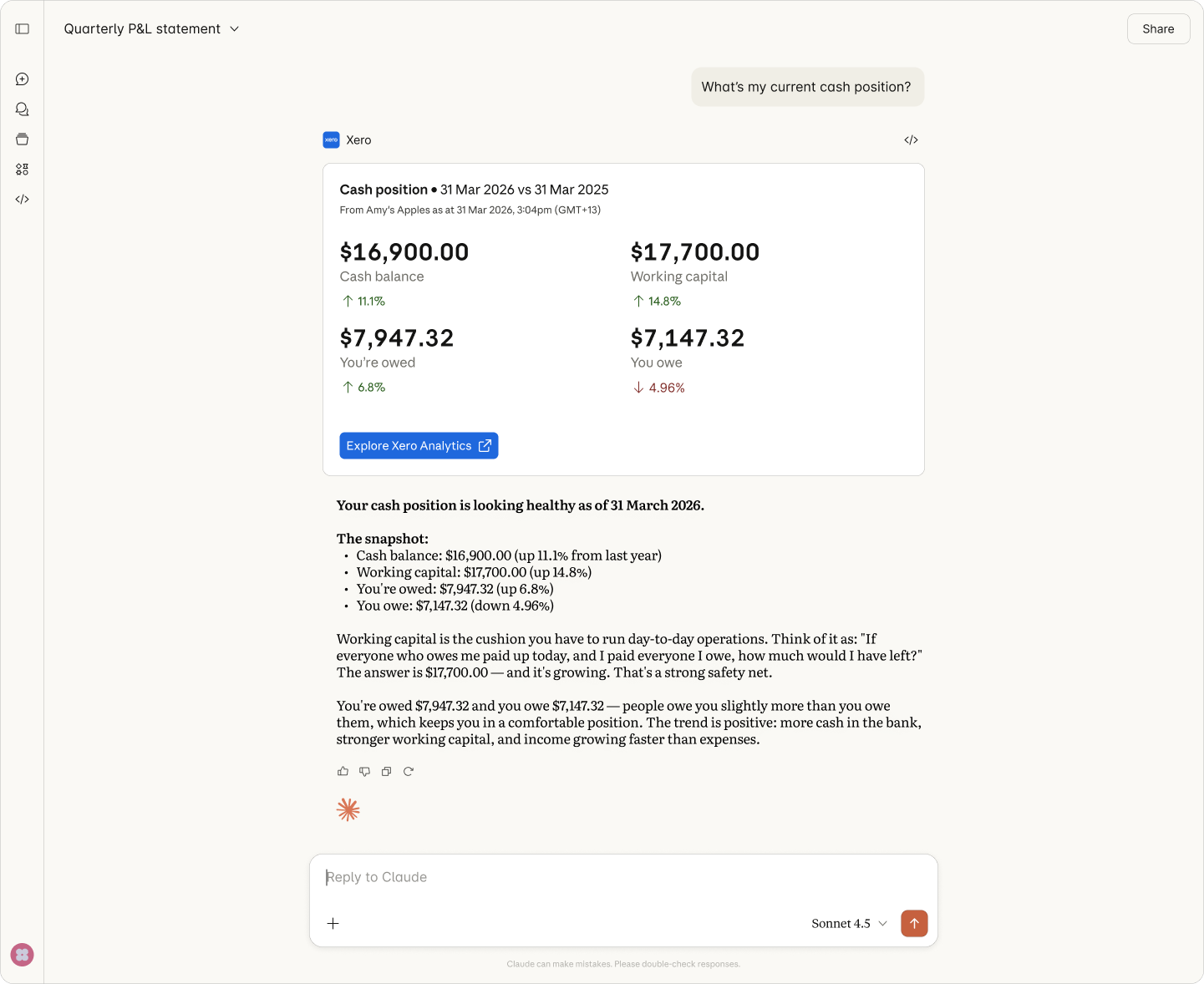
Ask Claude for each client’s cash, customer balances and monthly profit changes for business discussions.
Review the quarter together.
Compare quarters with your accountant/bookkeeper; draft an agenda of your priorities with Xero data in Claude.
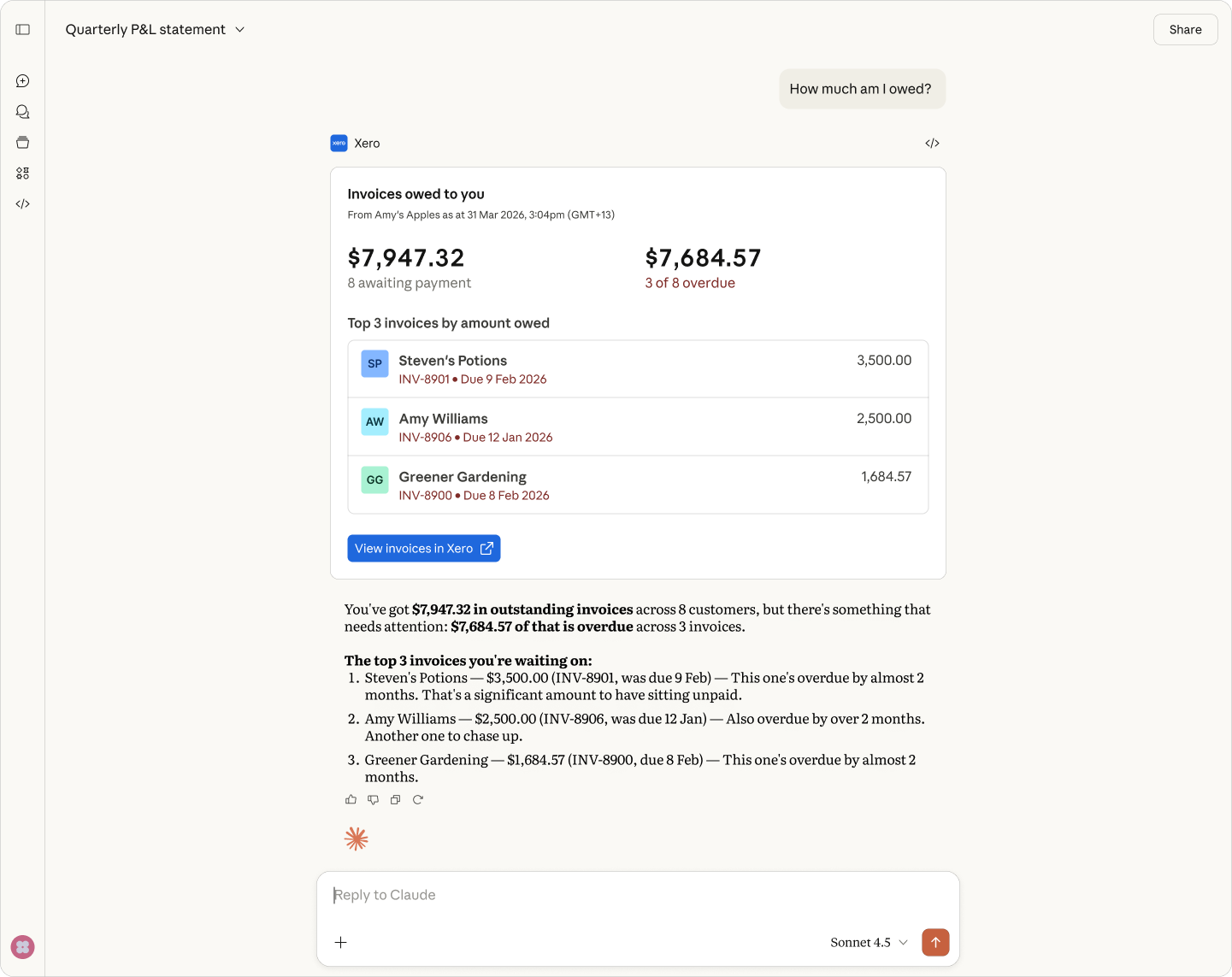
Check for duplicate invoices.
Ask Claude for possible duplicates; your customer knowledge helps your accountant confirm what's real.
Connecting Xero and all these other Apps to Claude gives you this 3D view of the business. Without this, you're only seeing 2D.
Shaun Singh, CEO / Founder, Death to Stock
Investigate possible duplicate invoices.
Two invoices with the same customer and amount may both be genuine. Your knowledge of the sales helps your accountant or bookkeeper investigate. In the Claude chat where you’re drafting a query, ask the connector for possible matches and Xero source links. No plugin required.
- Check the last 60 days for invoices with the same customer and amount, dated within 14 days
- Follow Xero links to investigate; draft a note asking the owner to confirm which invoices are genuine
- Switch between business entities or client organizations to check each set of records
Plan next quarter’s advisory discussion.
Customer reliance, profit trends and financial commitments shape each business’s questions and, with your plans, your accountant or bookkeeper’s advice. Claude plugin skills are preset prompts using the same connector to gather and organize Xero data for drafts and recurring work.
- Gather each organization’s top five customers by revenue over 12 months, including their share of revenue
- Examine four quarters of profit and loss and the financial position alongside business circumstances
- Draft an agenda item reflecting the issue you and your accountant or bookkeeper identify, with supporting figures
Claude made me much more adaptable. I can find answers to questions from my team or our clients on the fly.
Lane Pedersen · Revo Packaging
Nothing changes in Xero unless you change it.
The connector and plugin are read-only and follow your Xero permissions. Claude can’t create, edit, approve, reconcile or pay in Xero. Accounting actions stay in Xero. Owners can switch between business entities, and accountants and bookkeepers between clients. Disconnect anytime in Claude or Xero.
- Connector data access is limited to your session and connected organization
- Connector data isn’t combined across organizations or used to train Anthropic models
- Your Claude plan and settings control conversation data use
How to connect Xero to Claude
Connecting takes only a few minutes. You just need a Claude account on a free or paid plan – no developer setup or API work required.

Step 1
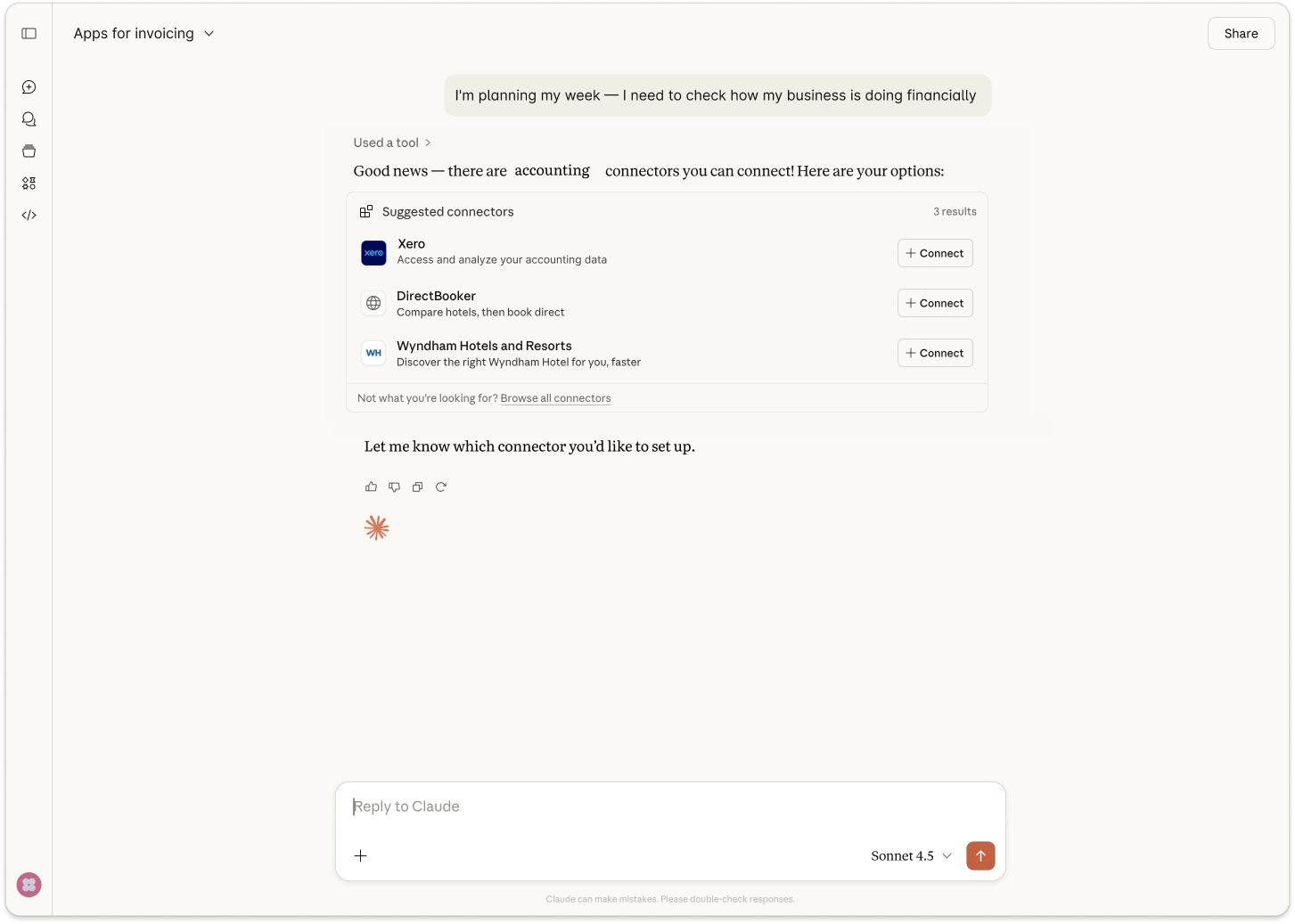
Sign in to Claude and add Xero in the connectors directory.
Step 2
Sign in with your Xero login to connect your account.
Step 3
Choose the Xero organization you want to use.
Step 4
Start asking Claude about your finances like your profit, cash, invoices, and customers.
The Xero Claude connector vs Xero MCP server
The connector is the read-only way to get answers in Claude. The Xero MCP server is a developer tool for custom workflows and automations.
FAQs
The Xero connector in Claude is a secure, read-only connection between your Xero account and Claude. It lets you ask plain-English questions about profit, cash, invoices, and customers, which Claude answers using your live Xero data. Claude gives you the links back to the Xero report, invoice, or contact it sourced from so you can check the details before you act.
The Xero connector in Claude is a secure, read-only connection between your Xero account and Claude. It lets you ask plain-English questions about profit, cash, invoices, and customers, which Claude answers using your live Xero data. Claude gives you the links back to the Xero report, invoice, or contact it sourced from so you can check the details before you act.
It’s pretty simple. Open Claude, go to the connectors directory and add the Xero connector, then sign in with your usual Xero login and choose the organization you want. There's no developer setup or API work, and it takes just a few minutes.
Once you're connected, you can ask Claude about your finances straight away.
It’s pretty simple. Open Claude, go to the connectors directory and add the Xero connector, then sign in with your usual Xero login and choose the organization you want. There's no developer setup or API work, and it takes just a few minutes.
Once you're connected, you can ask Claude about your finances straight away.
Yes, the Xero connector is free to add. You'll need an active Xero subscription and a Claude account (either free or paid). Xero doesn't charge you to connect the two, so you can start asking questions about your finances at no added cost.
Yes, the Xero connector is free to add. You'll need an active Xero subscription and a Claude account (either free or paid). Xero doesn't charge you to connect the two, so you can start asking questions about your finances at no added cost.
Your Xero data is never used to train AI. The Xero–Claude connection is read only and session only, which means Claude can only read your live data to answer a question – it cannot change it. and Xero stays the source of truth. You choose which organization to connect to Claude, and you stay in control of your data.
Your Xero data is never used to train AI. The Xero–Claude connection is read only and session only, which means Claude can only read your live data to answer a question – it cannot change it. and Xero stays the source of truth. You choose which organization to connect to Claude, and you stay in control of your data.
No. The Xero connector is read-only at launch, so Claude can look at your data and answer questions but can't edit invoices, post transactions, or change anything in your books. When you want to act on what you learn, just follow the link back to Xero and make the change yourself.
No. The Xero connector is read-only at launch, so Claude can look at your data and answer questions but can't edit invoices, post transactions, or change anything in your books. When you want to act on what you learn, just follow the link back to Xero and make the change yourself.
Ask Claude about profit, cash flow, overdue invoices, and your top customers. Claude pulls answers from your live Xero data, so its answers are always up to date. And you can see how the business is tracking and ask follow-up questions without opening a report or building one from scratch.
Ask Claude about profit, cash flow, overdue invoices, and your top customers. Claude pulls answers from your live Xero data, so its answers are always up to date. And you can see how the business is tracking and ask follow-up questions without opening a report or building one from scratch.
No, it doesn't replace your accountant, bookkeeper or JAX. Claude for accounting questions is a quick way to check your own numbers in plain English – it’s not a source of tax, compliance, or financial advice. For accountants and bookkeepers, the Claude–Xero connector can mean clients who arrive better informed, with fewer basic report requests.
No, it doesn't replace your accountant, bookkeeper or JAX. Claude for accounting questions is a quick way to check your own numbers in plain English – it’s not a source of tax, compliance, or financial advice. For accountants and bookkeepers, the Claude–Xero connector can mean clients who arrive better informed, with fewer basic report requests.
Your books shape the answers.
Useful answers need your questions and clean, current books you and your accountant or bookkeeper keep. Claude reads uncoded transactions and draft invoices too. Understanding figures takes your business knowledge and their investigation and advice.
See how Xero builds AI you can trust