What is a chart of accounts?
Learn what a chart of accounts is, how it works, and how to set one up for your UK business.
Published Tuesday 14 July 2026
Table of contents
Key takeaways
- A chart of accounts is a complete list of every financial account your business uses, organised by category. It forms the backbone of your bookkeeping and feeds directly into your financial statements.
- The 5 main account types are assets, liabilities, equity, revenue, and expenses. Every transaction you record falls into 1 of these categories.
- Setting up a clear, well-structured chart of accounts from the start saves time at tax season and helps you meet UK reporting requirements, including Making Tax Digital (MTD) for VAT.
- Accounting software like Xero comes with a default chart of accounts you can customise to suit your business, so you don't need to build one from scratch.
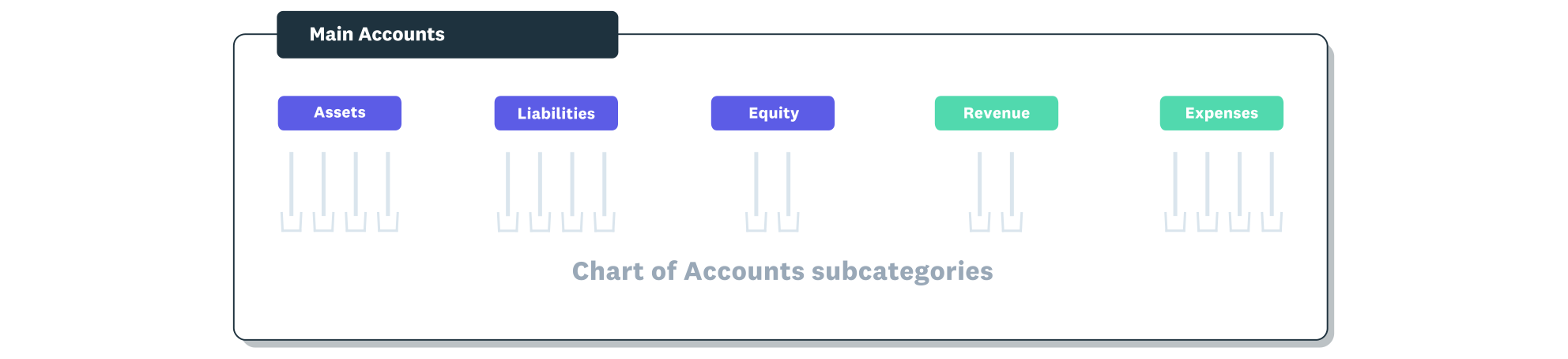
The chart of accounts is organised under the five main account types.
What is a chart of accounts?
A chart of accounts (COA) is a structured list of every financial account in your business, grouped by type. Think of it as an index for your finances; it tells you exactly where every pound coming in or going out gets recorded.
Your chart of accounts connects directly to your general ledger, which holds the detailed transaction records for each account. When you run a balance sheet or profit and loss statement, the numbers on those reports are pulled from the accounts listed in your COA. Without it, there's no consistent way to categorise and track your money. You can learn more about how account types connect in the Xero guide to double-entry bookkeeping.
Why your business needs a chart of accounts
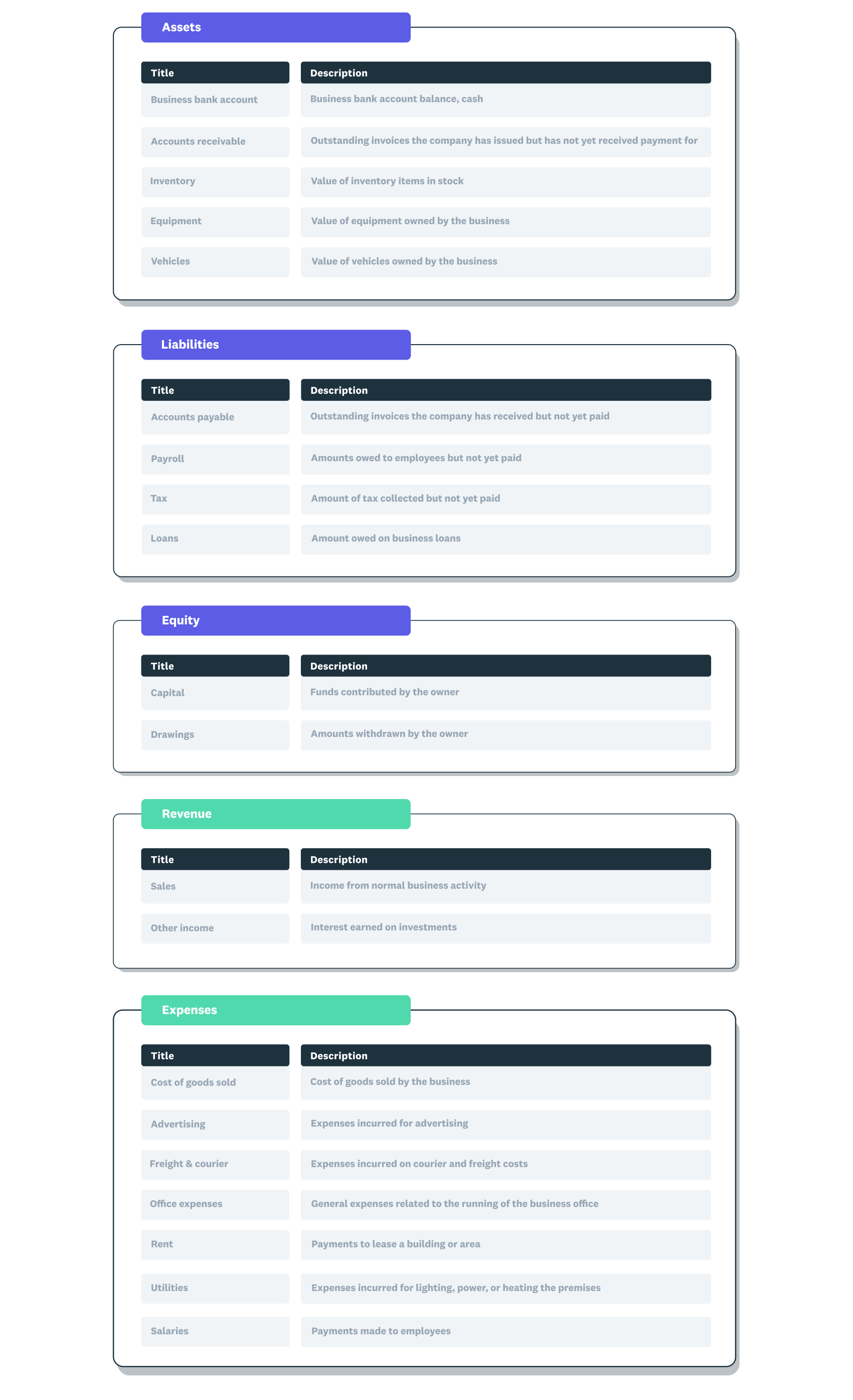
A chart of accounts example showing the five main account types with subcategories within each.
A well-organised chart of accounts gives you a clear, reliable picture of your business finances. It's the foundation that makes everything else in your accounting work properly.
Here's why it matters for your business:
- Accurate financial reporting: your balance sheet and profit and loss statement are only as good as the accounts behind them. A clear COA means your reports reflect what's actually happening in your business.
- Simpler tax compliance: when your accounts are well-structured, preparing your Self Assessment tax return or VAT return takes less time. It also helps you stay compliant with Making Tax Digital (MTD) for VAT, which requires digital record-keeping.
- Confident decision-making: you can quickly see where your money is going, which expenses are growing, and whether your revenue covers your costs. That clarity helps you make informed decisions about pricing, hiring, or investing.
- Meeting UK reporting standards: if you file accounts with Companies House or HMRC, your financial data needs to follow a consistent structure. A proper chart of accounts keeps everything aligned with UK accounting standards.
The 5 main account types explained
Every account in your chart of accounts falls into 1 of 5 main categories. Understanding these types helps you classify transactions correctly and keep your financial reports accurate.
- Assets: things your business owns or is owed. This includes your business bank account balance, equipment, inventory, and outstanding invoices (accounts receivable). For example, a laptop you bought for your business or the cash in your current account are both assets.
- Liabilities: what your business owes to others. This covers loans, credit card balances, VAT you've collected but not yet paid to HMRC, and unpaid supplier invoices (accounts payable). A business loan from your bank is a liability.
- Equity: the owner's stake in the business after subtracting liabilities from assets. For a sole trader, this includes the money you've put into the business and any profits you've retained. If you're a limited company, it includes share capital and retained earnings.
- Revenue: income your business earns from its normal activities. This is the money you receive from selling products or services. For a freelance designer, revenue is the fees clients pay. For a shop, it's sales income.
- Expenses: the costs of running your business. This includes rent, utilities, office supplies, software subscriptions, marketing costs, and staff wages. Tracking expenses accurately is essential for calculating your taxable profit. For more on how to record these transactions, see the Xero guide on journal entries in accounting.
How a chart of accounts works
Your chart of accounts acts as the organising structure behind all your financial records. Every time you record a transaction, it gets assigned to a specific account in your COA.
Those individual transactions are stored in your general ledger, which is the detailed, day-by-day record of every debit and credit. Your chart of accounts is the index; your general ledger is the full content. Together, they give you a complete picture of your finances.
When you generate financial reports, the data flows from the general ledger into 2 key statements. Your balance sheet pulls from asset, liability, and equity accounts to show your financial position at a specific point in time. Your profit and loss statement (also called an income statement) pulls from revenue and expense accounts to show how your business performed over a period.
This is why getting your chart of accounts right matters. If an expense is assigned to the wrong account, your profit figure will be off, and your tax calculations could be wrong too. The Xero guide to small business accounting covers how these reports fit into your overall financial management.
Chart of accounts structure and numbering
Most charts of accounts use a numbering system to keep accounts organised and easy to find. Each account gets a unique code, and the numbering ranges correspond to the 5 main account types.
Here's how the standard numbering typically works:
- 1000 to 1999: assets (for example, bank accounts, equipment, accounts receivable)
- 2000 to 2999: liabilities (for example, loans, VAT owed, accounts payable)
- 3000 to 3999: equity (for example, owner's capital, retained earnings)
- 4000 to 4999: revenue (for example, sales income, service fees)
- 5000 to 5999: expenses (for example, rent, utilities, office supplies)
The logic is straightforward: balance sheet accounts (assets, liabilities, equity) come first, followed by profit and loss accounts (revenue and expenses). Within each range, you can add specific accounts as your business needs them.
Here's what a simple chart of accounts might look like for a UK small business. Balance sheet accounts come first, followed by income statement accounts.
Assets and liabilities (1000s and 2000s):
- 1000: business current account
- 1100: accounts receivable
- 1200: office equipment
- 2000: accounts payable
- 2100: VAT liability
- 2200: business loan
Equity and revenue (3000s and 4000s):
- 3000: owner's equity
- 3100: retained earnings
- 4000: sales revenue
- 4100: consulting income
Expenses (5000s):
- 5000: rent
- 5100: utilities
- 5200: office supplies
- 5300: insurance
- 5400: marketing and advertising
You can adjust the codes and add accounts as your business grows. The key is keeping the structure consistent so you and your accountant can find anything quickly.
How to set up a chart of accounts
Setting up a chart of accounts doesn't need to be complicated. Follow these steps to create one that works for your business from day 1.
- Start with a template or default chart: most accounting software, including Xero, provides a default chart of accounts when you set up your business. This gives you a solid starting point with the standard account types already in place.
- Review your business activities: look at how your business earns money and where it spends money. List out your income sources, regular expenses, assets you own, and any debts or liabilities.
- Customise accounts to match your business: add, rename, or remove accounts so they reflect your actual operations. A freelance consultant needs different expense accounts than a retail shop. Keep it specific enough to be useful, but not so detailed that it becomes hard to manage.
- Assign account codes: use a consistent numbering system (such as the 1000 to 5000 ranges described above) so every account has a unique code. Leave gaps between numbers so you can add new accounts later without disrupting the structure.
- Set up VAT tracking: if you're VAT-registered, make sure your accounts are configured to track VAT correctly. This is especially relevant for MTD for VAT, which requires you to keep digital records and submit returns through compatible software.
- Get your accountant's input: if you work with an accountant or bookkeeper, share your chart of accounts with them before you start recording transactions. They can spot gaps, suggest improvements, and make sure it aligns with UK reporting requirements. The Xero bookkeeping guide on chart of accounts covers this process in more detail.
Chart of accounts best practices
A chart of accounts is something you set up once and refine over time. These practical tips help you keep it working well as your business evolves.
- Keep it simple: only create accounts you'll actually use. A chart of accounts with 200 accounts might look thorough, but it makes data entry slower and reporting harder. Most small businesses do well with 30 to 50 accounts.
- Review it regularly: at least once a year, go through your chart of accounts and archive any accounts you no longer use. Add new ones if your business activities have changed. A quick annual review keeps things tidy. The Xero small business bookkeeping guide covers how regular maintenance fits into your broader bookkeeping routine.
- Use consistent naming: pick a naming convention and stick with it. If you call 1 account "office supplies", don't create another called "stationery and supplies". Consistency makes it easier to find accounts and run accurate reports.
- Align to your reporting needs: think about the reports you need to produce, whether that's a VAT return, a profit and loss statement, or management accounts for your bank. Structure your chart of accounts so it feeds naturally into those reports.
- Don't over-categorise expenses: you don't need a separate account for every supplier or every type of expense. Group similar costs together. For example, 1 "travel expenses" account is usually better than separate accounts for trains, taxis, and flights.
Common chart of accounts mistakes to avoid
Even a small mistake in your chart of accounts can create headaches at reporting time. Here are the most common errors to watch for.
- Creating too many accounts: it's tempting to create an account for everything, but a bloated chart of accounts makes bookkeeping slower and reports harder to read. Start lean and add accounts only when you have a genuine need.
- Inconsistent naming: using different names for similar accounts (like "advertising" and "marketing and ads") leads to confusion and split data. Pick clear, descriptive names and use them consistently across all accounts.
- Not reviewing or updating: your business changes over time, and your chart of accounts should change with it. If you haven't reviewed it in years, you likely have dormant accounts cluttering your reports and missing accounts for new activities.
- Mixing personal and business transactions: recording personal expenses through your business accounts distorts your financial reports and can cause problems with HMRC. Keep personal and business finances completely separate.
Manage your chart of accounts with Xero
Xero's accounting software comes with a default chart of accounts that's ready to use from the moment you set up your business. You can customise it to match your specific needs, add or archive accounts as your business grows, and track every transaction in 1 place.
With automatic bank feeds, real-time reporting, and built-in VAT tracking, Xero makes it straightforward to keep your chart of accounts accurate and up to date. Try Xero for your business and Get one month free.
FAQs on chart of accounts
Here are answers to frequently asked questions about chart of accounts.
How does a chart of accounts differ from a trial balance?
A chart of accounts is the list of account names and codes you use to categorise transactions. A trial balance is a report that totals the debits and credits across all those accounts at a specific date, helping you check that your books are balanced before producing financial statements.
Does a chart of accounts differ for sole traders and limited companies?
The 5 main account types stay the same, but a limited company typically needs additional equity accounts for share capital and dividends. A sole trader's chart of accounts is usually simpler, with fewer equity categories and a focus on tracking income, expenses, and drawings.
Can you change your chart of accounts after setting it up?
Yes, you can add, rename, or archive accounts at any time. If you use accounting software like Xero, changes are straightforward, though it's worth checking with your accountant before making major structural changes mid-year.
What is the difference between a chart of accounts and a general ledger?
Your chart of accounts is the list of account names and codes; your general ledger holds the actual transaction data recorded against those accounts. The COA is the filing system, and the general ledger is the content inside each file.
Do you need accounting software to manage a chart of accounts?
You can manage a chart of accounts using spreadsheets, but accounting software automates categorisation, reduces errors, and saves significant time. It's especially useful for meeting MTD for VAT requirements, which mandate digital record-keeping.
Handy resources
Advisor directory
You can search for experts in our advisor directory
Xero Small Business Guides
Discover resources to help you do better business
Online accounting with Xero
Automate your accounting in the cloud
Disclaimer
This glossary is for small business owners. The definitions are written with their requirements in mind. More detailed definitions can be found in accounting textbooks or from an accounting professional. Xero does not provide accounting, tax, business or legal advice.