What is a general ledger?
Learn what a general ledger is, how it works, and why it matters for your small business.
Published Thursday 23 July 2026
Table of contents
Key takeaways
- A general ledger (GL) is the central record of every financial transaction your business makes, organised by account type. It forms the foundation of all your financial reports.
- Every GL entry uses double-entry bookkeeping, meaning each transaction has a matching debit and credit. This keeps your books balanced and makes it easier to spot errors.
- Reconciling your general ledger regularly helps you catch mistakes early, stay compliant with HMRC requirements, and make confident decisions based on accurate numbers.
- Cloud accounting software automates much of the general ledger process, from recording transactions to generating financial reports.
What is a general ledger?
A general ledger (GL) is the main accounting record that holds every financial transaction your business makes. Think of it as the master book where all your income, expenses, assets, debts, and equity are organised into separate accounts.
Every time money moves in or out of your business, that transaction gets recorded in your general ledger. Whether you're paying a supplier, receiving payment from a customer, or buying new equipment, it all ends up here.
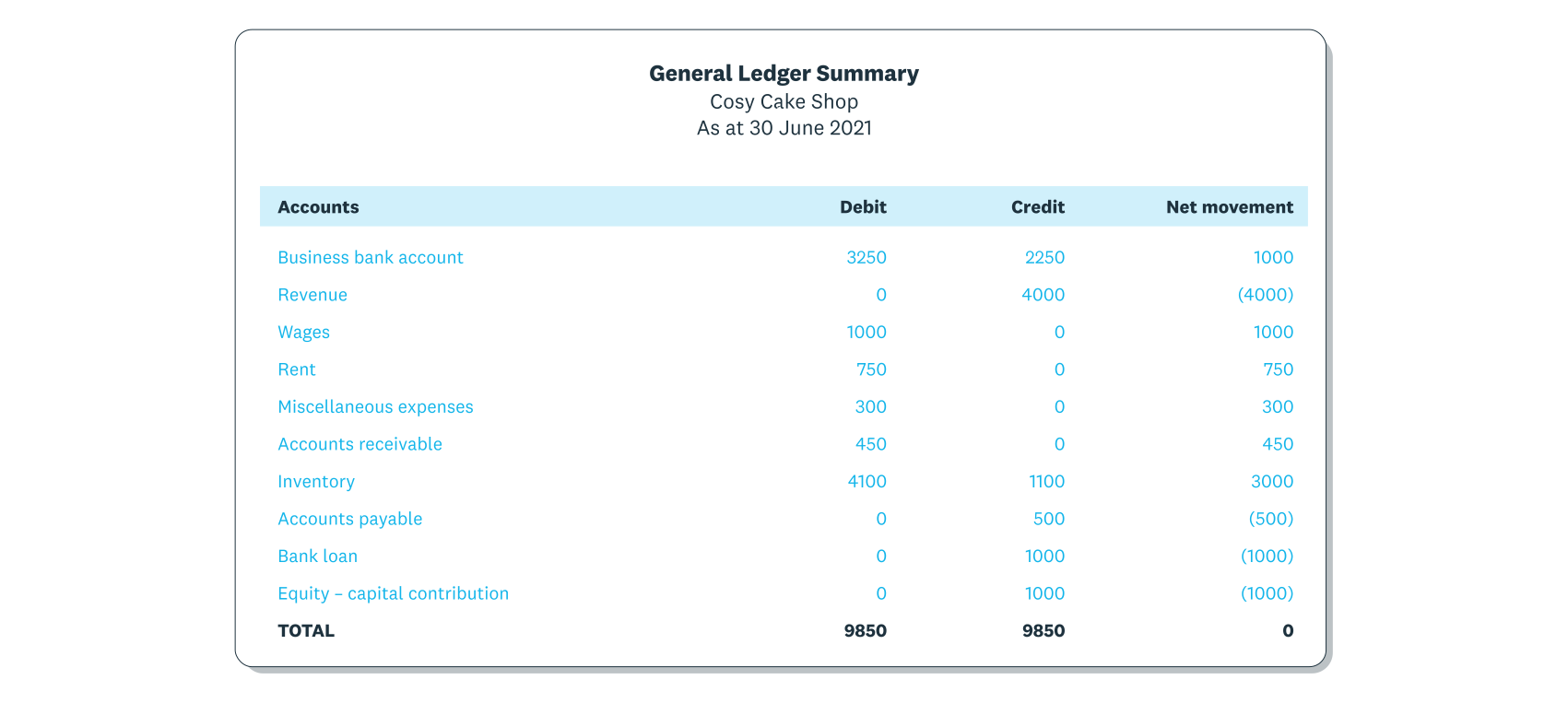
The general ledger summarises the credit and debit transactions for each account.
The GL is important because it's the single source of truth for your finances. Your balance sheet, profit and loss (P&L) statement, and cash flow statement all pull their numbers directly from the general ledger. Without an accurate GL, your financial reports can't be trusted.
How does a general ledger work?
Your general ledger follows a straightforward process that turns individual transactions into meaningful financial reports. Here's how it works, step by step.
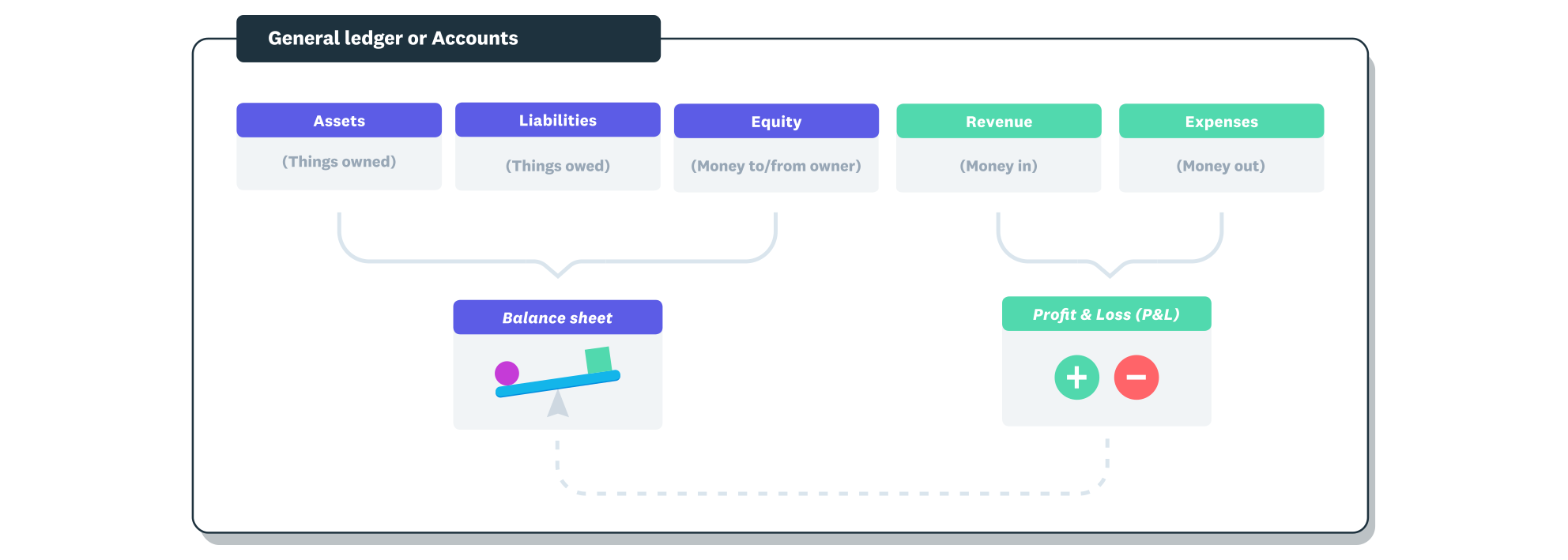
Transactions are entered into the correct account in order to produce the financial reports.
1. A transaction happens
Something financial occurs in your business. You sell a product, pay rent, or receive a bank loan. Every transaction that involves money needs to be recorded.
2. A journal entry is created
The transaction is first recorded as a journal entry in your general journal. This captures the date, amount, accounts affected, and a brief description of what happened.
3. Entries are posted to the general ledger
Each journal entry is then posted to the relevant accounts in the general ledger. A single transaction might affect 2 or more accounts. For example, a sale on credit increases both your revenue account and your accounts receivable.
4. A trial balance is prepared
At the end of a reporting period, you run a trial balance to check that total debits equal total credits across all accounts. If they don't match, there's an error somewhere that needs correcting.
5. Financial statements are produced
Once the trial balance is confirmed, the GL data feeds into your financial statements: the balance sheet, P&L, and cash flow statement. These reports show the financial health of your business at a glance.
What is recorded in a general ledger
Every transaction in your general ledger falls into 1 of 5 main account types. Together, these accounts give you a complete picture of where your business stands financially. Your chart of accounts organises these categories and their subcategories for your specific business.
- Assets are things your business owns or is owed. This includes cash in the bank, inventory, equipment, and money your customers owe you (accounts receivable).
- Liabilities are what your business owes to others. Bank loans, credit card balances, unpaid supplier invoices, and VAT you've collected but not yet paid to HMRC all count as liabilities.
- Equity represents the owner's stake in the business. It includes money you've invested, retained profits, and any drawings you've taken out.
- Revenue is money coming into your business through sales, interest, or other income. It's sometimes called income or turnover.
- Expenses are the costs of running your business, for example, rent, wages, utilities, and office supplies.
Components of a general ledger entry
Each entry in your general ledger contains several pieces of information that make it traceable and accurate. Understanding these components helps you read your own books with confidence.
- Date: when the transaction took place.
- Description: a short explanation of what the transaction was for, for example, "office rent payment" or "invoice from client."
- Reference number: a unique identifier that links the entry back to its source document, such as an invoice or receipt number.
- Debit amount: the value being debited. Debits increase asset and expense accounts.
- Credit amount: the value being credited. Credits increase liability, equity, and revenue accounts.
- Running balance: the updated total for that account after the transaction is applied.
General ledger vs general journal
These 2 terms sound similar, but they serve different purposes in your bookkeeping. Understanding the difference helps you follow the flow of your financial data.
The general journal is where transactions are first recorded in chronological order. It's like a diary of everything financial that happens, listed by date. Each journal entry captures the full details of a transaction before it goes anywhere else.
The general ledger, on the other hand, organises those same transactions by account. Instead of seeing everything in date order, you see all the activity for a specific account (like rent, or sales) grouped together. This makes it much easier to check balances and produce reports.
In short: the journal records transactions as they happen, and the ledger sorts them by account. Information flows from the journal into the ledger, not the other way around.
How a general ledger drives financial reporting
Your general ledger is the engine behind every financial report your business produces. Without it, there's no reliable way to understand your financial position or plan ahead.
The GL uses double-entry bookkeeping, which means every transaction is recorded in at least 2 accounts: 1 as a debit and 1 as a credit. This system keeps your books balanced and ties back to the accounting equation: assets equal liabilities plus equity.
From your general ledger, you can generate several key reports.
- Trial balance: a summary of all account balances to confirm that debits and credits are equal.
- Balance sheet: a snapshot of what your business owns, owes, and is worth at a specific point in time.
- Profit and loss statement: a summary of your revenue and expenses over a period, showing whether you made a profit or a loss.
- Cash flow statement: a record of how cash has moved in and out of your business, helping you understand liquidity.
These reports are essential for tax returns, Making Tax Digital (MTD) submissions to HMRC, and conversations with your accountant or potential investors.
General ledger reconciliation
Reconciliation is the process of comparing your general ledger records against external documents, like bank statements, to make sure everything matches. It's one of the most important habits you can build as a business owner.
When you reconcile, you're checking that every transaction in your GL has a matching record from your bank or payment provider. If something doesn't match, it could point to a missed entry, a duplicate payment, or even fraud.
Regular reconciliation helps you in several ways.
- It catches errors before they snowball into bigger problems.
- It gives you confidence that your financial reports are accurate.
- It makes tax time and MTD submissions much smoother because your records are already tidy.
- It helps you spot unusual activity or cash flow issues early.
Cloud accounting software can speed this up significantly. For example, Xero's bank reconciliation feature pulls in bank transactions automatically and suggests matches, so you can reconcile daily in just a few minutes.
General ledger example
Seeing a real example makes the general ledger much easier to understand. Here's a simple scenario showing how a single transaction flows through your books.
Imagine you pay 500 pounds for office rent by bank transfer. This transaction affects 2 accounts in your general ledger.
In the rent expense account, you record a debit of 500 pounds. This increases your expenses. In the bank account, you record a credit of 500 pounds. This decreases your cash.
After posting, the rent expense account shows a new running balance reflecting the 500 pounds, and your bank account balance drops by the same amount. The total debits and credits are equal, keeping your books balanced.
Now imagine a customer pays you 1,200 pounds for an invoice. You'd debit your bank account by 1,200 pounds (increasing cash) and credit your accounts receivable by 1,200 pounds (reducing what's owed to you). Again, both sides balance.
Every transaction in your general ledger follows this same pattern: at least 1 debit and 1 credit, always equal.
Why the general ledger matters for small businesses
If you run a small business, your general ledger isn't just an accounting formality. It's a practical tool that helps you stay on top of your finances and make better decisions.
Here's why it matters.
- Financial accuracy: a well-maintained GL means your reports reflect reality. You can trust the numbers when making decisions about spending, hiring, or investing.
- Error detection: because every transaction must balance, mistakes show up quickly. A mismatched trial balance tells you something needs fixing before it causes bigger issues.
- Tax and compliance: HMRC expects accurate records, especially under Making Tax Digital. A clean general ledger makes filing VAT returns and preparing for MTD for Income Tax much simpler.
- Audit readiness: if your business is ever audited, a complete and accurate GL gives you a clear trail from every transaction to every report.
- Cash flow visibility: by keeping your GL up to date, you always know how much money is coming in, going out, and sitting in your accounts.
The good news is that you don't need to manage all of this manually. Accounting software handles most of the heavy lifting, from recording transactions to generating reports, so you can spend your time running your business instead of managing your books.
Manage your general ledger with Xero
Keeping your general ledger accurate doesn't have to be a chore. Xero's cloud accounting software records your transactions automatically, reconciles your bank feeds daily, and turns your GL data into clear financial reports you can access from anywhere.
Whether you're tracking expenses, preparing for MTD, or just want to know exactly where your business stands, Xero gives you the tools to stay organised and in control. Get one month free.
FAQs on general ledgers
Here are some frequently asked questions about general ledgers.
What is a general ledger code?
A general ledger code (or GL code) is a unique number assigned to each account in your chart of accounts. It helps you categorise and locate transactions quickly, for example, all rent payments might sit under code 6100.
What is the difference between a general ledger and a trial balance?
The general ledger contains every individual transaction for each account. A trial balance is a summary that lists the closing balance of each GL account to check that total debits equal total credits.
Can accounting software replace a manual general ledger?
Yes. Cloud accounting software maintains your general ledger automatically by recording transactions from bank feeds, invoices, and bills. It removes the need for manual data entry and reduces the risk of errors.
How often should you reconcile your general ledger?
Ideally, you should reconcile daily or at least weekly. Regular reconciliation catches errors early and keeps your financial reports accurate, which is especially important for VAT returns and MTD compliance.
Does a sole trader need a general ledger?
Yes. Even as a sole trader, you need accurate financial records for your Self Assessment tax return and any VAT obligations. A general ledger keeps everything organised and makes working with your accountant much easier.
Handy resources
Advisor directory
You can search for experts in our advisor directory
Xero Small Business Guides
Discover resources to help you do better business
Online accounting with Xero
Automate your accounting in the cloud
Disclaimer
This glossary is for small business owners. The definitions are written with their requirements in mind. More detailed definitions can be found in accounting textbooks or from an accounting professional. Xero does not provide accounting, tax, business or legal advice.