What is revenue? Formula, calculation, and examples
Learn what revenue is, how to calculate it, and what it shows about your business.

Written by Jotika Teli—Certified Public Accountant with 24 years of experience. Read Jotika's full bio
Published Monday 20 April 2026
Table of contents
Key takeaways
- Apply the basic revenue formula (units sold × price per unit) and adjust it for your business model — such as hourly rate × hours worked for service businesses — to accurately measure total income before expenses.
- Track both revenue and profit separately, since high revenue doesn't guarantee profitability; revenue shows your total sales while profit reveals what remains after all expenses are deducted.
- Implement consistent revenue tracking using accounting software or POS systems rather than spreadsheets to reduce errors, automate processes, and maintain accurate financial records for better decision-making.
- Recognize revenue when it's earned — not when payment is received — by following proper accounting principles such as those outlined in ASC Topic 606.
Key takeaways
- Apply the basic revenue formula (Units sold × Price per unit) and adjust it for your business model to accurately measure total income before expenses.
- Track both revenue and profit separately since high revenue doesn't guarantee profitability; revenue shows total sales while profit reveals what remains after all expenses are deducted.
- Implement consistent revenue tracking using accounting software or POS systems rather than spreadsheets to reduce errors, automate processes, and maintain accurate financial records for better decision-making.
- Recognize revenue according to proper accounting principles by recording it when earned, not when payment is received. Follow the revenue recognition guidance in ASC Topic 606.
Understanding revenue helps you measure your business performance and make informed financial decisions. This guide explains what revenue is, how to calculate it accurately, and why tracking it matters for your business success.
What is revenue?
Revenue is the total money your business earns from selling products or services before deducting any expenses. It's generally considered realized or realizable when delivery has occurred or services have been rendered. It's also called sales or turnover.
A bakery generates revenue by selling bread and pastries. A freelancer creates revenue by providing consulting services. You use revenue to calculate profit.
How to calculate revenue
Calculating revenue helps you measure business performance and make informed financial decisions. Use the formulas below to determine your revenue accurately.
1. Use the basic revenue formula
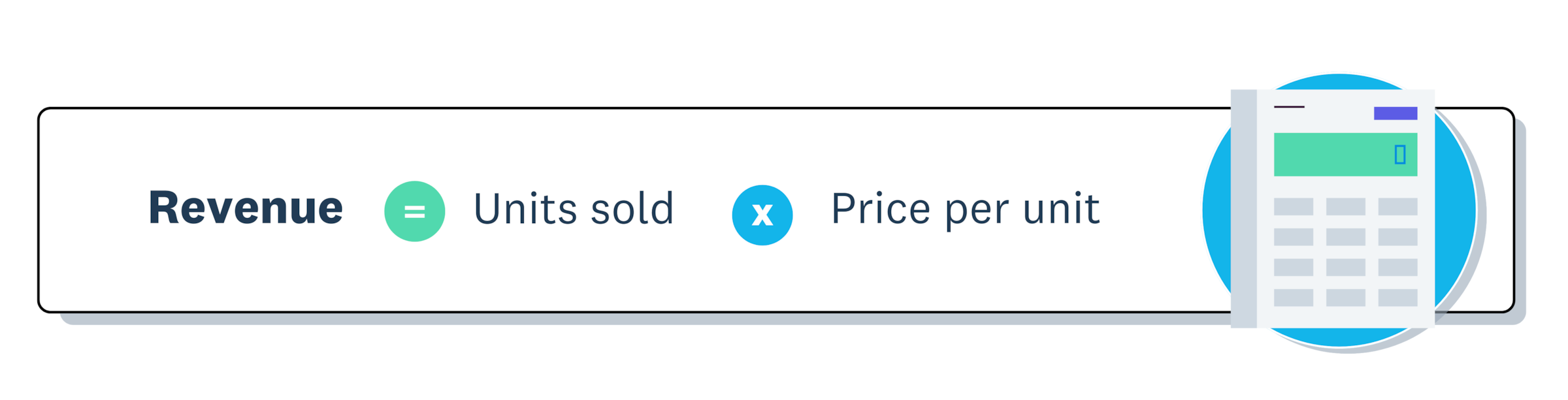
Revenue = Units sold × Price per unit
This formula works for most businesses selling products.
Example: A bakery sells 100 loaves at $5 each = $500 revenue
2. Adjust for different business models
Different business types require adjusted formulas:
- Service-based businesses: Revenue = Hourly rate × Number of hours worked
- Subscription-based businesses: Revenue = Number of subscribers × Subscription price
- Ecommerce businesses: Revenue = Sum of all individual transaction amounts
Consultants and freelancers typically use the service-based formula. Gyms and streaming services use the subscription formula.
3. Calculate net revenue
Net revenue shows your earnings after returns, discounts, and allowances. The formula is:
Net revenue = (Units sold × Price per unit) - Discounts - Returns
This gives a clearer picture of your actual income after adjustments.
4. Track your revenue
Track revenue consistently to maintain accurate financial records and make better decisions. Follow these steps to track your revenue effectively.
1. Choose a tracking method
- Spreadsheets: Best for very small businesses, but prone to errors
- Point of sale (POS) systems: Great for physical stores with automatic sales data integration
- Accounting software: Best for automation and advanced financial reporting
You can automate revenue tracking with real-time reporting using Xero.
2. Record transactions consistently
- Record every sale correctly and on time, keeping in mind that for trial products, revenue should only be recorded when acceptance occurs or the evaluation period lapses
- Automate data entry to reduce errors and save time
Why revenue matters for your small business
Track revenue to see exactly how much money flows into your business before expenses. This data helps you make smarter decisions and plan for growth.
Tracking revenue provides these key benefits:
- Monitor how you're progressing toward financial goals
- Spot patterns in sales and seasonal changes
- Make informed decisions about pricing, inventory, and expansion
- Compare actual results against your targets
- Identify areas for improvement
- Decide whether to adjust your pricing strategy
- Determine when to invest in new equipment
- Assess readiness to expand into new markets
Benchmarking against the market can also provide valuable insights. Explore Xero Small Business Insights (XSBI) to learn more.
Business growth
Growing revenue provides resources to reinvest and expand. Consistent revenue allows you to:
- Open additional locations
- Upgrade equipment and technology
- Develop new products or services
- Attract investors for larger opportunities
For example, a bakery earning steady revenue can reinvest profits to open a second location or upgrade to commercial-grade ovens.
Keep in mind that revenue doesn't equal profitability. Learn more about increasing revenue.
Revenue vs profit: Key differences
Revenue measures total money coming into your business. Profit shows money remaining after all expenses are deducted.
Knowing this difference helps you make better financial decisions. High revenue doesn't guarantee profitability if expenses exceed income.
Revenue
Revenue looks at your total sales before you deduct any costs:
- Calculation: Equals total sales
- Focus: Shows income generated
- Position: Sits at the top of the income statement (the "top line")
- Significance: Shows how well you sell and how much the market demands your products
Profit
Profit shows what's left after you pay all your costs:
- Calculation: Equals revenue minus costs
- Focus: Shows income after deducting all expenses
- Position: Appears at the bottom of the income statement (the "bottom line")
- Significance: Shows whether your business is financially healthy and sustainable
Knowing both metrics helps you:
- Set realistic goals based on actual profit, not just sales figures
- Make informed pricing decisions that cover costs and generate profit
- Focus on growing sustainably rather than just boosting revenue
Revenue vs income: Key differences
Revenue and income have distinct meanings, though people often use them interchangeably.
Revenue refers to the total amount of money your business receives from sales before any deductions. Income (or net income) is what remains after subtracting all business expenses from revenue.
Think of revenue as your gross earnings and income as your take-home amount. A business can have high revenue but low income if expenses are substantial.
FAQs on revenue
Here are answers to common questions about revenue and how it affects your business.
What's the difference between revenue and sales?
Revenue and sales are essentially the same thing. Both terms refer to the total money your business earns from selling products or services before deducting expenses.
How often should I track revenue?
Track revenue daily if possible, especially for retail or service businesses. At minimum, track it weekly to spot trends quickly and make timely business decisions.
Can a business have revenue but no profit?
Yes. Revenue represents total sales, while profit is what remains after expenses. If your expenses equal or exceed your revenue, you'll have no profit even with strong sales.
What's the best way to increase revenue?
You can increase revenue by raising prices, selling more units, adding new products or services, expanding to new markets, or improving your marketing to attract more customers.
Do I need accounting software to track revenue?
While you can track revenue with spreadsheets, accounting software reduces errors, automates calculations, and provides real-time insights that help you make better business decisions.
Disclaimer
Xero does not provide accounting, tax, business or legal advice. This guide has been provided for information purposes only. You should consult your own professional advisors for advice directly relating to your business or before taking action in relation to any of the content provided.