Journal entry in accounting: types, examples, steps
Learn how a journal entry keeps your books accurate, and how to record one for your small business.

Written by Lena Hanna—Trusted CPA Guidance on Accounting and Tax. Read Lena's full bio
Published Thursday 16 April 2026
Table of contents
Key takeaways
- Record every business transaction using double-entry bookkeeping, where total debits must always equal total credits, to keep your books balanced and your financial statements accurate.
- Use the right type of journal entry for each situation (simple, compound, adjusting, reversing, recurring, closing, or correcting) to make sure your records reflect the true financial position of your business at all times.
- Follow five clear steps when recording a journal entry: identify the accounts involved, classify each as a debit or credit, record the date and description, enter the amounts, then post to your general ledger and check the balance.
- Use accounting software to automate recurring journal entries, catch errors in real time, and reduce the time you spend on manual bookkeeping, freeing you up to focus on running your business.
What is a journal entry?
A journal entry is a record of a business transaction that shows which accounts are affected and by how much. It captures the transaction date, the accounts involved, and the amounts debited and credited. Journal entries create the audit trail your business needs for accurate financial statements and tax returns.
Journal entries form the foundation of your financial records. They feed directly into your general ledger and ensure your financial statements, including your balance sheet, accurately reflect your business's financial position.
These records must align with standards like FRS 102, which is subject to a periodic review approximately every five years.
Learn more about preparing annual accounts.
Why journal entries matter for your business
Accurate journal entries keep your books balanced and your business compliant with evolving regulations. For example, FRS 102 requires UK small entities to provide disclosure about related party transactions for periods beginning on or after 1 January 2026. They form the foundation of every financial report you produce.
Journal entries provide several benefits for your business. They help you:
- Track cash flow: See where your money comes from and where it goes
- Maintain accuracy: Produce reliable financial statements for lenders and investors
- Simplify tax time: File returns with fewer errors and less stress
- Spot opportunities: Review trends to manage expenses and plan for growth
How journal entries work
Journal entries use double-entry bookkeeping, which means every transaction records at least one debit and one credit. This keeps your books balanced and your financial statements accurate.
The double-entry system ensures your books stay balanced. The system works like this:
- Two accounts minimum: Money flows from one account to another
- Equal amounts: If you debit £100, you must credit £100
- Balanced equation: Assets always equal liabilities plus equity
Parts of a journal entry
Understanding the components of a journal entry helps you record transactions correctly. Every journal entry contains four essential parts:
- Date: When the transaction occurred
- Accounts: Which accounts are affected by the transaction
- Amounts: The debit and credit figures, which must be equal
- Description: A brief note explaining the transaction
These four parts create a complete record that you can trace back during audits or tax preparation.
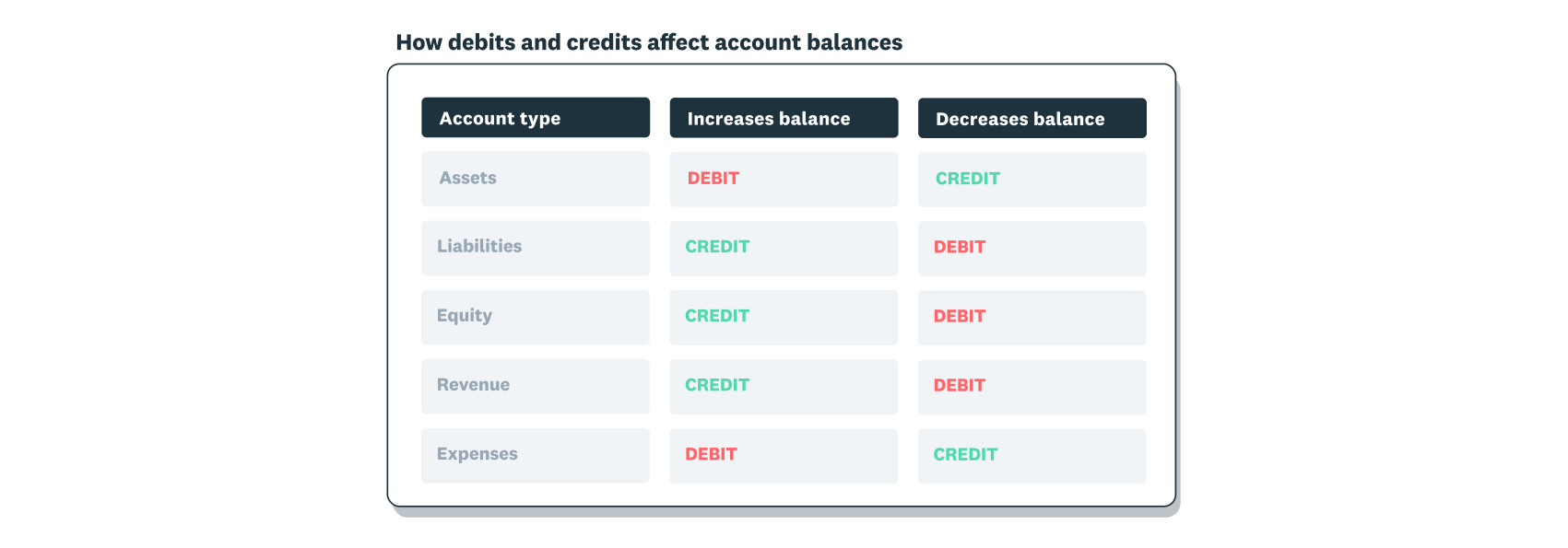
Here's how debits and credits work:
If you need more help, you can find an accountant near you.
What are debits and credits?
Debits and credits are the two sides of every journal entry. They must always equal each other to keep your books balanced.
Debits increase certain types of accounts. These include:
- Asset accounts: Cash, equipment, inventory
- Expense accounts: Rent, supplies, wages
Credits increase other types of accounts. These include:
- Liability accounts: Loans, accounts payable
- Revenue accounts: Sales, service income
- Equity accounts: Owner's capital, retained earnings
The key rule: total debits must always equal total credits in every journal entry.
What are the different types of journal entries in accounting?
There are seven main types of journal entries that small businesses use. The type you need depends on the transaction and when you record it.
Simple journal entry
A simple journal entry affects exactly two accounts: one debit and one credit. Use simple entries for straightforward transactions like cash sales, bill payments, or equipment purchases.
Compound journal entry
A compound journal entry involves more than two accounts but still balances perfectly. Use compound entries when a single transaction affects multiple accounts at once.
Compound entries are useful in several common scenarios. Here are some examples:
- Payroll: Wages expense (debit), tax withholdings (credits), net pay (credit)
- Bulk purchases: Multiple inventory items (debits), single payment (credit)
- Loan payments: Interest expense (debit), loan principal (debit), cash (credit)
Adjusting journal entry
An adjusting journal entry updates account balances at the end of an accounting period. Use adjusting entries to record income or expenses that span multiple periods, such as accruals, prepayments, or unbilled revenue.
Mastering adjustments to accounting records and financial statements accounts for 20% of the ICAEW Accounting Fundamentals exam syllabus.
For example, if you work on a three-month project but only invoice at the end, you can record a third of the income each month using an adjusting entry.
Reversing journal entry
A reversing journal entry undoes an adjusting entry from the previous period. This simplifies recording the actual transaction when it occurs.
For example, if you accrued wages in January for work done but not yet paid, you reverse that entry in February when you process payroll. The reversal prevents double-counting.
Recurring journal entry
A recurring journal entry records transactions that repeat on a regular schedule, such as monthly rent, subscriptions, or loan payments. Accounting software can automate these entries to save time.
Closing journal entry
A closing journal entry transfers balances from temporary accounts (revenue and expenses) to permanent accounts (retained earnings) at the end of an accounting period. Closing entries reset your income and expense accounts to zero so you can start the next period fresh.
Correcting journal entry
A correcting journal entry fixes errors in your records. If you post a transaction to the wrong account, a correcting entry moves the amount to the right place.
Journal entry example
The Cosy Cake Shop bought £300 of baking supplies with cash on 20 January 2021. The journal entry records a debit to baking supplies (increasing the asset) and a credit to cash (decreasing the asset).
Here's what the entry looks like:

How to record journal entries
Recording journal entries correctly keeps your financial records accurate and your books balanced. Follow these five steps for every transaction:
- Identify the transaction and accounts involved: Start by identifying the transaction and the accounts it affects, such as cash, revenue, or expenses. Ask yourself which account gains and which loses value.
- Classify the transaction as a debit or credit: Decide whether each account needs a debit or credit. Remember: debits increase assets and expenses, while credits increase liabilities, revenue, and equity.
- Record the date and transaction details: Enter the transaction date and a brief description, such as "office supplies purchase." Clear descriptions make it easier to review entries later.
- Enter debit and credit amounts: Enter the debit and credit amounts, then verify that total debits equal total credits before posting.
- Post to your general ledger and review: Post the entry to your general ledger and verify that your accounts balance. If you spot an error after posting, use a correcting journal entry to fix it.
Streamline your journal entries with accounting software
Accounting software automates journal entries and reduces manual errors. You spend less time on data entry and get clearer insights into your business.
Xero accounting software offers several features to help with journal entries. These include:
- Automatic bank feeds: Create entries from your transactions
- Customisable templates: Set up recurring entries once
- Real-time error checking: Ensure entries always balance
- Instant reporting: See your business performance at a glance
Accurate journal entries keep your books balanced, your financial statements reliable, and your tax returns straightforward. With the right approach and tools, they become a routine part of running your business rather than a time-consuming chore.
You can get one month free to see how automated journal entries help you save time and keep your records accurate.
FAQs on journal entries
Here are answers to common questions about journal entries.
How do I fill out a journal entry?
Filling out a journal entry requires attention to detail. To fill out a journal entry, gather your transaction details and follow these steps:
- Record the date: Note when the transaction occurred
- Add a reference: Include a tracking number or code
- List the accounts: Identify which accounts to debit and credit
- Enter the amounts: Add debit and credit figures
- Check the balance: Verify that total debits equal total credits
Accounting software like Xero automates this process and flags errors before you post.
What's an example journal entry?
Here's a practical example of a journal entry. If your business buys £300 of office supplies with cash, the journal entry looks like this:
- Date: 25/10/2024
- Account debited: Office Supplies (£300)
- Account credited: Cash (£300)
- Description: Purchased office supplies for cash
Can I use accounting software to track journal entries?
Yes. Accounting software automates journal entries and reduces manual errors.
Accounting software offers several key features that make journal entries easier. These include:
- Automatic bank feeds: Create entries from transactions
- Built-in templates: Handle recurring entries like rent or utilities
- Real-time balance checking: Prevent posting errors
- Instant reporting: Show business performance at a glance
Software like Xero handles the technical details while you focus on running your business.
What's the difference between a journal entry and a ledger entry?
A journal entry records a transaction as it happens. A ledger entry organises that transaction by account. The journal is your chronological record; the ledger groups transactions by account type.
How often should I make journal entries?
Record journal entries as transactions happen, or at regular intervals such as daily or weekly. Consistency matters more than frequency.
UK businesses must keep records for six years from the end of the financial year they relate to. Accounting software helps by recording transactions automatically.
Disclaimer
Xero does not provide accounting, tax, business or legal advice. This guide has been provided for information purposes only. You should consult your own professional advisors for advice directly relating to your business or before taking action in relation to any of the content provided.