Margin vs markup: what's the difference and how to calculate each
Learn the difference between margin and markup, plus formulas and examples to price with confidence.
Published Thursday 23 July 2026
Table of contents
Key takeaways
- Margin measures how much of your selling price is profit, while markup measures how much you've added on top of your cost. They use the same numbers but give different percentages.
- For the same transaction, markup is always a higher percentage than margin. Confusing the 2 can lead to underpricing and shrinking profits.
- Markup is most useful when setting prices, because it starts from your cost. Margin is better for analysing profitability, because it shows profit as a share of revenue.
- You can convert between the 2 using simple formulas, making it easy to switch perspectives depending on whether you're pricing a product or reviewing your financials.
What is margin?
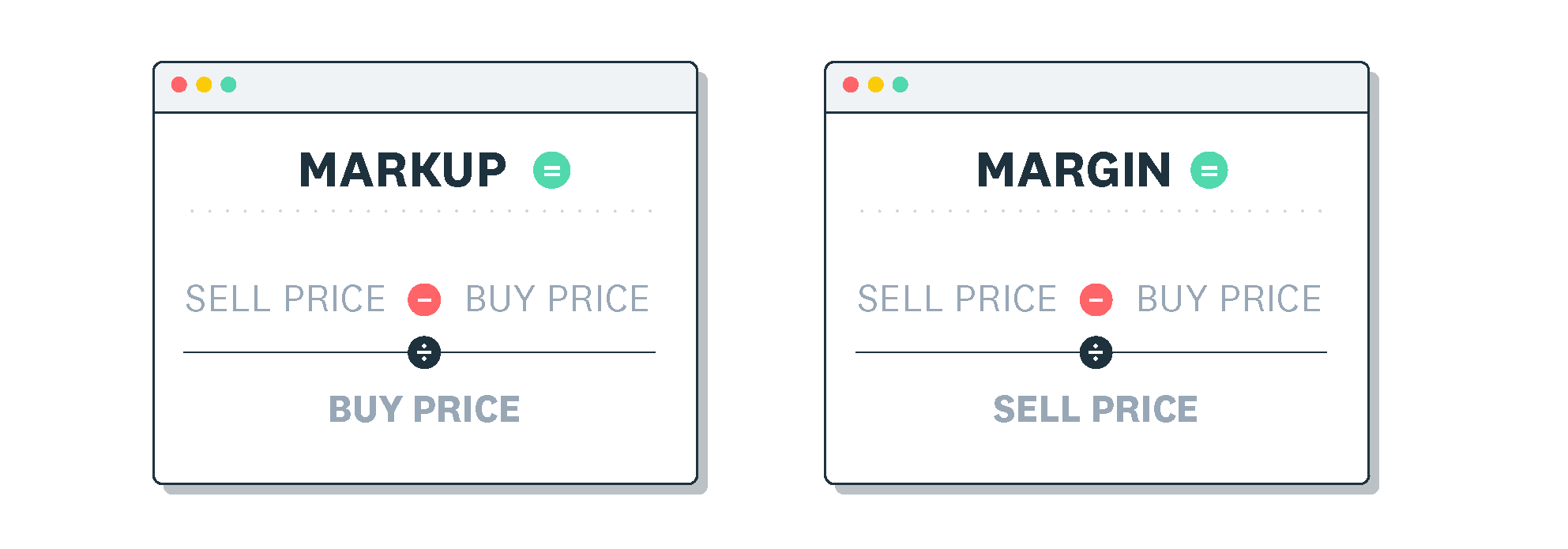
Margin (also called gross profit margin) is the percentage of your selling price that's left over after you subtract the cost of the product. It tells you how much profit you keep from every dollar of revenue.
The formula is:
Margin = (Revenue - Cost of Goods Sold) / Revenue x 100
Here's a quick example. Say you sell a product for $100 and it costs you $60 to make or buy it. Your margin is ($100 - $60) / $100 x 100 = 40%.
That 40% means you keep $0.40 of every dollar in revenue as gross profit. The remaining $0.60 covers your direct costs. It's a useful way to gauge how efficiently your pricing turns revenue into profit.
What is markup?
Markup is the percentage you add on top of your cost to arrive at your selling price. Where margin looks at profit as a share of revenue, markup looks at profit as a share of cost.
The formula is:
Markup = (Revenue - Cost of Goods Sold) / Cost of Goods Sold x 100
Using the same numbers as before: you sell a product for $100 and it costs you $60. Your markup is ($100 - $60) / $60 x 100 = 66.7%.
That 66.7% tells you that you've added roughly two-thirds on top of your cost to reach your selling price. Notice the profit in dollars is identical ($40 in both cases), but the percentage is higher because the base number (cost) is smaller than revenue.
Margin vs markup: what is the difference?
Margin and markup both describe the relationship between cost, price, and profit, but they measure it from different starting points. Understanding this difference is essential for setting prices that actually deliver the profit you expect.
Here are the key differences:
- Margin is based on revenue (selling price). Markup is based on cost.
- For the same transaction, markup will always be a higher percentage than margin.
- Margin tells you what share of each sale is profit. Markup tells you how much you've added on top of your cost.
- Margin is capped at 100% (you can never keep more than your full selling price). Markup has no upper limit.
- Margin is the go-to metric for financial reporting and profitability analysis. Markup is the go-to metric for pricing decisions.
The practical risk is this: if you aim for a 50% margin but accidentally apply a 50% markup, you'll end up with a margin of only 33.3%. Over time, that gap can seriously erode your profits.
How to calculate margin and markup
Working through both calculations side by side makes it easier to see how they differ. Let's use a new example: a product that costs you $75 and sells for $120.
To calculate margin, follow these steps:
- Subtract your cost from your selling price: $120 - $75 = $45 profit.
- Divide the profit by the selling price: $45 / $120 = 0.375.
- Multiply by 100 to get the percentage: 0.375 x 100 = 37.5% margin.
To calculate markup, follow these steps:
- Subtract your cost from your selling price: $120 - $75 = $45 profit.
- Divide the profit by the cost: $45 / $75 = 0.6.
- Multiply by 100 to get the percentage: 0.6 x 100 = 60% markup.
Same product, same profit in dollars, but the percentages are quite different: 37.5% margin versus 60% markup. That's because margin divides by the larger number (revenue) and markup divides by the smaller number (cost).
Margin vs markup conversion
Sometimes you know your markup but need to understand what margin that delivers, or the other way around. You can convert between them using these formulas.
To convert markup to margin:
Margin = Markup / (1 + Markup)
To convert margin to markup:
Markup = Margin / (1 - Margin)
In both formulas, use the decimal form of the percentage (for example, 50% markup = 0.5). You can also use Xero's margin calculator to do the conversion instantly.
Here's a quick-reference list of common conversions:
- 20% markup = 16.7% margin
- 25% markup = 20% margin
- 33.3% markup = 25% margin
- 50% markup = 33.3% margin
- 100% markup = 50% margin
Notice the pattern: as markup increases, the gap between the 2 percentages gets wider. A 100% markup sounds dramatic, but it only delivers a 50% margin.
When to use margin vs markup
Choosing between margin and markup depends on the question you're trying to answer. Each metric is better suited to a different part of running your business.
Use markup when you're setting prices. Markup starts from your cost, so it's the natural choice when you know what a product costs and need to decide what to charge. You pick a markup percentage that covers your overheads and profit target, then apply it to your cost to get the selling price.
Use margin when you're measuring profitability. Margin starts from revenue, which makes it easier to compare performance across products, time periods, or against industry benchmarks. Financial reports and profit-and-loss statements typically use margin, so it's the metric your accountant or bookkeeper will expect to see.
In practice, most business owners use both. Markup helps you price products confidently; margin helps you check whether those prices are actually delivering the profit you need.
How to set the right markup for your business
There's no single "correct" markup. The right number for your business depends on several factors, and it may vary across different products or services.
Here are the main things to consider:
- Industry norms: markups vary widely by sector. Retail clothing might use a 100% markup, while grocery operates on much thinner margins. Research what's typical in your industry as a starting point.
- Competitor pricing: your markup needs to result in a price your customers will pay. If competitors offer similar products at lower prices, a high markup could push buyers away.
- Cost coverage: your markup needs to cover more than just the direct cost of goods. Factor in overheads like rent, wages, marketing, and shipping.
- Profit goals: work backwards from the profit you want to make and set your markup accordingly. If you need a 30% margin, you'll need roughly a 43% markup.
Reviewing your margins regularly helps you spot when costs creep up or when a product line stops performing. You can use Xero's free markup calculator to quickly check your figures. Xero's reporting tools let you track margins across your products in real time, so you can adjust your pricing before small shifts become big problems.
Track your margins and markups with Xero
Knowing the difference between margin and markup is the first step. Keeping track of both across your business is what helps you price with confidence and protect your profits.
Xero's accounting software gives you real-time visibility into your costs, revenue, and profit margins. With smart reporting and automated data entry, you can spend less time in spreadsheets and more time making pricing decisions that grow your business. Get one month free.
FAQs on margin vs markup
Here are answers to frequently asked questions about margin vs markup.
Is 100% markup the same as 50% margin?
Yes. A 100% markup means you've doubled your cost to set the selling price. When you calculate margin on that same sale, profit is exactly half of revenue, which gives you a 50% margin.
How do you calculate gross profit margin?
Subtract your cost of goods sold (COGS) from your revenue, then divide the result by revenue and multiply by 100. For example, if revenue is $200 and COGS is $120, your gross profit margin is ($200 - $120) / $200 x 100 = 40%.
What is a good markup for a small business?
It depends on your industry and cost structure. Retail businesses often apply markups of 50% to 100%, while service-based businesses may go higher. The right markup is one that covers all your costs and leaves the profit you need.
Can margin be higher than markup?
No. For any given transaction, margin is always a smaller percentage than markup. This is because margin divides profit by the larger number (revenue), while markup divides by the smaller number (cost).
What happens if you confuse margin with markup?
You'll likely underprice your products. For example, if you want a 40% margin but apply a 40% markup instead, your actual margin drops to about 28.6%. Over hundreds of sales, that gap can add up to a significant loss in profit.
Handy resources
Advisor directory
You can search for experts in our advisor directory
Xero Small Business Guides
Discover resources to help you do better business
Financial reporting
Keep track of your performance with accounting reports
Disclaimer
This glossary is for small business owners. The definitions are written with their requirements in mind. More detailed definitions can be found in accounting textbooks or from an accounting professional. Xero does not provide accounting, tax, business or legal advice.