Margin vs markup
Learn the difference between margin and markup, with formulas and NZ examples to price and report with confidence.
Published Thursday 23 July 2026
Table of contents
Key takeaways
- Markup is the extra you add to a product's cost, shown as a percentage of that cost.
- Margin is the profit you keep, shown as a percentage of the selling price.
- Markup is always a higher percentage than margin because it divides by cost, which is smaller than the selling price.
- Use markup to set prices, and use margin to report on profitability.
Margin vs markup: definition
Margin and markup both describe the profit on a sale, but they measure it against different starting points. Markup is a percentage of what a product costs you, while margin is a percentage of your selling price.
Both use the same dollar profit, so mixing them up is easy to do and can quietly erode your earnings. Getting the difference right helps you price with confidence and read your profit reports correctly.
What is markup?
Markup is the amount you add to a product's cost to reach its selling price, expressed as a percentage of that cost. It answers a pricing question: how much more than cost are you charging?
The formula is:
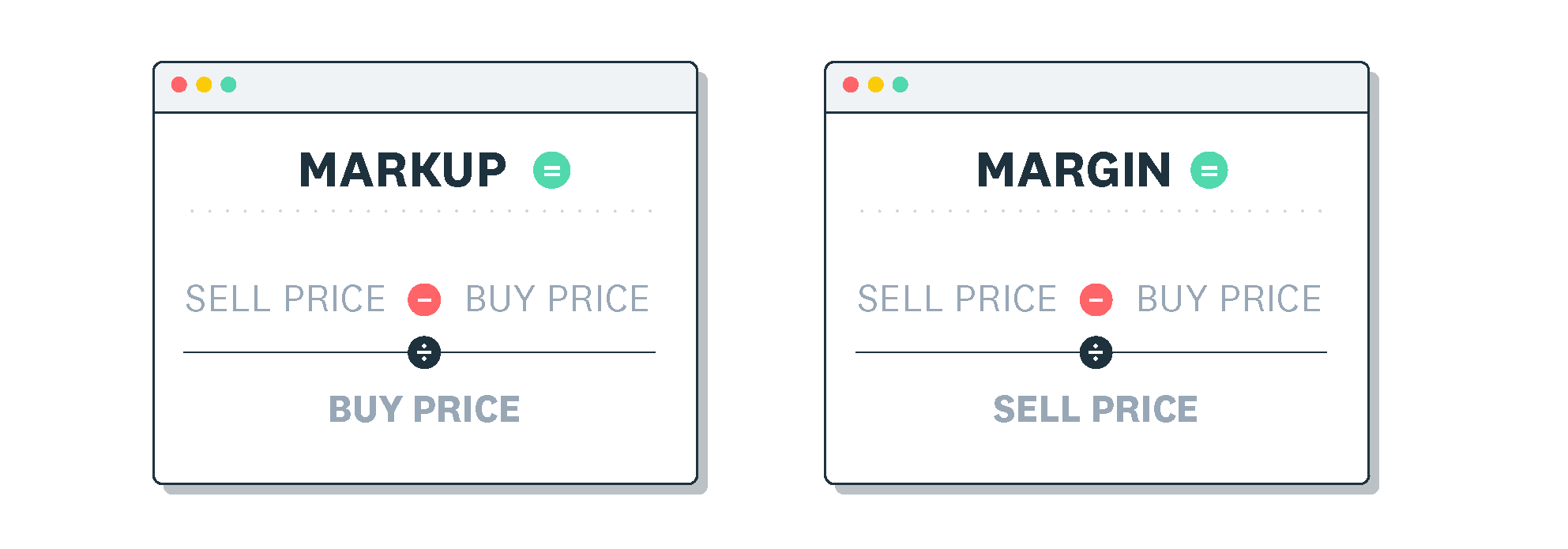
- markup % = (selling price − cost) ÷ cost × 100
Say a product costs you $60 and you sell it for $90. Your profit is $30, so your markup is $30 ÷ $60 × 100, which comes to 50%.
What is margin?
Margin is the profit you keep from a sale, expressed as a percentage of the selling price. It answers a profitability question: how much of each sale is profit?
The formula is:
- margin % = (selling price − cost) ÷ selling price × 100
Using the same figures, a $60 product sold for $90 gives $30 profit. The margin is $30 ÷ $90 × 100, which comes to 33%.
Margin appears in a few forms as you move down the profit and loss statement. Gross margin is based on gross profit, which is revenue minus cost of goods sold. Operating margin subtracts your operating expenses, and net margin reflects the profit left after all expenses and tax.
Key differences between margin and markup
The two measures share the same dollar profit but divide it by different numbers, so they tell you different things. These points sum up how margin and markup compare.
- Markup measures profit against cost, while margin measures profit against the selling price
- Markup guides how you set a price, while margin shows how profitable that price is
- Markup divides by cost, so it always produces a higher percentage than margin
- Margin can never exceed 100%, while markup has no upper limit
Markup is always larger than margin because cost is smaller than the selling price. Dividing the same $30 profit by the smaller number gives a bigger percentage. That's why a 50% markup equals only a 33% margin.
Converting between margin and markup
Once you understand the link between the two, you can switch between them quickly. Here are a few common pairs to keep handy.
- 20% margin equals a 25% markup
- 33% margin equals a 50% markup
- 50% margin equals a 100% markup
To work out any other pair, use these formulas, expressing each percentage as a decimal (for example, 50% as 0.5).
- Convert markup to margin: margin = markup ÷ (1 + markup)
- Convert margin to markup: markup = margin ÷ (1 − margin)
- Find a selling price from a target margin: selling price = cost ÷ (1 − target margin)
When to use margin vs markup
Each measure suits a different job, and picking the right one keeps your pricing and reporting accurate. The guidance below shows when to reach for each.
- Use markup when you're setting a price by adding a percentage to what a product costs you
- Use margin when you're reporting profitability or comparing performance against revenue
Confusing the two is a common way to underprice. If you want a 50% margin but apply a 50% markup instead, you'll only keep 33% of each sale. That gap costs you profit on every order.
Track your margins and markups with Xero
Clear numbers make pricing decisions easier, and accounting software keeps those numbers in one place. Xero brings your sales, costs and profit together so you can see how each product performs and adjust your pricing with confidence. See your profitability in real time and get one month free.
FAQs on margin vs markup
Below are answers to some frequently asked questions about margin vs markup to help you apply both measures correctly.
What is the difference between margin and markup?
Markup is profit shown as a percentage of cost, while margin is profit shown as a percentage of the selling price. They use the same dollar profit but a different starting point.
Why is markup always higher than margin?
Markup divides profit by cost, and margin divides the same profit by the larger selling price. Dividing by a smaller number gives a bigger percentage, so markup always comes out higher.
Is a 50% margin the same as a 100% markup?
Yes, they describe the same sale. A product costing $50 sold for $100 gives $50 profit, which is a 50% margin and a 100% markup.
How do you convert markup to margin?
Divide the markup by 1 plus the markup, using decimals. A 0.5 markup becomes 0.5 ÷ 1.5, which is 0.33, or a 33% margin.
When should you use markup instead of margin?
Use markup when you're setting a selling price from a product's cost. Use margin when you're measuring how profitable your sales are.
Related terms
Learn more about margin and markup
Handy resources
Advisor directory
You can search for experts in our advisor directory
Xero Small Business Guides
Discover resources to help you do better business
Financial reporting
Keep track of your performance with accounting reports
Disclaimer
This glossary is for small business owners. The definitions are written with their requirements in mind. More detailed definitions can be found in accounting textbooks or from an accounting professional. Xero does not provide accounting, tax, business or legal advice.