Journal entries in accounting: a guide with examples
Learn how journal entries help you record transactions, keep your books accurate, and stay on top of your accounts.

Written by Jotika Teli—Certified Public Accountant with 24 years of experience. Read Jotika's full bio
Published Friday 17 April 2026
Table of contents
Key takeaways
- Record every business transaction using double-entry bookkeeping, where debits and credits always balance, to keep your financial records accurate and your books in order.
- Use the right type of journal entry for each situation — such as adjusting entries for transactions that span multiple periods, or correcting entries to fix mistakes — rather than deleting records, so you maintain a clear audit trail.
- Store all journal entries and supporting financial records for at least seven years to meet New Zealand Inland Revenue requirements under the Tax Administration Act.
- Use accounting software to automate routine journal entries through bank feeds and invoicing, and save manual entries for adjustments, corrections, and transactions that don't flow through your bank or invoicing system.
What is a journal entry?
A journal entry is a detailed record of a business transaction that tracks money moving in and out of your accounts. Journal entries form the basis for accurate financial reporting and help you meet New Zealand Inland Revenue requirements. You must keep accurate and complete records for seven years.
Every journal entry captures:
- Transaction date: when the business activity occurred
- Accounts affected: which parts of your business gained or lost value
- Amounts: how much money moved between accounts
- Description: what happened in simple terms
Journal entries go straight into your financial statements and tax reports. This helps you stay compliant with the Accounting Standards Framework and make informed decisions.
Under the Tax Administration Act (TAA), you must keep these records for seven years. The Commissioner can extend this period to 10 years in certain audit or investigation situations, requiring retention for a further period not exceeding three years.
Learn more about preparing financial statements.
Why journal entries matter for your business
Accurate journal entries give you a clear picture of your business finances. When your records are organised, you gain several advantages:
- Better decision-making: see exactly where money comes from and goes
- Easier tax time: provide your accountant with complete, accurate records
- Growth planning: spot trends and opportunities in your financial data
- Compliance confidence: meet Inland Revenue requirements without stress
How journal entries work
Double-entry bookkeeping means you record every business transaction in at least two accounts. This system keeps your records accurate and balanced.
Here's how it works:
- Two accounts minimum: every transaction affects at least two accounts
- Balanced entries: debits and credits always equal each other
- Predictable patterns: each account type increases or decreases in a specific way
Understanding debits and credits:
- Debits increase asset and expense accounts
- Credits increase liability, revenue, and equity accounts
- Debits decrease liability, revenue, and equity accounts
- Credits decrease asset and expense accounts
Here is an example of debits and credits in action:
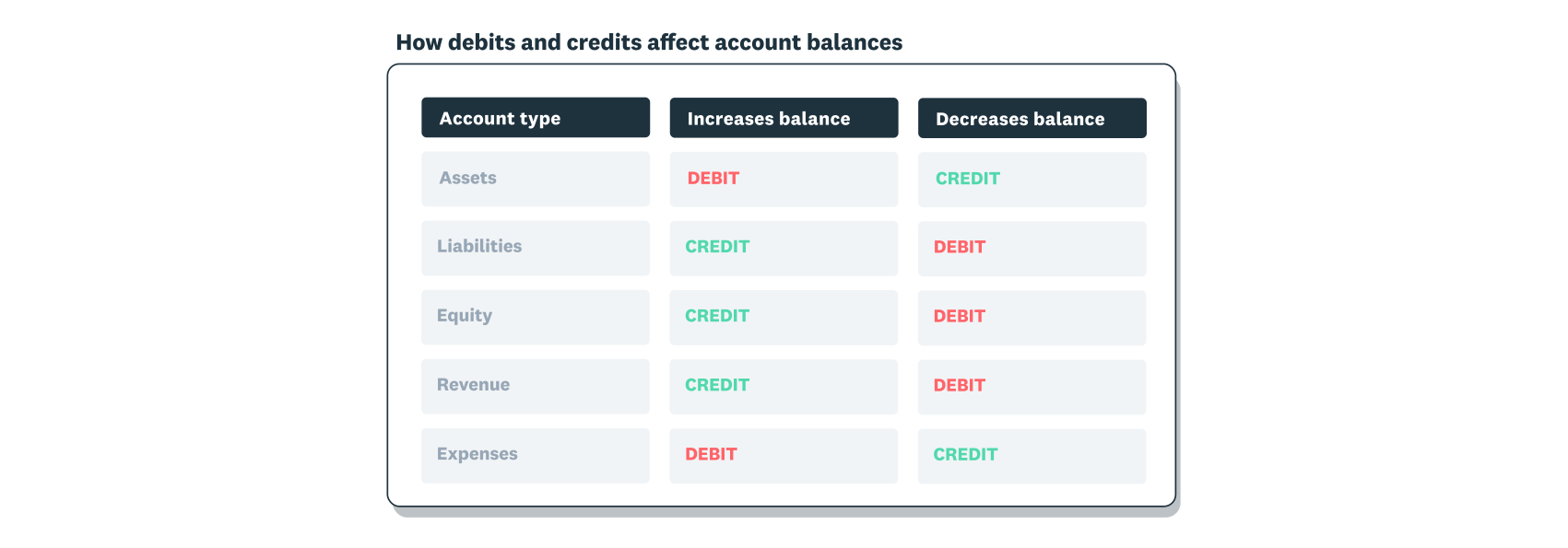
Debits and credits must balance in each journal entry and the accounting equation. So, in its simplest form, a $100 debit must also be a $100 credit in the same journal entry.
Need more help? Find an accountant near you.
When to use journal entries
Journal entries are needed whenever you record a financial transaction that affects your business accounts. Some entries happen automatically through your accounting software, while others require manual input.
You'll typically create journal entries for:
- Daily transactions: sales, purchases, and payments
- Period-end adjustments: accruals, prepayments, and depreciation
- Error corrections: fixing mistakes in previous entries
- Non-standard transactions: owner contributions, write-offs, and transfers
Modern accounting software handles most routine entries automatically, making it easy to supply electronic records to Inland Revenue in the required format. Bank feeds import transactions, and invoicing creates journal entries when you bill customers. Manual journal entries are usually needed for adjustments, corrections, and transactions that don't flow through your bank or invoicing system.
What are the different types of journal entries in accounting?
Journal entry types depend on when and why you're recording the transaction. Choosing the right type ensures your financial records stay accurate.
The main types include:
- opening entries
- simple entries
- compound entries
- adjusting entries
- closing entries
- correcting entries
Here's a closer look at each type of journal entry:
Opening journal entry

An opening journal entry records your business's financial position when you start a new accounting system. It sets up the starting balances for your asset, liability, and equity accounts.
Simple journal entry
A simple journal entry records a straightforward transaction involving only two accounts. Most daily business transactions fall into this category, making simple entries the foundation of small business bookkeeping.
When to use simple entries:
- recording cash purchases of supplies or inventory
- transferring funds between bank accounts
One account increases while another decreases by the exact same amount, keeping your books balanced.
Compound journal entry
A compound journal entry records multiple debits and credits across more than two accounts in a single transaction.
Use compound entries for complex events like payroll, which includes wages, taxes, and deductions. Even with more accounts involved, total debits must still equal total credits.
Transfer entry
A transfer entry moves money between accounts without involving an external party. Common examples include transferring funds between bank accounts or moving money from a business account to a petty cash fund.
Transfer entries always balance because the same amount leaves one account and enters another. They're useful for tracking internal movements of cash and keeping your account balances accurate.
Adjusting journal entry
An adjusting journal entry captures transactions that span multiple accounting periods, ensuring your financial statements reflect reality at period-end.
Common adjusting entries include:
- Accrued expenses: bills you owe but haven't received yet, like utilities
- Accrued revenue: money you've earned but haven't invoiced yet
- Prepaid expenses: payments you've made for future services, like insurance
- Deferred revenue: money received for services you haven't delivered yet
For example, if you complete consulting work in December but invoice in January, an adjusting entry records the December revenue in the correct period for accurate year-end reporting.
Reversing journal entry
A reversing journal entry undoes a previous entry at the start of a new period, making future transactions easier to record.
For example, you accrue wages in December for work your employees completed but you haven't paid yet. In January, you reverse that entry before recording the actual payroll. This prevents double-counting the expense.
Recurring journal entry
A recurring journal entry records regular transactions that happen on a set schedule, such as monthly rent or subscription payments.
Most accounting software lets you automate recurring entries, saving time on repetitive bookkeeping tasks.
Closing journal entry
A closing journal entry ends an accounting period by transferring balances from temporary accounts to permanent accounts.
Temporary accounts like revenue and expenses reset to zero. Their balances move to retained earnings (accumulated profits), preparing your books for the next period.
Correcting journal entry
A correcting journal entry fixes errors in your books, such as recording a transaction to the wrong account. It moves the amount to the correct account and keeps your records accurate.
Journal entry examples
Understanding how journal entries work in practice helps you apply them correctly in your business. Here are some common examples:
Simple entry example
You purchase office supplies for $200 cash.
- Debit: Office supplies $200
- Credit: Cash $200
This entry increases your office supplies asset and decreases your cash asset by the same amount.
Compound entry example
You pay employee wages of $5,000, with $800 in tax withheld and $200 in superannuation contributions.
- Debit: Wages expense $5,000
- Credit: Cash $4,000
- Credit: Tax payable $800
- Credit: Superannuation payable $200
This entry records the full wage expense while accounting for all deductions and payments.
Adjusting entry example
You've earned $3,000 in consulting revenue in December but won't invoice until January.
- Debit: Accounts receivable $3,000
- Credit: Consulting revenue $3,000
This entry ensures your December financial statements reflect the revenue you earned in that period.
FAQs on journal entries
Here are answers to common questions about journal entries.
What's the difference between a journal entry and a ledger entry?
A journal entry is the initial record of a transaction with all the details in one place. A ledger entry is where that information gets posted to individual account records. Think of the journal as your daily diary and the ledger as organised folders for each account.
Can I delete a journal entry if I make a mistake?
You shouldn't delete journal entries once they're recorded. Instead, create a correcting journal entry that reverses or adjusts the mistake. This maintains a clear audit trail of all your financial activities.
How often should I make journal entries?
Record journal entries whenever a financial transaction occurs. Daily transactions like sales and purchases should be recorded promptly. Period-end adjusting entries are typically done monthly, quarterly, or annually depending on your reporting schedule.
Do I need accounting software to make journal entries?
While you can record journal entries manually in a physical journal or spreadsheet, accounting software makes the process faster and more accurate. It automatically creates entries from bank feeds and invoices, reducing manual work and errors.
What happens if my debits and credits don't balance?
If debits and credits don't balance, you've made an error that needs correcting. Your accounting software should alert you to unbalanced entries. Review the transaction details and create a correcting entry to fix the imbalance.
Disclaimer
Xero does not provide accounting, tax, business or legal advice. This guide has been provided for information purposes only. You should consult your own professional advisors for advice directly relating to your business or before taking action in relation to any of the content provided.