Free receipt template
Record any payment with a receipt template you download once and reuse for every sale. It's customisable, made with Australian accounting experts, and does the maths for you.
- Customisable fields for the exact details your customers need
- Built with Australian accounting experts, so the formatting is right
- Does the maths for you once you enter quantities and prices
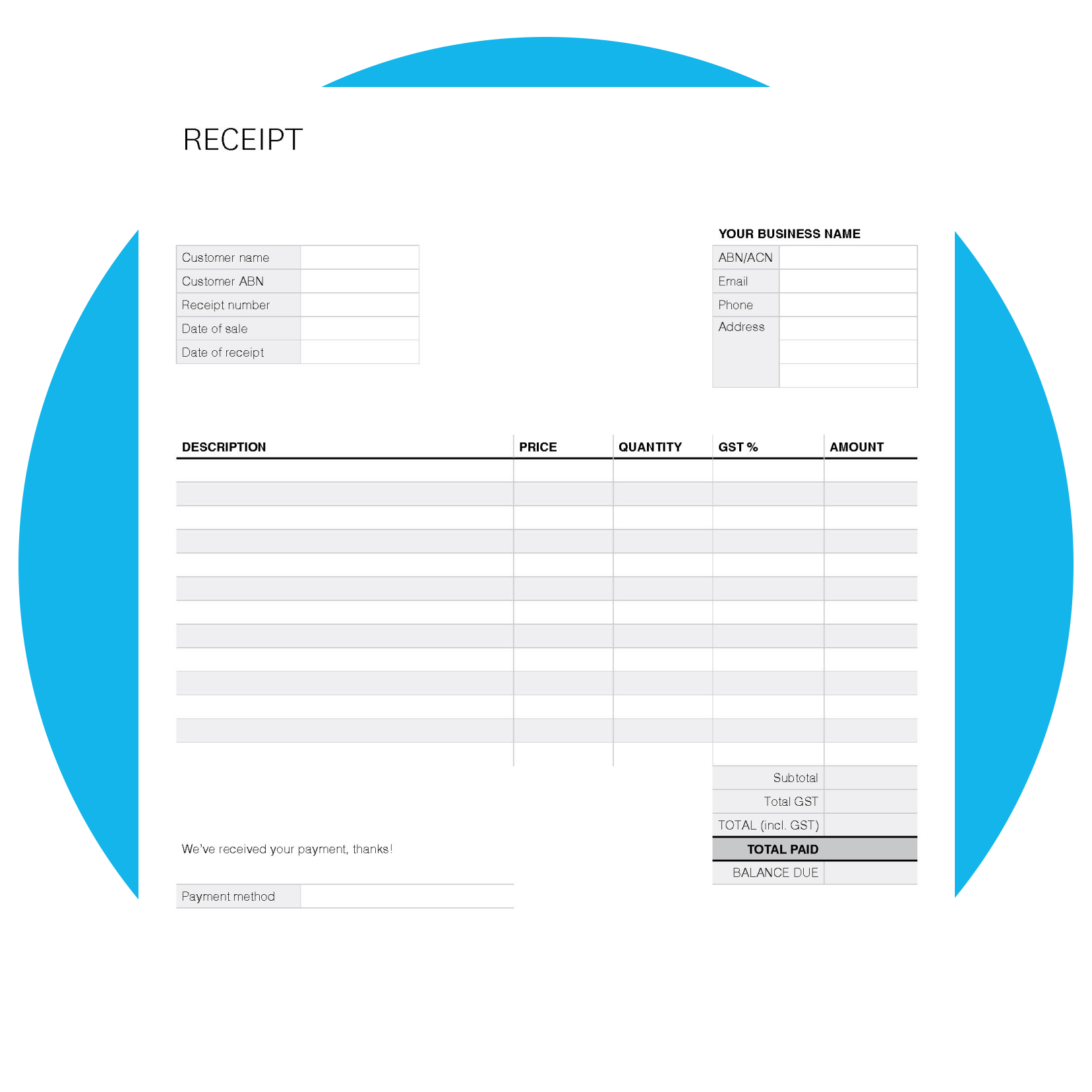
What a good receipt includes
A clear receipt captures the details both you and your customer need. This template comes prepopulated so you don't miss anything.
- Your business contact details and the client's details
- A unique receipt number so you can track it
- A description of each item or service, with quantity and price
- GST where it applies, or left blank when it doesn't
- The amount paid, the payment method and a signature
- Room for two dates, plus any balance still owing
How to fill out a receipt
The template is an editable PDF, so you can complete it on screen or print it. Enter the numbers and it works out the totals. Fill out a receipt in six steps:
1. Add your business details and the client's details at the top.
2. Give the receipt a unique number so you can track it later.
3. List each item or service, with the quantity and price.
4. Add the GST rate where it applies, or leave it blank if no tax applies.
5. Enter how much the customer paid and the payment method.
6. Add your signature, then send a copy and save your own.

One template for every kind of receipt
Use the same template across your business: for cash sales, deposits and instalment payments, rent, and donations. Record partial payments and show the balance owing.
Download the free receipt template
Fill in the form to get a blank receipt template as an editable PDF. We’ll also link you to an example on how to use it.
Do more with Xero accounting software
A template is a handy quick fix. When receipts and invoices start eating into your week, Xero accounting software takes the manual work off your plate.

Invoicing and receipts in one place
Create and send invoices and payment receipts, then track which are paid and which are outstanding.
Capture receipts on your phone
Snap a receipt with the Xero Me app and record the expense in your accounts automatically.
GST tracked for your BAS
Xero tracks GST as you go, so your figures are ready when it's time to lodge your BAS.
FAQs on receipt templates
Download the template, then add your business and client details, a unique receipt number, a description of what was bought, the amount paid and the payment method. The template adds up the total for you.
Download the template, then add your business and client details, a unique receipt number, a description of what was bought, the amount paid and the payment method. The template adds up the total for you.
A receipt should show your business details, the date, a unique number, a description of the items or services, the amount paid, the payment method, and GST where it applies.
A receipt should show your business details, the date, a unique number, a description of the items or services, the amount paid, the payment method, and GST where it applies.
It's a free, editable PDF you can fill out on screen or print. You can save and reuse it for every sale, then email or hand a copy to your customer.
It's a free, editable PDF you can fill out on screen or print. You can save and reuse it for every sale, then email or hand a copy to your customer.
A receipt confirms a payment has been made, while an invoice requests payment before it's made. A tax invoice also lets a GST-registered customer claim a GST credit, and for taxable sales of $82.50 or more you provide one on request. Check the ATO for what applies to you.
A receipt confirms a payment has been made, while an invoice requests payment before it's made. A tax invoice also lets a GST-registered customer claim a GST credit, and for taxable sales of $82.50 or more you provide one on request. Check the ATO for what applies to you.
The ATO generally requires businesses to keep records, including receipts, for at least five years. Digital copies are accepted, so storing them in the cloud makes them easy to find.
The ATO generally requires businesses to keep records, including receipts, for at least five years. Digital copies are accepted, so storing them in the cloud makes them easy to find.
Yes. Save the completed PDF and email it to your customer, or print it if they'd prefer a paper copy. Digital receipts are quick to send and easy to store.
Yes. Save the completed PDF and email it to your customer, or print it if they'd prefer a paper copy. Digital receipts are quick to send and easy to store.
Other tools to run your business
Manage receipts and payments with Xero
Spend less time on admin and more on the work that pays. See how Xero keeps receipts, invoices and reporting in one place.
Disclaimer
Xero does not provide accounting, tax, business or legal advice. This template has been provided for information purposes only. You should consult your own professional advisors for advice directly relating to your business.