Margin vs markup
Learn the difference between margin and markup, how to calculate each and how to convert between them.
Published Wednesday 30 September 2026
Table of contents
Key takeaways
- Margin is profit as a percentage of the selling price, while markup is profit as a percentage of cost
- Markup is always the higher figure on a profitable sale, so a 50% markup gives a 33.3% margin
- Markup suits setting prices from your costs, while margin suits tracking profitability and comparing benchmarks
- Mixing the two up leads to underpricing: treating a 40% margin target as a 40% markup costs S$16 per unit on a S$60 item
What is margin?
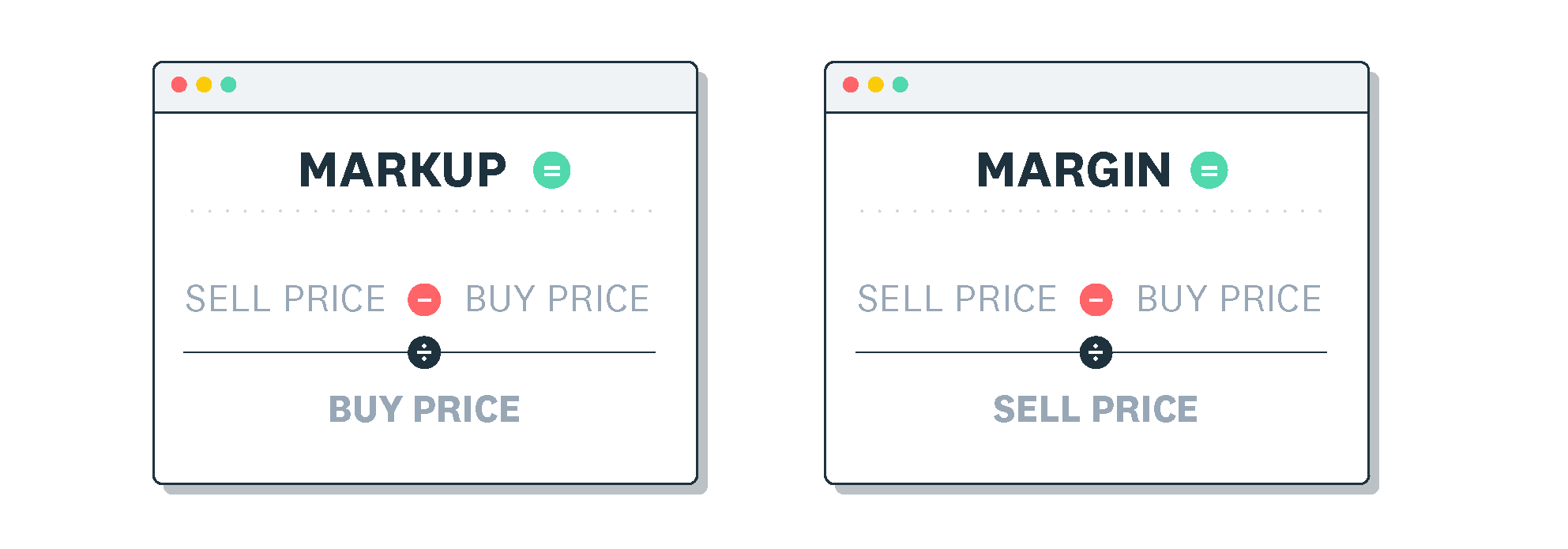
Margin is the share of your selling price you keep as profit after paying for the goods you sold. It's often called gross margin, and you show it as a percentage of revenue.
To work it out, subtract your cost of goods sold (COGS) from revenue to get gross profit. Then divide gross profit by revenue.
Margin = (revenue − COGS) ÷ revenue × 100
Say you buy a product for S$100 and sell it for S$130. Your gross profit is S$30, and S$30 ÷ S$130 × 100 = 23.1%, so 23.1% of that sale is profit.
What is markup?
Markup is the percentage you add to your cost to set a selling price. It shows how much more you charge than you paid.
Markup = (revenue − COGS) ÷ COGS × 100
Using the same product, the S$30 gross profit divided by the S$100 cost gives a 30% markup. Xero's guide on how to calculate markup walks through more worked examples.
Margin vs markup: what's the difference?
The core of margin vs markup is the base each one uses: margin divides profit by the selling price, and markup divides it by cost. That's why the two percentages differ for any profitable sale.
- Margin uses the selling price as its base, while markup uses cost
- Margin shows the share of revenue that's profit, while markup shows how much you added to cost
- Markup is always the higher percentage on a profitable sale, because cost is smaller than the selling price
- Markup suits pricing decisions, while margin suits reporting and benchmarking
If someone quotes a single percentage, ask which measure they mean before you compare profit.
How to calculate margin and markup
You only need two figures for either calculation: your cost and your selling price. Follow the steps below, or check your numbers with Xero's margin calculator and markup calculator.
How to calculate margin
This example uses a product that costs S$100 and sells for S$150.
- Start with your selling price: S$150
- Subtract your COGS to get gross profit: S$150 − S$100 = S$50
- Divide gross profit by the selling price: S$50 ÷ S$150 ≈ 0.333
- Multiply by 100 to get your margin: 33.3%
How to calculate markup
Use the same S$100 cost and S$150 selling price.
- Start with your COGS: S$100
- Subtract it from the selling price to get gross profit: S$150 − S$100 = S$50
- Divide gross profit by your cost: S$50 ÷ S$100 = 0.5
- Multiply by 100 to get your markup: 50%
The same S$50 profit gives a 33.3% margin and a 50% markup. Only the base has changed.
How to set a price from a target margin
When you know the margin you want, you can work backwards to a price. The formula is price = cost ÷ (1 − target margin).
- Write your target margin as a decimal: 25% becomes 0.25
- Subtract it from 1: 1 − 0.25 = 0.75
- Divide your cost by that figure: S$45 ÷ 0.75 = S$60
- Check the result: S$15 profit ÷ S$60 = 25% margin
How to set a price from a target markup
Pricing from a target markup is simpler, because markup builds directly on cost. The formula is price = cost × (1 + target markup).
- Write your target markup as a decimal: 50% becomes 0.5
- Add 1: 1 + 0.5 = 1.5
- Multiply your cost by that figure: S$80 × 1.5 = S$120
- Check the result: S$40 profit ÷ S$80 = 50% markup, which is a 33.3% margin
Markup to margin conversion chart
A conversion chart saves you recalculating each time you switch between pricing and reporting. Each markup below gives the margin shown, rounded to one decimal place.
- 10% markup = 9.1% margin
- 20% markup = 16.7% margin
- 25% markup = 20% margin
- 33.3% markup = 25% margin
- 50% markup = 33.3% margin
- 60% markup = 37.5% margin
- 66.7% markup = 40% margin
- 75% markup = 42.9% margin
- 100% markup = 50% margin
- 150% markup = 60% margin
- 200% markup = 66.7% margin
To convert other figures, write the percentages as decimals and use these formulas.
- Margin = markup ÷ (1 + markup)
- Markup = margin ÷ (1 − margin)
For example, a 40% margin needs a markup of 0.4 ÷ (1 − 0.4) ≈ 0.667, or 66.7%.
What happens when you mix up margin and markup?
Mixing up the two measures means you price too low and earn less than you planned. Here's how it plays out on one product.
Say an item costs S$60 and you want a 40% margin. The correct price is S$60 ÷ (1 − 0.4) = S$100, which leaves S$40 profit.
If you add 40% to cost as a markup instead, you charge S$60 × 1.4 = S$84. That's S$24 profit, a 28.6% margin and S$16 less profit on every unit.
Across 500 units, that gap adds up to S$8,000. Before you set a price, check whether your target is a margin or a markup.
Types of margin
Margin can measure profit at different stages of your profit and loss statement. These four are common profitability ratios, and each takes a different set of costs away from revenue.
- Gross margin is gross profit (revenue − COGS) as a percentage of revenue
- Operating margin is operating profit, after operating expenses like rent and wages, as a percentage of revenue
- Net margin is net profit, after all expenses including interest and tax, as a percentage of revenue
- Contribution margin is revenue minus variable costs, showing what each sale adds towards fixed costs and profit
Markup relates most directly to gross margin, because both compare the selling price with the cost of goods sold.
When to use margin vs markup
Markup and margin answer different questions, so each fits a different job. Use markup when you're pricing and margin when you're reviewing results.
When to use markup
Markup works best when you know your cost and need a selling price. It answers one question: how much should you add on top of what you paid?
For example, adding a 60% markup to a S$25 cost gives a S$40 price. That matches the chart's 37.5% margin.
When to use margin
Margin is the standard for reporting, because it shows how much of each sale you keep. Use it when you measure profitability across products or compare results with industry benchmarks.
It's also the figure lenders and accountants look for in your financial statements.
What's a good margin or markup?
A good margin depends on your industry, so sector benchmarks are a useful starting point. NYU Stern's January 2026 margins-by-sector data puts average gross margins at 33.18% for general retail and 35.30% for specialty retail.
Grocery and food retail averages 26.31%. These figures cover US listed companies, so margins for Singapore small businesses may differ.
For markup, a traditional retail rule of thumb is keystone pricing, where you double your cost. That's a 100% markup, which equals a 50% margin.
Common mistakes when using margin and markup
Each of these mistakes comes from using the wrong base or leaving costs out. Check for them before you set or review prices.
Confusing margin and markup
The simplest error is treating margin and markup as the same number. If you price with a 30% markup but budget for a 30% margin, your real margin is 23.1%.
Assuming equal percentages mean equal profit
A 25% margin and a 25% markup produce different profits. On a S$100 selling price, a 25% margin means S$25 profit.
A 25% markup on a S$80 cost also gives a S$100 price, but only S$20 profit. Confirm which percentage you're using before you compare products.
Applying discounts on the wrong base
Markup is calculated on cost, while discounts come off the selling price. So a discount can remove more profit than the matching markup added.
Say you mark up a S$80 item by 25% to S$100, then offer 25% off. Your customer pays S$75, which is S$5 below your cost.
Forgetting overheads when judging net margin
Gross margin covers only COGS, so rent, wages, utilities and marketing sit outside it. A healthy gross margin can still leave little profit once you pay those overheads.
Factor in every expense to see your true net profit margin. When you price extra orders, your marginal cost, the cost of producing one more unit, shows whether each sale adds to profit.
Track margin and markup with Xero
Knowing your margin and markup helps you price with confidence and protect the profit on every sale. Xero brings your sales and costs into real-time reports, so you can see revenue, costs, margins and profit in one place.
You can customise those reports to follow your margins over time and spot changes early. Try Xero and get one month free to see exactly where your profit comes from.
FAQs on margin vs markup
Here are quick answers to common questions about margin vs markup.
What's the difference between a 30% margin and a 30% markup?
A 30% markup on a S$100 cost gives a S$130 price, which is a 23.1% margin. To earn a true 30% margin on the same cost, you'd charge S$142.86.
Is a 50% margin the same as a 100% markup?
Yes, both describe the same price. A S$50 item sold for S$100 earns S$50 profit, which is 100% of the cost and 50% of the price.
Is a 20% margin the same as a 25% markup?
Yes. A S$40 item sold for S$50 earns S$10 profit, which is a 25% markup on cost and a 20% margin on price.
What's the difference between margin and profit?
Profit is a dollar amount, while margin shows that profit as a percentage of revenue. For example, S$40 profit on a S$100 sale is a 40% margin, which lets you compare products at different prices.
Should I use markup or margin for pricing?
Use markup to set a price from your cost and margin to check how profitable that price is. You can use both: set the price with markup, then confirm the margin meets your target before you publish it.
Related terms
Learn more about margin vs markup
Handy resources
Advisor directory
You can search for experts in our advisor directory
Xero Small Business Guides
Discover resources to help you do better business
Financial reporting
Keep track of your performance with accounting reports
Disclaimer
This glossary is for small business owners. The definitions are written with their requirements in mind. More detailed definitions can be found in accounting textbooks or from an accounting professional. Xero does not provide accounting, tax, business or legal advice.