General ledger: definition, accounts and examples
Learn what a general ledger is, how it works and how to set one up for your Singapore business.
Published Wednesday 30 September 2026
Table of contents
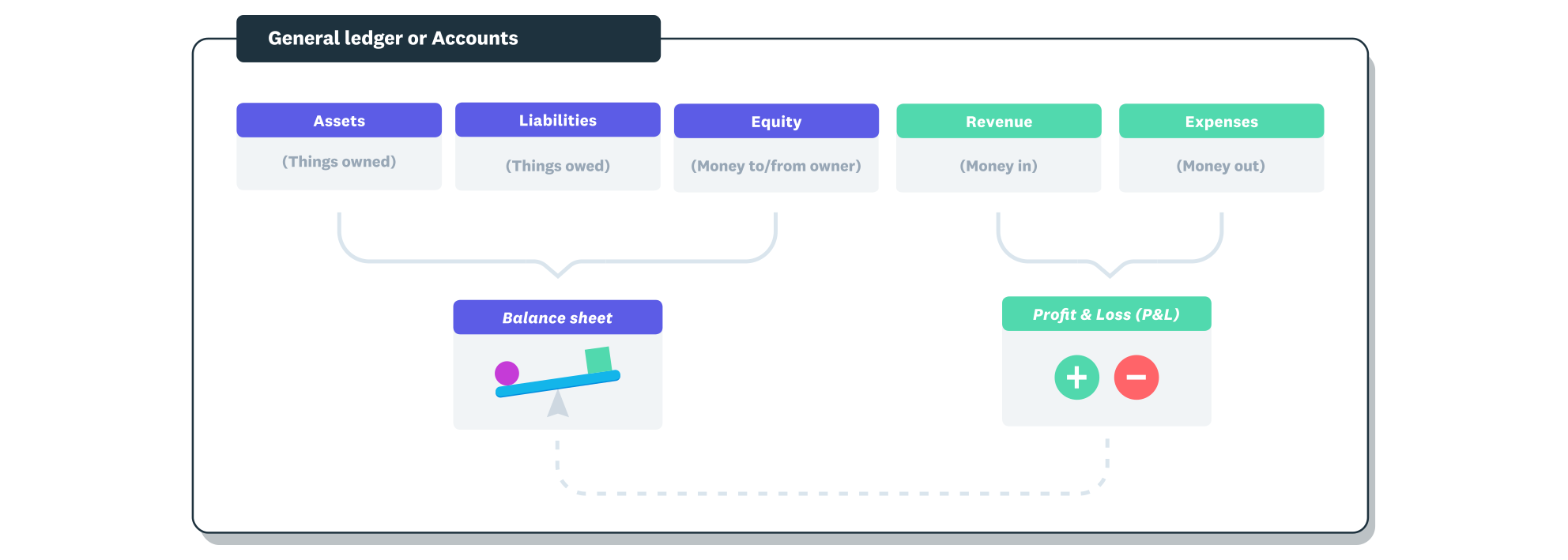
Transactions are entered into the correct account in order to produce the financial reports.
Key takeaways
- A general ledger (GL) is the central record of every financial transaction in your business, sorted by account so you can see each balance.
- Double-entry bookkeeping gives every entry an equal debit and credit, which builds an error check into your general ledger.
- Ledger accounts fall into five categories: assets, liabilities, equity, revenue and expenses, and they feed your trial balance and financial statements.
- In Singapore, your ledger supports financial statements under Singapore Financial Reporting Standards (SFRS), and companies must keep records for at least five years.
What is a general ledger?
A general ledger (GL) is the master record of every financial transaction your business makes, sorted by account. It shows every debit and credit in each account, along with its current balance.
Think of it like a filing cabinet with a labelled folder for each account, such as cash or rent. Every sale, bill, wage payment and expense claim goes into the right folder, and your financial reports draw on what’s inside.
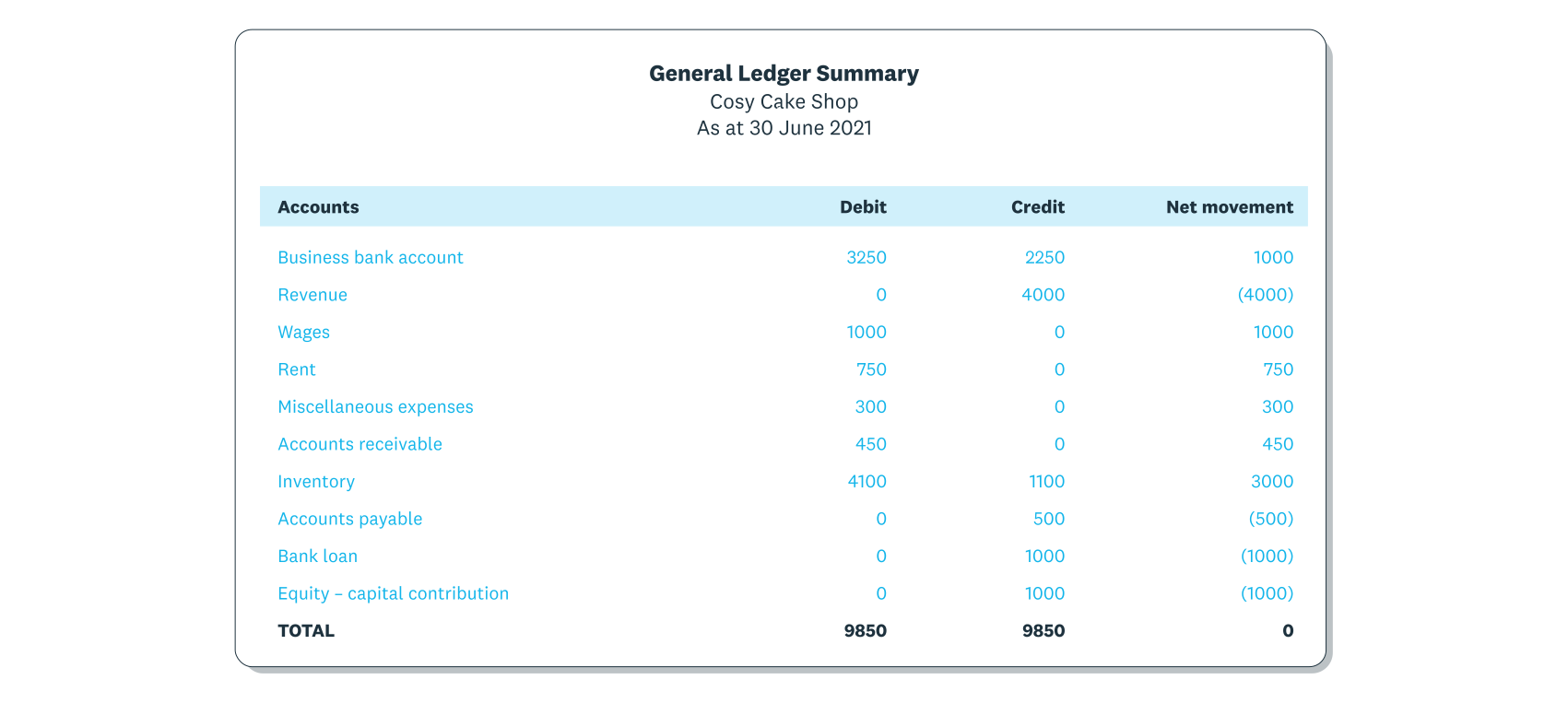
The general ledger summarises the credit and debit transactions for each account.
The folders and their labels come from your chart of accounts, the list of every account your business uses. Each account has a name and a code, which tell you exactly where a transaction belongs.
How does a general ledger work?
A general ledger collects every transaction, posts it to the right accounts and totals them for each accounting period, usually a month or a year. Here’s how a transaction moves through it:
- A transaction happens, such as a sale or a supplier bill.
- You record it as a journal entry, with a debit in one account and an equal credit in another.
- You post the entry to those accounts in the general ledger, or your software does it for you.
- Each account’s running balance updates, so you can see its current total at any point in the period.
- At the end of the period, you run a trial balance from the ledger totals to confirm debits equal credits.
- You prepare your financial statements, such as the balance sheet and profit and loss statement, from the trial balance.
The cycle repeats each period. Over time, your ledger builds a complete financial history of your business.
What is double-entry bookkeeping?
Double-entry bookkeeping is the method that keeps a general ledger in balance: every transaction is recorded in at least two accounts, as a debit and an equal credit. It keeps the accounting equation true: assets = liabilities + equity.
Say you pay S$1,200 in rent. Cash, an asset, falls by S$1,200. Rent expense rises by the same amount, which lowers your profit and equity, so both sides of the equation still match.
This gives you a built-in error check. If total debits don’t equal total credits, you know an entry needs fixing before it reaches your reports.
The 5 main types of general ledger accounts
Every general ledger account belongs to one of five categories. Together they show what your business owns and owes, plus what it earns and spends.
- Assets, such as cash in the bank, equipment, inventory and money customers owe you
- Liabilities, such as bank loans, unpaid supplier bills, credit card balances and goods and services tax (GST) you’ve collected
- Equity, such as capital you’ve put in and retained earnings, which is what’s left when you subtract liabilities from assets
- Revenue, such as sales and service fees your business earns
- Expenses, such as rent, wages, utilities and marketing costs
Permanent vs temporary accounts
Permanent accounts carry their balances into the next period. Balance sheet accounts are permanent, so your cash balance on 31 December becomes your opening balance on 1 January.
Temporary accounts, meaning revenue and expenses, reset to zero at the end of each financial year. Their net result moves into retained earnings, so you start the new year tracking income and spending afresh.
Subledgers and control accounts
A subledger holds the detail behind one general ledger account, called a control account. Your accounts receivable subledger lists every customer invoice, while the control account in the GL shows only the total owed to you.
Other common subledgers track accounts payable and payroll. This keeps the main ledger summarised while the day-to-day detail stays easy to find.
GL codes
Many businesses give each account a numeric code so it’s quicker to find and sort. For example, assets could sit in the 1000s, liabilities in the 2000s, equity in the 3000s, revenue in the 4000s and expenses in the 5000s.
General ledger example
Worked entries make the general ledger easier to picture. Here are three common transactions for a Singapore small business and how each one appears in the ledger.
Buying office supplies
Your business buys S$500 of office supplies and pays from its bank account. The entry looks like this:
- Debit office supplies (expense) S$500
- Credit cash at bank (asset) S$500
Your expense account rises because you’ve spent money, and your cash falls by the same amount. The two sides balance.
Invoicing a customer
You invoice a customer S$1,000 for services. The entry is:
- Debit accounts receivable (asset) S$1,000
- Credit sales revenue (revenue) S$1,000
Accounts receivable rises because the customer now owes you S$1,000, and revenue rises because you’ve earned it. When the customer pays, you debit cash and credit accounts receivable.
Paying wages with CPF contributions
You pay an employee S$4,000 in gross monthly wages. Say the employee’s Central Provident Fund (CPF) share is S$800 and your employer share is S$680:
- Debit wages expense S$4,000
- Debit employer CPF expense S$680
- Credit cash at bank (asset) S$3,200, the employee’s take-home pay
- Credit CPF payable (liability) S$1,480
Debits and credits both total S$4,680. When you pay the CPF Board, you debit CPF payable and credit cash to clear the liability. Actual CPF amounts depend on the employee’s age and wages.
General ledger vs chart of accounts
The chart of accounts and the general ledger work together, but they hold different things. If the ledger is the filing cabinet, the chart of accounts is the set of folder labels.
- The chart of accounts lists account names and codes, while the ledger records the transactions in each account
- The chart of accounts carries no amounts, while the ledger shows a running balance for every account
- The chart of accounts changes occasionally, such as when you add a new revenue stream, while the ledger grows with every transaction
- The chart of accounts is a reference list, while the ledger is the source for your trial balance and reports
General ledger vs journal, trial balance and balance sheet
These terms often come up together because each one is a stage in the same flow of numbers. Here’s how the general ledger relates to each.
General ledger vs general journal
The general journal records each journal entry in date order, like a diary of your business’s financial activity. The ledger takes the same entries and sorts them by account, so you can see each account’s balance.
General ledger vs trial balance
A trial balance is a report drawn from the ledger at the end of a period that lists every account balance. It checks that total debits equal total credits, while the ledger keeps the full detail behind those totals.
General ledger vs balance sheet
The balance sheet is a financial statement built from ledger data, showing what your business owns and owes on a specific date. The ledger is the underlying record, and the balance sheet is one of several reports that come from it.
How to set up a general ledger for your business
Setting up a general ledger is mostly about getting the structure right before you post your first transaction. Follow these steps:
- Build your chart of accounts, choosing accounts and codes that match how your business earns and spends money.
- Enter opening balances on your start date, such as your bank balance, stock, loans and amounts customers owe you.
- Record each transaction as a journal entry and post it to the right accounts, or connect bank feeds so software posts them for you.
- Reconcile your ledger against bank and credit card statements regularly.
- Run a trial balance at the end of each period to confirm debits equal credits before you prepare financial statements.
Why does your business need a general ledger?
A well-kept general ledger gives you accurate numbers for everyday decisions and for your legal obligations. It helps you:
- produce financial statements your accountant and bank can rely on
- prepare your corporate income tax return with income and expenses already categorised
- catch errors and unusual activity early through double-entry checks and regular reconciliation
- make pricing and spending decisions from current figures
- respond quickly if the Inland Revenue Authority of Singapore (IRAS) reviews your records
Your ledger is also central to compliance. Under section 199 of the Companies Act 1967, directors of Singapore-incorporated companies must keep records that enable true and fair financial statements. The Accounting and Corporate Regulatory Authority (ACRA) guidance on directors’ financial reporting duties adds that directors of public companies and their subsidiaries must also maintain a system of internal accounting controls.
Those financial statements follow SFRS, and every figure in them starts in your ledger. For tax, IRAS requires companies to keep records and accounts for at least five years from the relevant Year of Assessment (YA). If you use accounting software, IRAS asks you to export your accounts and general ledgers in Microsoft Excel format to speed up audit reviews.
How to reconcile a general ledger
Reconciling your general ledger means checking your records against external documents, like bank statements, to confirm they match. Follow these steps:
- Gather your statements for the period from your bank, credit card provider, lender and any payment platforms.
- Compare each ledger account balance with its matching statement.
- Identify any differences, such as missing transactions, duplicate entries, incorrect amounts or timing differences.
- Post adjusting entries to correct errors and record anything you missed.
- Confirm your balances match and your trial balance still balances.
Bank reconciliation in Xero suggests matches between your bank feed lines and ledger entries. That way, most of the checking happens as transactions arrive.
Common general ledger mistakes and how to prevent them
Most ledger errors are small slips that good habits prevent. To keep your general ledger accurate:
- import transactions through bank feeds instead of retyping them, so S$540 never becomes S$450
- code each transaction to the right account, such as recording a new delivery van as an asset instead of an expense
- record every transaction before you close the period, including cash sales and small expense claims
- reconcile regularly so differences surface while they’re still easy to trace
- limit who can edit or delete entries, and keep a record of every change
General ledger and accounting software
Keeping a general ledger in spreadsheets or on paper takes time and relies on manual checks. Accounting software posts entries to the right accounts as you record transactions, so your balances stay current.
Digital tools are already part of daily work for most Singapore small and medium-sized enterprises (SMEs). The Infocomm Media Development Authority (IMDA) Singapore Digital Economy Report 2025 found 95.1% of SMEs adopted at least one digital area in 2024.
With Xero accounting software, you can check ledger balances and share reports with your accountant or bookkeeper from any device. You see where your business stands whenever you need to.
Simplify your general ledger with Xero
An accurate general ledger gives you reports and tax returns you can rely on. Xero updates your ledger as you send invoices and reconcile your bank, so your numbers stay current with less manual admin.
JAX, Xero’s AI financial superagent, can reconcile bank transactions automatically where there’s high confidence, and you keep the final say. Pick a plan and get one month free, then spend less time on your books and more on your business.
FAQs on general ledgers
Here are answers to common questions about general ledgers in Singapore.
How long do you need to keep your general ledger in Singapore?
IRAS counts the five years from the relevant YA, which is the year after your financial year ends. So records for a financial year ending 31 December 2026 fall under YA 2027, and the five years count from there.
Are there other types of ledgers?
Businesses often keep a sales ledger for customers and a purchases ledger for suppliers, plus a fixed asset register and payroll records. Their totals feed into control accounts in the general ledger.
What is an example of a GL account?
A rent expense account is a typical GL account: every rental payment is posted there, and its balance shows your total rent for the period. Your business bank account and GST payable are GL accounts too.
Can you manage a general ledger without accounting software?
Yes, a spreadsheet can work when you have only a few transactions a month, but you’ll need to build your own debit and credit checks. Accounting software runs those checks automatically and imports your bank data for you.
How often should you reconcile your general ledger?
Aim for at least once a month so differences surface before you prepare reports. With bank feeds, reconciling weekly or daily keeps your cash position current and lightens the month-end workload.
Related terms
Learn more about general ledgers
Handy resources
Advisor directory
You can search for experts in our advisor directory
Xero Small Business Guides
Discover resources to help you do better business
Online accounting with Xero
Automate your accounting in the cloud
Disclaimer
This glossary is for small business owners. The definitions are written with their requirements in mind. More detailed definitions can be found in accounting textbooks or from an accounting professional. Xero does not provide accounting, tax, business or legal advice.