Margin vs markup
Learn how margin and markup differ, how to calculate and convert each, and when to use them to price and profit.
Published Thursday 23 July 2026
Table of contents
Key takeaways
- Markup is the amount you add to a product's cost to set its selling price, shown as a percentage of that cost.
- Margin is your gross profit shown as a percentage of the selling price, so it measures how profitable a sale is.
- Both use the same dollar profit, but markup is always the larger percentage because it divides by the smaller number, your cost.
- Use markup to set prices from a known cost, and use margin to compare and track profitability across your business.
Markup is where most pricing decisions start, so it helps to define it clearly before you compare it to margin.
What is markup?
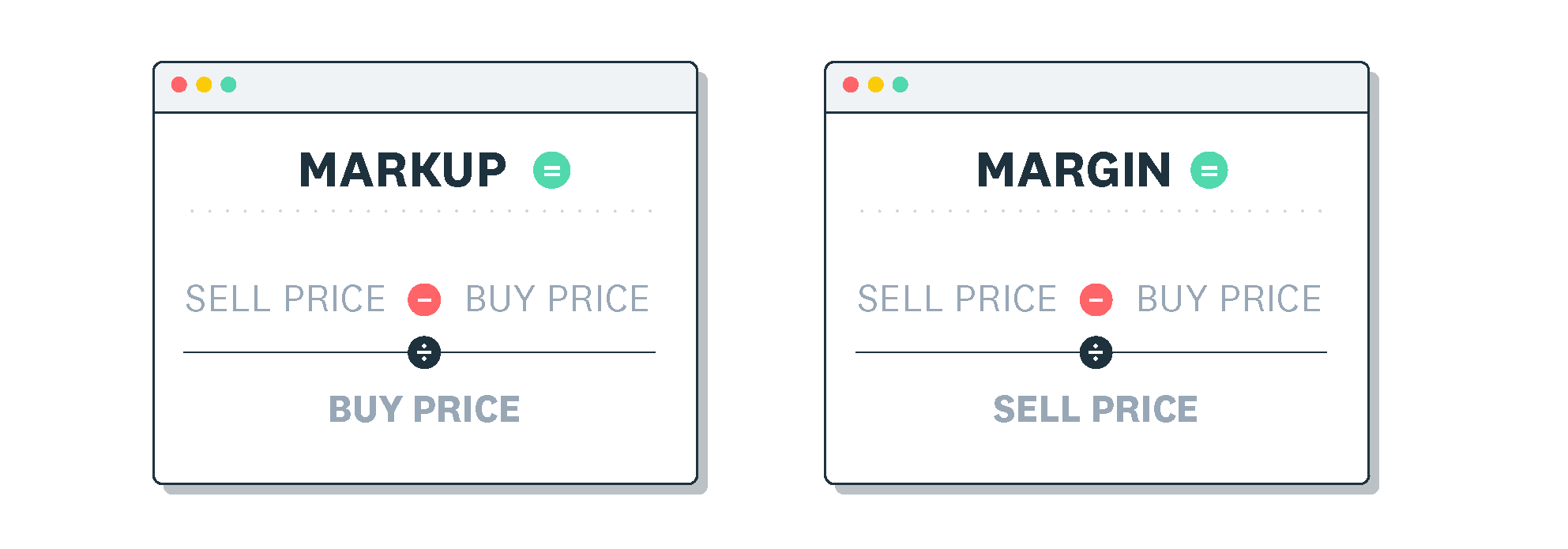
Markup is the amount you add to a product's cost to set its selling price. It's shown as a percentage of the cost you paid, not the price you charge.
You can work it out with this formula: markup % = (selling price − cost) ÷ cost × 100.
Say a Canadian retailer buys a product for C$50 and sells it for C$65. The C$15 profit divided by the C$50 cost gives a markup of 30%.
Margin looks at the same sale from a different angle, so it's the second piece you need before comparing the two.
What is margin?
Margin, or gross profit margin, is your gross profit shown as a percentage of the selling price. It tells you how much of each sale you keep after covering the cost of the item.
The formula is: margin % = (selling price − cost) ÷ selling price × 100.
Using a C$56 cost and an C$80 selling price, the C$24 gross profit divided by the C$80 price gives a margin of 30%.
Margin and markup describe the same profit, yet they produce different percentages. Here's how they line up on a single sale.
Margin vs markup: the key difference
Both figures start from the same dollar profit on a sale. Markup shows that profit as a percentage of your cost, while margin shows it as a percentage of your revenue.
Because cost is always smaller than revenue, markup is always the larger number. Mixing them up can make a price look more profitable than it really is.
Take a product that costs C$60 and sells for C$100, giving C$40 of gross profit. The margin is C$40 ÷ C$100 = 40%, while the markup is C$40 ÷ C$60 = 66.7%.
Once you know one figure, you can calculate the other with a quick formula. This is useful when a supplier quotes markup but you plan in margin.
How to convert between margin and markup
To move between the two, use these formulas: margin = markup ÷ (1 + markup), and markup = margin ÷ (1 − margin).
Here are a few common conversions to show how the numbers relate:
- 20% markup equals a 16.7% margin
- 50% markup equals a 33.3% margin
- 40% margin equals a 66.7% markup
Each figure answers a different question, so the one you reach for depends on the task in front of you.
When to use markup vs margin
Use markup when you're setting a selling price from a known cost. Multiply the cost by your target markup to reach a price quickly.
Use margin when you're measuring and comparing profitability. Margin makes it easy to see how much of your revenue you keep and to compare products or periods on the same basis.
Confusing the two is a common and costly slip, so it helps to know where pricing errors creep in.
Common margin vs markup mistakes to avoid
The most frequent mistake is treating markup and margin as the same figure, which leads to under-pricing and thinner profit than you expected.
Another is applying a target margin as if it were a markup. If you want a 40% margin but add only a 40% markup, you'll fall short of the profit you planned.
To stay accurate, decide which figure you're working with, then use the matching formula every time.
Tracking your costs, prices, and profit in one place makes margin and markup easy to monitor as your business grows.
Track your margins and markups with Xero
Xero brings your sales, costs, and gross profit together, so you can see how each product and period is performing without manual spreadsheets. Real-time reports help you spot thin margins early and adjust your pricing with confidence.
Sign up for Xero and get one month free.
FAQs on margin vs markup
Here are answers to frequently asked questions about margin vs markup.
What is the difference between margin and markup?
Markup is profit shown as a percentage of cost, while margin is profit shown as a percentage of the selling price. They describe the same dollar profit from different starting points.
Is a 50% markup the same as a 50% margin?
No. A 50% markup equals a 33.3% margin, because markup divides profit by cost and margin divides it by revenue.
Should I use margin or markup to set prices?
Use markup to set a price from a known cost by adding a percentage to that cost. Use margin afterwards to check how profitable the price is.
What is a good profit margin?
A healthy margin varies by industry, so compare yours against similar Canadian businesses rather than a single benchmark. Tracking your margin over time matters more than one target number.
Why is markup always higher than margin?
Markup divides profit by your cost, and margin divides the same profit by the larger selling price. Dividing by a smaller number gives a larger percentage.
Related terms
Learn more about margin and markup
Handy resources
Advisor directory
You can search for experts in our advisor directory
Xero Small Business Guides
Discover resources to help you do better business
Financial reporting
Keep track of your performance with accounting reports
Disclaimer
This glossary is for small business owners. The definitions are written with their requirements in mind. More detailed definitions can be found in accounting textbooks or from an accounting professional. Xero does not provide accounting, tax, business or legal advice.