What is payroll? Definition and process in Australia
Learn how payroll works in Australia, from wages and tax to super and STP compliance.
Published Thursday 23 July 2026
Table of contents
Key takeaways
- Payroll is the process of calculating, distributing and reporting employee wages, tax withholdings and superannuation contributions for your business.
- Australian employers must comply with Single Touch Payroll (STP) Phase 2, pay as you go (PAYG) withholding, superannuation guarantee obligations and Fair Work award conditions.
- From 1 July 2026, Payday Super will require you to pay superannuation on the same day as wages, replacing the current quarterly deadline.
- Automating payroll with cloud software helps reduce compliance risk, minimise errors and save time on every pay run.
What is payroll?
Payroll is the process of managing everything related to paying your employees. It covers calculating wages, withholding the correct amount of tax, making superannuation contributions and ensuring each team member receives the right amount on time.
But payroll goes beyond simply transferring money into bank accounts. It also includes maintaining accurate records, meeting government reporting obligations like Single Touch Payroll and staying compliant with Fair Work requirements. For small business owners, getting payroll right protects your business from penalties and keeps your team happy. Xero's small business payroll guide walks you through the essentials.
Payroll costs are closely tied to broader wage trends. According to Xero Small Business Insights, wages across Australian small businesses grew by 2.0% year on year in the December quarter of 2025, based on anonymised data from over 520,000 businesses.
How does payroll work in Australia?
Running payroll in Australia follows a regular cycle that repeats each pay period. Understanding how it works helps you stay organised and meet your obligations as an employer.
A typical payroll cycle starts when you collect timesheets or attendance records for the pay period. You then calculate gross pay based on each employee's hourly rate or salary, apply the correct PAYG withholding amounts, deduct any salary sacrifice or voluntary contributions, calculate superannuation and determine the net pay. Once calculations are complete, you process payments to employees and report the details to the Australian Taxation Office (ATO) through Single Touch Payroll.
The Australian payroll landscape is shaped by Fair Work awards, the National Employment Standards and the tax system administered by the ATO. You need to stay across all 3 to run payroll correctly.
Data from Xero Small Business Insights shows that jobs growth among Australian small businesses reached 3.4% year on year in the December quarter of 2025, the strongest result in 2 years. As your team grows, having a reliable payroll process becomes even more critical.
Key components of payroll
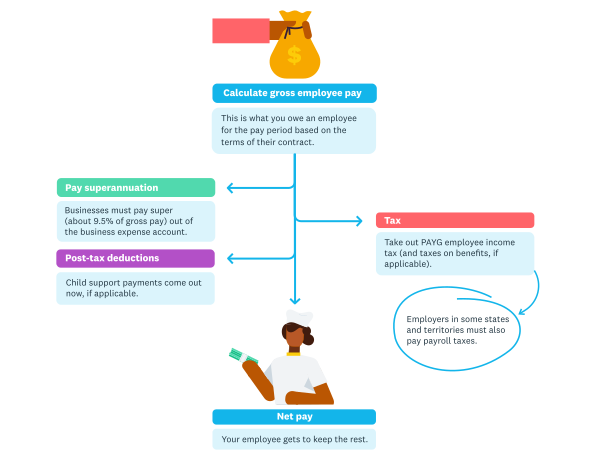
Payroll is what happens each payday and involves sending the right amounts of money to the employee, but also to a number of other locations.
Every pay run involves several components that determine what your employees take home. Here's a breakdown of the main elements you need to understand.
Gross pay is the total amount an employee earns before any deductions. For salaried employees, this is their annual salary divided across pay periods. For hourly workers, it's the number of hours worked multiplied by their pay rate, including any overtime, penalty rates or loadings that apply under their award or agreement.
PAYG withholding is the amount of income tax you deduct from each employee's gross pay on behalf of the ATO. The amount depends on the employee's earnings and the information they provide on their tax file number (TFN) declaration. You send these amounts to the ATO as part of your regular reporting.
Superannuation is the compulsory retirement contribution you make on top of your employee's wages. From 1 July 2025, the superannuation guarantee (SG) rate is 12% of an employee's ordinary time earnings.
Higher Education Loan Program (HELP) repayments are additional withholdings for employees who have a study debt. If an employee has notified you of a HELP debt on their TFN declaration, you need to withhold extra amounts based on their income level.
Net pay is the final amount deposited into your employee's bank account after all deductions. It's gross pay minus PAYG withholding, any HELP repayments, salary sacrifice arrangements and other authorised deductions.
Allowances and benefits cover additional payments such as travel allowances, uniform allowances, tool allowances or fringe benefits. These may have different tax treatment depending on the type and amount, so it's worth checking the ATO guidelines for each one.
How to process payroll step by step
Processing payroll involves a series of steps that you repeat each pay cycle. Following a consistent process helps you avoid errors and stay compliant.
Step 1: Collect employee time and attendance data
Gather timesheets, clock-in records or leave requests for the pay period. Confirm hours worked, overtime, public holiday hours and any leave taken. Accurate time data is the foundation of a correct pay run.
Step 2: Calculate gross pay
Work out each employee's total earnings for the period. Include base pay, overtime, penalty rates, allowances and any bonuses. Make sure you're applying the correct award rates where applicable.
Step 3: Apply deductions and withholdings
Calculate PAYG withholding using the ATO's tax tables or your payroll software. Deduct any HELP repayments, salary sacrifice amounts or other authorised deductions. Double-check that the correct tax-free threshold and any offsets have been applied.
Step 4: Calculate superannuation
Apply the current SG rate of 12% to each employee's ordinary time earnings. Note any salary sacrifice super contributions and add those to the employer contribution. Record the total super liability for the pay period.
Step 5: Process payments
Transfer net pay to each employee's nominated bank account. You can process payments via direct deposit through your bank or payroll software. Keep a record of all payment details for your files.
Step 6: Report through Single Touch Payroll
Submit your STP report to the ATO on or before each payday. Your payroll software should generate and lodge this report automatically. STP reporting covers gross pay, PAYG withholding, super liability and other required details.
Step 7: Distribute payslips
Provide each employee with a payslip within 1 working day of payment. Payslips must include gross and net pay, deductions, super contributions, the pay period and the employee's hourly rate or annual salary. Electronic payslips are acceptable under Fair Work rules.
Superannuation and payroll
Superannuation is one of the most important payroll obligations for Australian employers. Getting it right protects your employees' retirement savings and keeps your business compliant.
From 1 July 2025, the superannuation guarantee rate is 12% of each employee's ordinary time earnings. You must pay super for most employees, including full-time, part-time and casual workers, regardless of how much they earn. Some contractors may also be eligible depending on their working arrangement.
A significant change is coming with Payday Super. From 1 July 2026, you'll need to pay superannuation contributions on the same day you pay your employees' wages. This replaces the current quarterly payment deadline and means super will need to be part of every pay run rather than a separate quarterly task.
You pay super contributions into each employee's nominated super fund or a default fund if they haven't made a choice. Late or missing super payments attract the super guarantee charge (SGC), which includes interest and an administration fee that isn't tax-deductible. Read more about your superannuation obligations as an employer.
PAYG withholding explained
Pay as you go (PAYG) withholding is the system the ATO uses to collect income tax from employees throughout the year. As an employer, you're responsible for withholding the correct amount from each payment and sending it to the ATO.
The amount you withhold depends on the employee's gross earnings for the pay period, whether they've claimed the tax-free threshold, any HELP or other study loan debts and any tax offsets they've declared. You use the ATO's withholding tax tables or schedules to determine the correct amount for each pay run.
You must register for PAYG withholding with the ATO before your first pay run. Once registered, you report withholding amounts through STP each payday and pay the withheld amounts to the ATO, usually on a monthly or quarterly basis depending on your business size.
If you withhold the wrong amount or fail to remit on time, the ATO can apply penalties and interest charges. Payroll software automates these calculations based on current tax tables, which reduces the risk of errors. See Xero's guide to keeping compliant PAYG withholding records.
Single Touch Payroll (STP)
Single Touch Payroll is the ATO's digital reporting system that requires employers to report payroll information each time they pay their employees. It streamlines tax and super reporting by sending the data directly from your payroll software to the ATO.
STP Phase 2 has been mandatory for all employers since January 2022. Phase 2 expanded the data you need to report to include more detailed breakdowns of gross amounts, such as separately identifying overtime, bonuses, directors' fees, salary sacrifice and paid leave. It also requires reporting of employment and cessation details.
With STP, you no longer need to provide payment summaries to employees at the end of the financial year. Instead, employees can access their year-to-date tax and super information through myGov at any time. You still need to make a finalisation declaration by 14 July each year to confirm the data is complete.
Most payroll software, including Xero Payroll, is STP Phase 2 compliant and handles the reporting automatically when you process a pay run.
Fair Work payroll obligations
Fair Work Australia sets the minimum standards for pay and conditions that apply to most Australian employees. Understanding these obligations is essential to running compliant payroll.
Awards and minimum pay: Most employees are covered by a modern award that sets minimum pay rates, overtime, penalty rates and allowances for their industry or occupation. You need to identify the correct award for each employee and ensure your payroll reflects those minimum rates. The national minimum wage is reviewed annually and applies to award-free employees.
Payslip requirements: You must provide employees with a payslip within 1 working day of each payment. Payslips can be electronic or paper and must include specific details: the employer's name, the employee's name, the pay period, gross and net amounts, loadings, allowances, bonuses, deductions and super contributions.
Record-keeping: You're required to keep employee records for 7 years. These records must include details of hours worked, pay rates, leave balances, superannuation contributions and tax withholdings. Records need to be in English, legible and readily accessible.
Failing to meet Fair Work obligations can result in significant penalties. The Fair Work Ombudsman actively audits small businesses, so it's worth investing the time to get your payroll processes right from the start. Learn more about superannuation compliance requirements.
Pay periods and pay cycles in Australia
Choosing the right pay cycle is one of the first payroll decisions you'll make as an employer. The pay period you select affects cash flow, admin workload and employee satisfaction.
Weekly: Employees are paid every week, resulting in 52 pay runs per year. This is common in industries like hospitality, retail and construction where workers rely on regular cash flow. The downside is a higher admin workload from more frequent pay runs.
Fortnightly: Employees are paid every 2 weeks, resulting in 26 pay runs per year. This is the most popular pay cycle in Australia and strikes a balance between employee needs and business admin. Many awards default to fortnightly pay.
Monthly: Employees are paid once per month, resulting in 12 pay runs per year. This reduces admin time but may not suit all employees, particularly those on lower incomes. Check your applicable award, as some require more frequent payment.
Whatever pay cycle you choose, consistency matters. Your employees should always know when to expect their pay, and you need to ensure each pay run meets your STP reporting and Fair Work obligations.
Common payroll mistakes to avoid
Even small payroll errors can lead to penalties, unhappy employees and compliance headaches. Here are the most common mistakes to watch out for.
- Applying the wrong award rate or failing to update rates after annual wage reviews, which can result in underpayment claims.
- Missing superannuation payment deadlines and incurring the super guarantee charge, which is not tax-deductible.
- Using outdated PAYG withholding tax tables, leading to incorrect tax deductions from employee wages.
- Forgetting to include overtime, penalty rates or allowances when calculating gross pay under the relevant award.
- Not providing payslips within 1 working day of payment or issuing payslips that are missing required details.
- Failing to keep accurate payroll records for the required 7-year retention period. See what to look for in payroll accounting software to help avoid these issues.
Simplify your payroll with Xero
Managing payroll doesn't have to mean hours of manual calculations and compliance stress. Xero Payroll automates pay runs, calculates PAYG withholding and super, lodges STP reports to the ATO and distributes payslips to your employees, all in a few clicks.
With Xero, you can set up pay templates, track leave balances and stay on top of your obligations as they change. Xero Payroll is designed to handle Australian payroll requirements, from STP reporting to super calculations, so you can spend less time on admin and more time running your business. Get one month free.
FAQs on payroll
Here are answers to frequently asked questions about payroll.
What does payroll mean?
Payroll has 2 meanings: it can refer to the process of paying employees (including tax and super obligations) or to the actual register of employees and what they're owed. When someone says "run payroll", they typically mean executing the full pay cycle for a given period.
How does payroll work in Australia?
Before your first pay run, you'll need to register for PAYG withholding, set up a default super fund and choose STP-enabled software. After that, each pay cycle follows the same pattern of collecting time data, calculating pay, processing deductions, transferring wages and reporting to the ATO.
What are payroll deductions?
Payroll deductions are amounts subtracted from an employee's gross pay before they receive their net pay. Common deductions include PAYG income tax withholding, HELP loan repayments, salary sacrifice contributions and any other amounts the employee has authorised.
What is Single Touch Payroll (STP)?
STP sends your payroll data to the ATO automatically each payday, which means you no longer need to provide payment summaries to employees at the end of the financial year. If you miss an STP lodgement, the ATO may issue a failure-to-lodge penalty, so it's worth making sure your software submits the report on or before each payday.
How often do you need to pay employees in Australia?
There's no single rule: you can pay employees weekly, fortnightly or monthly. However, the applicable modern award or enterprise agreement may specify a maximum pay interval, so check the award that covers your employees before setting your pay cycle.
What is Payday Super?
From 1 July 2026, Payday Super will require you to pay super on the same day as wages rather than quarterly. If you miss the deadline, the super guarantee charge (SGC) still applies, so it's worth updating your payroll software and payment processes ahead of the changeover.
Handy resources
Advisor directory
You can search for experts in our advisor directory
Your guide to hiring
Learn tips for hiring, onboarding and paying an employee, while keeping everyone happy
Payroll with Xero
Learn how Xero can help with your payroll requirements
Disclaimer
This glossary is for small business owners. The definitions are written with their requirements in mind. More detailed definitions can be found in accounting textbooks or from an accounting professional. Xero does not provide accounting, tax, business or legal advice.