What is a chart of accounts? Definition, examples and how to set one up
Learn how a chart of accounts organises your business finances and how to set one up.
Published Thursday 23 July 2026
Table of contents
Key takeaways
- A chart of accounts is a categorised index of every financial account your business uses to record transactions and produce accurate financial reports.
- The 5 main account types are assets, liabilities, equity, revenue, and expenses, and each one plays a distinct role in your financial statements.
- A consistent numbering system makes it faster to locate accounts, run reports, and keep your books aligned with Australian accounting standards.
- You can update your chart of accounts over time as your business grows, but keeping it simple from the start saves you from messy clean-ups later.
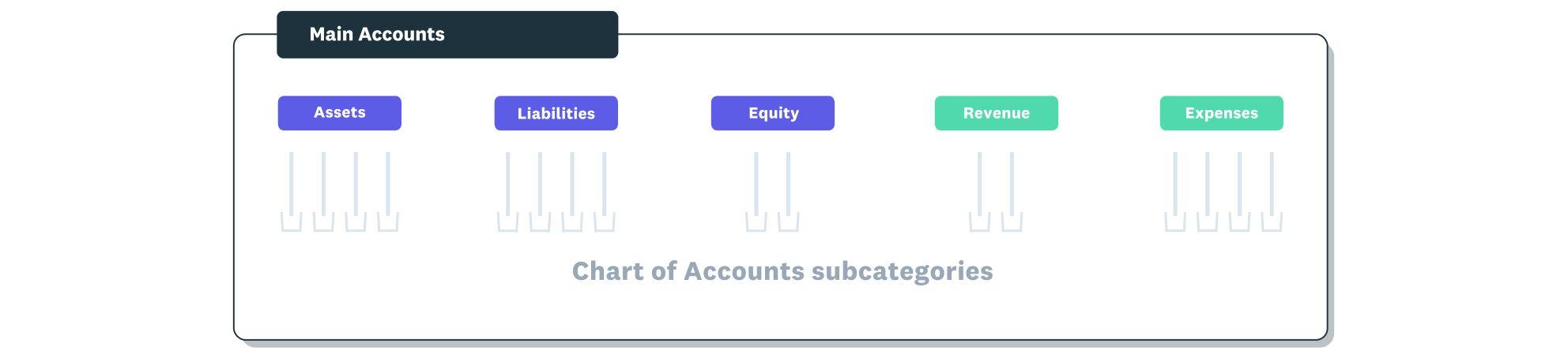
The chart of accounts is organised under the five main account types.
What is a chart of accounts?
A chart of accounts (COA) is the complete list of every financial account your business uses to categorise transactions. It works as a filing system for your bookkeeping, sorting every dollar that flows in or out into a specific account so you can track where your money is going.
Each account in the chart has a unique name and number. When you record an expense or receive a payment, the transaction is assigned to the correct account. This structure feeds directly into your profit and loss statement, balance sheet, and other financial reports.
Most accounting software comes with a default chart of accounts that you can customise to suit your business. The goal is to have enough accounts to give you clear visibility into your finances, without creating so many that your bookkeeping becomes unnecessarily complex.
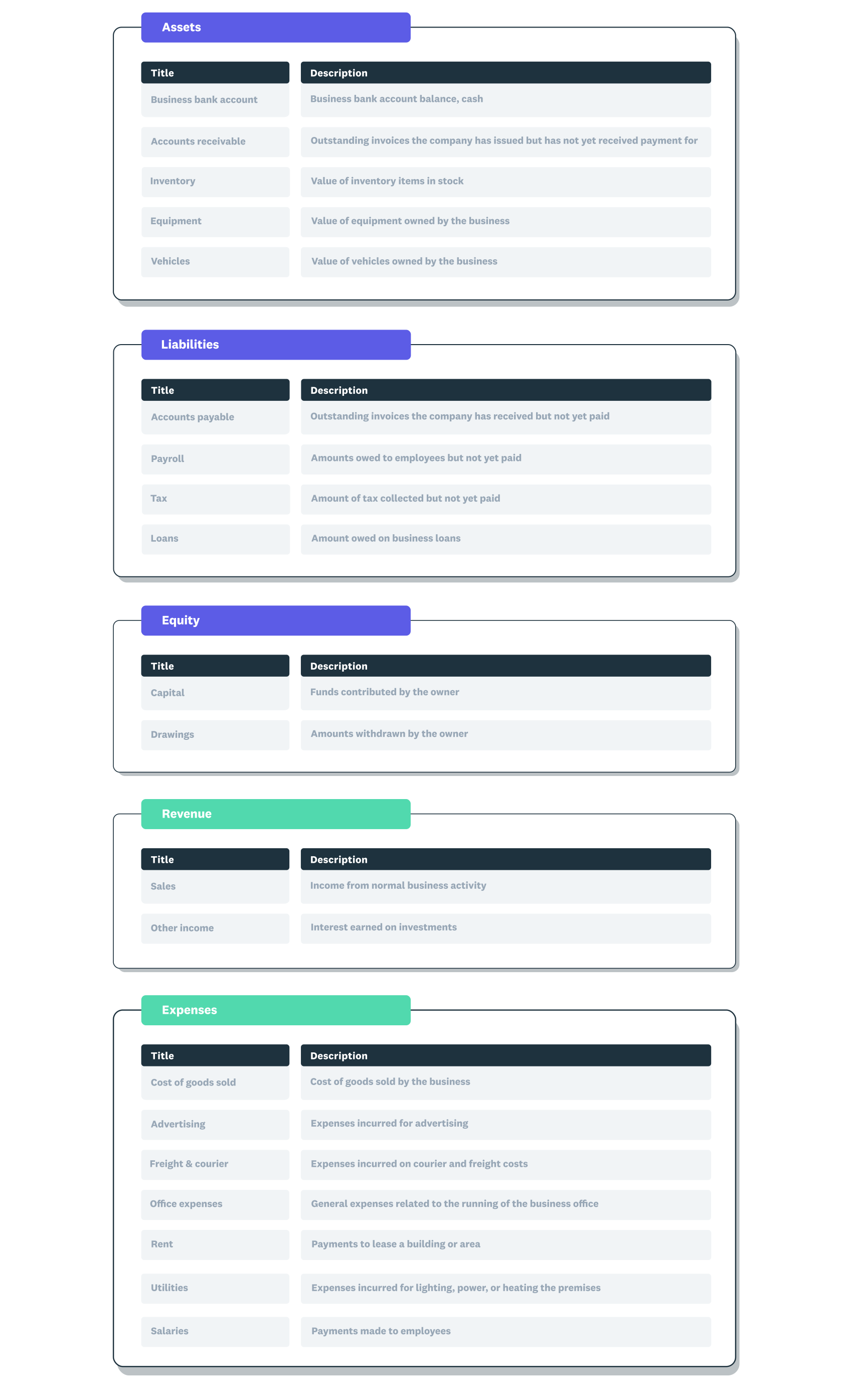
A chart of accounts example showing the five main account types with subcategories within each.
Why is a chart of accounts important?
Your chart of accounts is the backbone of your financial record-keeping. Without a well-organised COA, your reports won't give you the clarity you need to make confident business decisions.
A good chart of accounts helps you in several practical ways.
- Your profit and loss, balance sheet, and cash flow statements all rely on transactions being categorised correctly.
- The Australian Taxation Office (ATO) expects you to track income, expenses, and goods and services tax (GST) in a clear, auditable way for your Business Activity Statement (BAS). You can learn more in the small business accounting guide.
- You can quickly spot where you're spending too much or where revenue is growing when your accounts are well structured.
- Your accountant or bookkeeper can work with your books more efficiently when accounts follow a logical structure.
- A clean COA grows with your business, making it easier to add new accounts for products, services, or departments as you expand.
How does a chart of accounts work?
A chart of accounts works by grouping every transaction your business makes into specific categories. Each category, or account, belongs to 1 of 5 main types that map directly to your financial statements.
When you receive income, pay a bill, purchase stock, or take out a loan, the transaction is recorded against the relevant account. Your accounting software then uses these categorised entries to generate reports like the profit and loss statement and balance sheet. You can explore more about creating financial reports for your business.
Each account has a name, a number, and a type. The numbering system keeps accounts in a logical order so you can find them quickly and produce consistent reports. For example, all your asset accounts might start with the number 1, while expense accounts start with 5. This structure follows the standards set by the Australian Accounting Standards Board (AASB) for how you reclassify financial statements.
The 5 main account types
Every account in your chart of accounts falls into 1 of 5 categories. These categories align with the 2 core financial statements: the balance sheet and the profit and loss statement.
Each account type maps to a specific section of your financial statements.
- Assets: resources your business owns or controls that have economic value. This includes your bank accounts, accounts receivable (money customers owe you), inventory, equipment, and vehicles.
- Liabilities: debts and obligations your business owes to others. Common examples include accounts payable (money you owe suppliers), loans, credit cards, and GST collected that you haven't yet remitted to the ATO.
- Equity: the owner's stake in the business after subtracting liabilities from assets. This includes owner contributions, retained earnings, and drawings.
- Revenue: income your business earns from its core operations. Sales revenue, service fees, interest income, and any other earnings go here.
- Expenses: the costs of running your business. Rent, wages, utilities, marketing, insurance, and office supplies are all tracked under expense accounts.
Assets, liabilities, and equity appear on your balance sheet. Revenue and expenses appear on your profit and loss statement.
Chart of accounts numbering system
A numbering system assigns a unique code to every account in your chart of accounts, making it faster to find, sort, and report on your finances. Most small businesses use either a 3-digit or 5-digit coding convention.
3-digit numbering
A 3-digit system is the simplest option and works well for sole traders and small businesses with straightforward finances. Each account type gets a number range.
- 100-199: assets
- 200-299: liabilities
- 300-399: equity
- 400-499: revenue
- 500-599: expenses
Within each range, you assign individual codes. For example, your everyday business bank account might be 100, accounts receivable 110, and office equipment 150.
5-digit numbering
A 5-digit system gives you more room to grow. The first digit still represents the account type, but the extra digits let you add sub-categories and departments. For example, account 50100 might represent general office expenses, while 50200 covers marketing expenses and 50201 is specifically for online advertising.
This approach is useful if your business has multiple departments, locations, or product lines. It also makes it easier to generate detailed reports without creating separate charts.
Whichever system you choose, the key is consistency. Stick with the same structure across all accounts so your reports stay reliable and your team can find what they need quickly.
Chart of accounts example
This example shows a simple chart of accounts for a small Australian retail business. This example uses a 3-digit numbering system.
Assets:
- 100 - Business bank account
- 110 - Accounts receivable
- 120 - Inventory
- 130 - Office equipment
Liabilities:
- 200 - Accounts payable
- 210 - GST collected
- 220 - Business loan
- 230 - Credit card
Equity:
- 300 - Owner's equity
- 310 - Retained earnings
- 320 - Owner's drawings
Revenue:
- 400 - Sales revenue
- 410 - Service revenue
- 420 - Interest income
Expenses:
- 500 - Rent
- 510 - Wages and salaries
- 520 - Utilities
- 530 - Marketing and advertising
- 540 - Insurance
- 550 - Office supplies
- 560 - Accounting and legal fees
Your chart of accounts will look different depending on your industry and business structure. The example above covers the basics, but you can add or remove accounts to match how you actually operate.
How to set up your chart of accounts
Setting up a chart of accounts is straightforward. Follow these steps to create a structure that fits your business.
- Start with a default template. Most accounting software, including Xero, provides a ready-made chart of accounts when you create a new organisation. This gives you a solid starting point with standard account types already in place.
- Review the default accounts. Go through the pre-built list and remove any accounts that don't apply to your business. For example, if you don't carry inventory, delete the inventory account.
- Add accounts specific to your business. Think about the income streams and expense categories that are unique to your operations. If you run a cafe, you might add separate accounts for food supplies, beverage supplies, and takeaway packaging.
- Choose a numbering system. Decide whether a 3-digit or 5-digit code works best for your current size and expected growth. Keep gaps between numbers (for example, 100, 110, 120) so you can insert new accounts later without renumbering everything.
- Organise accounts by type. Make sure every account sits under the correct category: assets, liabilities, equity, revenue, or expenses. Misclassified accounts lead to inaccurate reports.
- Check alignment with your accountant. Share your draft chart of accounts with your accountant or bookkeeper before you start entering transactions. They can spot gaps, suggest improvements, and confirm it meets ATO and AASB requirements.
Chart of accounts best practices
A well-maintained chart of accounts saves you time and keeps your financial reports reliable. These practical tips help you avoid common mistakes.
- Keep it simple. Only create accounts you actually need. Too many accounts make data entry slower and reports harder to read.
- Use clear, descriptive names. Anyone looking at your chart of accounts should understand what each account tracks without guessing. "Marketing - social media ads" is more useful than "Marketing misc".
- Review it regularly. Set a reminder to review your chart of accounts at least once a year, or whenever your business changes significantly. Remove accounts you no longer use and add new ones as needed.
- Avoid duplicates. Before adding a new account, check whether an existing one already covers the same type of transaction. Duplicate accounts split your data and distort your reports.
- Leave gaps in your numbering. Spacing account numbers apart (for example, 100, 110, 120 instead of 100, 101, 102) gives you room to add new accounts in the right position later.
- Lock historical accounts. If you stop using an account, archive or deactivate it rather than deleting it. This preserves your historical data for audits and year-end reporting. For more on managing your books, see the bookkeeping for small business guide.
Organise your finances with Xero
Xero makes it straightforward to set up and manage your chart of accounts. You get a ready-made template when you create your organisation, and you can customise it in a few clicks to match how your business actually operates.
With Xero, your chart of accounts connects directly to bank feeds, invoicing, and reporting, so every transaction is automatically categorised and ready for your next BAS or end-of-year review. Get one month free.
FAQs on chart of accounts
Here are answers to some frequently asked questions about chart of accounts.
How many accounts should a small business have?
Most small businesses do well with 30 to 60 accounts. The right number depends on your industry and how much detail you need in your reports, but fewer well-organised accounts are always better than hundreds of unused ones.
What is a 7-digit chart of accounts system?
A 7-digit system adds extra digits for departments, locations, or cost centres. It's typically used by larger businesses that need granular reporting across multiple divisions; most small businesses won't need this level of detail.
Can I modify my chart of accounts after setting it up?
Yes, you can add, rename, or archive accounts at any time. It's good practice to review your chart of accounts regularly and adjust it as your business grows or changes direction.
What's the difference between assets and liabilities in a chart of accounts?
Assets are resources your business owns or controls, like bank balances, equipment, and inventory. Liabilities are debts you owe, such as loans, supplier invoices, and tax obligations. Both appear on your balance sheet.
What happens if you don't have a chart of accounts?
Without a chart of accounts, transactions end up in the wrong categories, which leads to inaccurate financial reports and potential issues at tax time. It also makes it harder to get finance, since lenders and investors expect well-organised financial records.
Handy resources
Advisor directory
You can search for experts in our advisor directory
Xero Small Business Guides
Discover resources to help you do better business
Online accounting with Xero
Automate your accounting in the cloud
Disclaimer
This glossary is for small business owners. The definitions are written with their requirements in mind. More detailed definitions can be found in accounting textbooks or from an accounting professional. Xero does not provide accounting, tax, business or legal advice.