1099 software for your small business
Simplify your 1099 filing with Xero’s tax preparation software. Securely collect W-9s from your independent contractors. Track their payments over the year and organize this info in Xero. Then create and review 1099 reports for simple e-filing to the IRS – and hit your tax season deadlines!

All your numbers. All in one. All for less than QuickBooks.*
Pay your bills at no extra cost
Free standard ACH bill payments are now included in Xero business plans.*
Early
for the first 3 months
Then $27 per month
An easy financial foundation - track cash flow with the essentials.
- Send quotes and 20 invoices†
- Accept online invoice payments^
- 5 bills
- Reconcile bank transactions
- Smart Document Capture
- View real-time reports
- W-9 + 1099 management
- Sales tax
- Visualize performance with basic graphs
- 30 day cash flow forecast
- Make online bill payments (Domestic - Free ACH)
- Make online bill payments (Cross Border)

Growing
for the first 3 months
Then $59 per month
Go beyond the basics - automate tasks and access performance dashboards.
- Send invoices and quotes
- Accept online invoice payments^
- Automate bill entry and track bills
- Reconcile bank transactions
- Smart Document Capture
- View real-time reports
- W-9 + 1099 management
- Sales tax
- Visualize performance with graphs
- 60 day cash flow forecast
- Make online bill payments (Domestic - Free ACH)
- Make online bill payments (Cross Border)
- Customize performance dashboards
- Tailored financial health scorecards
- Budget with smart suggestions
- Auto-reconcile transactions
Forecast with clarity
Forecast with clarity
Established
for the first 3 months
Then $97 per month
Future proof your scaling business - with advanced tools and analytics.
- Send invoices and quotes
- Accept online invoice payments^
- Automate bill entry and track bills
- Reconcile bank transactions
- Smart Document Capture
- View real-time reports
- W-9 + 1099 management
- Sales tax
- Visualize performance with graphs
- 180 day cash flow forecast
- Make online bill payments (Domestic - Free ACH)
- Make online bill payments (Cross Border)
- Customize performance dashboards
- Tailored financial health scorecards
- Analyze KPIs and ratios
- Use multiple currencies
- Track time and costs for projects
- Employee expense and mileage claims
- Benchmark against the industry
- Make online bill payments (International)
- Budget with smart suggestions
- Auto-reconcile transactions
How Xero payroll software works for 1099s
Xero software makes it easy to pay your contractors by approving a bill or a spend-money transaction. Xero then stores and organizes these details so they are ready for you to generate accurate reports for the IRS.
- Let Xero pull the data to create your 1099-NEC and 1099-MISC forms
- File the forms directly from Xero with 1099 SmartFile, Tax1099, or another app integration (fees may apply)
- Or export the report as a CSV file to send it to the IRS yourself
- Manage all your records – including employee payroll data – in one place to see your bigger financial picture

Create 1099 reports in no time
Xero 1099 creation software helps you minimize your tax season admin. Set up rules to effortlessly generate your 1099-NEC and 1099-MISC forms. View the transactions that match your rules. And see a summary of your contacts and payments in Xero reports. Easy!
Review and fine tune your 1099 reports
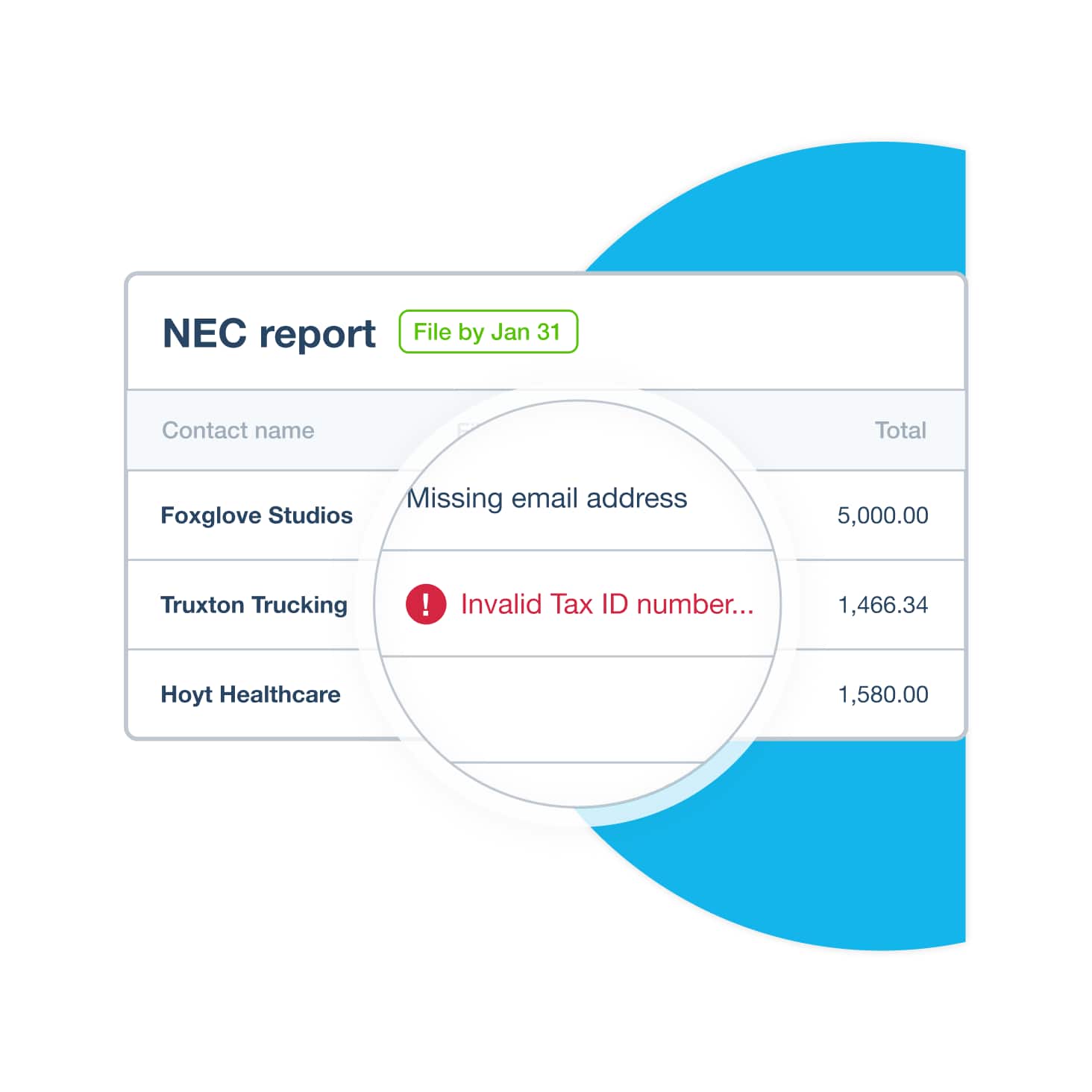
Want peace of mind for your tax filing? Xero’s 1099 tax preparation software lets you double-check everything before you file with the IRS.
- See which transactions are included in your reports (Xero automatically excludes any above the threshold)
- Spot any missing info, like a valid Tax ID number
- Avoid having to make 1099 corrections with the IRS later
Always hit IRS tax season deadlines
Ace your fiscal year end with Xero’s 1099 e-filing software features. Get friendly due-date reminders before your deadlines. And once you’re on the job, just set up reporting rules and let Xero generate the numbers for your 1099 e-filing.
Prepare for fiscal year end with Xero
Create and e-file 1099 forms in Xero
FAQs on Xero’s 1099 software
Xero’s 1099 software helps small businesses prepare, file, and distribute tax forms for their independent contractors. First, Xero records their payment amounts and details throughout the year. Xero then uses this information to generate accurate 1099 forms and provide options for e-filing with the IRS and states, and for sending copies to your contractors.
Xero’s 1099 software helps small businesses prepare, file, and distribute tax forms for their independent contractors. First, Xero records their payment amounts and details throughout the year. Xero then uses this information to generate accurate 1099 forms and provide options for e-filing with the IRS and states, and for sending copies to your contractors.
You generally need to file a 1099 for any unincorporated business or individual you pay a minimum amount during the year (this threshold is set by the IRS). You’ll need a 1099-NEC form for non-employee compensation, including independent contractors, freelancers, and other self-employed individuals. But you’ll use a 1099-MISC form for miscellaneous payments, like rent, prizes, awards, and legal fees to an attorney.
You generally need to file a 1099 for any unincorporated business or individual you pay a minimum amount during the year (this threshold is set by the IRS). You’ll need a 1099-NEC form for non-employee compensation, including independent contractors, freelancers, and other self-employed individuals. But you’ll use a 1099-MISC form for miscellaneous payments, like rent, prizes, awards, and legal fees to an attorney.
Xero automatically excludes transactions for amounts less than the IRS threshold. For example, in 2025 the threshold was $600. Xero also excludes credit card transactions because these are not needed for 1099 reports. Xero lets you manually exclude other transactions, like payments by debit card or third-party processors.
Xero automatically excludes transactions for amounts less than the IRS threshold. For example, in 2025 the threshold was $600. Xero also excludes credit card transactions because these are not needed for 1099 reports. Xero lets you manually exclude other transactions, like payments by debit card or third-party processors.
To pay a contractor, you create a bill or a send- money transaction, or submit a company expense claim as normal. Xero includes expenses paid via the Xero expenses feature in 1099 reports.
See how to identify your contacts for 1099 reportsTo pay a contractor, you create a bill or a send- money transaction, or submit a company expense claim as normal. Xero includes expenses paid via the Xero expenses feature in 1099 reports.
See how to identify your contacts for 1099 reportsYes – Xero’s 1099 filing software integrates with trusted e-filing partners, allowing you to securely e-file your 1099-NEC and 1099-MISC forms directly from Xero to the IRS and applicable states. This process streamlines your workflow and helps you avoid the hassle of manual paper filing.
Visit the Xero App Store to find e-filing partner appsYes – Xero’s 1099 filing software integrates with trusted e-filing partners, allowing you to securely e-file your 1099-NEC and 1099-MISC forms directly from Xero to the IRS and applicable states. This process streamlines your workflow and helps you avoid the hassle of manual paper filing.
Visit the Xero App Store to find e-filing partner appsYes – Xero gives you a simple way to collect W-9 forms from your contractors. You can send them a unique, secure link that they use to complete and submit a digital W-9. Their information automatically populates their contact record in Xero. While Xero helps you collect the Taxpayer Identification Number (TIN), the TIN validation itself is typically performed by our e-filing partners as part of the filing process to make sure the data is accurate before submission to the IRS.
Yes – Xero gives you a simple way to collect W-9 forms from your contractors. You can send them a unique, secure link that they use to complete and submit a digital W-9. Their information automatically populates their contact record in Xero. While Xero helps you collect the Taxpayer Identification Number (TIN), the TIN validation itself is typically performed by our e-filing partners as part of the filing process to make sure the data is accurate before submission to the IRS.
You don’t need to! With Xero, there's no need to manually import data for your 1099s – your vendor and payment data is already in Xero as part of your regular bookkeeping. Xero's 1099 report pulls directly from your accounts payable, bills, and spend money transactions, including payments you make to your vendors. Just set up your reporting rules to make sure payments are categorized correctly.
You don’t need to! With Xero, there's no need to manually import data for your 1099s – your vendor and payment data is already in Xero as part of your regular bookkeeping. Xero's 1099 report pulls directly from your accounts payable, bills, and spend money transactions, including payments you make to your vendors. Just set up your reporting rules to make sure payments are categorized correctly.
Xero supports the most common forms for independent contractors: 1099-NECs and 1099-MISCs. Through our e-filing partners, Xero supports a wide range of state filings, simplifying your state-level reporting needs.
Xero supports the most common forms for independent contractors: 1099-NECs and 1099-MISCs. Through our e-filing partners, Xero supports a wide range of state filings, simplifying your state-level reporting needs.
Once you've filed your 1099s, our e-filing partners handle the delivery of copies to your contractors. This can often be done electronically via email or by mail. If you spot a mistake after filing, you can file a correction by contacting the e-filing provider you used to submit the original form. They'll have a process for fixing the information and sending a corrected copy to both the contractor and the IRS.
Once you've filed your 1099s, our e-filing partners handle the delivery of copies to your contractors. This can often be done electronically via email or by mail. If you spot a mistake after filing, you can file a correction by contacting the e-filing provider you used to submit the original form. They'll have a process for fixing the information and sending a corrected copy to both the contractor and the IRS.
The deadline for filing Form 1099-NEC and sending copies to contractors is January 31 of the following year. For most payments reported on Form 1099-MISC, the deadline is also January 31. Our e-filing partners will send you reminders as the deadlines approach to help you file on time and avoid penalties.
The deadline for filing Form 1099-NEC and sending copies to contractors is January 31 of the following year. For most payments reported on Form 1099-MISC, the deadline is also January 31. Our e-filing partners will send you reminders as the deadlines approach to help you file on time and avoid penalties.
Your 1099s and accounting go hand in hand
Don’t treat your filings as a last-minute job. Let Xero’s 1099 accounting software integrate them with your everyday bookkeeping. Keep all your contractor payment info in Xero – and come tax season, see this flow into your 1099s for fast, accurate reporting and a full picture of your finances.



*Fees apply for other payment methods.
*Based on published list prices for software subscription only. Pricing and features vary by plan.