How do you calculate profitability? Formula and tips
See how to calculate profitability, compare margins, and use the results to grow.

Written by Lena Hanna—Trusted CPA Guidance on Accounting and Tax. Read Lena's full bio
Published Thursday 26 March 2026
Table of contents
Key takeaways
- Calculate your profitability by dividing profit by revenue and multiplying by 100, using three key metrics: gross profit margin (revenue minus cost of goods sold), operating profit margin (gross profit minus operating expenses), and net profit margin (revenue minus all expenses).
- Track your profitability monthly or quarterly to spot margin changes early, as factors like rising material costs, interest rate changes, or rent increases can quickly shrink your margins without warning.
- Aim for a net profit margin of 10-20% as a healthy benchmark for most small businesses, though this varies by industry, and compare your results to similar businesses rather than generic targets.
- Improve thin margins by raising prices, reducing cost of goods sold through supplier negotiations, or cutting operating expenses, as even small price increases can significantly boost profitability if sales volume remains steady.
What profitability means for your business
Profitability measures how much of your sales revenue you keep as profit after paying business costs. The higher your profitability, the more money stays in your business for every dollar you earn.
The main profitability metrics are gross profit margin and net profit margin. Both show what percentage of revenue you retain versus what goes toward expenses.
Profitability levels tell you different things about your business:
- High profitability (wide margins): A big chunk of your sales revenue stays as profit. That's generally good, though it could mean your prices have room to come down, which might lift sales.
- Low profitability (thin margins): Most of your revenue goes toward expenses. This could signal high costs, underpriced products, or a competitive market where you're always competing on price.
Profit versus profitability
- Profit: The dollar amount your business keeps after paying expenses.
- Profitability: The percentage of revenue you keep versus what you spend to operate.
Both matter. High profitability only helps your bottom line when paired with strong revenue. You need good margins and good sales to build a healthy business.
Why measuring profitability matters
Tracking profitability regularly helps you catch margin changes before they become problems. When margins shrink, cash flow often follows, and business gets stressful fast.
Several factors can shift your margins without warning:
- Rising costs for materials, energy, or transport
- Interest rate changes affecting loan repayments
- Rent increases or lease renewals
- Currency fluctuations if you import or export
By measuring profitability monthly or quarterly, you can spot trends early and adjust pricing, costs, or operations before margins get too thin.
Types of profitability metrics
Three main metrics help you measure profitability: gross profit margin, net profit margin, and operating profit margin. These are sometimes called profitability ratios because they express profit as a percentage of revenue.
Each metric measures profitability at a different stage of your business expenses.
Gross profit margin
- What it measures: The percentage of revenue remaining after you pay your cost of goods sold (COGS). COGS includes direct costs like materials, inventory, and production labour.
- Why it matters: Gross profit covers your operating expenses like rent, utilities, and marketing. Whatever remains after those becomes your net profit.
Net profit margin
- What it measures: The percentage of revenue remaining after paying all business costs, including operating expenses.
- Why it matters:Net profit is what your business keeps. You can reinvest it in growth or pay it to owners.
Net profit can be quoted before or after taxes. In this guide, we're using net profit before taxes.
Operating profit margin
Operating profit margin shows what percentage of revenue remains after paying both COGS and operating expenses, but before interest and taxes.
- What it measures: The percentage of revenue left after direct costs and day-to-day operating expenses like rent, utilities, and wages.
- Why it matters: Operating margin reveals how efficiently your core business runs, separate from financing decisions or tax situations.
This metric helps you understand whether your business model is profitable before accounting for how it's financed. A strong operating margin means your operations generate healthy returns regardless of your debt structure.
How to calculate profitability
To calculate profitability, divide your profit by revenue, then multiply by 100. The result is your profit margin as a percentage.
Before you calculate, you need to determine your profit amount. This differs depending on which margin you're measuring:
- Gross profit: Revenue minus cost of goods sold
- Net profit: Revenue minus all expenses
- Operating profit: Gross profit minus operating expenses
How to calculate gross profit margin
Here are the steps to find your gross profit margin.
- Calculate gross profit: Revenue - Cost of Goods Sold (COGS) = Gross Profit
- Divide gross profit by revenue: Gross Profit / Revenue
- Multiply by 100 to get your percentage

You can also use our gross margin calculator to do the work for you.
How to calculate net profit margin
Follow these steps to find your net profit margin.
- Calculate net profit: Revenue - All Expenses = Net Profit
- Divide net profit by revenue: Net Profit / Revenue
- Multiply by 100 to get your percentage

*Net profit can be quoted before or after taxes. If quoting after-tax net profit then you need to also subtract taxes.
Try our net profit margin calculator for a quick answer.
How to calculate operating profit margin
To calculate operating profit margin, follow these steps:
- Calculate your gross profit (Revenue - COGS)
- Subtract your operating expenses from gross profit to get operating profit
- Divide operating profit by revenue
- Multiply by 100 to get the percentage
Formula: Operating Profit Margin = (Operating Profit ÷ Revenue) × 100
Use operating margin when you want to assess your core business efficiency without the impact of interest payments or taxes.
Profitability calculation example
Here's how to calculate profitability for a business with $100,000 in sales, $60,000 in inventory costs (COGS), and $20,000 in operating expenses.
Step 1: Calculate gross profit
$100,000 revenue - $60,000 COGS = $40,000 gross profit
Step 2: Calculate gross profit margin
$40,000 ÷ $100,000 × 100 = 40% gross profit margin
Step 3: Calculate operating profit
$40,000 gross profit - $20,000 operating expenses = $20,000 operating profit
Step 4: Calculate operating profit margin
$20,000 ÷ $100,000 × 100 = 20% operating profit margin
Step 5: Calculate net profit margin
$20,000 net profit ÷ $100,000 × 100 = 20% net profit margin
In this example, the business keeps 40 cents of every dollar after direct costs, and 20 cents after all expenses.
Where to find the numbers you need
To calculate profitability, you need three numbers from your business records: revenue, cost of goods sold, and total expenses.
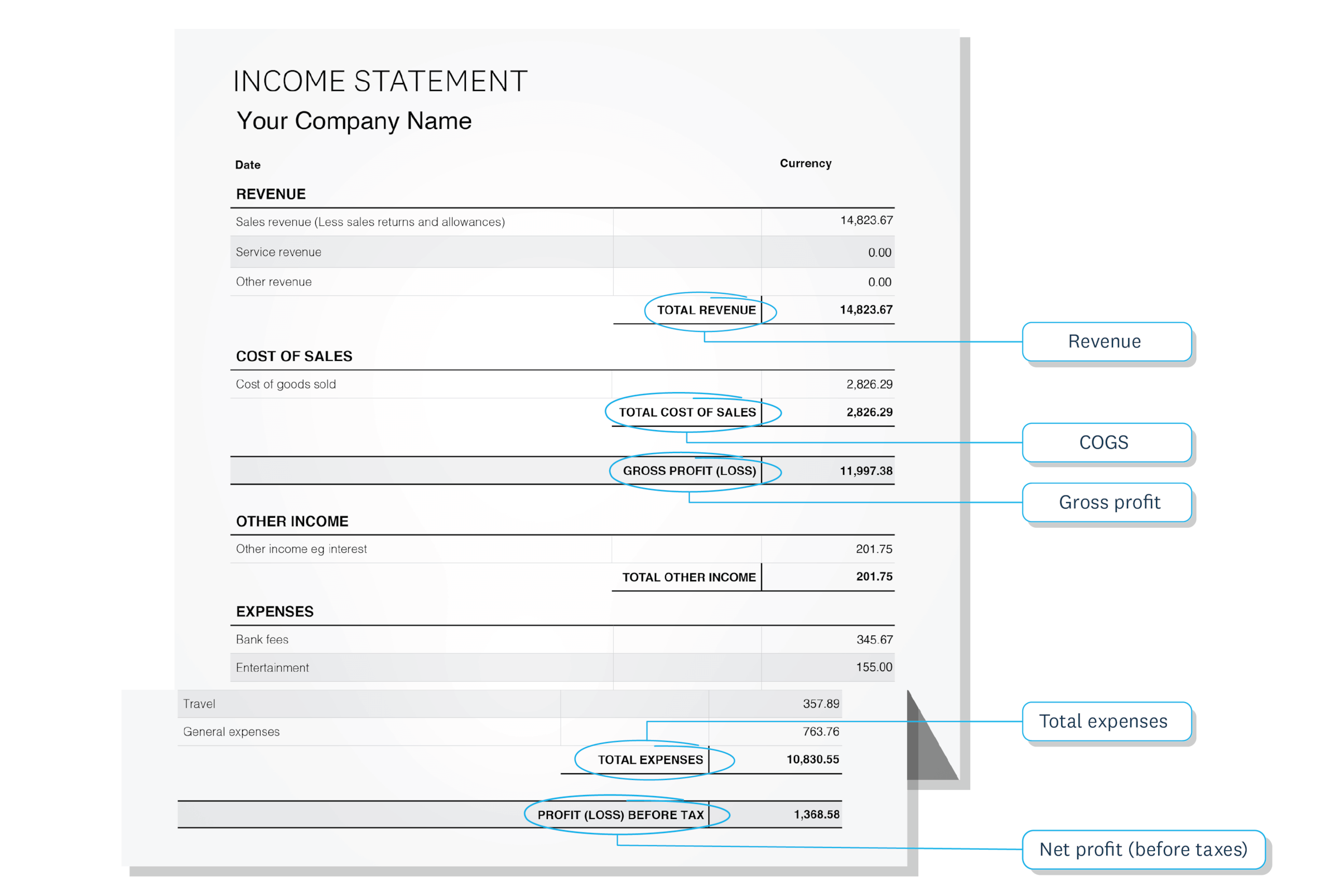
Here's where to find each one:
- Revenue (sales): Check your income statement's top line, sales reports, or point-of-sale system totals.
- Cost of goods sold (COGS): Find this on your income statement below revenue, or calculate it from inventory records and supplier invoices.
- Operating expenses: Look at your income statement's expense section, which includes rent, utilities, wages, marketing, and insurance.
If you use accounting software, these numbers are automatically categorized and ready to use. You can pull them from your income statement or profit and loss report in seconds.
Calculate profitability automatically with software
Accounting software calculates your profit margins automatically, so you don't need to do the math yourself.
With Xero, you can:
- open Xero Analytics to see your margins for any time period
- generate an income statement to review revenue, costs, and profit at a glance
- track margin changes over time with built-in reporting dashboards
This lets you see your profitability instantly without manual spreadsheet work.
What your profitability numbers tell you
Once you've calculated your profitability, you need context to understand whether your numbers are healthy.
General benchmarks for small businesses:
- Net profit margin of 10–20%: Considered healthy for most industries
- Net profit margin of 5–10%: Moderate, but monitor closely
- Net profit margin under 5%: Thin margins that leave little room for error
What your margin level suggests:
- Strong margins (15%+): You likely have pricing power, efficient operations, or both. You have room to invest in growth or weather unexpected costs.
- Moderate margins (7–15%): Typical for many small businesses. Keep tracking monthly and look for gradual improvements.
- Thin margins (under 5%): Review your pricing strategy and expense structure. Small cost increases or sales dips could push you into loss.
Keep in mind that margins vary widely by industry. Service businesses often see higher net margins, while retail may run much thinner. Compare your margins to your own past performance and industry norms rather than generic targets.
How to improve profitability
Measure profitability monthly, and always recalculate when costs change or you're competing on price. Set a target margin for your business and use it as a benchmark. An accountant or bookkeeper in your industry can tell you what's typical.
If your margins are lower than you'd like, you have three main levers to improve them:
- Raise prices: Even small increases can significantly boost margins if sales volume holds.
- Reduce COGS: Negotiate with suppliers, find alternative materials, or improve production efficiency.
- Cut operating expenses: Review subscriptions, renegotiate contracts, or reduce overhead.
For more detailed tactics, check out the guide on how to increase profits.
Make profitability tracking effortless
Understanding your profitability helps you make smarter decisions about pricing, expenses, and growth. The more regularly you track it, the faster you can respond to changes in your business.
With Xero's cloud accounting software, you don't have to calculate profitability manually. Your gross and net profit margins update automatically as you record sales and expenses, so you can always see how your business is performing. Get one month free and see how simple profitability tracking can be.
FAQs on calculating profitability
Here are answers to common questions about calculating and understanding profitability.
What's considered a good profit margin?
A net profit margin of 10–20% is considered healthy for most small businesses. However, this varies by industry, so compare your margin to businesses similar to yours and track your own trends over time.
How is profitability different from cash flow?
Profitability measures whether you're earning more than you spend, while cash flow tracks the actual movement of money in and out of your business. You can be profitable on paper but still face cash flow problems if customers pay slowly.
What does it mean if my profitability calculation is negative?
A negative profit margin means your expenses exceed your revenue, and you're operating at a loss. This is common for new businesses or during slow seasons. Track the trend over time and review where you can cut costs or increase revenue.
Can I calculate profitability without accounting software?
Yes, you can calculate profitability manually using the formulas in this guide and numbers from your financial records. However, accounting software makes the process faster and more accurate by automatically tracking and categorizing your revenue and expenses. This accuracy is crucial, as the Canada Revenue Agency states that failing to report all your income can result in a penalty of 10% of the unreported amount.
Should I focus on gross profit margin or net profit margin?
Both metrics matter for different reasons. Gross margin shows how efficiently you produce or source your products, while net margin reveals your overall business health after all expenses. Use gross margin to evaluate pricing and production costs, and net margin to assess total profitability.
Written by Jotika Teli—Certified Public Accountant with 24 years of experience. Read Jotika's full bio
Disclaimer
Xero does not provide accounting, tax, business or legal advice. This guide has been provided for information purposes only. You should consult your own professional advisors for advice directly relating to your business or before taking action in relation to any of the content provided.
Start using Xero for free
Access Xero features for 30 days, then decide which plan best suits your business.