Journal entry in accounting: types, rules and examples
Learn what a journal entry is and how to record one for your small business.

Written by Jotika Teli—Certified Public Accountant with 24 years of experience. Read Jotika's full bio
Published Monday 20 April 2026
Table of contents
Key takeaways
- Record every business transaction as a journal entry with a date, the accounts affected, balanced debit and credit amounts, and a brief description to keep your books accurate and audit-ready.
- Apply the double-entry bookkeeping rule to every transaction: debits must always equal credits, ensuring your accounts stay balanced and your financial statements stay reliable.
- Use the right type of journal entry for each situation (simple, compound, adjusting, recurring, or correcting) so your records accurately reflect what happened in each accounting period.
- Keep all journal entries and supporting documents for at least six years to meet Canada Revenue Agency requirements and protect your business during tax audits.
What is a journal entry?
A journal entry is a record of a business transaction in your accounting system. It captures which accounts are affected, how much money moved, and when the transaction happened. Every time you buy supplies, receive payment, or pay a bill, you create a journal entry to track it.
Journal entries use double-entry bookkeeping. Every transaction affects at least two accounts. When money leaves one account, it enters another.
Accurate journal entries support more reliable financial statements, including the balance sheet.
What are debits and credits?
Debits and credits are the two sides of every journal entry. They record how transactions affect your accounts and must always balance.
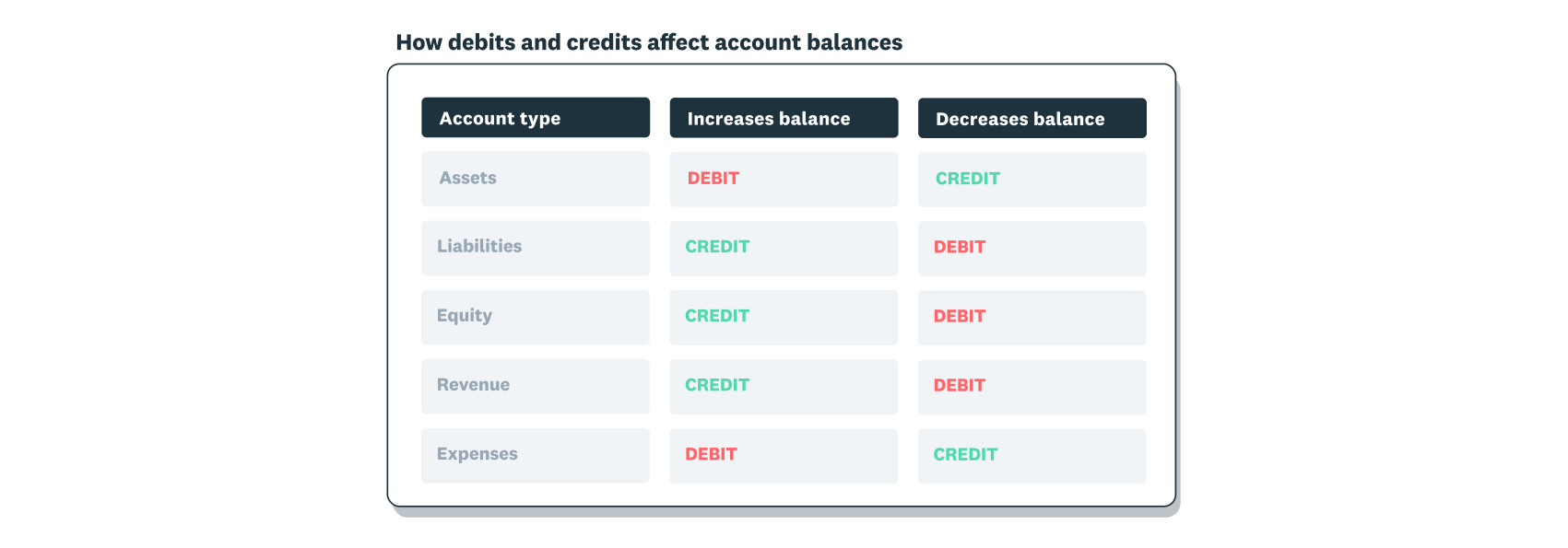
The rules depend on the account type:
- Debits increase: asset accounts (cash, inventory, equipment) and expense accounts (rent, wages, supplies)
- Debits decrease: liability accounts (loans, accounts payable), equity accounts (owner's capital, retained earnings), and revenue accounts (sales, service income)
- Credits increase: liabilities, equity, and revenue while decreasing assets and expenses
Every transaction has two sides. When you buy supplies for $200 cash, your supplies increase (debit) and your cash decreases (credit) by the same amount. Debits must always equal credits for the entry to be correct.
Why journal entries matter for your business
Journal entries do more than track transactions. They form the foundation of accurate financial statements and help you make informed business decisions.
- Accurate financial reporting: Your income statement, balance sheet, and cash flow statement all rely on properly recorded journal entries. Errors in your entries flow through to every report.
- Tax compliance: The Canada Revenue Agency requires you to maintain accurate records. Generally, you must keep your records for six years from the end of the taxation year to which they relate. Complete journal entries with supporting documents protect you during audits. They also make tax filing straightforward.
- Cash flow visibility: When you record transactions as they happen, you see your true cash position. This helps you plan for expenses, manage payments, and stay prepared.
- Business decisions:Accurate books show which products are profitable, where you're overspending, and how your business is trending. Measuring your performance is the first step to improving it.
- Credibility with lenders: Banks and investors review your financial statements before approving loans or investments. Clean, accurate records demonstrate that you manage your business professionally.
How journal entries work
Journal entries track changes to your account balances through the double-entry system. Every transaction affects at least two accounts, and total debits must always equal total credits.
This balancing requirement keeps your books accurate. When you record a $500 sale, you debit one account and credit another for the same amount. The accounting equation stays in balance, and your records reflect exactly what happened.
What are the different types of journal entries in accounting?
The main types of journal entries are simple, compound, adjusting, reversing, recurring, closing, and correcting entries. Each type serves a specific purpose, and understanding which to use helps you record transactions accurately.
Simple journal entry
A simple journal entry records a transaction that affects only two accounts. Use simple entries for basic business activities like cash purchases or sales.
Example: You buy $200 in office supplies with cash.
- Debit: Office Supplies (+$200)
- Credit: Cash (–$200)
Compound journal entry
A compound journal entry records a transaction that affects more than two accounts. Use compound entries for payroll, loan payments, or sales with multiple components.
Payroll example:
- Debit: Wage expense ($3,000)
- Credit: Cash ($2,400), Payroll taxes payable ($400), Benefits payable ($200)
Total debits ($3,000) equal total credits ($3,000).
Adjusting journal entry
An adjusting journal entry updates account balances at the end of an accounting period. Use adjusting entries for income or expenses that span multiple periods, estimated expenses, accruals, and deferred revenue.
Example: A construction company works for three months but invoices only when the job is complete. Each month, they record an adjusting entry for one-third of the total revenue to reflect work already performed.
Reversing journal entry
A reversing journal entry cancels a previous entry at the start of a new period. This simplifies recording the actual transaction when it occurs.
Example: You accrued wages in December for work performed but not yet paid. In January, you reverse that entry. When you pay the wages, you record the payment normally without double-counting.
Recurring journal entry
A recurring journal entry repeats at set intervals for regular transactions. Use recurring entries for monthly rent, loan payments, or subscription fees.
Most accounting software lets you automate recurring entries. You set them up once, and they post automatically each period.
Closing journal entry
A closing journal entry ends an accounting period by transferring balances from temporary accounts to permanent accounts. Revenue and expense accounts reset to zero, and their balances move to retained earnings.
Closing entries prepare your books for the next period while preserving your financial history.
Correcting journal entry
A correcting journal entry fixes errors in your books, such as posting an amount to the wrong account or recording the wrong figure. You create a new entry that adjusts the accounts to their correct balances, preserving the original entry.
Journal entry example
Here's a practical example of a simple journal entry for a small business.
Scenario: The Cozy Cake Shop bought baking supplies for $300 on 20 January 2021.
Journal entry:
- Date: 20 January 2021
- Debit: Baking Supplies $300
- Credit: Cash $300
- Description: Purchased baking supplies

The baking supplies account increases, and the cash account decreases by the same amount. Debits equal credits.
How to record journal entries
Recording journal entries accurately keeps your financial records reliable and audit-ready. Note that records kept outside the country that you access electronically from within Canada are not technically considered books and records in Canada. Follow these five steps for each transaction.
- Identify the transaction and accounts involved. Identify which accounts the transaction affects. Ask yourself what your business gained and what it gave up. Common accounts include cash, accounts receivable, inventory, accounts payable, revenue, and expenses.
- Classify the transaction as a debit or credit. Determine whether each account receives a debit or credit. Debits increase assets and expenses, while credits increase liabilities, revenue, and equity.
- Record the date and transaction details. Record the transaction date and a brief description. A clear description like "office supplies purchase" or "client invoice payment" helps you find entries later and provides context during reviews.
- Enter debit and credit amounts. Enter the debit and credit amounts in their respective columns. Before moving on, verify that total debits equal total credits. Ensure they balance by reviewing your account classifications if needed.
- Post to your general ledger and review. Post your balanced entry to the general ledger. This updates your account balances and creates a permanent record. The Canada Revenue Agency requires you to keep most supporting documents for six years. The retention period ends two years after a corporation is dissolved. If you discover an error later, create a correcting journal entry rather than deleting the original.
Manage journal entries efficiently with Xero
Accurate journal entries keep your books balanced and your business compliant. Recording them manually takes time you could spend running your business.
Xero accounting software automates journal entry creation, reduces manual errors, and generates financial statements instantly. You'll spend less time on bookkeeping and more time on what matters.
Get one month free to see how Xero simplifies your journal entries.
FAQs on journal entries
Find answers to common questions about recording and managing journal entries.
What are the essential parts of a journal entry?
Every journal entry has four essential parts: the transaction date, the accounts affected, the debit and credit amounts, and a description. These elements create a complete record that you can reference later for reporting, audits, or tax filing.
How do I fill out a journal entry?
Every journal entry needs four elements:
- Date: when the transaction occurred
- Accounts: which accounts are affected
- Amounts: debit and credit figures that balance
- Description: brief explanation of the transaction
Enter these details and verify that debits equal credits.
Disclaimer
Xero does not provide accounting, tax, business or legal advice. This guide has been provided for information purposes only. You should consult your own professional advisors for advice directly relating to your business or before taking action in relation to any of the content provided.