Trial balance: definition, types and how to prepare one
Learn how a trial balance helps you spot errors fast and keep your accounts ready for smooth month end.

Written by Ebony-Storm Halladay — Freelance accounting copywriter, 10 years. Read Ebony's full bio
Published Thursday 5 February 2026
Table of contents
Key takeaways
- Prepare trial balances at least monthly to catch bookkeeping errors early, as this simple three-column report helps you verify that total debits equal total credits before creating financial statements.
- Use the three types of trial balances strategically: create an unadjusted trial balance first to spot obvious errors, then an adjusted trial balance after period-end adjustments, and finally a post-closing trial balance to confirm your books are ready for the next accounting period.
- Follow the systematic preparation process by gathering general ledger balances, listing all accounts, entering debits and credits in their respective columns, and comparing totals to identify any mathematical errors that need correction.
- Recognise that a balanced trial balance doesn't guarantee error-free books, as issues like missing transactions or misclassified accounts won't show up as imbalances, so always review your entries carefully for accuracy.
What is a trial balance?
A trial balance is a financial report that lists the closing balances of all accounts in your general ledger at a specific point in time. It's a checkpoint for your books: if total debits equal total credits, your accounting entries are mathematically correct. This double-entry system was first codified in a 1494 mathematics textbook by Franciscan friar Luca Pacioli.
Most businesses prepare a trial balance as the first step in closing their books at the end of an accounting period. This quick test helps you catch errors before preparing financial statements or completing a full audit.
Components of a trial balance
A trial balance uses a simple three-column layout:
- Account names: All ledger accounts from your chart of accounts, listed on the left
- Debit balances: Assets and expense accounts
- Credit balances: Liabilities, capital, and income accounts
You can omit accounts you haven't used during the period. When complete, the totals of both columns should match exactly.
Trial balance example
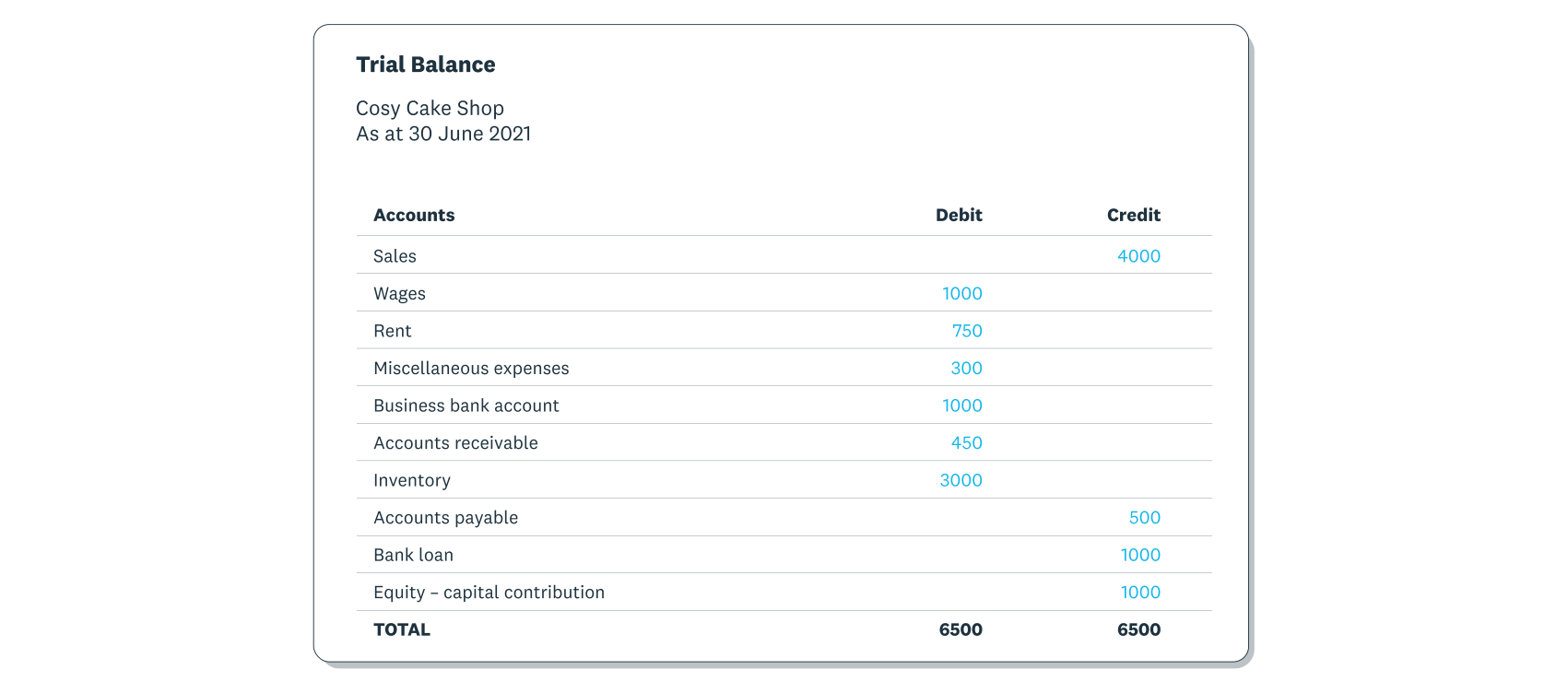
Here's an example of the trial balance format that shows the closing balances of all accounts in the general ledger at the end of a financial period.
As explained above, the account names go in the far left column. All debit and credit balances from the general ledger are recorded in the 'Debit' and 'Credit' columns accordingly. As you can see, the debit and credit columns total the same amount.
Why trial balances matter for your business
A trial balance helps you catch bookkeeping errors before they become bigger problems. When your debits and credits match, you have confidence that your ledger entries are mathematically accurate.
Trial balances matter for your business because they:
- Error detection: Spot missing entries, typos, or incorrect amounts before closing your books
- Financial statement accuracy: Provide a verified foundation for your balance sheets and other reports
- Audit preparation: Give auditors a clear snapshot of your account balances
- Decision confidence: Ensure the numbers you're using to make business decisions are reliable
A balanced trial balance doesn't guarantee your books are error-free. Issues like missing transactions or misclassified accounts won't show up as imbalances, so review your entries carefully.
Trial balance vs balance sheet
A trial balance and a balance sheet both show financial information, but they serve different purposes in your accounting process.
A trial balance is an internal bookkeeping report that lists all account balances from your general ledger. Its job is to verify that your debits equal your credits, catching mathematical errors before you finalise your books.
A balance sheet is a formal financial statement that summarises your business's overall financial position. It shows what your business owns (assets), what it owes (liabilities), and the owner's stake (equity).
The key differences between them are:
- Purpose: Trial balance checks for errors; balance sheet reports financial health
- Audience: A trial balance is strictly for internal use within the accounting department; the balance sheet is for external stakeholders, lenders, and investors
- Timing: Trial balance comes first; balance sheet is prepared after adjustments are complete
- Detail: Trial balance lists every account; balance sheet groups accounts into categories
The trial balance is your error-checking step, and the balance sheet is the polished final report.
Types of trial balances
There are three types of trial balances, each used at a different stage of the accounting cycle:
- Unadjusted trial balance: Prepared first, before any adjustments. Use it to check for obvious errors and identify entries that need correcting.
- Adjusted trial balance: Prepared after making adjustments like accruals and depreciation. Use it as the basis for your financial statements.
- Post-closing trial balance: Prepared after closing temporary accounts. Use it to confirm your ledger is ready for the next accounting period.
All three follow the same format. The difference is timing and purpose.
Unadjusted trial balance
An unadjusted trial balance captures the initial data from your general ledger before any period-end adjustments. It reflects your day-to-day transactions exactly as recorded.
From here, you or your accountant makes adjustments to reflect your true financial position. Common adjustments include:
- Accruals: Adding expenses you've incurred but haven't yet paid
- Deferrals: Recognising income only when it's actually earned
- Depreciation: Spreading an asset's cost over its useful life
These adjustments transform the unadjusted trial balance into a more accurate picture of your finances.
Adjusted trial balance
An adjusted trial balance shows your account balances after all period-end adjustments have been made. It's the foundation for your financial statements.
Prepare this trial balance after completing your adjusting entries but before creating your income statement or balance sheet. The adjusted figures give you an accurate snapshot of your business's financial position.
Post-closing trial balance
A post-closing trial balance is prepared after you've finalised your financial statements and closed all temporary accounts. Revenue, expense, and dividend account balances transfer to retained earnings, leaving these accounts at zero.
This final trial balance confirms that debits still equal credits after closing entries. It also verifies your ledger is ready for the next accounting period, as a post-closing trial balance contains the beginning balances for the next year's activities.
How to prepare a trial balance
Preparing a trial balance helps you verify that your books are mathematically correct before closing the period. To create one:
- Gather your general ledger balances. Pull the closing balance for each account in your ledger for the period you're reviewing.
- List all accounts. Enter each account name in the left column of your trial balance worksheet.
- Enter debit balances. Record balances from asset and expense accounts in the debit column.
- Enter credit balances. Record balances from liability, equity, and revenue accounts in the credit column.
- Total both columns. Add up all debits and all credits separately.
- Compare the totals. If debits equal credits, your entries are mathematically balanced. If they don't match, review your ledger for errors.
These steps produce an unadjusted trial balance. From there, you'll make adjusting entries and prepare your adjusted trial balance before finalising your financial statements.
How often should you prepare a trial balance
Most small businesses prepare a trial balance at least monthly, as part of their month-end close process. However, the right frequency depends on your transaction volume and business needs.
- Monthly: Standard practice for most businesses to catch errors early
- Weekly: Helpful during high-volume periods or rapid growth
- Before major decisions: Useful when you need confidence in your numbers for budgeting or forecasting
- At period-end: Essential before preparing financial statements or filing taxes
Accounting software like Xero generates trial balances automatically, so you can run one whenever you need it without extra effort.
Common trial balance errors
Simple mistakes are easy to make when preparing your trial balance. Watch out for these common errors:
- Transcription errors: Data entry mistakes like mistyping $500 as $5,000
- Omission errors: Transactions left out of the accounts entirely
- Misclassification errors: Transactions recorded under the wrong account headings
Even small errors can lead to inaccurate financial statements and poor business decisions. Catching them early saves time and prevents bigger problems later.
How to correct trial balance errors
Fixing trial balance errors is straightforward when you follow a systematic approach:
- Recheck your trial balance. Review your numbers thoroughly. Step away and return with fresh eyes, or ask someone else to spot-check for typos.
- Verify your ledger entries. Confirm your ledger figures are correct before transferring them to your trial balance. Double-check any amounts that seem unusual.
- Use accounting software. Tools like Xero prevent data entry mistakes and automate calculations, giving you more time to review accuracy.
Run accurate trial balances with Xero
Xero takes the manual work out of preparing trial balances so you can focus on running your business.
Xero helps by:
- Automatic calculations: Xero totals your debits and credits instantly, eliminating manual errors
- Real-time balances: See your account balances update as you record transactions
- One-click reports: Generate trial balances and other financial reports whenever you need them
- Built-in error checks: Xero flags discrepancies so you can fix issues before they compound
With accurate books and reliable reports, you can make confident decisions about your business's future. Get one month free and see how Xero simplifies your accounting.
FAQs on trial balances
Here are answers to common questions about trial balances.
What are the three rules of trial balances?
Three fundamental rules ensure your trial balance is accurate:
- Total debits must equal total credits. This is the core principle of double-entry bookkeeping, and the earliest extant accounting records that follow this system in Europe date back to a Florentine merchant in the late 13th century. Every transaction affects at least two accounts, keeping the equation balanced.
- Use the correct chart of accounts. Assign each transaction to the right account category so your balances reflect your true financial position.
- Enter data accurately. Double-check amounts and account selections to avoid transcription errors that throw off your totals.
Can a trial balance be unbalanced?
Yes, a trial balance can be unbalanced when there are errors in your bookkeeping. Common causes include missed entries, incorrect amounts, or posting debits as credits (or vice versa). An unbalanced trial balance signals that something needs fixing before you can prepare accurate financial statements.
What's the difference between a trial balance and a general ledger?
A general ledger is a complete record of all your business transactions, organised by account. A trial balance is a summary report that lists the ending balance of each ledger account at a specific point in time. The general ledger is the detailed transaction history and the trial balance is the snapshot that confirms everything adds up correctly.
Do I need accounting software to prepare a trial balance?
No, you can prepare a trial balance manually using spreadsheets or even paper. However, accounting software like Xero significantly reduces time and effort while minimising errors. Software automatically calculates balances and flags discrepancies, turning a tedious task into a quick check.
Disclaimer
Xero does not provide accounting, tax, business or legal advice. This guide has been provided for information purposes only. You should consult your own professional advisors for advice directly relating to your business or before taking action in relation to any of the content provided.
Start using Xero for free
Access Xero features for 30 days, then decide which plan best suits your business.