What is payroll?
Learn what payroll means, how it works in the UK and how to stay compliant as a small business.
Published Tuesday 14 July 2026
Table of contents
Key takeaways
- Payroll is the process of calculating and distributing wages to your employees, including tax deductions, National Insurance contributions and pension payments.
- As an employer in the UK, you're legally required to operate Pay As You Earn (PAYE) through HMRC, report payroll information in real time and provide employees with payslips.
- You can run payroll manually, through an accountant or bookkeeper, or with payroll software that automates calculations and HMRC submissions.
- Getting payroll right from day 1 helps you avoid penalties, stay compliant with employment law and keep your team paid accurately and on time.
What is payroll?
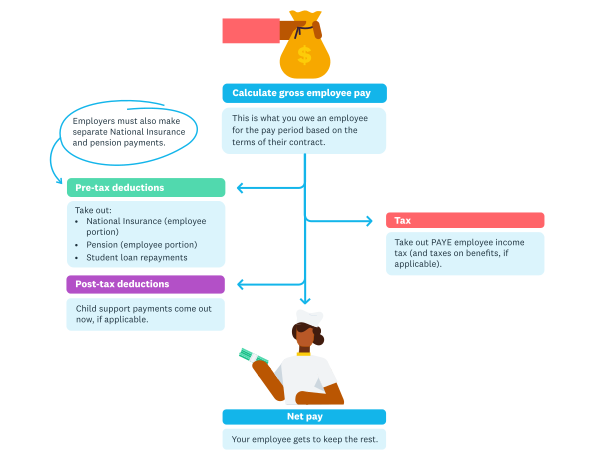
Payroll is what happens each payday and involves sending the right amounts of money to the employee, but also to a number of other locations.
If you employ anyone in your business, you need to understand payroll. It's one of the most important responsibilities you'll take on as an employer.
Payroll is the process of calculating, managing and distributing wages or salaries to your employees. It covers everything from working out gross pay and applying tax deductions to making National Insurance contributions and pension payments. For a deeper look at how to manage the full process, see the small business payroll guide.
Beyond simply paying your team, payroll also involves keeping accurate records, reporting to HM Revenue and Customs (HMRC) and making sure you meet your legal obligations as an employer. Whether you have 1 employee or 50, payroll applies to you.
How does payroll work in the UK?
Running payroll in the UK follows a structured cycle that repeats every pay period.
Each time you run payroll, you calculate your employees' gross pay based on their salary or hours worked. You then apply deductions for income tax, National Insurance and any workplace pension contributions. The net amount left over is what your employee actually receives. For step-by-step guidance on getting this right, see the guide to paying employees.
You're required to report these figures to HMRC through a system called Real Time Information (RTI). This means submitting a Full Payment Submission (FPS) on or before each payday. You also need to send an Employer Payment Summary (EPS) if you're reclaiming statutory payments or reporting no payments in a tax month.
After submitting your reports, you pay HMRC the income tax and National Insurance you've deducted, along with your employer's National Insurance contributions. These payments are typically due by the 22nd of the following tax month if you pay electronically.
What is PAYE?
PAYE is the system HMRC uses to collect income tax and National Insurance from employees' wages. As an employer, it's your responsibility to operate it.
Pay As You Earn (PAYE) means you deduct income tax and National Insurance contributions from your employees' pay before you pay them. You then send those deductions to HMRC on their behalf.
HMRC assigns each employee a tax code, which tells you how much tax-free income they're entitled to before deductions apply. You use these tax codes along with HMRC's tax tables to calculate the correct amount of income tax to deduct each pay period. For a full walkthrough, read the PAYE guide for employers.
You must register as an employer with HMRC before your first payday. Once registered, you'll receive a PAYE reference number and an Accounts Office reference, both of which you need for submitting payroll reports and making payments.
What is included in payroll?
Payroll involves more than just transferring money into your employees' bank accounts. Several components make up a complete payroll run.
A standard payroll process includes the following elements:
- Gross pay: the total amount an employee earns before any deductions
- Income tax: calculated using the employee's tax code and HMRC's tax bands
- Employee National Insurance: contributions based on the employee's earnings
- Employer National Insurance: a separate contribution you pay on top of wages
- Pension contributions: both employee and employer contributions under auto-enrolment
- Statutory payments: such as Statutory Sick Pay (SSP), maternity pay or paternity pay
- Student loan repayments: deducted when an employee earns above the repayment threshold
You'll also need to account for any overtime, bonuses, commission, benefits in kind, or salary sacrifice arrangements that affect the final pay calculation.
Payroll deductions explained
Deductions are the amounts taken from an employee's gross pay before they receive their net pay. Understanding each type helps you stay accurate and avoid errors.
Income tax
Income tax is calculated based on the employee's earnings and their personal tax code. The UK uses a progressive system, meaning higher earnings are taxed at higher rates. The basic rate is 20%, the higher rate is 40% and the additional rate is 45%.
National Insurance contributions
Both you and your employees pay National Insurance. Employees pay Class 1 National Insurance on earnings above the primary threshold. As the employer, you also pay Class 1 contributions on earnings above the secondary threshold. These rates and thresholds are set by HMRC each tax year.
Pension contributions
Under auto-enrolment, eligible employees must be enrolled into a qualifying workplace pension scheme. The minimum total contribution is 8% of qualifying earnings, with at least 3% coming from you as the employer. Pension contributions are deducted from the employee's pay each period.
Student loan repayments
If an employee has an outstanding student loan or postgraduate loan, you'll receive a Start Notice (SL1 or PGL1) from HMRC. You then deduct repayments from their pay once their earnings exceed the relevant threshold. The repayment rate depends on the loan plan type.
Other deductions
Other deductions might include court orders, child maintenance, salary sacrifice arrangements for benefits like cycle-to-work schemes, or voluntary deductions the employee has agreed to. Always keep clear records of why each deduction is being made.
How to set up payroll for the first time
Setting up payroll for the first time can feel daunting, but it becomes manageable when you break it down into clear steps. Follow this process to get started.
1. Register as an employer with HMRC
You must register as an employer with HMRC before your first employee's payday. You can do this up to 2 months in advance. HMRC will send you a PAYE reference number and an Accounts Office reference, which you'll need for all future payroll submissions.
2. Collect employee information
Gather the details you need from each employee, including their full name, address, date of birth, National Insurance number, P45 from a previous employer (if they have one) and bank details for payment. If they don't have a P45, they'll need to complete a starter checklist.
3. Choose a payroll method
Decide how you'll run payroll. You can do it manually using HMRC's Basic PAYE Tools, hire an accountant or bookkeeper to handle it, or use payroll software. Payroll software is often the most practical option for small businesses because it automates calculations and HMRC reporting.
4. Set up a workplace pension
You're legally required to provide a workplace pension scheme and auto-enrol eligible employees. Choose a pension provider, set up the scheme, and make sure your payroll system is configured to calculate and deduct the correct contributions each pay period.
5. Run your first payroll
Calculate each employee's gross pay, apply the correct deductions, and process the payments. Submit your Full Payment Submission (FPS) to HMRC on or before payday. Keep a copy of all payroll records, and provide each employee with a payslip showing a breakdown of their pay and deductions.
Ways to run payroll
There's no single right way to run payroll. The best approach depends on the size of your business, your budget and how much time you can dedicate to it.
Run payroll manually
You can run payroll yourself using HMRC's free Basic PAYE Tools. This option works if you have a small number of employees and straightforward pay arrangements. You'll need to calculate tax and National Insurance manually, submit RTI reports yourself and keep your own records. It's low cost but time-consuming, and errors can lead to penalties.
Use an accountant or bookkeeper
Outsourcing payroll to an accountant or bookkeeper takes the burden off your plate. They'll handle calculations, submissions and record keeping on your behalf. You can search for a qualified professional in the Xero advisor directory. This is a good option if you'd rather focus on running your business than managing payroll details. The cost varies depending on the number of employees and complexity of your payroll.
Use payroll software
Payroll software automates the calculation of pay, tax, National Insurance and pension contributions. It submits your RTI reports directly to HMRC and generates payslips for your employees. Many solutions connect with your accounting software, so payroll data flows straight into your books without manual entry. This can help save time and reduce the risk of errors.
Payroll compliance and legal requirements
Getting payroll wrong can result in fines, penalties and legal problems. Staying compliant means understanding your obligations and meeting them consistently.
As an employer, you're legally required to:
- register with HMRC as an employer before your first employee's payday
- operate PAYE on your employees' wages and report to HMRC in real time
- pay at least the National Minimum Wage or National Living Wage
- provide employees with itemised payslips on or before each payday
- auto-enrol eligible employees into a workplace pension scheme
- keep payroll records for at least 3 years
You also need to stay aware of changes to tax codes, National Insurance thresholds, minimum wage rates and pension contribution levels. These are updated by the government each tax year, and applying outdated figures can lead to underpayments or overpayments.
Late or incorrect RTI submissions can result in penalties from HMRC. The penalties vary based on the size of your business and how late the submission is. Filing on time every pay period is the simplest way to avoid them.
Key payroll documents
Several important documents are part of the payroll process. Understanding what each one is and when it's used helps you stay organised and meet your obligations.
P45
A P45 is issued when an employee leaves your business. It shows their total pay and deductions for the current tax year up to their leaving date. You give 1 copy to the employee and send the details to HMRC through your payroll software. The employee then gives their P45 to their next employer so they're put on the correct tax code.
P60
A P60 is a summary of an employee's total pay, tax and National Insurance for the full tax year (6 April to 5 April). You must provide a P60 to every employee who's on your payroll on 5 April. It must be issued by 31 May following the end of the tax year. Employees may need their P60 to complete a Self Assessment tax return or apply for a mortgage.
P11D
A P11D is used to report benefits in kind and expenses that aren't put through payroll. Examples include company cars, private medical insurance or interest-free loans above a certain amount. You must submit P11D forms to HMRC by 6 July after the end of the tax year and give a copy to the employee.
Payslips
You must give every employee an itemised payslip on or before each payday. A payslip must show gross pay, net pay, and a breakdown of all deductions including tax, National Insurance and pension contributions. You can provide payslips in paper or electronic format.
Statutory payments through payroll
Certain payments are required by law and must be processed through your payroll system. These statutory payments support employees during specific life events.
The main statutory payments you may need to handle include:
- Statutory Sick Pay (SSP): paid to employees who are too ill to work, after 3 qualifying waiting days, for up to 28 weeks
- Statutory Maternity Pay (SMP): paid for up to 39 weeks to eligible employees who are having a baby
- Statutory Paternity Pay (SPP): paid for up to 2 weeks to eligible employees whose partner is having a baby or adopting
- Statutory Adoption Pay (SAP): paid for up to 39 weeks to employees who adopt a child
- Statutory Shared Parental Pay (ShPP): allows parents to share up to 37 weeks of pay between them
- Statutory Parental Bereavement Pay (SPBP): paid for up to 2 weeks to employees who lose a child under 18
Each statutory payment has its own eligibility criteria, rates and duration. You can reclaim some or all of these payments from HMRC, depending on the size of your business. Smaller employers can often reclaim 103% of statutory payments through Small Employers' Relief.
Pension auto-enrolment and payroll
Workplace pensions are closely linked to payroll, and auto-enrolment is a legal duty for every employer. Your payroll process needs to handle pension contributions correctly from day 1.
Auto-enrolment means you must automatically enrol eligible employees into a qualifying workplace pension scheme. An employee is eligible if they're aged between 22 and State Pension age, earn above the earnings trigger (currently £10,000 per year) and work in the UK.
The minimum total contribution is 8% of the employee's qualifying earnings, split between you and the employee. You must contribute at least 3%, with the employee contributing the remaining 5%. These percentages can be higher if you choose to offer a more generous scheme.
Your payroll system needs to assess each employee every pay period to determine whether they meet the eligibility criteria. If they do, you must enrol them and start making deductions. Employees can choose to opt out, but you can't encourage them to do so.
You're also required to re-enrol eligible employees who have opted out roughly every 3 years. Your payroll records should track opt-out dates so you know when re-enrolment is due. The Pensions Regulator oversees compliance and can issue fines for employers who don't meet their duties.
Simplify your payroll with Xero
Payroll doesn't have to be complicated. With the right tools, you can save time, reduce errors and stay on top of your obligations every pay period.
Xero brings your finances together in 1 place, helping you manage everything from invoicing and bank reconciliation to expenses and reporting. When your accounting and payroll data are connected, you get a clearer picture of your business finances without the manual data entry.
Whether you're running payroll for the first time or looking for a better way to manage it, Xero helps you stay organised and compliant. Get one month free.
FAQs on payroll
These are frequently asked questions about payroll that come up regularly for employers.
How often do you need to run payroll?
You run payroll according to whatever pay schedule you've set for your employees, whether that's weekly, fortnightly or monthly. Monthly is the most common for salaried employees in the UK, but you can choose whichever frequency suits your business.
What happens if you miss a payroll deadline?
If you submit your FPS late, HMRC may charge a penalty based on the number of employees on your payroll. Penalties start at £100 for businesses with 1 to 9 employees and increase for larger workforces, with additional charges for submissions that are more than 3 months late.
Can you run payroll for just 1 employee?
Yes, even with 1 employee you must register as an employer and operate PAYE if they earn above the Lower Earnings Limit. HMRC's free Basic PAYE Tools can handle payroll for up to 9 employees.
Do directors need to be on payroll?
If you're a limited company director paying yourself a salary, you need to be on payroll and have PAYE operated on your earnings. Review the hiring employees checklist if you're setting up payroll for the first time alongside bringing on staff. Many directors pay themselves a small salary below the National Insurance threshold and take the rest as dividends, which are handled outside of payroll.
Can you change your payroll frequency once you've started?
Yes, you can switch between weekly, fortnightly and monthly payroll, but you need to update your payroll software settings and let HMRC know through your next FPS submission. Give employees reasonable notice before changing their pay dates.
Handy resources
Advisor directory
You can search for experts in our advisor directory
Your guide to hiring
Learn tips for hiring, onboarding and paying an employee, while keeping everyone happy
Payroll with Xero
Learn how Xero can help with your payroll requirements
Disclaimer
This glossary is for small business owners. The definitions are written with their requirements in mind. More detailed definitions can be found in accounting textbooks or from an accounting professional. Xero does not provide accounting, tax, business or legal advice.