Trial balance: definition, types and how to prepare one
Learn how a trial balance keeps your ledgers accurate, speeds month end, and flags errors before they grow.

Written by Ebony-Storm Halladay — Freelance accounting copywriter, 10 years. Read Ebony's full bio
Published Friday 20 February 2026
Table of contents
Key takeaways
- Prepare a trial balance regularly as a checkpoint to catch errors before they affect your financial statements by listing all account balances and verifying that total debits equal total credits.
- Use the three-step approach of unadjusted, adjusted, and post-closing trial balances to systematically verify your books at different stages of the accounting process.
- Watch for common errors like transcription mistakes, omitted transactions, and misclassified accounts that can throw off your trial balance totals and lead to incorrect financial decisions.
- Implement accounting software to automate trial balance calculations and reduce manual errors, as it pulls balances directly from your ledger and calculates totals automatically.
What is a trial balance?
A trial balance is a financial report that lists the closing balances of all accounts in your general ledger at a specific point in time. It verifies that your total debits equal your total credits before you prepare financial statements or complete an audit.
You might create a trial balance as the first step in closing your books at the end of an accounting period. Think of it as a checkpoint to catch errors before they affect your financial reports.
Components of a trial balance
A trial balance uses a simple three-column layout:
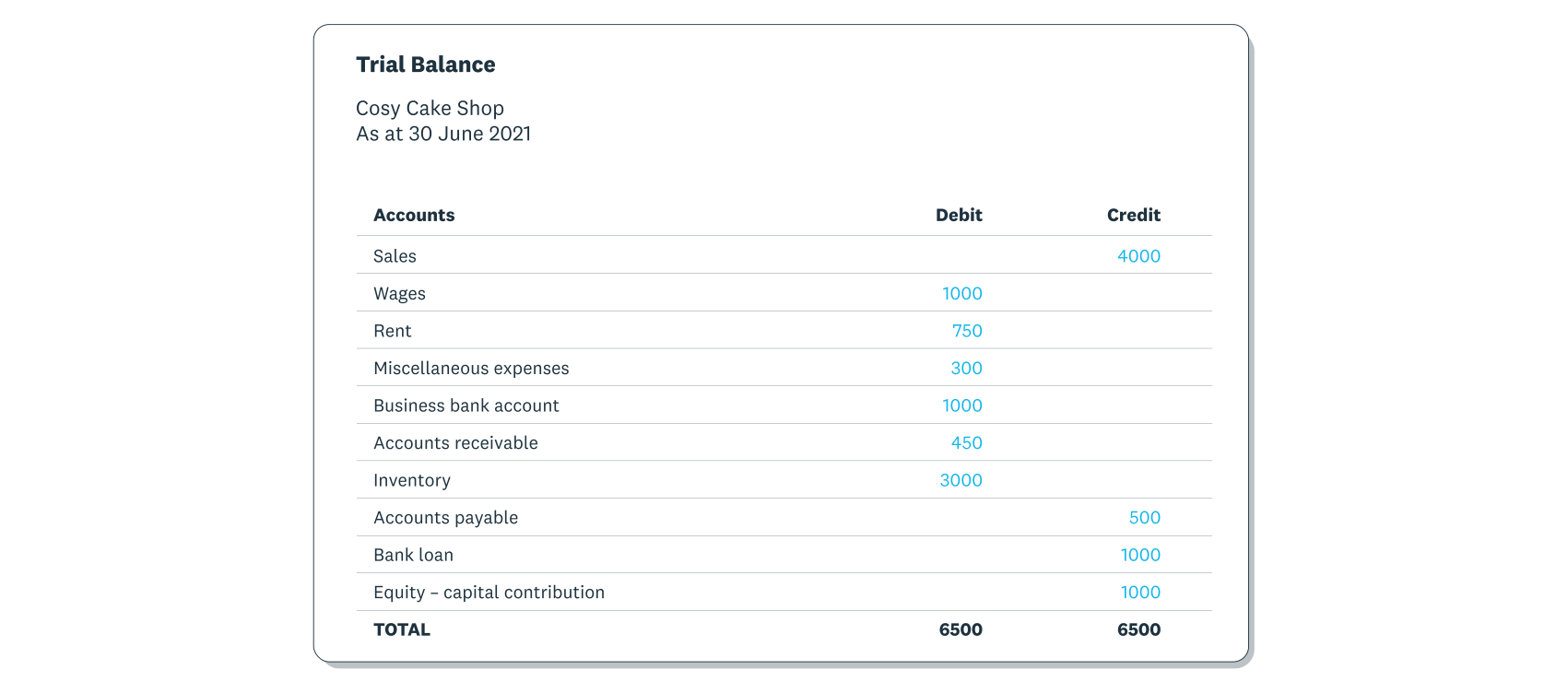
- Account names: lists all ledger accounts from your chart of accounts on the left side
- Debit column: shows debit balances for assets and expense accounts
- Credit column: shows credit balances for liabilities, capital, and income
You can omit accounts you haven't used during the period. The totals of the debit and credit columns should match.
Trial balance example
This trial balance format shows the closing balances of all accounts in the general ledger at the end of a financial period.
The account names go in the far left column. All debit and credit balances from the general ledger are recorded in the 'Debit' and 'Credit' columns accordingly. As you can see, the debit and credit columns total the same amount.
Why trial balances matter
A trial balance helps you catch errors before they affect your financial statements. Running one regularly keeps your books accurate and saves time during audits or tax season.
Here's why trial balances matter for your business:
- Catch errors early: spot mistakes before they compound into bigger problems
- Save time and money: fix issues now rather than untangling errors later
- Meet compliance requirements: maintain accurate records for tax filings and audits, which must adhere to standards like International Financial Reporting Standards (IFRS) 18, which becomes effective for annual reporting periods starting on or after 1 January 2027
- Build a foundation for financial reports: ensure your balance sheet and other statements start with verified data
- Make confident decisions: trust your numbers when planning cash flow or growth
For small businesses, a trial balance is a simple checkpoint that prevents costly surprises down the road.
Types of trial balances
There are three types of trial balances: unadjusted, adjusted, and post-closing. Each follows the same format but happens at a different stage of the accounting process:
- Unadjusted trial balance: captures initial data and checks for obvious errors before adjustments
- Adjusted trial balance: includes corrected entries and serves as the basis for financial statements
- Post-closing trial balance: confirms the ledger is ready for the next accounting period
Unadjusted trial balance
An unadjusted trial balance captures all initial data from your general ledger before any period-end adjustments. It records day-to-day transactions as a starting point for closing your books.
You or your accountant then makes adjustments such as:
- Accruing: adding unpaid bills or earned revenue not yet recorded
- Deferring: recognising income only when it's earned
- Depreciating: spreading asset costs over several years
These adjustments give you a clearer view of your business's financial position.
Adjusted trial balance
An adjusted trial balance summarises the final balances in all accounts after you've made period-end adjustments. You prepare it after the unadjusted trial balance but before creating financial statements.
This report serves as the foundation for your financial reports, ensuring all adjustments are correctly reflected before you finalise your accounts.
Post-closing trial balance
A post-closing trial balance verifies that all debit and credit balances are equal after you've closed temporary accounts. You prepare it after finalising your financial statements.
During the closing process, balances from temporary accounts (revenue, expenses, and dividends) move into retained earnings. The post-closing trial balance confirms your ledger is ready for the next accounting period with a clear separation from the previous one.
How to prepare a trial balance
Preparing a trial balance takes just a few steps. Here's how to create one for your business:
- Gather your general ledger balances: collect the closing balance for each account in your ledger
- List each account name: enter account names in the left column of your trial balance
- Record debit balances: enter all debit balances (assets, expenses) in the debit column
- Record credit balances: enter all credit balances (liabilities, income, equity) in the credit column
- Total both columns: add up the debit column and the credit column separately
- Compare the totals: verify that total debits equal total credits
- Investigate discrepancies: if totals don't match, review your entries for errors before proceeding
Accounting software like Xero automates much of this process. Xero pulls balances directly from your ledger and calculates totals automatically, reducing manual errors and saving you time.
Common trial balance errors
Simple mistakes can throw off your trial balance. Watch out for these common errors:
- Transcription errors: data entry mistakes like mistyping $500 as $5,000
- Omission errors: leaving transactions out of the accounts entirely
- Misclassification errors: recording transactions under the wrong account headings
Even minor errors can alter your financial statements and lead to business decisions based on incorrect information, which is why governing bodies have long-standing standards for the Presentation of Financial Statements, such as International Accounting Standard (IAS) 1, which was adopted in 2001.
How to correct trial balance errors
- Recheck your trial balance: review your numbers thoroughly, take a break, and get a second pair of eyes to spot typos
- Verify your ledger: confirm your ledger figures are correct before inputting them, and re-verify any unreliable figures
- Use accounting software: automate calculations with tools like Xero to prevent mistyped entries and save time
The role of trial balances in financial statements
A trial balance serves as the foundation for accurate financial statements, which must comply with standards designed to improve financial reporting by requiring new defined subtotals like operating profit. Accountants and bookkeepers use it to verify that general ledger account balances correctly reflect your business's financial position.
Check that your debit and credit column totals match. If they don't, the cause may be:
- missing a debit or credit entry
- copying figures incorrectly from the general ledger
Once mistakes are corrected, the adjusted trial balance can be used to prepare balance sheets and other financial statements.
Matching totals don't guarantee error-free books. Missing transactions or incorrect account classifications can still exist even when debits equal credits.
Use Xero to simplify your trial balance preparation
Trial balances help keep your financial statements accurate and give you confidence that your numbers reflect your business's true financial health. With accurate books, you can meet compliance requirements and make better-informed decisions.
Xero accounting software simplifies the process by automating calculations, reducing manual errors, and helping you produce trial balances and financial reports with ease. Get one month free and see how Xero can streamline your accounting.
FAQs on trial balances
Common questions on trial balances answered.
What are the three rules of trial balances?
- Total debits must equal total credits: if they don't match, there's an error somewhere in your entries
- Use the correct chart of accounts: each transaction must be recorded under the appropriate account category
- Enter data accurately: double-check figures to avoid transcription errors that throw off your totals
What is the objective of the trial balance?
A trial balance verifies that your bookkeeping is mathematically accurate before you prepare financial statements. If total debits equal total credits, your ledger is balanced. If they don't match, you have errors to investigate and fix.
What is the difference between a general ledger and a trial balance?
Your general ledger contains detailed records of every transaction, showing individual debits and credits for each account over time. A trial balance summarises only the ending balances of those accounts at a specific point in time.
The general ledger is your complete transaction history. The trial balance is a checkpoint that confirms everything balances before you create financial statements.
What is a trial balance vs a balance sheet?
A trial balance and a balance sheet serve different purposes:
- Trial balance: an internal bookkeeping report that lists general ledger balances to check for mathematical errors before preparing financial statements
- Balance sheet: a formal financial statement that summarises your business's assets, liabilities, and owner's equity at a specific point in time
The trial balance is a working document used to verify accuracy. The balance sheet is a finished report that shows your business's overall financial position.
Disclaimer
Xero does not provide accounting, tax, business or legal advice. This guide has been provided for information purposes only. You should consult your own professional advisors for advice directly relating to your business or before taking action in relation to any of the content provided.
Start using Xero for free
Access Xero features for 30 days, then decide which plan best suits your business.