What is owner's equity?
Learn what owner's equity means, how to calculate it, and why it matters for your business.
Written by Lena Hanna—Trusted CPA Guidance on Accounting and Tax. Read Lena's full bio
Published Wednesday 27 May 2026
Table of contents
Key takeaways
- Owner's equity is the portion of your business you truly own after subtracting all liabilities from total assets, and it serves as a key indicator of financial health for lenders, investors, and potential buyers.
- Your equity changes constantly as you earn revenue, take on debt, withdraw profits, or invest additional capital, so tracking it regularly gives you a clear picture of whether you're building wealth or losing ground.
- Business structure matters: sole proprietors, partnerships, and corporations each account for owner's equity differently, which affects how you report and manage it.
- Book value and fair market value aren't the same thing; understanding the difference helps you set realistic expectations when applying for financing or preparing to sell.
What is owner's equity?
Owner's equity is the portion of your business you actually own after paying off all debts. It's defined as the residual interest in the assets of a business after deducting all liabilities, according to CPA Canada. It represents your business's book value, or net worth, which you can calculate at any time.
This number matters because it shows whether your business is building wealth or losing ground. Lenders, investors, and potential buyers all look at owner's equity to assess your financial health.
Owner's equity gives you a starting point for valuation, though it differs from liquidation value, as CPA Canada notes. That depends on negotiations and other factors, like assets selling for more or less than their carrying amount. But it gives you a reliable starting point for understanding your business's true value.
Components of owner's equity
Several factors determine the size of your owner's equity at any given time. Understanding what increases and decreases it helps you make informed decisions about your business finances.
Things that increase owner's equity:
- Capital investments: money you put into the business from personal funds or outside sources.
- Retained earnings: profits your business earns and keeps rather than distributing to owners.
- Revenue growth: higher sales and income add to your total assets, boosting equity.
Things that decrease owner's equity:
- Owner withdrawals (also called owner's draws): money you take out of the business for personal use.
- Business losses: when expenses exceed revenue, the resulting loss reduces your equity.
- Increased liabilities: taking on more debt without a corresponding increase in assets shrinks equity.

If your business is incorporated, a few additional components come into play. Dividends paid to shareholders reduce equity, while issuing new shares increases it. Treasury stock (shares the company has bought back) also affects the calculation. For most Canadian small businesses operating as sole proprietorships or partnerships, the core components above are what you'll focus on.
How business structure affects owner's equity
The way you record and report owner's equity depends on how your business is structured. Each structure handles ownership, profits, and withdrawals differently.
Sole proprietorship: As the sole proprietor, your equity equals your initial investment plus any profits you've retained, minus any withdrawals you've taken. It's the simplest structure because there's only one owner's capital account to track.
Partnership: Each partner has their own capital account. Equity for each partner reflects their individual capital contributions, plus their share of profits (or minus their share of losses), minus any withdrawals they've taken. The partnership agreement typically sets out how profits and losses are divided.
Corporation: In a corporation, owner's equity is called shareholders' equity. It includes money raised through issuing stock, retained earnings the company has accumulated, and any adjustments for dividends paid or treasury stock. In Canada, private corporations follow Accounting Standards for Private Enterprises (ASPE) when preparing their financial statements, which sets out specific requirements for how shareholders' equity is presented.
How to calculate owner's equity
Calculating your owner's equity takes three steps, all based on the accounting equation. If you're unsure what counts as an asset or a liability, this guide to assets and liabilities breaks it down.
1. Add up your total assets
Assets are everything your business owns that has value:
- Cash: money in bank accounts.
- Accounts receivable: money customers owe you.
- Inventory: products you have in stock.
- Equipment: machinery, computers, and tools.
- Real estate: property and buildings.
- Intangible assets: intellectual property, trademarks, and brand value.
2. Add up your total liabilities
Liabilities are everything your business owes:
- Loans: money owed to banks or lenders.
- Accounts payable: money owed to suppliers.
- Wages payable: money owed to employees.
- Tax obligations: money owed to tax authorities.
3. Apply the formula
Owner's equity = Total assets – Total liabilities. Subtract what you owe from what you own, and the remaining amount is your owner's equity.
Examples of owner's equity
Seeing owner's equity in action makes the concept easier to grasp. Here are two straightforward examples that show how the formula works in practice.
Personal example of owner's equity
Think of it like owning a home. If you own a house worth $300,000 but have a $120,000 mortgage, your equity is $180,000. The house is your asset, the mortgage is your liability, and the difference is what you actually own.
Business example of owner's equity
Now apply the same logic to a business. A repair shop has:
- Assets: $600,000 garage + $50,000 machinery + $50,000 inventory = $700,000 total.
- Liabilities: $300,000 owed on the premises.
- Owner's equity: $700,000 – $300,000 = $400,000.
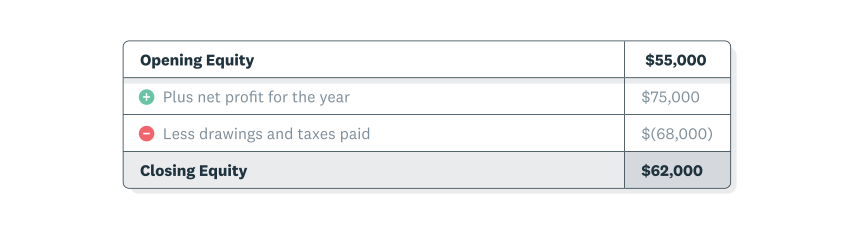
Statement shows closing equity is equal to the opening equity plus the year’s net profit, minus owner withdrawals and taxes.
That $400,000 represents how much of the business the owner truly holds after accounting for all debts.
Where to find owner's equity
Owner's equity appears in two places in your financial statements, each giving you a different perspective.
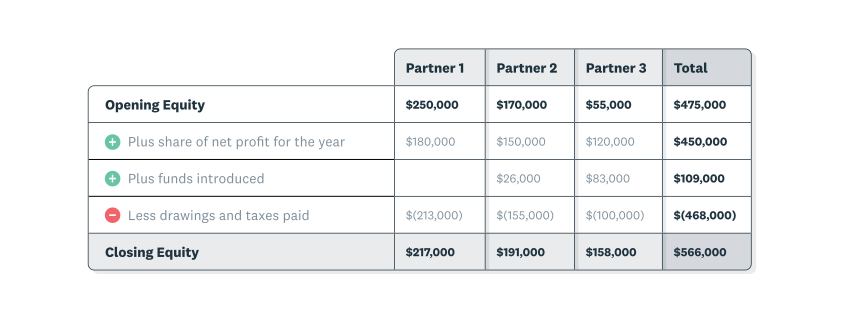
Statement shows closing equity is equal to the opening equity plus the year’s net profit and money introduced, minus owner withdrawals and taxes.
On your balance sheet, you'll find it listed after the assets and liabilities sections. This shows your equity at a specific point in time, though these statements are often issued sometime after the report date, as CPA Canada notes, due to the work involved in their preparation.
On your statement of changes in equity, you'll see how your equity has increased or decreased over a period. This connects your profits and losses to your overall business value.
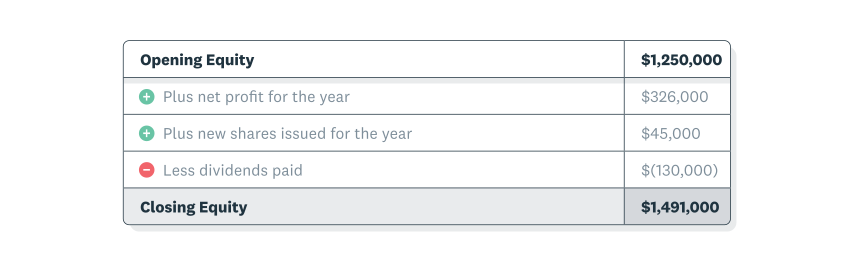
Statement shows closing equity is equal to the opening equity plus the year’s net profit and money from investors, minus owner withdrawals and taxes.
What is a statement of changes in equity?
A statement of changes in equity shows how your business's net worth changed over a specific period. It's one of four basic financial statements. The others are:
- Income statement.
- Balance sheet.
- Cash flow statement.
This statement connects your income statement to your balance sheet by providing information on the sources of this "residual interest," as explained in CPA Canada's guide to reading financial statements. It shows how profits and losses from operations, owner withdrawals, and new investments from capital providers affected your equity during the year.
Example of statement of changes in equity for a sole proprietor
For a sole proprietor, the statement is straightforward. Closing equity equals the opening equity plus the year's net profit, minus owner withdrawals and taxes.
Example of statement of changes in equity for a partnership
In a partnership, the statement tracks each partner's capital account separately. Closing equity equals the opening equity plus the year's net profit and any money introduced by partners, minus owner withdrawals and taxes.
Example of statement of changes in equity for a company
For a company, closing equity equals the opening equity plus the year's net profit and money from investors, minus dividends paid and taxes.
Most small business owners focus on the income statement and balance sheet for day-to-day decisions. These show your profits and current financial position in more detail.
How the statement of changes in equity is used
The statement of changes in equity becomes especially useful when you're preparing for a loan application, bringing in investors, or planning to sell your business. That's when tracking how your equity has grown over time really matters.
Owner withdrawals can vary significantly from year to year; a 2023 Xero survey found that 31% of Canadian small business owners were unable to pay themselves at some point during the prior 12 months, a pattern that would be reflected directly on this statement.
Owner's equity vs. fair market value
Your owner's equity (book value) and the price someone would actually pay for your business (fair market value) are rarely the same number. Understanding why they differ helps you set realistic expectations.
Book value is based on historical cost accounting. That means your assets are recorded at what you originally paid for them, minus depreciation. A piece of equipment you bought five years ago might be worth far more (or far less) on the open market than what appears on your balance sheet.
Fair market value also accounts for things that don't appear on a balance sheet at all:
- Brand recognition and customer loyalty.
- Goodwill, including your reputation and relationships.
- Future earning potential.
- Market conditions and buyer demand.
CPA Canada guidance distinguishes book value from liquidation value, noting that the actual sale price depends on negotiations and whether assets sell for more or less than their carrying amount. If you're thinking about selling your business or bringing in investors, get a professional valuation that goes beyond the numbers on your balance sheet.
How to increase owner's equity
Growing your owner's equity means building the long-term value of your business. There are several practical strategies you can use to move the number in the right direction.
- Increase revenue and profitability: higher profits that stay in the business directly boost retained earnings, which is the largest driver of equity growth for most small businesses.
- Reduce liabilities: paying down loans, credit lines, and other debts shrinks the liability side of the equation, increasing equity even if your assets stay the same.
- Invest additional capital: putting more of your own money into the business increases your capital account and, in turn, your equity.
- Minimize owner withdrawals: the less you take out, the more equity stays in the business. This doesn't mean you shouldn't pay yourself; it means being strategic about timing and amounts.
- Improve asset utilization: making better use of the assets you already own (selling unused equipment, collecting outstanding receivables faster) can strengthen your balance sheet.
Even small, consistent improvements across these areas add up over time. Reviewing your balance sheet regularly helps you spot opportunities to build equity before they slip past.
Can owner's equity be negative?
Yes, owner's equity can turn negative, and it's a serious warning sign. Negative equity means your business owes more than it owns.
Common causes of negative equity include:
- Sustained losses over multiple periods that erode retained earnings.
- Excessive owner withdrawals that outpace profits.
- Taking on large amounts of debt without a corresponding increase in asset value.
- A sudden drop in asset value (for example, inventory that becomes obsolete).
Negative equity makes it harder to borrow money, since lenders see it as a sign that your business may not be able to repay new debt. It can also discourage potential investors or buyers. If your equity turns negative, focus on the strategies in the previous section: reduce debt, limit withdrawals, and work on returning to profitability as quickly as possible.
Track your owner's equity with confidence
Understanding your owner's equity helps you make smarter decisions about your business. You'll know whether you're building wealth, when you can afford to invest in growth, and what your business might be worth if you decide to sell.
Your equity changes constantly as you earn revenue, pay expenses, take out loans, and withdraw profits. Tracking these movements gives you a clear picture of your financial progress over time.
Cloud accounting software automatically calculates your assets, liabilities, and equity as you record transactions, so you'll always know where your business stands. Get one month free to track your owner's equity with confidence.
FAQs on owner's equity
Here are answers to frequently asked questions about owner's equity.
Is shareholder's equity the same thing as owner's equity?
Yes, they refer to the same concept. Sole proprietors and partnerships typically use "owner's equity," while corporations call it "shareholders' equity" or "stockholders' equity."
How do I calculate the owner's equity statement?
Start with your opening equity balance, add profits and new investments, then subtract withdrawals and losses. The result is your closing equity balance.
Do all transactions affect the owner's equity?
Most transactions affect your owner's equity, either directly or indirectly. However, some transactions, like swapping one asset for another of equal value, have no net effect on equity.
Is owner's equity an asset?
No. Owner's equity is a separate category on the balance sheet that represents your residual claim after all liabilities have been subtracted from assets.
What is the difference between equity and return on equity?
Equity is the total value of your ownership stake at a point in time. Return on equity (ROE) measures how effectively your business generates profit relative to that equity, calculated by dividing net income by average owner's equity.
How do owner withdrawals affect owner's equity?
Every withdrawal reduces your owner's equity directly by lowering your capital account on the balance sheet. Track withdrawals against your profits to make sure you're not taking out more than the business can sustain.
Disclaimer
Xero does not provide accounting, tax, business or legal advice. This guide has been provided for information purposes only. You should consult your own professional advisors for advice directly relating to your business or before taking action in relation to any of the content provided.
Start using Xero for free
Access Xero features for 30 days, then decide which plan best suits your business.