Margin vs markup
Understand margin vs markup: how to calculate each and when to use them to price and protect your profit.
Published Wednesday 12 August 2026
Table of contents
Key takeaways
- Margin (or gross margin) is gross profit expressed as a percentage of your selling price, showing how much of each sale you keep after covering costs.
- Markup is gross profit expressed as a percentage of your cost of sales, showing how much you add on top of cost to reach your selling price.
- Because markup divides by the smaller cost figure, it always produces a larger percentage than margin for the same sale.
- Use markup when setting prices from a known cost, and use margin when judging profitability or comparing performance over time.
What is margin?
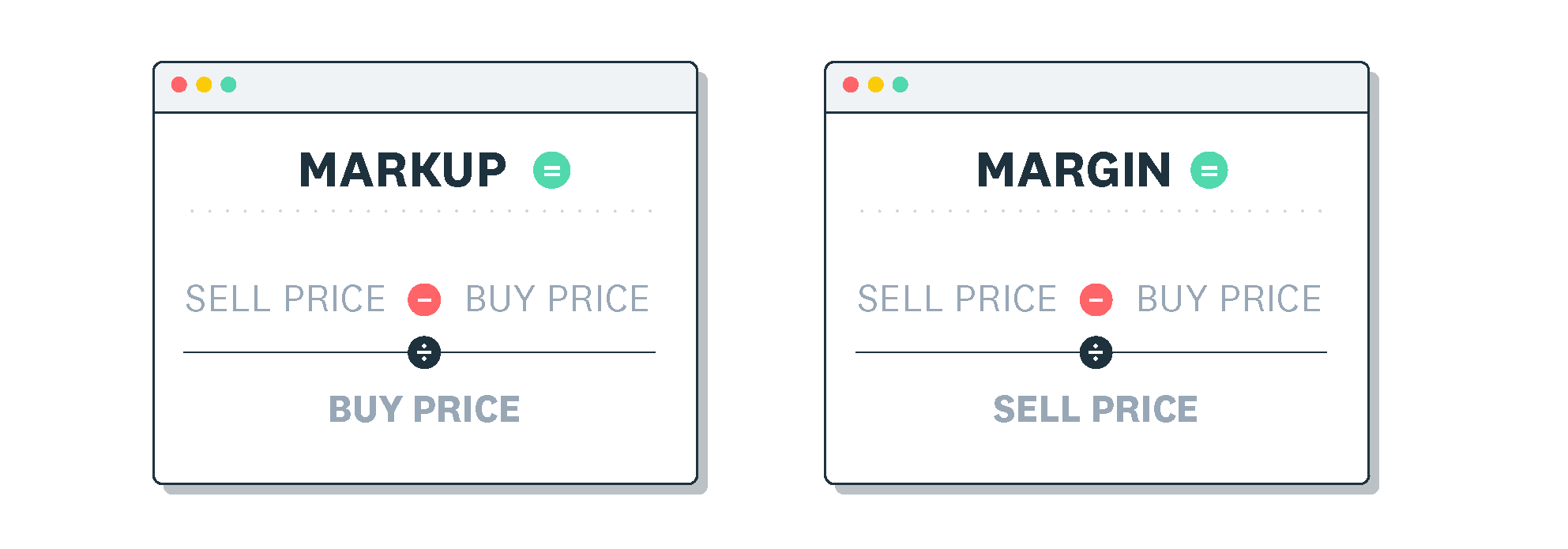
Margin (also called profit margin or gross margin) is gross profit expressed as a percentage of your selling price (revenue). It tells you what portion of every rand you earn actually stays in your pocket after paying for what you sold.
Margin = (gross profit ÷ revenue) × 100, where gross profit = selling price − cost of sales.
For example, you buy an item for R60 and sell it for R100. Your gross profit is R40. Margin = R40 ÷ R100 × 100 = 40%. This means you keep 40 cents of every rand from that sale. Understanding your gross profit margin helps you see how efficiently your pricing covers costs.
What is markup?
Markup is gross profit expressed as a percentage of your cost of sales. It shows how much you add on top of your cost to arrive at your selling price.
Markup = (gross profit ÷ cost of sales) × 100.
Using the same example, your gross profit is R40 and your cost is R60. Markup = R40 ÷ R60 × 100 = 66.7%. This tells you that you add 66.7% to your cost to set your selling price. Markup is the figure most business owners use when pricing products or services.
Margin vs markup: the key difference
Both margin and markup describe the same rand amount of gross profit. The difference is which base you divide by. Markup divides by the smaller cost figure, so it always produces a larger percentage than margin, which divides by the larger selling price. The Corporate Finance Institute defines markup as the difference between selling price and cost expressed against cost, while margin measures that same profit against revenue.
- Margin uses selling price as the base, answering "what percentage of revenue is profit?"
- Markup uses cost of sales as the base, answering "what percentage did I add to cost?"
- Margin is typically used to judge profitability and compare profitability ratios across products or periods.
- Markup is typically used to calculate what selling price to charge based on a known cost.
How to convert between margin and markup
You can convert between these two figures using simple formulas. This is useful when your supplier quotes a markup but you need to know the margin for your financial reports.
To turn markup into margin: margin = markup ÷ (1 + markup).
To turn margin into markup: markup = margin ÷ (1 − margin).
When working through these conversions, remember that cost figures (including marginal cost) feed directly into your pricing decisions. Here are some common equivalents to keep handy:
- 15% markup ≈ 13% margin
- 20% markup ≈ 16.7% margin
- 25% markup = 20% margin
- 33.3% markup = 25% margin
- 50% markup = 33.3% margin
- 100% markup = 50% margin
When to use margin vs markup
Use markup when you know your cost and need to calculate a selling price. Use margin when you want to judge how much of each sale you actually keep as gross profit, or when comparing profitability over time or against competitors.
According to Statistics South Africa's Annual Financial Statistics, as analysed by the Bureau of Market Research, the average after-tax profit margin across all South African businesses was 1.3% in 2024, and the trade sector operated at just 1.0%. When profitability is this tight, watching your margin (not just your markup) matters. A healthy markup on paper can still leave you with razor-thin margins if your other costs creep up.
To measure profitability accurately, you need to run financial reports regularly. Tracking margins also helps you spot how changes in cost of sales or pricing affect your cash flow over time.
Keep your margins healthy with Xero
Xero's accounting software shows your margins in real time, so you always know where you stand. Financial reports update automatically as you record sales and costs, giving you a clear view of profitability without manual calculations. To see how Xero can help you track margins and stay on top of your numbers, get one month free.
FAQs on margin vs markup
Here are answers to common questions about margin and markup.
Is margin or markup always bigger?
Markup is always the bigger number when you compare the same sale. This is because markup divides gross profit by the smaller cost figure, while margin divides by the larger selling price.
How do I work out margin from markup?
Divide your markup percentage (as a decimal) by one plus that markup. For instance, a 50% markup (0.5) gives you 0.5 ÷ 1.5 = 0.333, or 33.3% margin.
Should I price using margin or markup?
Most businesses find markup easier for setting prices because you simply add a percentage to your cost. Once prices are set, track your margin to confirm you're hitting your profitability targets.
Can margin and markup ever be equal?
Only when both are zero, meaning you sell at cost with no gross profit. Any positive gross profit produces a larger markup than margin.
Related terms
Learn more about margin and markup
Handy resources
Advisor directory
You can search for experts in our advisor directory
Xero Small Business Guides
Discover resources to help you do better business
Financial reporting
Keep track of your performance with accounting reports
Disclaimer
This glossary is for small business owners. The definitions are written with their requirements in mind. More detailed definitions can be found in accounting textbooks or from an accounting professional. Xero does not provide accounting, tax, business or legal advice.