Get Xero finance answers in Microsoft 365 Copilot
Ask Microsoft 365 Copilot about your profit, cash, invoices and customers, and get answers from your live Xero data.
Get Xero finance answers instantly with Copilot
What to ask Copilot about your finances
Once the Xero connector is set up in Microsoft 365 Copilot, you can ask about your numbers in plain English. Here are three places to start.
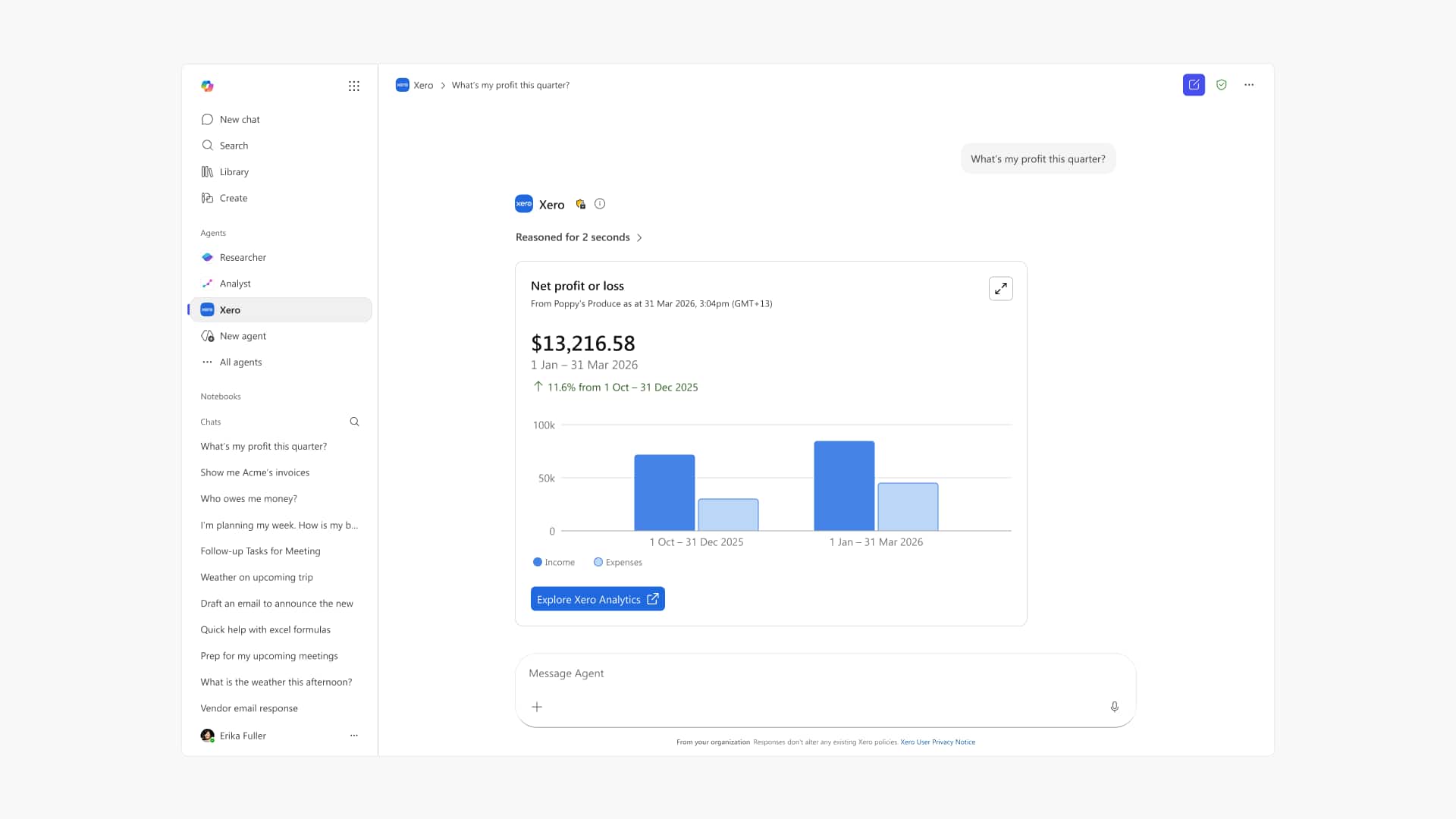
Revenue and profit
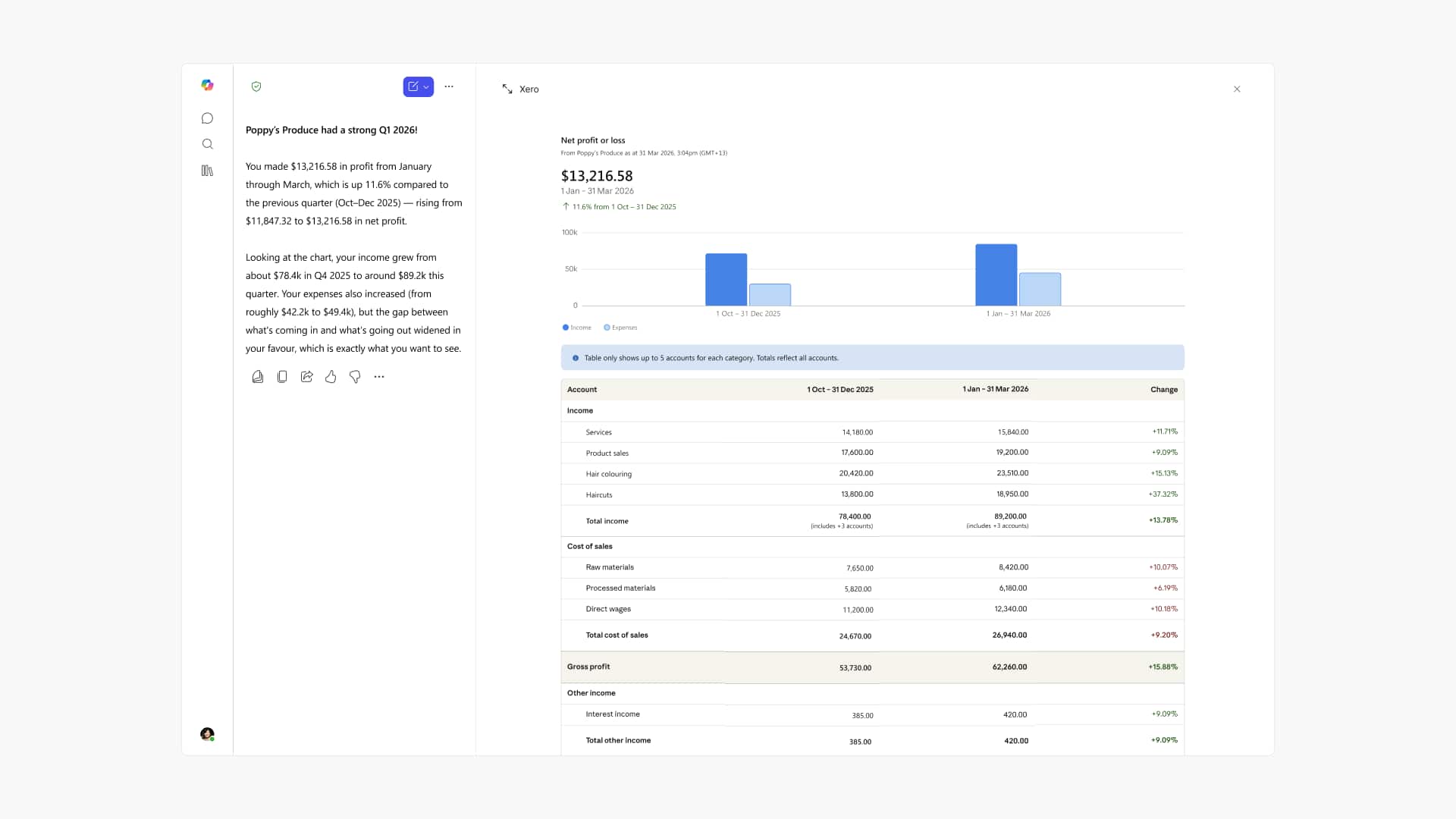
Ask "What was my profit this quarter?" and get a plain-English P&L summary from your Xero data.
Receivables and customers
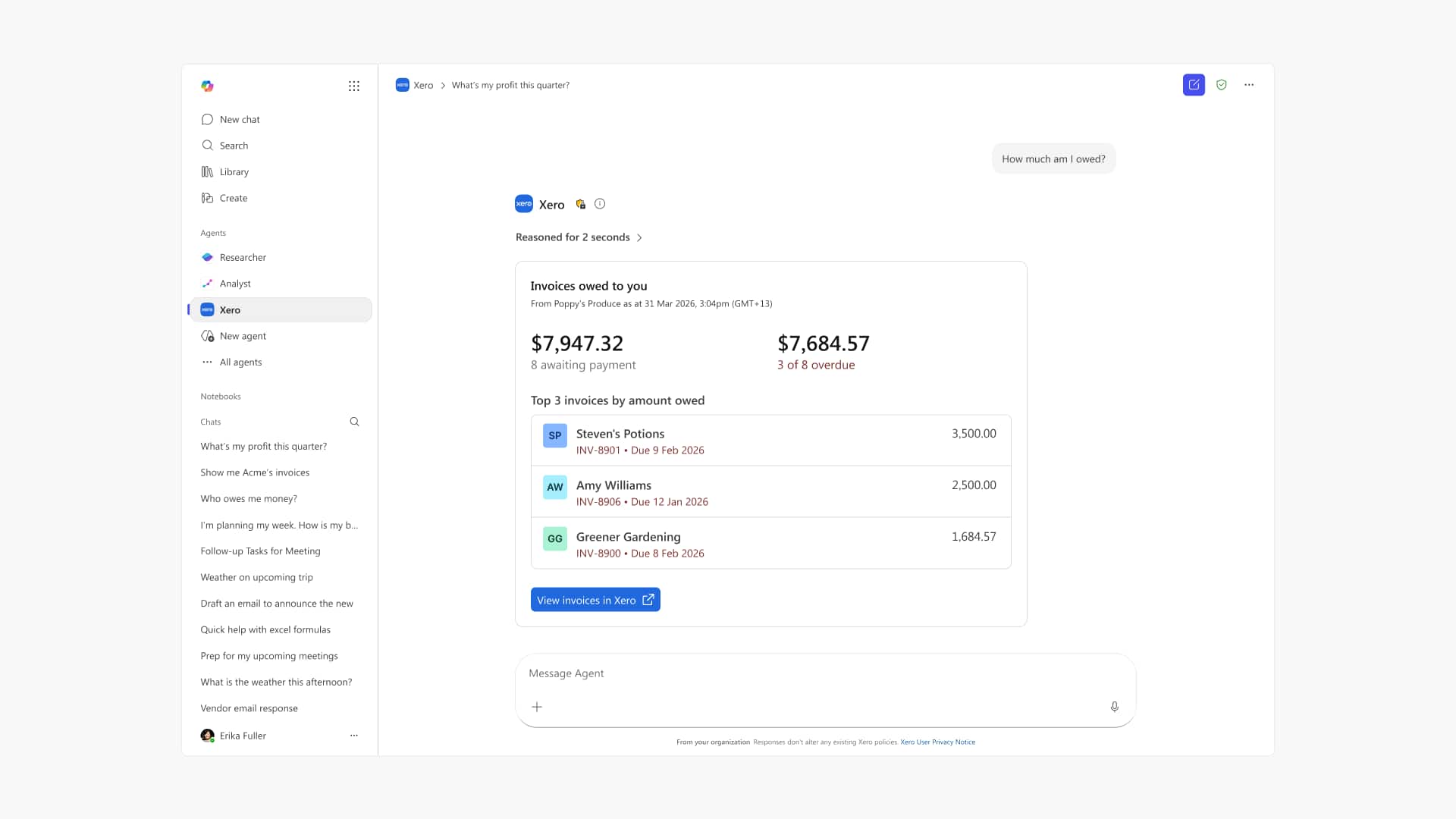
Ask "Who owes me money?" to see overdue invoices and your top customers, pulled from your Xero records.
Cash and financial position
Ask "What's my cash position right now?" for your balance, plus what you're owed and what you owe.
Ask your Xero questions right in Copilot
Ask Microsoft 365 Copilot in plain English and it pulls the figure from your live Xero data, without leaving the Microsoft 365 apps you already work in, whether you're mid-email or planning your week.
- Get upfront answers in plain English, with no report to run
- Pull profit, cash, invoice and customer figures from Xero together in one answer
- Ask follow-up questions to go deeper on any answer
Put the numbers next to what you know
Whether you chase an overdue invoice depends on more than the amount. You know the customer is waiting on a big job to pay out, and your accountant knows what a gap that size does to your cash this quarter. Copilot brings the amount and days overdue from Xero into that conversation.
- See each overdue invoice, with the amount and how late it is, in one answer
- Check your cash position at a glance, in plain English
- Compare revenue, profit and cash for any month, quarter or year
Stay in control of every decision
The Xero connector is read-only at launch, so Microsoft 365 Copilot pulls figures but can't change a thing. Answers link to the report, invoice or contact in Xero, the same records your accountant reconciles and reports from. Your data isn't used to train AI models.
- Read-only at launch: Copilot reads your data but can't change it
- Open the matching report, invoice or contact in Xero from any answer
- Your Xero data isn't used to train AI models
How to connect Xero to Microsoft 365 Copilot
Connecting takes only a few minutes. You'll need an active Xero subscription and a paid Microsoft 365 Copilot licence, with no developer setup.
Step 1:
In Microsoft 365 Copilot, add the Xero agent from the agent store.
Step 2:
Sign in with your Xero login to connect your account.
Step 3:
Choose the Xero organisation you want to use.
Step 4:
Start asking Copilot about your finances, like profit, cash, invoices and customers.

The Xero agent in Copilot vs Copilot Studio
The Xero agent in Microsoft 365 Copilot gives read-only answers in chat. Copilot Studio and the Xero MCP server are developer build tools.
FAQs
It's a secure, read-only connection between your Xero account and Microsoft 365 Copilot. You ask plain-English questions about profit, cash, invoices and customers, and Copilot answers from your live Xero data, with links back to the Xero report, invoice or contact so you can check the detail before you act.
It's a secure, read-only connection between your Xero account and Microsoft 365 Copilot. You ask plain-English questions about profit, cash, invoices and customers, and Copilot answers from your live Xero data, with links back to the Xero report, invoice or contact so you can check the detail before you act.
Open Microsoft 365 Copilot, add the Xero agent, then sign in with your usual Xero login and choose the organisation you want. There's no developer setup, and it takes a few minutes. Once connected, you can ask about your finances straight away.
Open Microsoft 365 Copilot, add the Xero agent, then sign in with your usual Xero login and choose the organisation you want. There's no developer setup, and it takes a few minutes. Once connected, you can ask about your finances straight away.
You need an active Xero subscription and a paid Microsoft 365 Copilot licence on a Business or Enterprise plan. With both in place, you can add the Xero agent and start asking questions about your Xero data in Copilot.
You need an active Xero subscription and a paid Microsoft 365 Copilot licence on a Business or Enterprise plan. With both in place, you can add the Xero agent and start asking questions about your Xero data in Copilot.
Xero doesn't charge you to add the connector. You'll need an active Xero subscription and a paid Microsoft 365 Copilot licence, so the cost sits with those existing plans rather than the connection itself.
Xero doesn't charge you to add the connector. You'll need an active Xero subscription and a paid Microsoft 365 Copilot licence, so the cost sits with those existing plans rather than the connection itself.
Your Xero data is never used to train AI models. The connection is read-only and session-based, so Copilot reads your live data to answer a question but can't change it, and Xero stays the source of truth. You choose which organisation to connect.
Your Xero data is never used to train AI models. The connection is read-only and session-based, so Copilot reads your live data to answer a question but can't change it, and Xero stays the source of truth. You choose which organisation to connect.
No. The connector is read-only at launch, so Copilot can answer questions but can't edit invoices, post transactions or change anything in your books. When you want to act, follow the link back to Xero and make the change yourself.
No. The connector is read-only at launch, so Copilot can answer questions but can't edit invoices, post transactions or change anything in your books. When you want to act, follow the link back to Xero and make the change yourself.
Ask about profit, cash flow, overdue invoices and your top customers. Copilot pulls answers from your live Xero data, so they're always current, and you can ask follow-up questions without opening or building a report.
Ask about profit, cash flow, overdue invoices and your top customers. Copilot pulls answers from your live Xero data, so they're always current, and you can ask follow-up questions without opening or building a report.
No. This is the Xero agent inside Microsoft 365 Copilot. Copilot for Finance is Microsoft's own finance product, and Copilot Studio is Microsoft's tool for building custom agents. The Xero agent simply answers questions from your Xero data.
No. This is the Xero agent inside Microsoft 365 Copilot. Copilot for Finance is Microsoft's own finance product, and Copilot Studio is Microsoft's tool for building custom agents. The Xero agent simply answers questions from your Xero data.
No. You and your accountant already work through your numbers together, and that doesn't change. Copilot pulls figures from Xero, like the amount on a late invoice, while what it means for your cash and what to do about it stays with you both. It isn't tax or financial advice, and it doesn't replace JAX.
No. You and your accountant already work through your numbers together, and that doesn't change. Copilot pulls figures from Xero, like the amount on a late invoice, while what it means for your cash and what to do about it stays with you both. It isn't tax or financial advice, and it doesn't replace JAX.
AI that keeps you in control of your books
Xero believes AI should bring you the numbers, not make the calls. Decisions on cash, pricing and which customers to chase stay with you and your accountant. The Xero connector answers in Microsoft 365 Copilot without touching your books, and never uses your data to train AI models.
See how Xero builds AI you can trust
See your Xero numbers in Microsoft 365 Copilot
New to Xero? Start with a plan and connect the Xero agent in Microsoft 365 Copilot to ask about your finances in plain English.