What is profitability? How to measure profit margins
Learn how to measure profitability, track the right ratios, and find quick wins to grow your bottom line.

Written by Lena Hanna—Trusted CPA Guidance on Accounting and Tax. Read Lena's full bio
Published Monday 30 March 2026
Table of contents
Key takeaways
- Calculate both gross profit margin (revenue minus direct costs) and net profit margin (revenue minus all costs) monthly to track your business's financial health and catch cost increases before they damage your bottom line.
- Set target margins based on industry benchmarks and take immediate action when margins fall below targets by raising prices, negotiating better supplier rates, or cutting unnecessary operating expenses.
- Use accounting software to automate profitability calculations and generate real-time profit and loss reports, eliminating manual spreadsheet errors and giving you instant visibility into margin trends.
- Focus on improving profitability through strategic pricing adjustments on high-demand products, upselling to existing customers, and eliminating low-margin offerings that drain resources without adding significant value.
What profitability means in small business
Profitability measures how effectively your business turns sales into profit. You express it as a percentage, showing how much revenue you keep after paying costs.
The main profitability metrics are gross profit margin and net profit margin. These ratios reveal what portion of each sale becomes actual profit.
Here's what your profitability levels might indicate:
- High profitability (healthy margins): You keep a large portion of revenue as profit. This is generally positive, though it may signal room to lower prices and boost sales volume.
- Low profitability (narrow margins): Most revenue goes toward expenses. While many consider a 10% net profit margin average, experts consider a 5% margin low according to profit margin benchmarks. This could mean costs are too high, pricing is too low, or you're in a price-competitive market.
Profit vs profitability: understanding the difference
Understanding the difference helps you make better decisions:
- Profit: The rand amount remaining after you pay all expenses
- Profitability: The percentage of revenue you keep as profit
High profitability only improves your bottom line when paired with strong sales. You need both good margins and good revenue to grow.
Understanding key profitability metrics helps you assess your business's financial performance.
Profitability metrics
Profitability metrics show what percentage of your revenue becomes profit. The most common are gross profit margin and net profit margin, sometimes called profitability ratios.
These metrics help you track financial health and compare performance over time.
The two most important metrics to understand are gross profit margin and net profit margin.
Gross profit margin
Gross profit margin measures the percentage of revenue remaining after paying direct costs, known as cost of goods sold (COGS). These include materials, labour, and other expenses that directly relate to delivering your product or service.
Why it matters:
- Shows production efficiency: Reveals how much you spend to create what you sell
- Funds operations: Gross profit covers rent, utilities, marketing, and admin costs
- Signals pricing health: Low margins may indicate pricing or cost issues, as a gross margin below 30% can signal financial strain for businesses with high gross costs, according to small business profit margin benchmarks
Net profit margin
Net profit margin measures the percentage of revenue remaining after paying all business costs, including operating expenses, interest, and overheads.
Why it matters:
- Shows overall profitability: Reveals your true bottom-line performance
- Guides reinvestment: Net profit funds growth or owner distributions
- Enables comparison: Helps benchmark against industry standards, as the average net profit margin by industry across all industries is around 8.5%
Note: You can quote net profit before or after taxes. This article focuses on pre-tax net profit.
Operating profit margin
Operating profit margin measures the percentage of revenue remaining after paying both direct costs and operating expenses, but before interest and taxes.
This metric shows how efficiently you run day-to-day operations. It's useful when comparing businesses with different financing structures, since it excludes interest costs.
To calculate: (Revenue − COGS − Operating expenses) ÷ Revenue × 100
How to measure profitability
To measure profitability, divide profit by revenue and then multiply by 100 to get a percentage. You'll need to figure out what your profit is first. This step differs between gross and net profit margin.
How to calculate gross profit margin
To calculate gross profit margin:
- Subtract cost of goods sold (COGS) from revenue to get gross profit
- Divide gross profit by revenue
- Multiply by 100 to get the percentage
Try our gross margin calculator.

*Net profit can be quoted before or after taxes. If quoting after-tax net profit then you need to also subtract taxes.
How to calculate net profit margin
To calculate net profit margin:
- Subtract all costs (COGS, operating expenses, interest, and overheads) from revenue to get net profit
- Divide net profit by revenue
- Multiply by 100 to get the percentage
Try our net profit margin calculator.

*Net profit can be quoted before or after taxes. If quoting after-tax net profit then you need to also subtract taxes.
Example of profitability calculation
A business takes R100K in sales, after spending R60K on inventory and R20K on general expenses. Here's how to calculate profitability step by step:
- Calculate gross profit: R100K revenue − R60K COGS = R40K gross profit
- Calculate gross profit margin: R40K ÷ R100K × 100 = 40%
- Calculate net profit: R100K revenue − R80K total costs = R20K net profit
- Calculate net profit margin: R20K ÷ R100K × 100 = 20%
In this example, the business keeps 40% of revenue after direct costs and 20% after all expenses.
Why measuring profitability matters
Regular profitability tracking helps you spot problems early and make informed decisions. Without it, you may not notice margin erosion until cash flow suffers.
Here's why ongoing measurement matters:
- Catches cost increases early: Materials, energy, transport, and rent prices shift regularly
- Supports pricing decisions: Helps you adjust prices before margins shrink too far
- Reduces stress: Clear visibility into margins helps you plan with confidence
- Balances value and profit: Ensures you're offering fair prices while staying profitable
Finding the numbers to measure profitability
You'll need specific figures from your financial records to calculate profitability. Here's where to find them:
- Revenue: Check your profit and loss statement (P&L) or sales reports
- Cost of goods sold (COGS): Find this on your P&L under direct costs or cost of sales
- Operating expenses: Your P&L lists operating expenses as overheads, admin costs, or general expenses
- Net profit: Your P&L shows net profit at the bottom after deducting all costs
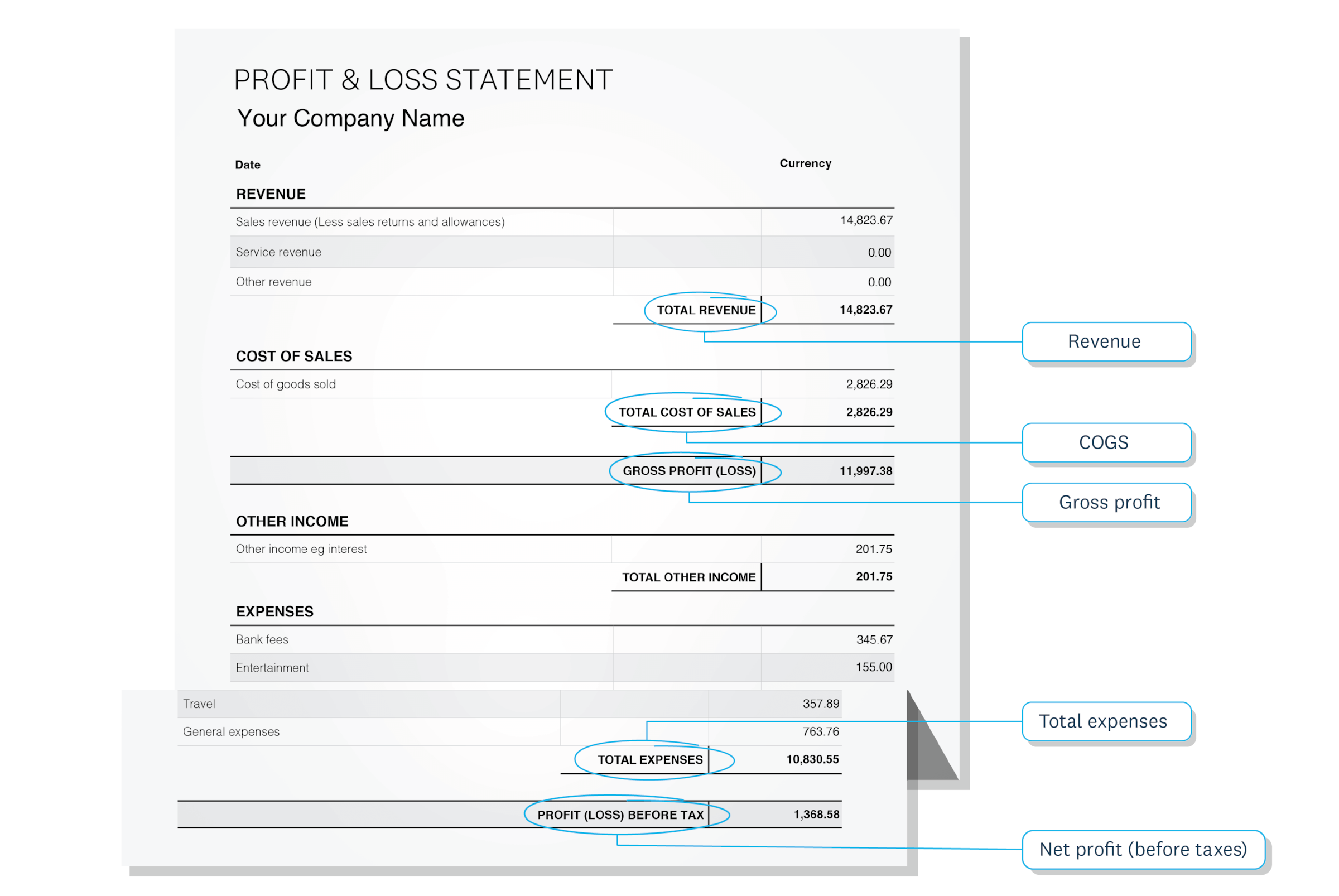
If you use accounting software like Xero, these figures update automatically as you record transactions. You can pull a P&L report anytime to get the numbers you need.
Once you know where to find your numbers, software can streamline the calculation process.
How to measure profitability with software
Accounting software automates profitability calculations, saving you time and reducing errors. Instead of manual spreadsheets, you get real-time margin data at a glance.
With Xero, you can:
- View margins instantly: Open Xero analytics and select your reporting period
- Generate P&L reports: Pull profit and loss statements whenever you need them
- Track trends over time: Compare profitability across months or years
This approach gives you accurate, up-to-date figures without manual calculations.
How to manage profitability
Managing profitability means tracking your margins and taking action when they slip. Here's how to stay on top of it:
- Set a target margin: Ask your accountant or bookkeeper what's typical for your industry
- Review regularly: Check margins monthly, or whenever costs change significantly
- Watch for warning signs: Price wars, rising supplier costs, or declining sales all affect margins
If margins fall below your target, you have options:
- Raise prices: Adjust pricing to reflect your true costs
- Reduce COGS: Negotiate with suppliers or find more efficient production methods
- Cut overheads: Review general expenses for savings opportunities
For more strategies, see How to increase profits.
Common ways to improve profitability
Improving profitability means either increasing revenue, reducing costs, or both. Here are practical strategies that work for small businesses.
Increase revenue without adding costs:
- Raise prices on high-demand products or services
- Upsell or cross-sell to existing customers
- Focus marketing on your most profitable offerings
Reduce direct costs (COGS):
- Negotiate better rates with suppliers
- Find alternative materials or vendors
- Improve production efficiency to reduce waste
Lower operating expenses:
- Review subscriptions and recurring costs for savings
- Automate repetitive tasks to reduce labour costs
- Consolidate software tools where possible
Improve pricing strategy:
- Analyse which products or services deliver the best margins
- Phase out low-margin offerings that drain resources
- Test price increases on less price-sensitive customers
Small changes across multiple areas often add up to meaningful margin improvements. For example, some industries like apparel maintain high gross margins through a substantial markup on products, as shown in industry profit margin data.
Track profitability with confidence using Xero
Understanding your profitability helps you make smarter decisions about pricing, costs, and growth. Regular tracking keeps you in control of your margins and your business.
Xero makes profitability measurement simple:
- Automated calculations: See gross and net margins without manual spreadsheets
- Real-time reports: Pull P&L statements and analytics whenever you need them
- Clear dashboards: Track trends and spot changes at a glance
Take control of your profitability today. Get one month free and see how Xero simplifies your financial management.
FAQs on profitability
Here are answers to common questions about measuring and improving profitability.
What's a good profitability percentage for a small business?
Net profit margins typically range from 5% to 20% depending on your industry. Service businesses often see higher margins than retail or manufacturing; for example, average profit margin benchmarks show restaurants at around 11% net, while retail sits closer to 3%.
How often should I measure profitability?
Review your margins monthly at minimum, and check them whenever costs change significantly or you adjust pricing.
Can a business be profitable but still run out of cash?
Yes. Profitability measures earnings over time, while cash flow tracks actual money available. A profitable business can face cash shortages if customers pay slowly or large expenses come due. For example, retail businesses often have narrow margins and must cover expenses like rent, inventory, and payroll before receiving cash from sales, as explained in small business profit margin guidance.
What's the difference between gross and net profit margin?
Gross profit margin measures revenue minus direct costs only. Net profit margin measures revenue minus all costs, including overheads and operating expenses.
Do I need accounting software to measure profitability?
You can calculate margins manually using spreadsheets, but accounting software automates the process and reduces errors. It also gives you real-time visibility into your margins.
Disclaimer
Xero does not provide accounting, tax, business or legal advice. This guide has been provided for information purposes only. You should consult your own professional advisors for advice directly relating to your business or before taking action in relation to any of the content provided.
Start using Xero for free
Access Xero features for 30 days, then decide which plan best suits your business.