How to lodge BAS online: due dates and steps
Learn when your BAS is due, how to lodge online, and tips to keep the process hassle free.

Written by Lena Hanna—Trusted CPA Guidance on Accounting and Tax. Read Lena's full bio
Published Wednesday 27 May 2026
Key takeaways
- A Business Activity Statement (BAS) is a form you submit to the Australian Taxation Office (ATO) to report and pay your tax obligations, including Goods and Services Tax (GST), Pay As You Go (PAYG) withholding, and PAYG instalments.
- You can lodge BAS online through ATO Online Services, Standard Business Reporting (SBR)-enabled accounting software, or a registered tax agent, and lodging electronically gives you an extra two weeks to meet your deadline.
- Keeping your financial records reconciled throughout the quarter, rather than scrambling at the end, makes BAS preparation faster and reduces the risk of errors.
- Cloud accounting software like Xero Accounting Software automates bank feeds and GST tracking, so your numbers are ready when it's time to lodge.
What is BAS?
If you run a business in Australia and you're registered for GST, you'll need to lodge a BAS. It's a regular requirement from the ATO, and understanding what it covers helps you stay on top of your tax obligations.
A BAS is a form you use to report and pay several tax obligations to the ATO. Most businesses lodge one every quarter, though the frequency depends on your turnover and registration type.
Your BAS covers a range of taxes as part of the GST and BAS reporting framework, including:
- GST collected on sales and GST credits claimed on purchases
- PAYG withholding: tax withheld from payments to employees and other payees
- PAYG instalments: regular prepayments toward your expected income tax liability
- Other taxes such as fringe benefits tax instalments, luxury car tax, and wine equalisation tax, if applicable
Benefits of lodging BAS online
Lodging your BAS online rather than on paper gives you practical advantages that save time and reduce the chance of mistakes.
When you lodge BAS online, you benefit from:
- An extra two weeks to lodge if you're a quarterly lodger, giving you more breathing room around due dates
- Less manual data entry, since online forms and accounting software can pre-fill figures from your records
- Faster confirmation that the ATO has received your lodgement
- The ability to lodge directly from your accounting software without switching between platforms
- A clear audit trail stored digitally, making it straightforward to review past lodgements
Who has to lodge a BAS, and when?
Not every business needs to lodge a BAS. Whether you're required to lodge depends on your GST registration status, which is linked to your annual turnover and the type of business you operate.
You must register for GST and lodge a BAS if your business has a GST turnover of $75,000 or more per year. If you operate a taxi or rideshare service, GST registration is mandatory regardless of your turnover.
Businesses with a turnover below $75,000 can choose to register for GST voluntarily. If you do, you'll still need to lodge a BAS.
How often you lodge depends on your circumstances:
- Quarterly: the default for most small businesses with an annual turnover under $20 million
- Monthly: required if your GST turnover is $20 million or more
- Annually: available if you voluntarily registered for GST and your turnover is under $75,000
BAS due dates and deadlines
Missing a BAS deadline can lead to penalties, so it's worth knowing exactly when your lodgement is due. The deadlines depend on whether you lodge monthly or quarterly.
For quarterly lodgers, your BAS is due on the 28th of the month after each quarter ends. Here are the standard quarterly due dates:
- July to September quarter: due 28 October
- October to December quarter: due 28 February
- January to March quarter: due 28 April
- April to June quarter: due 28 July
If you lodge monthly, your BAS is due on the 21st of the month following the reporting period.
When you lodge BAS online or through an agent, you receive a two-week extension on these deadlines. This electronic lodgement concession applies to quarterly lodgers and is a practical reason to lodge digitally rather than on paper. You can confirm the latest deadlines on the ATO's BAS due dates page.
How to complete a BAS statement
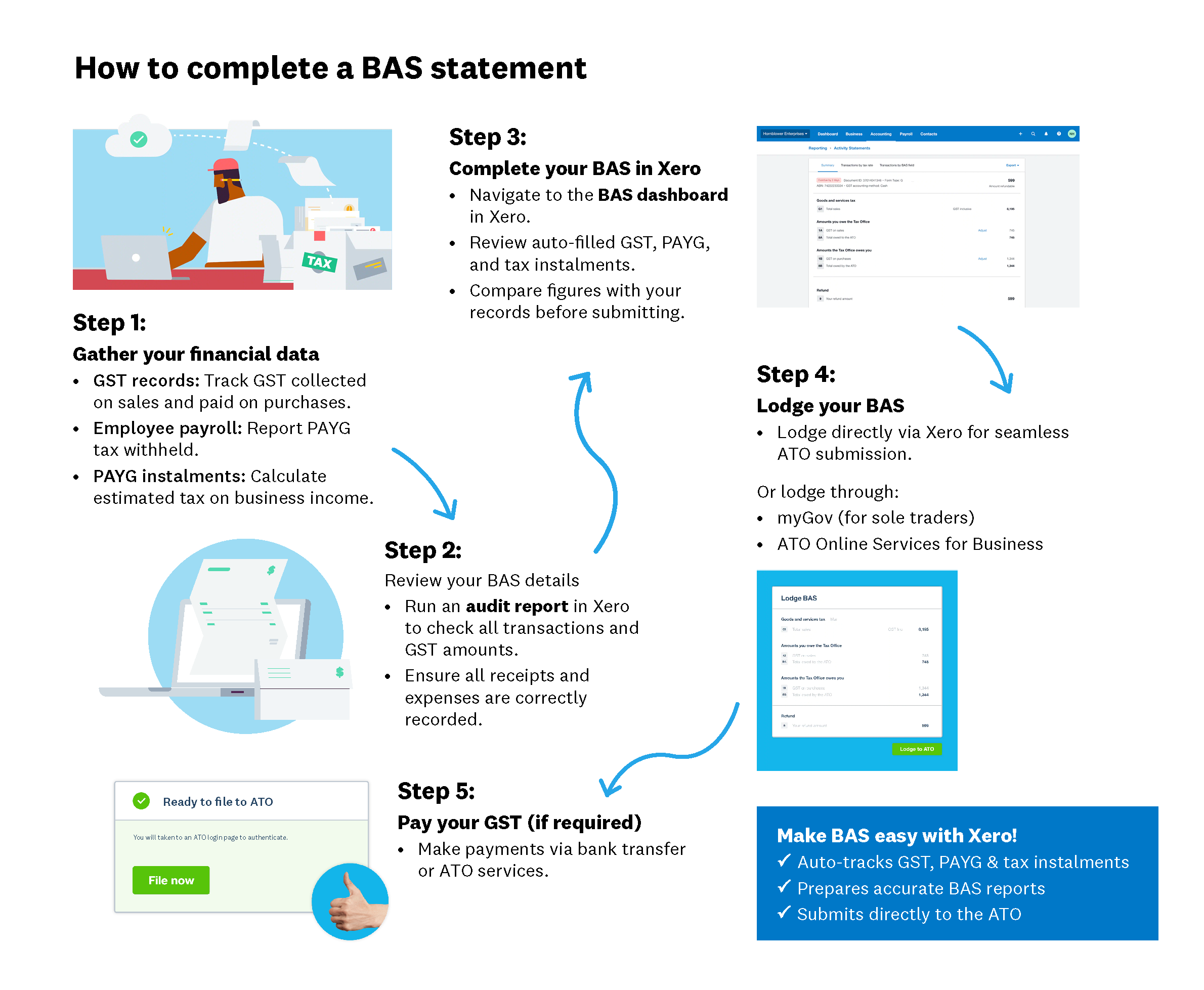
Before you lodge, you need to complete your BAS by filling in the correct figures. The information you report falls into three main categories, depending on your tax obligations.
Your BAS draws on three types of data:
- GST data: the total GST you've collected on sales and the total GST credits you're claiming on business purchases
- PAYG withholding: the tax you've withheld from payments to employees, directors, and other payees during the period
- PAYG instalments: the prepayment amount toward your expected annual income tax, which the ATO calculates or you estimate yourself
Accounting software tracks these figures as you go, pulling data from your bank transactions, invoices, and payroll records. This means you don't need to tally everything manually at the end of each period.
How to lodge BAS
Once your BAS is complete, you need to submit it to the ATO. There are several ways to lodge, and the right method depends on your business setup and how hands-on you want to be.
You can lodge BAS online using four main methods: ATO Online Services, SBR-enabled accounting software, a registered tax or BAS agent, or by phone for certain simple returns. Here's how each method works.
Lodge through ATO Online Services
ATO Online Services is the government's own portal for lodging BAS directly. You'll need a myGovID linked to your Australian Business Number (ABN) to access it.
- Sign in to ATO Online Services through myGov using your myGovID.
- Navigate to the Business Portal and select Lodgements, then Activity Statements.
- Choose the BAS period you need to lodge for.
- Review the pre-filled information and enter or update your figures for GST, PAYG withholding, and PAYG instalments.
- Check your entries, then submit your BAS.
- Save or print the confirmation receipt for your records.
Lodge through accounting software
If you use SBR-enabled accounting software, you can prepare and lodge your BAS without leaving the platform. Software like Xero Accounting Software connects directly to the ATO.
- Reconcile your bank transactions and check that all invoices and bills are recorded for the period.
- Run a BAS report or GST return within the software to generate your figures.
- Review the report for accuracy.
- Submit the BAS directly to the ATO through the software's built-in lodgement feature.
Lodge through a registered agent
A registered tax agent or BAS agent can handle your lodgement on your behalf. This is a common choice for businesses with more complex tax affairs or those who prefer professional oversight.
Your agent prepares and lodges your BAS electronically. They may also have access to extended deadlines, giving you additional time. You'll still need to provide your agent with accurate records, so keeping your bookkeeping up to date remains important.
Choose the right lodgement method
The right approach depends on your business size, complexity, and confidence with financial reporting.
- ATO Online Services suits businesses that want to self-lodge and are comfortable entering figures manually.
- SBR-enabled accounting software suits businesses that want an efficient, integrated process with less manual handling.
- A registered agent suits businesses with complex tax obligations, multiple entities, or limited time to manage compliance themselves.
How to pay your BAS
After you lodge your BAS, you'll need to pay any amount owing by the due date. The ATO offers several payment options, so you can choose the one that fits your cash flow.
Common payment methods include:
- BPAY: use the biller code and reference number on your BAS or ATO correspondence.
- Direct debit: set up a recurring arrangement through the ATO to automate payments.
- Credit or debit card: pay through the ATO's online portal, noting that a card surcharge may apply.
If you're expecting a refund rather than owing a payment, the ATO typically processes BAS refunds within 12 business days of receiving your lodgement.
Cash flow can be tight around BAS time. If you're having difficulty paying the full amount, contact the ATO early to discuss a payment plan. Arranging a plan before the due date can help you avoid additional penalties and shows a good-faith effort to meet your obligations.
How a BAS agent can help you
A BAS agent is a qualified professional, typically an accountant or bookkeeper, who is registered with the Tax Practitioners Board. They can prepare and lodge your BAS on your behalf, and ensure your reporting is accurate.
Working with a BAS agent can be particularly helpful if your tax affairs are complex, if you're unsure about GST classifications, or if you'd prefer to spend your time running your business rather than managing compliance paperwork.
According to Xero research, 66% of Australian small business leaders surveyed don't fully understand all parts of a business tax return. A qualified BAS agent can help bridge that gap. A good BAS agent will also flag potential issues before they become costly mistakes.
You can verify that an agent is registered by checking the Tax Practitioners Board register. If you're looking for a bookkeeper or accountant who uses Xero, the Xero advisor directory can help you find a professional in your area.
What to do if you make BAS mistakes
Mistakes on a BAS are more common than you might think, and the ATO has a process for correcting them. How you fix an error depends on its size and nature.
For minor errors, you can generally correct them on your next BAS. This applies to small adjustments that fall within the ATO's correction thresholds.
For more significant errors, you'll need to revise the original BAS for the period where the mistake occurred. You can do this through ATO Online Services or ask your agent to handle the revision. The ATO provides detailed guidelines on which errors qualify for each approach, so check their instructions if you're unsure.
What if you can't lodge BAS on time?
Sometimes deadlines slip, whether due to unexpected circumstances, cash flow issues, or missing information. If you know you won't be able to lodge on time, contact the ATO as early as possible.
The ATO may grant a deferral or help you set up a payment plan. Being proactive about communication is always better than missing a deadline without explanation.
If you don't lodge on time and don't make contact, the ATO can apply a failure-to-lodge (FTL) penalty. This penalty is $313 for each 28-day period your BAS is overdue, up to a maximum of five penalty units ($1,565). The ATO may also charge a general interest charge (GIC) on any unpaid amounts from the original due date.
Keeping BAS hassle free
The businesses that find BAS lodgement straightforward are usually the ones that keep on top of their records throughout the quarter, rather than scrambling at the last minute.
Here are some habits that make BAS preparation less stressful:
- Reconcile your bank accounts weekly, not just at the end of the quarter.
- Use cloud accounting software to automate GST tracking and categorise transactions as they come in.
- Keep digital copies of all invoices, receipts, and financial documents.
- Set calendar reminders for BAS due dates, including time to review before submitting.
- Retain your records for at least five years, as required by the ATO.
Simplify your BAS preparation with Xero
Preparing your BAS doesn't have to mean hours of manual data entry and end-of-quarter stress. With the right tools, much of the work happens in the background throughout the year.
Xero Accounting Software connects to your bank and automatically imports transactions through daily bank feeds. This means your records stay reconciled as you go, and your GST data is tracked in real time. When it's time to prepare your BAS, the numbers are already there.
By keeping your finances organised year-round, Xero reduces the admin burden at BAS time. You can generate a GST return report, review it, and move on to lodgement with confidence. To see how Xero can help your business stay on top of compliance, get one month free.
FAQs on lodging BAS online
Here are some frequently asked questions about lodging BAS online.
How much does it cost to lodge BAS?
Lodging your BAS yourself through ATO Online Services or accounting software is free. If you use a registered BAS or tax agent, fees vary depending on complexity, typically starting from around $150 for straightforward returns and $500 or more for complex ones.
Do you need an accountant to lodge BAS?
No, you aren't required to use an accountant or BAS agent. Many small business owners lodge their own BAS through ATO Online Services or their accounting software. However, an agent can be helpful if your tax obligations are complex or you'd prefer professional support. Xero research found that 76% of Australian small businesses engage an accountant or tax advisor at the end of the financial year.
Can I lodge BAS through my accounting software?
Yes, if your software supports Standard Business Reporting (SBR). You can check whether your software is SBR-enabled by looking for a built-in ATO lodgement feature or checking the ATO's list of approved digital service providers.
What happens if I lodge my BAS late?
The ATO can apply penalties and interest on outstanding amounts. If this is your first late lodgement, you may be able to request remission of the penalty by contacting the ATO and explaining the circumstances.
How long does it take for BAS lodging to be processed?
You'll receive an instant confirmation receipt when you lodge online. If a refund is taking longer than expected, you can check its status through ATO Online Services or by calling the ATO directly.
Disclaimer
Xero does not provide accounting, tax, business or legal advice. This guide has been provided for information purposes only. You should consult your own professional advisors for advice directly relating to your business or before taking action in relation to any of the content provided.
Plans to suit your business
Get one month free
Purchase any Xero plan, and we will give you the first month free.