Journal entry: what it is, format, examples and how to post one
Learn the journal entry format, see worked examples in RM, and post manual journals the right way.

Written by Lena Hanna—Trusted CPA Guidance on Accounting and Tax. Read Lena's full bio
Published Tuesday 6 October 2026
Table of contents
Key takeaways
- Every journal entry records a transaction in at least two accounts, and total debits must always equal total credits
- A standard journal entry format shows the date, reference, account names, debit and credit amounts, and a short narration
- Manual journals cover what bank feeds and invoices miss, such as accruals and depreciation
- In Xero, you can save a manual journal as a draft for review, then post it to update your ledger and reports
What is a journal entry?
A journal entry is a record of a business transaction in your accounting system. It shows the date, the accounts affected, and the amounts debited and credited.
Think of each entry as a receipt for your books: it explains what happened and where the money went. Journal entries feed your general ledger, which in turn produces your financial statements, including your balance sheet.
Why journal entries matter
Accurate journal entries give you reliable numbers to run your business on. Well-kept entries help you:
- record every transaction the same way, so fewer errors slip through
- meet your tax and audit obligations with the Inland Revenue Board of Malaysia (LHDN)
- see where your money comes from and where it goes
- plan budgets and forecasts with confidence
- keep a clear audit trail of all financial activity
Good records are the base of small business accounting, so you’ll face fewer surprises at tax time.
How journal entries work
Journal entries track changes to your account balances using debits and credits. In double-entry bookkeeping, every transaction has at least one debit and one credit.
Debits and credits affect each account type differently.
- Debits increase asset and expense accounts, and decrease liability, equity and revenue accounts
- Credits increase liability, equity and revenue accounts, and decrease asset and expense accounts
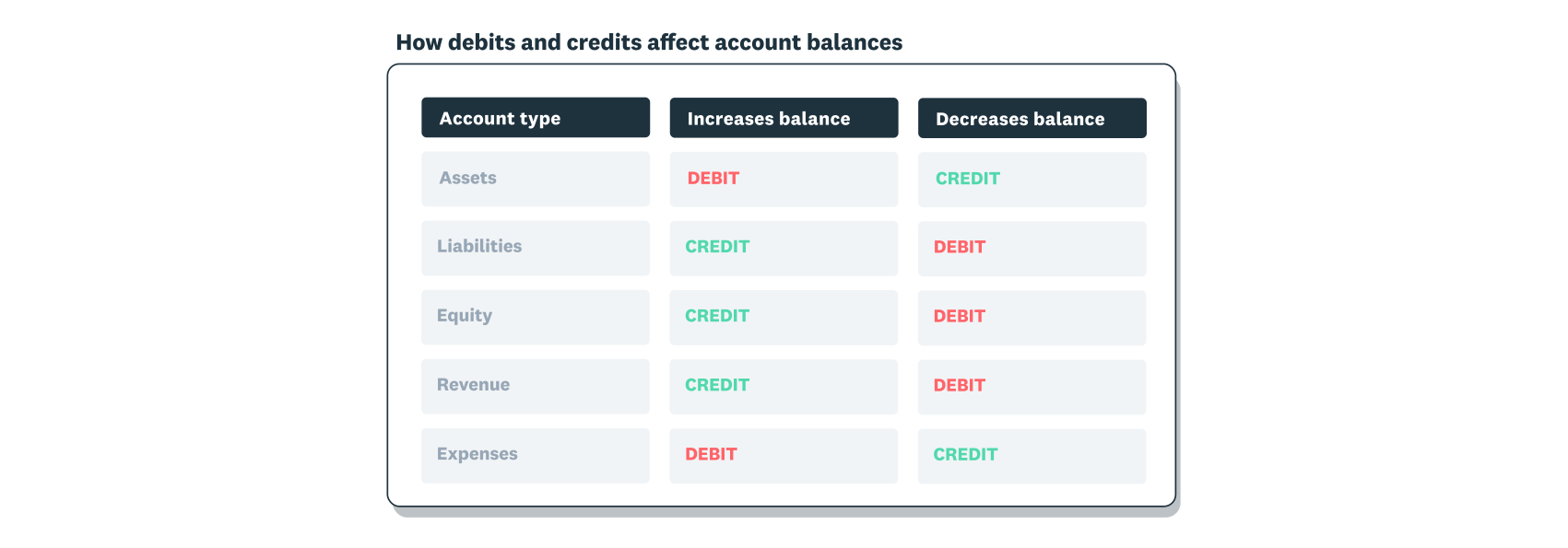
Every journal entry must balance. If you debit RM100, you must also credit RM100 in the same entry, which keeps your accounting equation in balance.
Journal accounts and the chart of accounts
A journal account is any account a journal line is posted to, and each one comes from your chart of accounts. That list groups your accounts into assets, liabilities, equity, revenue and expenses.
The journal records entries in date order, like a diary of your business. Each entry is then posted to the matching ledger accounts, where balances build up over time.
When to use journal entries
You need a journal entry whenever a transaction changes your account balances. Accounting software creates many entries automatically, while some need manual input.
Create a manual journal entry when you need to:
- record transactions outside your bank feed, such as cash payments or owner contributions
- make period-end adjustments for accruals, prepayments, depreciation and bad debts
- correct errors in earlier entries
- record non-cash transactions, such as asset transfers or write-offs
- split costs across departments or projects
Accounting software handles routine entries through bank feeds and invoicing. That cuts manual data entry from your bookkeeping and keeps your records up to date.
Journal entry format
A standard journal entry format keeps your records consistent and easy to review. Each entry includes:
- the date the transaction happened
- a reference number that links the entry to its source document
- the account names, with debits listed first and credits indented below
- the debit amount for each debited account
- the credit amount for each credited account
- a narration that briefly explains the transaction
This layout makes errors easy to spot in a paper or spreadsheet journal. Accounting software uses the same journal entries format, with separate debit and credit columns.
What are the different types of journal entries in accounting?
Journal entry types vary with the transaction you’re recording. Here are seven common types you’ll see in small business accounting.
Simple journal entry
A simple journal entry affects exactly two accounts: one debit and one credit. Use it for straightforward transactions, such as a cash purchase or a single payment.
Compound journal entry
A compound journal entry affects more than two accounts in one transaction. Use it when a single event touches several accounts at once.
For example, a payroll entry might debit salaries expense. It then credits Employees Provident Fund (EPF) and Social Security Organisation (SOCSO) contributions payable, monthly tax deduction (PCB) payable and net wages payable. Total debits must still equal total credits.
Adjusting journal entry
An adjusting journal entry updates account balances at the end of an accounting period. It records income or expenses that belong to that period but haven’t been billed or paid yet.
Common uses include accruals and deferred revenue. For example, a construction company on a three-month project might record one-third of the expected revenue each month, even if it invoices only at completion.
Reversing journal entry
A reversing journal entry cancels an entry from the previous period to make future recording simpler. It’s optional, and it’s most useful for accruals.
Say you accrue wages in January for work done but not yet paid. You’d reverse that entry in February when you process the payment, so the wages are counted once.
Recurring journal entry
A recurring journal entry records transactions that repeat on a schedule, such as monthly rent, loan repayments, insurance premiums or subscription fees. Most accounting software lets you automate these entries to save time.
Closing journal entry
A closing journal entry moves balances from temporary accounts to permanent accounts at the end of the financial year. Revenue and expense accounts reset to zero, and their net balance moves to retained earnings.
This gives your books a clean start for the new year.
Correcting journal entry
A correcting journal entry fixes a mistake in your records, such as an amount posted to the wrong account or an incorrect figure. It reverses the error and records the transaction correctly.
Journal entry examples
These worked examples follow The Cosy Cake Shop, a small bakery, through its September books. To keep the maths simple, they leave out Sales and Service Tax (SST).

Simple entry for a cash purchase
On 7 September 2026, The Cosy Cake Shop buys baking supplies for RM300 in cash. The bookkeeper debits the baking supplies account by RM300 and credits the cash account by RM300.
Check: debits of RM300 equal credits of RM300.
Credit sale to a customer
On 10 September 2026, the shop supplies cakes for a corporate event and sends a RM1,200 invoice on 30-day terms. The customer pays later, so the bookkeeper debits accounts receivable by RM1,200 and credits sales revenue by RM1,200.
When the payment arrives, a second entry debits cash and credits accounts receivable. Check: debits of RM1,200 equal credits of RM1,200.
Compound entry for equipment bought with cash and a loan
On 14 September 2026, the shop buys a new oven for RM15,000. It pays RM5,000 in cash and funds the remaining RM10,000 with a bank loan.
The bookkeeper debits equipment by RM15,000, credits cash by RM5,000 and credits loan payable by RM10,000. Check: debits of RM15,000 equal total credits of RM15,000 (RM5,000 plus RM10,000).
Accrued expense with a reversing entry
The shop’s September electricity bill of RM850 arrives in October, but the cost belongs in September. On 30 September 2026, the bookkeeper debits electricity expense by RM850 and credits accrued expenses by RM850.
On 1 October 2026, a reversing entry debits accrued expenses by RM850 and credits electricity expense by RM850. The shop then records the bill as normal, so the cost lands in September only.
Check: each entry has debits of RM850 and credits of RM850.
Depreciation at month end
In January 2026, the shop bought a display fridge for RM12,000. Using the straight-line method over five years with no resale value, depreciation is RM2,400 a year, or RM200 a month.
On 30 September 2026, the bookkeeper debits depreciation expense by RM200 and credits accumulated depreciation by RM200. Check: debits of RM200 equal credits of RM200.
Correcting an expense posted to the wrong account
On 18 September 2026, the shop paid RM400 to repair its mixer, and the bookkeeper coded it to office supplies by mistake. On 25 September 2026, a correcting entry debits repairs and maintenance by RM400 and credits office supplies by RM400.
The cost moves to the right account, and total expenses stay the same. Check: debits of RM400 equal credits of RM400.
How to record journal entries
Recording journal entries the same way each time keeps your financial records reliable. Follow these five steps to create a correct entry.
1. Identify the transaction and accounts involved
Pick the transaction you need to record and work out which accounts it affects, such as cash or revenue. Ask yourself which account receives value and which account gives it up.
2. Classify each account as a debit or credit
Decide whether each account should be debited or credited. Debits increase assets and expenses, while credits increase liabilities, equity and revenue.
3. Record the date and transaction details
Enter the transaction date and a short narration, such as “office supplies purchase” or “September rent”. Clear narrations make your records easier to review later.
4. Enter the debit and credit amounts
Enter each amount in the debit or credit column. Check that total debits equal total credits before you move on.
5. Post to your general ledger and review
Post the balanced entry to your ledger, then review the affected accounts. Running a trial balance at month end confirms your debits and credits still match across every account.
If you spot an error later, fix it with a correcting journal entry.
How to post a manual journal in accounting software
A manual journal lets you enter adjustments that sit outside your bank feeds and invoices. In Xero, you’ll need the administrator or standard + manual journals user role to add and post one.
Here’s how to add a manual journal in Xero.
- In the Accounting menu, select Manual journals
- Click New manual journal entry
- Enter a narration and the journal date
- Add a line for each account, with a description, account, tax rate and debit or credit amount
- Check that total debits equal total credits
- Save the journal as a draft, or post it
Draft and posted journals
A draft saves your entry without changing your accounts or reports, so you or your accountant can review it first. Posting finalises the journal and updates your general ledger and reports.
Debits and credits must be equal before Xero lets you post. To post several drafts at once, open the Draft tab, select each journal and click Post.
Multi-currency journals
According to Xero Central, you can only enter manual journals in your base currency, even if your plan includes multi-currency. For most Malaysian businesses that’s RM, so convert foreign-currency amounts at the relevant exchange rate first.
Note the rate you used in the narration, so the figure is easy to check later.
Cash basis reporting
Manual journals appear on accrual-basis reports by default, because the “Show journal on cash basis reports” checkbox starts unticked. If you report on a cash basis, tick this box so the journal shows in those reports too.
Auto-reversing and repeating journals
Two settings save you from rebuilding the same journals each month. Add an auto-reversing date to an accrual, and Xero creates the reversing entry on that date for you.
For recurring entries, such as monthly depreciation, set up a repeating journal that Xero creates on a schedule. If you’re unsure which accounts to use or how an adjustment affects your tax, check with your accountant or bookkeeper before you post.
Record journal entries faster with Xero
Clear, balanced journal entries give you numbers you can trust when you plan ahead or file tax. Xero creates routine entries from bank feeds and invoices, and manual journals with drafts handle everything else.
Get one month free and spend less time on your books and more time on your business.
FAQs on journal entries
Here are quick answers to common questions about journal entries.
How do I fill out a journal entry?
Gather the date, accounts, amounts and narration, and keep the source document, such as a receipt or invoice, as evidence. Accounting software like Xero stores these details digitally, so you can search for any entry later.
Can I use accounting software to track journal entries?
Yes, accounting software records entries from bank feeds and invoices automatically. In Xero, the Journal Report lists every journal, so you can review activity by date.
What are the basic rules for journal entries?
Every entry must affect at least two accounts, and total debits must equal total credits. Record entries in date order with a clear narration, and fix mistakes with a correcting entry so the original stays on record.
What is a journal account?
A journal account is any account in your chart of accounts, such as cash or rent expense, that a journal line debits or credits. Each account feeds a specific line in your profit and loss statement or balance sheet, so picking the right one keeps your reports accurate.
What is the standard format of a journal entry?
The standard format lists the date and reference, then the debited accounts and amounts, with the credited accounts and amounts indented below. A short narration underneath explains why the entry was made.
What’s the difference between a draft and a posted journal?
A draft journal is saved for review and has no effect on your reports, while a posted journal updates your general ledger straight away. If a posted journal is wrong, reverse it and post a corrected version.
Disclaimer
Xero does not provide accounting, tax, business or legal advice. This guide has been provided for information purposes only. You should consult your own professional advisors for advice directly relating to your business or before taking action in relation to any of the content provided.