Payroll
Learn what payroll is, how it works in Ireland and what employers must deduct and report to Revenue.
Published Wednesday 30 September 2026
Table of contents
Key takeaways
- Payroll is how you pay staff and deduct tax from their wages. In Ireland, you report every pay run to Revenue on or before payday.
- Deductions cover income tax, Universal Social Charge (USC), Pay Related Social Insurance (PRSI) and pensions. Employee PRSI rises to 4.35% on 1 October 2026.
- My Future Fund auto-enrolment started on 1 January 2026. You and each eligible employee contribute 1.5% of pay, and the State adds 0.5%.
- Payroll software or an accountant can handle the calculations and Revenue reporting for you. Budget 2027 on 6 October 2026 may change next year's rates.
What is payroll?
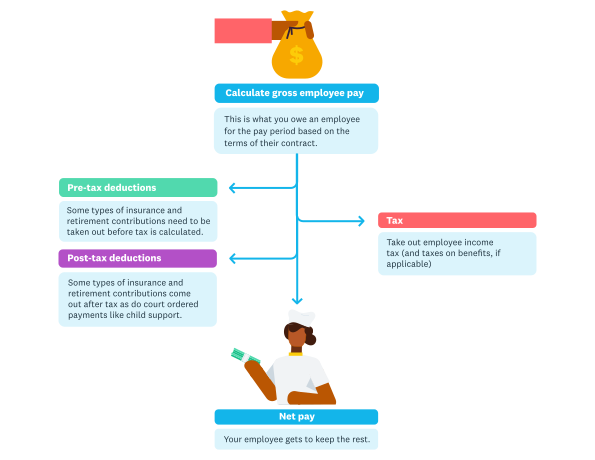
Payroll is what happens each payday and involves sending the right amounts of money to the employee, but also to a number of other locations.
Payroll is the process of paying your employees and deducting the right tax from their wages. It also covers the records you keep and the reports you send to Revenue.
Say you run a café with four staff. Each Friday, payroll works out what each person earned after deductions, then reports the figures to Revenue before the money lands in their accounts.
A payslip is one result of that process. Payroll is the whole routine you run each payday, while a payslip is the written statement showing one employee's gross pay and deductions.
How does payroll work in Ireland?
Payroll in Ireland runs on PAYE Modernisation, the real-time version of Pay As You Earn (PAYE) that Revenue introduced on 1 January 2019. You check each employee's tax details before every pay run and report what you paid on or before payday.
Each pay run follows the same cycle:
- Request a Revenue Payroll Notification (RPN) for each employee
- Work out gross pay from salary, hours, overtime and bonuses
- Deduct income tax, USC, PRSI and any pension contributions
- Pay your staff and report the figures to Revenue on or before payday
- Check the monthly statement Revenue sends you
- Pay Revenue the amount due by the deadline
The monthly statement totals everything you reported that month. For October payroll, you'd pay by 14 November, or by 23 November if you pay and file through the Revenue Online Service (ROS), according to Revenue's payment guidance.
Software can run most of this cycle for you, as this guide to online payroll explains.
What is PAYE?
PAYE is the system Revenue uses to collect tax and social insurance from wages. You deduct these amounts each payday and pass them to Revenue on your employees' behalf.
The RPN tells you each person's tax credits and standard rate cut-off point. That cut-off is the amount of income taxed at 20% before the 40% rate applies.
If there's no RPN for someone, for example because they don't have a Personal Public Service Number (PPSN) yet, you apply emergency tax. Once they have a PPSN, you can request an RPN and apply their correct tax credits.
What is included in payroll?
Payroll includes everything you pay or deduct for each employee. A complete pay run brings together:
- gross pay, including overtime and bonuses
- income tax deducted through PAYE
- USC and employee PRSI
- employer PRSI, which you pay on top of wages
- My Future Fund or other pension contributions
- benefits in kind, such as a company car
- statutory sick pay for eligible staff
Each of these items appears in your payroll submission, so Revenue sees what you paid and deducted every payday.
Payroll deductions explained
Payroll deductions are the amounts you take from gross pay before your employee receives their net pay. The 2026 rates below come from the KPMG Budget 2026 tables, and Budget 2027 on 6 October 2026 may change them for 2027.
Income tax
Income tax is charged at 20% up to the standard rate cut-off point and 40% above it. For a single person in 2026, the cut-off is €44,000 a year.
Tax credits then reduce the tax owed. In 2026, a single employee gets a personal credit of €2,000 and an employee (PAYE) credit of €2,000. This income tax explainer covers rates and credits in more depth.
Universal Social Charge (USC)
USC is a separate tax on gross income, charged in bands. In 2026, the rates are:
- 0.5% on the first €12,012
- 2% on income above €12,012, up to €28,700
- 3% on income above €28,700, up to €70,044
- 8% on income above €70,044
Anyone with total income of €13,000 or less a year is exempt from USC.
PRSI
PRSI is social insurance that builds your employee's entitlement to State benefits such as Maternity Benefit. Most employees pay Class A PRSI at 4.2% until 30 September 2026, rising to 4.35% from 1 October 2026.
Employees earning €352 a week or less are exempt, according to Citizens Information's PRSI guide.
Auto-enrolment pension contributions
If an employee is enrolled in My Future Fund, you deduct 1.5% of their gross pay each pay run in 2026. You pay a matching 1.5% yourself, and the State adds 0.5%.
Other deductions
Other deductions include amounts an employee agrees to, such as trade union fees or a savings scheme, and amounts a court orders. Keep a written record of the reason for each one.
How much does an employee cost?
An employee costs you their gross pay plus employer PRSI, pension contributions, sick pay and admin time. Knowing the full figure helps you price your work and plan each hire.
According to Citizens Information, employer PRSI is 9% where weekly pay is €552 or less and 11.25% above that, until 30 September 2026. From 1 October 2026, those rates rise to 9.15% and 11.40%.
For example, you might pay someone €600 a week from October 2026 and enrol them in My Future Fund. Employer PRSI adds €68.40 and your pension match adds €9. Each week then costs you €677.40 before sick pay or admin time.
Build these amounts into your cash flow forecast so you know you can cover every payday.
How to set up payroll for the first time
Setting up payroll takes five steps, and you can finish most of them before your first employee starts. Work through them in order.
1. Register as an employer with Revenue
Tell Revenue your name, address and plan to pay staff through MyEnquiries in ROS. Revenue's employer guidance says to do this before you make any payment to an employee.
2. Collect employee details and confirm their terms
Ask each new employee for their PPSN, date of birth, address and bank details. Give them their core terms of employment in writing within 5 days of their start date.
This hiring and onboarding guide walks you through the rest of bringing someone on board.
3. Choose how you'll run payroll
Decide how you'll run payroll before your first payday, because the method shapes how much time it takes each month. The next section compares your options.
4. Check who qualifies for My Future Fund
Check each employee against the My Future Fund age and earnings rules, and confirm whether they already have a pension through payroll. Set up your payroll so contributions start from their first eligible pay run.
5. Run your first payroll
Request an RPN for each employee, then run the pay calculations and submit them to Revenue on or before payday. Give every employee a payslip and keep a copy of your records.
Ways to run payroll
You can run payroll in-house or hand it to someone else, and software can help with either. Pick the approach that fits your team size and the time you can give it.
Run payroll yourself
You can work out deductions yourself and send each payroll submission through ROS. This keeps costs low for a business with one or two staff on fixed pay. Set aside time each pay run to check every figure.
Use an accountant or bookkeeper
An accountant or bookkeeper can take on the calculations and Revenue submissions for you. You can find a certified professional near you in the Xero advisor directory.
Fees usually depend on how many people you pay and how complex their pay is.
Use payroll software
Payroll software handles the calculations and Revenue reporting for each pay run, then produces payslips for your team. With Xero, you connect specialist payroll software built for Irish rules, and wage costs flow straight into your accounts.
Payroll compliance and legal requirements
Payroll compliance means paying staff correctly and meeting your Revenue and employment law duties every pay run. As an employer in Ireland, you need to:
- register with Revenue before your first payment to staff
- report each pay run to Revenue on or before payday
- pay at least the national minimum wage, which is €14.15 an hour for most workers aged 20 and over since 1 January 2026
- give every employee a payslip showing gross pay and deductions
- enrol eligible employees in My Future Fund
- keep payroll records for 6 years after the end of the tax year they relate to
Your wider employer responsibilities also cover areas such as contracts and working hours.
Look out for these common payroll mistakes:
- using an old RPN instead of requesting a fresh one
- applying last year's rates after a Budget change
- missing the PRSI increase on 1 October 2026
- reporting pay to Revenue after payday
- paying Revenue after the monthly deadline
Key payroll documents
Irish payroll uses a handful of documents, and most of them now live online with Revenue. Here's what each one does.
Revenue Payroll Notification (RPN)
An RPN is Revenue's instruction on how to tax an employee. It shows their tax credits and rate bands for income tax and USC, and you request it before every pay run.
Payslips
A payslip is a written statement of an employee's gross pay and each deduction. Employees have a right to one under the Payment of Wages Act 1991, as Citizens Information's payslip guide explains, and you must keep it confidential.
A payslip template can help you check you've included the right details.
Employment Detail Summary
The Employment Detail Summary replaced the P60 in 2019. Employees view it in Revenue's myAccount service, and it shows their pay and deductions for the year.
Revenue builds it from your payroll submissions, so there's nothing extra for you to send.
Leaver details
When someone leaves, you include their leaving date in their final payroll submission. The P45 was abolished in 2019, so this submission is how Revenue learns the job has ended.
Benefits in kind and Enhanced Reporting Requirements
Benefits in kind, such as a company car, are taxed through payroll as if they were extra pay. Since 1 January 2024, Enhanced Reporting Requirements (ERR) mean you also report certain tax-free payments on or before the day you make them.
ERR covers travel and subsistence payments, small benefits and the remote working daily allowance of €3.20 a day. Under the Small Benefit Exemption, you can give each employee up to five non-cash benefits a year, worth €1,500 combined, tax-free.
Revenue monthly statement
Revenue sends you a monthly statement based on the payroll submissions you made that month. Check it against your records, then pay the amount due by the deadline.
Statutory leave and payments
You pay some types of leave through payroll, while the State pays others directly. Here's how the main types work in 2026:
- Statutory sick pay is 5 days a year at 70% of normal daily pay, capped at €110 a day, for staff with 13 weeks' service
- Maternity Benefit is paid by the Department of Social Protection (DSP) for 26 weeks
- Paternity Benefit is paid by the DSP for 2 weeks
- Parent's Benefit is paid by the DSP for 9 weeks per parent
For sick pay, ask for a medical certificate to confirm the absence. The DSP pays each of the other benefits at €299 a week in 2026, according to the 2026 social welfare rates.
Topping up pay during family leave is your choice. If you offer it, set out your policy in writing so staff know what to expect.
Pension auto-enrolment and payroll
Auto-enrolment means eligible employees join a pension scheme through payroll without signing up themselves. Ireland's scheme, My Future Fund, started on 1 January 2026.
An employee qualifies if they're aged 23–60 and earn €20,000 or more a year across all their jobs. Employees already paying into a pension through payroll are outside the scheme.
In years 1–3, you and your employee each contribute 1.5% of gross pay and the State adds 0.5%. These rates rise every 3 years until they reach 6% each from you and your employee, plus 2% from the State.
For someone earning €40,000 a year, that's €600 each from you and them in year 1, plus €200 from the State. Contributions apply to earnings up to €80,000 a year, as this Grant Thornton factsheet sets out.
Simplify your payroll with Xero
Payroll runs smoothly when you prepare ahead and check each rate change as it arrives. Connect a payroll app to Xero and your wage costs flow into your accounts. You'll see what each pay run means for your cash flow.
Try it with your own numbers when you get one month free.
FAQs on payroll
Here are quick answers to common payroll questions from Irish employers.
How often do you need to run payroll?
You run payroll every time you pay staff, at whatever frequency you've agreed with them, such as weekly or monthly. Revenue still issues one statement a month, so weekly payers settle four or five pay runs in a single payment.
What happens if you pay Revenue late?
Revenue adds interest for every day a PAYE payment is overdue, so the cost grows the longer it's outstanding. A reminder a few days before each due date is the simplest way to stay ahead.
Can you run payroll for just 1 employee?
Yes, you register with Revenue and run payroll the same way for one employee as for 20. You still report their pay each payday, even if their earnings fall below the USC and PRSI thresholds.
Do company directors need to be on payroll?
Yes, if your company pays you a salary or director's fees, it runs them through payroll and operates PAYE on them. An accountant can help you choose the right mix of salary and other income.
What payroll changes are coming?
All PRSI rates rise by 0.15% from 1 October 2026, taking employee Class A PRSI to 4.35%. Budget 2027 on 6 October 2026 may also change tax rates and the minimum wage for 2027, so check your payroll settings once it's announced.
Can you change your payroll frequency?
Yes, you can move from weekly to monthly pay, for example, once you update your payroll settings. Pay frequency is one of the core terms you give staff in writing, so confirm the change with them in writing first.
Related terms
Learn more about payroll
Handy resources
Advisor directory
You can search for experts in our advisor directory
Your guide to hiring
Learn tips for hiring, onboarding and paying an employee, while keeping everyone happy
Payroll with Xero
Learn how Xero can help with your payroll requirements
Disclaimer
This glossary is for small business owners. The definitions are written with their requirements in mind. More detailed definitions can be found in accounting textbooks or from an accounting professional. Xero does not provide accounting, tax, business or legal advice.