What is revenue? A guide for small businesses
Learn what revenue is, how it differs from income and turnover, and how to calculate and track it.

Written by Shaun Quarton—Accounting & Finance Content Writer and Growth Marketer. Read Shaun's full bio
Published Tuesday 6 October 2026
Table of contents
Key takeaways
- Calculate your revenue using the basic formula of units sold multiplied by price per unit, and distinguish between gross revenue (total sales) and net revenue (after deducting returns, discounts, and allowances) to understand your true earnings.
- Track revenue consistently using accounting software or systematic methods to measure growth against targets, identify trends, and make informed business decisions about pricing, expansion, and investment opportunities.
- Categorise your revenue by product lines, sales channels, and customer segments to gain insights into which areas of your business perform best and where you should focus your efforts.
- Understand that revenue recognition timing depends on your accounting method: record revenue when earned under accrual accounting, or when payment is received under cash accounting. High revenue doesn't guarantee profitability once you consider expenses.
What is revenue in accounting?
Revenue is the income your business earns from its ordinary activities, such as selling goods or services, over a set period. It's counted before any costs or expenses are deducted, which makes it the top line of the income statement.
For example, a bakery's revenue comes from selling bread, while a freelancer earns revenue by providing services. Revenue is the starting point for calculating profit, and it sits above your costs on your income statement.
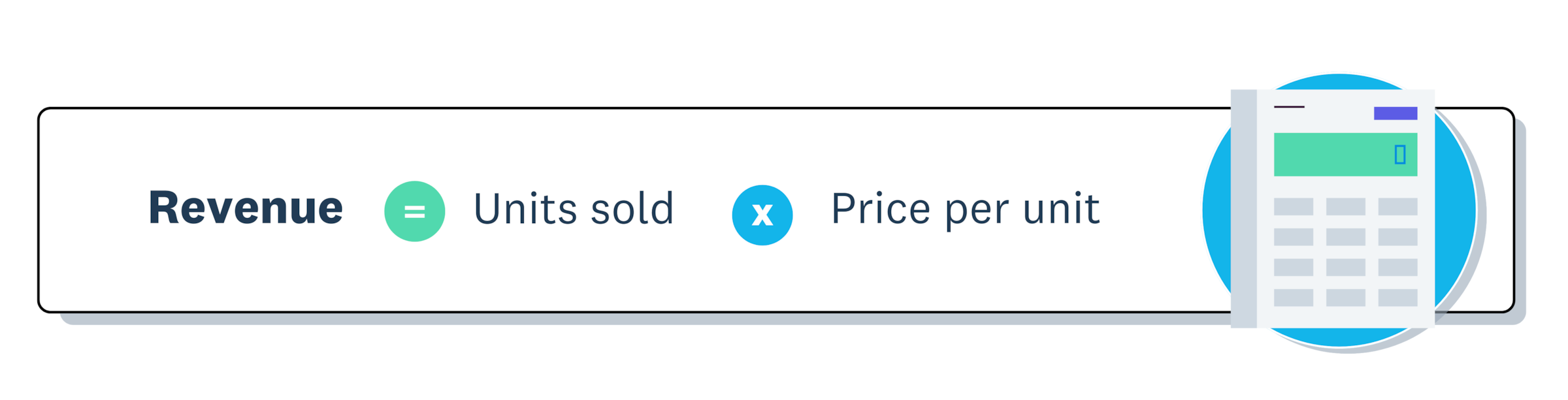
The basic formula is: Revenue = Units sold × Price per unit
Revenue vs income vs turnover
Turnover is the term Irish and UK businesses commonly use for revenue. Irish company law describes net turnover as the revenue from a company's ordinary activities, once trade discounts, value-added tax (VAT) and other taxes based on those amounts are taken off.
Income is a broader term. It can cover revenue plus other earnings, such as interest or rental income. Net income means something else: profit, which is what's left after all expenses. When a report or form asks for income, check which meaning it uses.
Types of business revenue
Businesses generate revenue through different channels, which fall into two main categories: operating revenue and non-operating revenue.
Operating revenue
Operating revenue is income generated from your primary business activities. It's often called gross revenue and forms the foundation of your financial performance.
Common types of operating revenue include:
- Sales revenue: Income from selling goods, like a bakery selling bread and pastries
- Service revenue: Income from providing services, such as consulting or repair work
- Subscription revenue: Recurring income from subscription models, such as gym memberships or streaming services
Helpful tip: Sales revenue is often used as a catch-all term for main income-generating activities, whether selling goods or providing services. Service revenue is used when a business wants to specifically track income from services, particularly if it offers both goods and services.
Non-operating revenue
Non-operating revenue is income generated from activities outside your core operations. These earnings are often irregular and not directly tied to your business's ongoing performance.
They include earnings like:
- Interest income: Earnings from interest on investments, like depositing retained earnings in a bank
- Dividend income: Income from shares in other companies, for example, investing in tracker funds that pay dividends
- Rental income: Leasing out property or equipment, such as renting extra space in a bakery
- Gain on sale of assets: Income from selling assets like old equipment, for example, when a bakery sells its old ovens after upgrading
- Licensing fees: Income from allowing others to use intellectual property, like patents or trademarks
- Franchise fees: Earnings from franchisees operating under your brand, for example, expanding a bakery through franchising
- Advertising revenue: Income from displaying ads on your website or property
How to calculate revenue
Here's how to calculate and track your revenue.
Basic revenue formula
The formula to calculate revenue is:
Revenue = Units sold × Price per unit
For example, if a bakery sells 100 loaves of bread at €5 each: 100 × €5 = €500 in revenue
Gross revenue vs net revenue
Understanding the difference between gross and net revenue helps you assess your true earnings.
Gross revenue is your total sales before any deductions: Gross revenue = Units sold × Price per unit
Net revenue is what remains after subtracting returns, discounts, and allowances: Net revenue = Gross revenue − Discounts − Returns − Allowances
When to use each:
- Gross revenue: Shows total sales volume and market demand
- Net revenue: Reflects actual income you can count on
For example, if your bakery sells €10,000 worth of bread but gives €500 in discounts and processes €200 in returns, your net revenue is €9,300.
Calculate revenue for different business models
Different business types use variations of the basic formula. Here's how to calculate revenue for common models:
Service-based businesses: Revenue = Hourly rate × Number of hours worked
A consultant charging €100 per hour for 20 hours earns €2,000 in revenue.
Subscription-based businesses: Revenue = Number of subscribers × Subscription price
A gym with 200 members paying €50 monthly generates €10,000 in monthly revenue.
Ecommerce businesses: Track each transaction individually since prices vary by product. Accounting software like Xero can automate this process.
Examples of how to calculate revenue
Here's how revenue calculation works for different business types:
Product-based business (bakery):
- Sells 500 loaves at €4 each
- Weekly revenue: 500 × €4 = €2,000
Service-based business (consultant):
- Bills 25 hours at €80 per hour
- Weekly revenue: 25 × €80 = €2,000
Subscription business (software):
- Has 100 subscribers paying €20 monthly
- Monthly revenue: 100 × €20 = €2,000
Track your revenue
Consistent revenue tracking keeps your financial records accurate and supports better decisions.
Choose a tracking method that fits your business:
- Spreadsheets: Suitable for simple businesses, but prone to errors as you grow
- Point of sale (POS) systems: Ideal for physical stores with automatic sales data capture
- Accounting software: Best for automation and detailed financial reporting
Whatever method you choose, record every transaction consistently and automate where possible to reduce errors.
Why tracking revenue is important for your small business
When you track revenue, you see how much money flows into your business before expenses, giving you a clear picture of performance over time.
Revenue tracking helps you:
- measure growth against targets
- forecast future earnings
- make informed financial decisions
- identify trends that guide strategy
Drive business growth
Steady revenue growth supports long-term sustainability by providing resources to reinvest, scale operations, and attract investors.
For example, a bakery with consistent revenue might use surplus funds to open a second location, upgrade equipment, or add new product lines.
Measure performance
Tracking revenue helps you monitor progress toward financial goals. Regular review reveals:
- whether you're meeting revenue targets
- where you can improve
- which products or services contribute most
Benchmarking against the market provides additional context. Explore Xero's Small Business Insights to see how your business compares.
Gain insights and identify trends
Revenue data helps you make smarter inventory, marketing, and product development decisions by revealing patterns:
- whether sales are increasing or decreasing over time
- which products or services perform best
- how seasonal factors affect your revenue
Make informed business decisions
When you decide based on data, you get better outcomes. Revenue tracking helps you determine:
- when to adjust your pricing strategy
- whether to invest in new equipment
- if you're ready to expand into new markets
Revenue doesn't equal profitability. Learn more about increasing revenue.
What is revenue recognition?
Revenue recognition determines when you record revenue in your accounts.
The timing depends on which accounting method you use.
Accrual accounting: Record revenue when earned, even if payment comes later. Most businesses use this method, and it aligns with International Financial Reporting Standards (IFRS) like IFRS 15, which states that an entity applies the following five steps to recognise revenue.
Cash accounting: Record revenue when payment is received. Some small businesses and sole traders use this simpler method.
For example, a bakery delivers a bulk order to a cafe in July with payment due in August. Under accrual accounting, the revenue is recorded in July when the goods are delivered.
Revenue vs profit: key differences
While revenue and profit are both financial metrics, they measure very different aspects of a business's performance. Revenue shows how much money comes in, while profit reveals how much you actually keep after expenses.
There are several key differences between revenue and profit.
Revenue:
- Calculation: Total sales (units sold × price)
- Position: Top of the income statement (the "top line")
- Shows: Sales performance and market demand
Profit:
- Calculation: Revenue minus all costs
- Position: Bottom of the income statement (the "bottom line")
- Shows: Financial health and sustainability
Why understanding revenue vs profit matters
High revenue doesn't guarantee success. If your expenses exceed your income, you'll operate at a loss despite strong sales.
Understanding both metrics helps you set realistic goals based on actual profit, not just sales figures, price products correctly to cover costs and generate profit, and plan sustainable growth rather than chasing revenue alone.
Best practices for effective revenue tracking
Your financial statements are only as reliable as the data you input. Inaccurate revenue tracking leads you to decide poorly, creates cash flow problems, and causes tax compliance issues.
Follow these practices to maintain reliable revenue records.
Maintain accurate records
Build these habits into your routine:
- Daily: Update records to stay on top of transactions.
- Monthly:Reconcile revenue with bank statements to spot discrepancies early.
- Always: Keep receipts and supporting documents for tax and audit purposes.
Categorise your revenue
Break down revenue by product lines, sales channels (online, in-store), and customer segments. This helps you understand where your revenue is coming from and helps you decide more effectively.
Use tools for automation
Invest in accounting software to streamline tracking and reduce human error. For example, one International Data Corporation (IDC) report found that businesses using an enterprise resource planning (ERP) system achieved a 327% three-year return on investment (ROI), which saves time and ensures more accurate financial insights.
Review data regularly
Set aside time each month to review your revenue data, spot trends, and identify areas for improvement.
Track your business revenue with Xero
Accurate revenue tracking helps you understand your cash flow, spot trends, and make confident business decisions.
Xero simplifies revenue management with:
- Automated bank feeds that capture transactions in real time
- Customisable reports to track revenue by product, service, or time period
- Dashboard insights that show your financial position at a glance
Ready to simplify your revenue tracking? Get one month free.
FAQs on calculating revenue
Here are answers to common questions about calculating and tracking business revenue.
What is the formula for revenue?
The basic revenue formula is: Revenue = Units sold × Price per unit. For service businesses, use: Revenue = Hourly rate × Hours worked.
How do you calculate total revenue in accounting?
Multiply the number of units sold by the price per unit, then add up revenue from all products or services. For accurate totals, include all income from your primary business activities.
What's the difference between gross revenue and net revenue?
Gross revenue is total sales before deductions. Net revenue is what remains after subtracting returns, discounts, and allowances.
How do I calculate revenue for a service-based business?
Multiply your hourly rate by the number of billable hours worked. For project-based pricing, add up the total value of completed projects in the period.
Can I calculate revenue without accounting software?
Yes, you can use spreadsheets or manual records. However, accounting software reduces errors, saves time, and provides real-time insights as your business grows.
Disclaimer
Xero does not provide accounting, tax, business or legal advice. This guide has been provided for information purposes only. You should consult your own professional advisors for advice directly relating to your business or before taking action in relation to any of the content provided.
Start using Xero for free
Access Xero features for 30 days, then decide which plan best suits your business.