Margin vs markup
Learn how margin and markup differ, how to calculate each, and when to use them to price for profit.
Published Monday 31 August 2026
Table of contents
Key takeaways
- Margin measures profit as a percentage of your selling price, while markup measures the same profit as a percentage of your cost
- Both use the same peso profit, so markup always looks larger than margin when you sell above cost
- Use markup to set prices and quotes, and use margin to report performance and compare against your industry
- Mixing them up leads to underpricing, because a 50% markup gives you only a 33.3% margin
Margin vs markup: the key difference
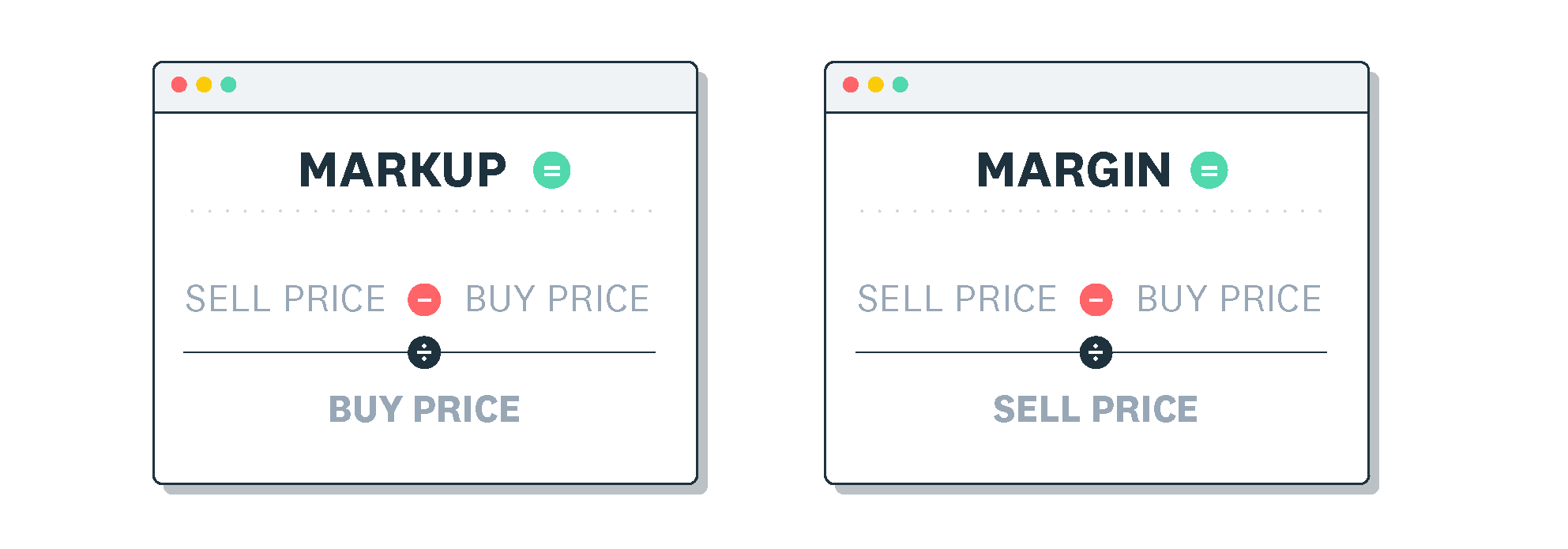
Margin is your profit shown as a percentage of your selling price, and markup is that same profit shown as a percentage of your cost. Both start from the same peso amount of profit, but they divide it by a different number, which is why the two figures never match.
Margin divides profit by the selling price, and markup divides profit by the cost. Your cost is always smaller than your selling price when you sell at a profit. That is why markup comes out larger than margin on the same sale.
Picture a small shop that buys a phone case for 100 pesos and sells it for 150 pesos. The 50 pesos of profit is a 50% markup on the 100-peso cost, yet it is only a 33.3% margin on the 150-peso sale. Same transaction, same peso profit, two honest percentages that answer two different questions.
What is profit margin?
Profit margin tells you how much of each peso you collect is actually profit. The most common version is gross profit margin, which you can explore further in Xero's guide to gross profit margin for small businesses.
Gross profit margin is calculated as (revenue − cost of goods sold) ÷ revenue × 100. The result is a percentage of your revenue, or selling price. For example, if a product earns 25 pesos of gross profit on every 100 pesos of sales, your gross profit margin is 25%.
Gross margin looks only at revenue minus the cost of goods sold. Net margin goes further and takes gross profit minus all your other operating expenses and taxes. It shows the profit that remains at the very bottom line, and you can read more about the different types of profit margin. The Corporate Finance Institute uses the same gross margin definition.
Tracking both matters for different reasons. Gross margin shows whether your pricing covers what it costs to make or buy each product. Net margin shows whether the whole business is profitable once rent, wages, and taxes come out. A strong gross margin can still lead to a thin net margin if your running costs climb, so watch the two together.
What is markup?
Markup is the amount you add on top of your cost to reach a selling price, shown as a percentage of that cost. It answers a practical question you face every day: how much do you charge above what you paid?
Markup is calculated as (selling price − cost) ÷ cost × 100, and the result is expressed as a percentage of your cost. Say a product costs you 100 pesos and you sell it for 140 pesos: the 40 pesos of profit is a 40% markup. Because it works directly from cost, markup is the figure you reach for when you set prices. The Corporate Finance Institute defines markup the same way.
This approach is often called cost-plus pricing, and it is popular because it is quick to apply across a whole range of products. You settle on a markup that covers your costs and target profit, then add the same percentage to each item's cost. The catch is that a markup that feels generous can still leave you with a slimmer margin than you expect. That is why the conversion below is worth knowing.
How to calculate margin and markup
You only need three numbers to work out both figures: your cost, your selling price, and the profit between them. Follow these steps to calculate each one from the same sale.
- Find your profit by subtracting the cost from the selling price
- To get margin, divide the profit by the selling price, then multiply by 100
- To get markup, divide the profit by the cost, then multiply by 100
- Compare the two percentages and note that markup is the higher of the pair
Here is a worked example in Philippine pesos. A product costs you ₱150 and you sell it for ₱200, so your profit is ₱50. Your margin is ₱50 ÷ ₱200 = 25%, and your markup is ₱50 ÷ ₱150 = 33.3%. Same ₱50 profit, two different percentages, because each one is measured against a different base.
Margin and markup conversion chart
Once you know one figure, you can convert it to the other without recalculating from scratch. The list below pairs some common markups with the margin they produce.
- 15% markup = 13% margin
- 20% markup = 16.7% margin
- 25% markup = 20% margin
- 50% markup = 33.3% margin
- 75% markup = 42.9% margin
- 100% markup = 50% margin
To convert between the two yourself, use these formulas, entering each percentage as a decimal. Margin = Markup ÷ (1 + Markup), and Markup = Margin ÷ (1 − Margin). So a 0.5 markup becomes 0.5 ÷ 1.5 = 0.333, or a 33.3% margin.
When to use margin or markup
Both figures describe the same sale, so the right one depends on the job in front of you. Markup helps you build prices, while margin helps you judge and report performance.
Reach for markup when you set a selling price, prepare a customer quote, or train staff to price stock. It starts from the cost you already know. Reach for margin when you complete financial reports, benchmark against your industry, or discuss profitability with your accountant or lender. Margin is the language they use. If you want to go deeper on measuring performance, Xero's guide on how to measure profitability walks through the main ratios.
Say you run a bakery in Cebu and want every cake to keep a 40% margin. You would work backwards from that target margin to find the markup that gets you there. Then you apply that markup to each recipe's cost when you price the menu. At the end of the month, you switch back to margin to check whether the business hit its profit goal across all sales.
Common mistakes to avoid
The most expensive slip is treating markup and margin as the same number when you price your products. Doing so quietly eats into your profit.
If you want a 50% margin but apply a 50% markup instead, you fall short, because a 50% markup produces only a 33.3% margin. Over hundreds of sales, that gap adds up to real money left on the table. Always confirm which figure a target refers to before you set a price against it.
A second trap is leaving costs out of the figure you start from. If your cost of goods sold only counts the wholesale price and skips freight, packaging, or payment fees, your markup looks fine while your real margin shrinks. Build the full landed cost into your calculation so the percentage you rely on reflects what you actually spend.
What counts as a good margin or markup?
There is no single "good" number, because a healthy margin in one industry looks thin in another. Retail and grocery businesses often run on slim margins, while software and professional services tend to keep more of each peso.
For a wider reference point, NYU Stern data compiled by Aswath Damodaran measured margins across US publicly listed companies as of January 2026. The total-market gross margin was about 38% and net margin about 10%. These are large US listed companies rather than Philippine small businesses, so treat the figures as a rough guide only.
As a simple benchmark, Brex suggests that a 5% net margin is low, 10% is healthy, and 20% is high. The right target still depends on your industry. Use these numbers to sense-check your own results, then set a goal that fits your costs and market.
A few things push your margin up or down. Businesses with low overheads and little stock, such as consultants or online services, tend to keep more of each peso. Shops that carry inventory and pay for shipping and rent usually run tighter. Your location, your suppliers, and the age of the business all shift the number too. Compare like with like when you judge your own performance, and see practical ways to increase your profits if the figure looks thin.
Track your margins with Xero
Xero brings your sales and costs into clear reports. You can see your gross and net margins update in real time, instead of waiting for month-end. That live view makes it easier to spot which products earn their keep and adjust prices with confidence. You can try it for yourself, and you can get one month free when you start with Xero.
FAQs on margin vs markup
Here are quick answers to the questions small business owners ask most often about margin and markup.
Is a 50% markup the same as a 50% margin?
No, a 50% markup gives you a 33.3% margin, because markup is measured against cost while margin is measured against your selling price. To reach a 50% margin, you would need to double your cost, which is a 100% markup.
What is the difference between a 30% margin and a 30% markup?
A 30% margin keeps 30 pesos of profit on every 100 pesos you sell. A 30% markup adds 30% on top of your cost, giving a smaller margin of about 23%.
How do you convert markup to margin?
Divide the markup by one plus the markup, using decimals, so a 0.25 markup becomes 0.25 ÷ 1.25 = 0.2, or a 20% margin. The result is always smaller than the markup you started with.
Should I use markup or margin when talking to my accountant?
Use margin, because accountants and lenders read profitability as a percentage of revenue on your financial statements. Markup stays more useful on the shop floor when you are setting prices.
What is a good profit margin for a small business?
It varies by industry, but a net margin around 10% is often seen as healthy, with 5% on the low side and 20% considered strong. Compare your figure with businesses in your own sector rather than a single national average.
Related terms
Learn more about margin vs markup
Handy resources
Advisor directory
You can search for experts in our advisor directory
Xero Small Business Guides
Discover resources to help you do better business
Financial reporting
Keep track of your performance with accounting reports
Disclaimer
This glossary is for small business owners. The definitions are written with their requirements in mind. More detailed definitions can be found in accounting textbooks or from an accounting professional. Xero does not provide accounting, tax, business or legal advice.