Journal entry: what it is and how to record one
Discover how a journal entry keeps your books accurate, saves time, and helps you make smarter decisions.

Written by Lena Hanna—Trusted CPA Guidance on Accounting and Tax. Read Lena's full bio
Published Thursday 5 February 2026
Table of contents
Key takeaways
- Record every business transaction using the double-entry system where total debits must equal total credits, ensuring your accounting equation stays balanced and your financial records remain accurate.
- Create manual journal entries for transactions your accounting software doesn't capture automatically, such as cash payments, period-end adjustments, error corrections, and expense allocations across departments.
- Follow the five-step process when recording entries: identify the transaction and affected accounts, classify as debits or credits, record the date and description, enter amounts, then post to your general ledger and review for accuracy.
- Use accounting software to automate routine journal entries through bank feeds and invoicing, which can reduce manual operations by up to 50% while maintaining accurate, accessible financial records.
What is a journal entry?
A journal entry is a record of a business transaction in your accounting system. It captures the amounts debited and credited, the date, and the accounts affected.
Journal entries use a double-entry system, meaning each transaction affects at least two accounts. They form the foundation of your general ledger and ensure your financial statements, including your balance sheet, are accurate and complete.
Why journal entries matter
Journal entries are the foundation of accurate financial records. Without them, you can't produce reliable financial statements or make informed business decisions.
Here's why journal entries matter for your business:
- Record accurately: Every transaction is recorded systematically, reducing errors and omissions
- Stay compliant: Proper records help you meet tax obligations and audit requirements, as companies must follow bookkeeping rules outlined by GAAP or IFRS
- Gain visibility: You can see exactly where money comes from and where it goes
- Make better decisions: Accurate data supports better budgeting, forecasting, and planning
- Create an audit trail: Journal entries create a clear history of all financial activity
For small businesses, maintaining accurate journal entries means fewer surprises at tax time and greater confidence in your financial position.
How journal entries work
Journal entries track changes to your account balances using debits and credits. In double-entry bookkeeping, every transaction requires at least two entries: one debit and one credit.
Understanding which account to debit or credit takes practice. The table below shows how debits and credits affect different account types.
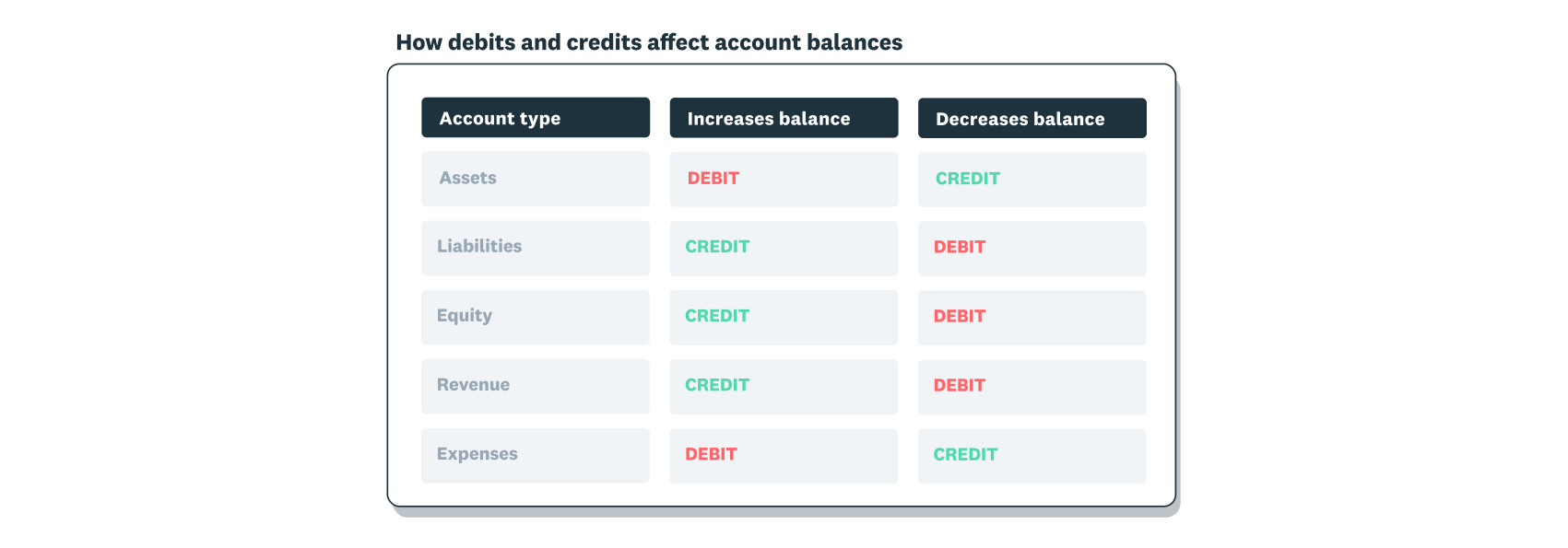
Debits and credits affect accounts differently depending on the account type:
- Debits increase expense and asset accounts, and decrease liability, revenue, and equity accounts
- Credits decrease expense and asset accounts, and increase liability, revenue, and equity accounts
Every journal entry must balance. If you debit £100, you must also credit £100 in the same entry. This keeps your accounting equation in balance.
When to use journal entries
You need a journal entry whenever a financial transaction affects your accounts. Some entries happen automatically through your accounting software, while others require manual input.
Create manual journal entries when you need to:
- Record transactions not captured automatically: Cash payments, owner contributions, or transactions outside your bank feed
- Make period-end adjustments: Accruals, prepayments, and depreciation entries at month or year end
- Correct errors: Fix mistakes from previous entries
- Record non-cash transactions: Asset transfers, write-offs, or contra entries
- Allocate expenses: Split costs across departments or projects
Modern accounting software automates many routine entries through bank feeds and invoicing, which can reduce manual operations by up to 50% while ensuring your records stay current.
What are the different types of journal entries in accounting?
Journal entry types vary based on the transaction you're recording. While there are many variations, here are seven common types you'll encounter in small business accounting.
Simple journal entry
A simple journal entry affects exactly two accounts: one debit and one credit. Use this type for straightforward transactions like cash purchases or single payments.
Compound journal entry
A compound journal entry involves more than two accounts in a single transaction. Use this type when one event affects multiple accounts at once.
For example, a payroll entry might debit wage expenses while crediting accounts for taxes payable, superannuation, and net pay. The total debits must still equal the total credits.
Adjusting journal entry
An adjusting journal entry updates account balances at the end of an accounting period. Use these entries to record income or expenses that span multiple periods.
Common uses include accruals, estimated expenses, and deferred revenue. For example, a construction company working a three-month project might record one-third of the expected revenue each month, even if they invoice only at completion.
Reversing journal entry
A reversing journal entry cancels out an entry from the previous period to simplify future recording. These entries are optional but useful for managing accruals.
For example, if you accrued wages in January for work done but not yet paid, you'd reverse that entry in February when you process the actual payment. This prevents double-counting.
Recurring journal entry
A recurring journal entry records transactions that repeat on a regular schedule, such as monthly rent, loan payments, or subscription fees. Many accounting software tools let you automate these entries to save time.
Closing journal entry
A closing journal entry transfers balances from temporary accounts to permanent accounts at the end of an accounting period. Revenue and expense accounts reset to zero, with balances moving to retained earnings.
This prepares your books for the next fiscal period with a clean slate.
Correcting journal entry
A correcting journal entry fixes mistakes in your records. Use this type when you've posted an amount to the wrong account or entered an incorrect figure.
The correcting entry reverses the error and records the transaction correctly, keeping your books accurate.
Journal entry example
Here's a practical example of how a journal entry works in a real business scenario.
The Cosy Cake Shop bought baking supplies for £300 cash on 20 January 2021. The bookkeeper records this as a simple journal entry:
- Debit: Baking supplies account (increases the asset)
- Credit: Cash account (decreases the asset)
Here's what this looks like in a journal format:

How to record journal entries
Recording journal entries accurately keeps your financial records reliable. Follow these five steps to create a correct journal entry:
1. Identify the transaction and accounts involved
Select the transaction you need to record and determine which accounts it affects, such as cash, revenue, or expenses.
Tip: Ask yourself which account gains and which account loses from this transaction.
2. Classify the transaction as a debit or credit
Determine whether each account should be debited or credited. Remember: debits increase assets and expenses, while credits increase liabilities, equity, and revenue.
3. Record the date and transaction details
Enter the transaction date and a brief description, such as "office supplies purchase" or "monthly rent payment." Clear descriptions make it easier to review your records later.
4. Enter debit and credit amounts
Enter the amounts in your debit and credit columns. Verify that total debits equal total credits before proceeding.
5. Post to your general ledger and review
Post your balanced entries to the general ledger. Review your ledger accounts to confirm accuracy before finalising.
If you discover an error later, create a correcting journal entry to fix it.
Simplify journal entries with Xero
Xero automates your journal entries, so you spend less time on bookkeeping and more time running your business. With Xero, you can:
- Create entries automatically: Bank feeds and invoicing generate journal entries without manual input
- Reduce errors: Built-in checks flag imbalances, and some AI-powered platforms can detect financial anomalies with over 95% accuracy
- Access records securely: Cloud-based storage keeps your journals organised and accessible
- Generate reports instantly: Produce accurate financial statements whenever you need them
Ready to simplify your accounting? Get one month free.
FAQs on journal entries
Here are answers to common questions about journal entries.
How do I fill out a journal entry?
To fill out a journal entry, gather these details first:
- Identify the transaction date
- List account names affected
- Calculate debit and credit amounts
- Write a brief description of the transaction
Accounting software like Xero automates this process, reducing manual errors.
Can I use accounting software to track journal entries?
Yes, accounting software automates journal entry creation and tracking. It reduces manual data entry, with some systems achieving up to 90% transaction auto-match, which saves you time while improving accuracy.
What are the basic rules for journal entries?
Three fundamental rules govern journal entries:
- Every transaction affects at least two accounts (double-entry principle)
- Total debits must equal total credits in each entry
- Record entries in chronological order with clear descriptions
Following these rules keeps your books balanced and your records accurate.
Disclaimer
Xero does not provide accounting, tax, business or legal advice. This guide has been provided for information purposes only. You should consult your own professional advisors for advice directly relating to your business or before taking action in relation to any of the content provided.