Journal entry in accounting: what it is and how it works
See how a journal entry records your transactions, improves accuracy, and speeds up reporting.

Written by Lena Hanna—Trusted CPA Guidance on Accounting and Tax. Read Lena's full bio
Published Friday 6 February 2026
Table of contents
Key takeaways
- Record every journal entry with equal debits and credits to maintain balanced books, ensuring that debits increase assets and expenses while credits increase liabilities, revenue, and equity accounts.
- Use different journal entry types for specific situations: simple entries for two-account transactions, compound entries for multiple accounts, and adjusting entries for end-of-period corrections like accrued expenses or depreciation.
- Include essential details in each entry by recording the transaction date, affected account names, accurate amounts, and clear descriptions that reference vendor names or invoice numbers for better tracking.
- Automate routine journal entries through accounting software to reduce manual errors and save time, while manually creating entries for end-of-period adjustments, error corrections, and unusual transactions.
What is a journal entry?
A journal entry records a business event in your accounting system. It captures the amounts debited and credited, the date, and which accounts are affected.
In double-entry bookkeeping, every transaction requires at least two entries: one debit and one credit. These entries form the foundation of your general ledger and financial statements, including your balance sheet.
What are debits and credits?
Debits and credits are the two sides of every journal entry. They track how money moves between accounts and keep your books balanced.
In accounting, whether a credit adds or subtracts money depends on the account type.
The example below shows what happens when debits and credits are made:
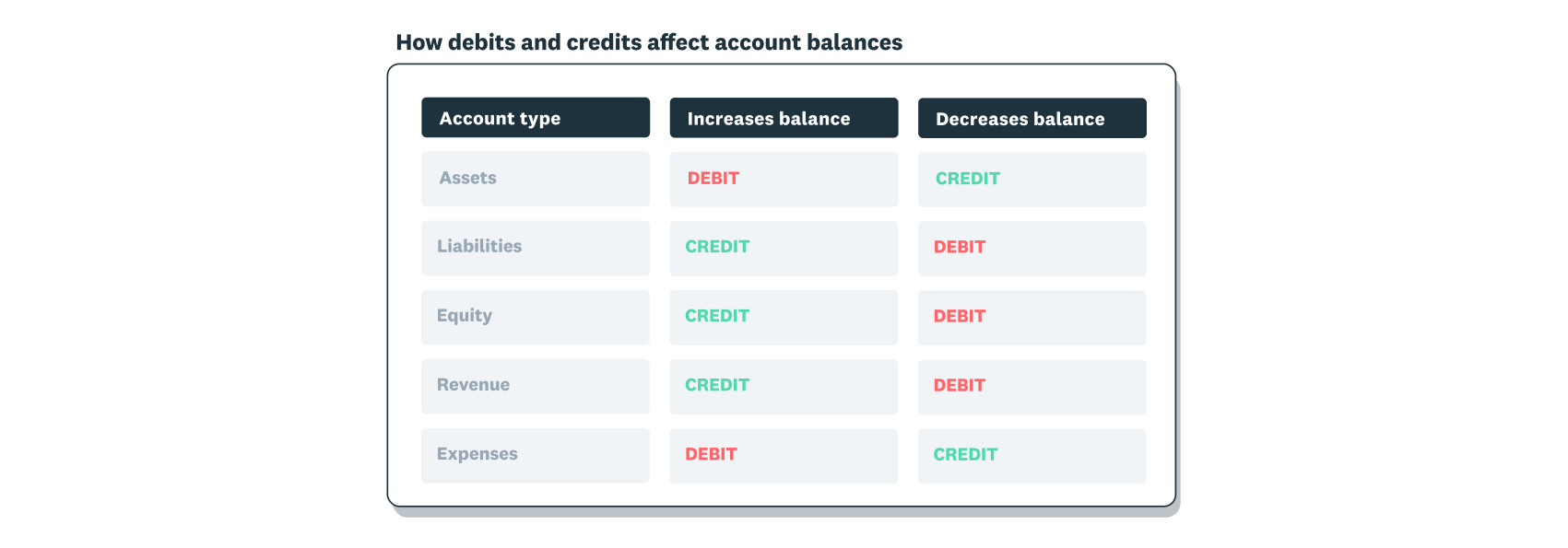
Debits and credits affect accounts differently depending on the account type. Here's how they work:
Debits increase:
- Asset accounts
- Expense accounts
Debits decrease:
- Liability accounts
- Revenue accounts
- Equity accounts
Credits increase:
- Liability accounts
- Revenue accounts
- Equity accounts
Credits decrease:
- Asset accounts
- Expense accounts
The key rule: debits must always equal credits in every journal entry.
This directory can help find an accountant near you.
How journal entries work
Journal entries work by recording equal debits and credits for every transaction. This keeps your books balanced and your financial records accurate.
When you record a transaction, you enter at least two lines: one debit and one credit. The total debits must always equal the total credits. This balance is the foundation of the accounting equation: Assets = Liabilities + Equity.
Why are journal entries important?
Journal entries form the foundation of accurate financial management. Without them, your financial statements wouldn't reflect your true business performance.
Here's why they matter for your business:
- Accurate financial reporting: Journal entries feed into your profit and loss statement, balance sheet, and cash flow reports
- Audit trail: Each entry creates a record you can reference during tax time or audits
- Error detection: Balanced entries help you catch mistakes before they affect your reports
- Better decisions: Accurate records give you reliable data for business planning
- Compliance: Proper documentation helps you meet tax and regulatory requirements
For small business owners, maintaining accurate journal entries means you can trust your numbers when making financial decisions.
What are the different types of journal entries in accounting?
Journal entries come in several types, each designed for specific accounting situations. The most common types include simple, compound, adjusting, reversing, recurring, closing, and correcting entries.
Understanding which type to use helps you record transactions accurately and maintain clean financial records. Here are the details on each type.
Simple journal entry
A simple journal entry records a transaction that affects exactly two accounts: one debit and one credit. Use this type for straightforward transactions like cash purchases or single payments.
Compound journal entry
A compound journal entry records a transaction that affects more than two accounts. Use this type when a single event involves multiple debits or credits, such as issuing compound financial instruments which, according to accounting standards, require allocating proceeds between liability and equity components.
Adjusting journal entry
An adjusting journal entry updates account balances at the end of an accounting period. Use this type to record income or expenses that haven't been captured yet.
Common uses include:
- recording accrued expenses (like wages earned but not yet paid)
- recognising deferred revenue (like payments received for work not yet completed)
- accounting for depreciation or prepaid expenses
For example, a construction company working on a three-month project would record an adjusting entry each month for one-third of the total revenue, even if they invoice only at the end.
Reversing journal entry
A reversing journal entry cancels out an adjusting entry from the previous period. Use this type to simplify recording when a transaction spans two accounting periods.
For example, if you accrued wages in December for work done but not yet paid, you'd reverse that entry in January when the actual payment is made. This prevents double-counting the expense.
Recurring journal entry
A recurring journal entry records transactions that repeat on a regular schedule. Use this type for predictable expenses like monthly rent, insurance premiums, or subscription fees.
Most accounting software, including Xero, lets you automate recurring entries so you don't have to create them manually each period.
Closing journal entry
A closing journal entry transfers balances from temporary accounts to permanent accounts at the end of a fiscal period. Revenue and expense accounts reset to zero, while the net result moves to retained earnings.
This process prepares your books for the next accounting period with a clean slate.
Correcting journal entry
A correcting journal entry fixes mistakes in previously recorded entries. Use this type when you've posted an amount to the wrong account or entered an incorrect figure.
For example, if you accidentally recorded office supplies as a travel expense, a correcting entry would move the amount to the correct account and document the change.
When to use journal entries
You'll need journal entries whenever a transaction affects your accounts. Some entries happen automatically through your accounting software, while others require manual input.
Common scenarios that require journal entries include:
- End-of-period adjustments: recording accrued expenses, deferred revenue, or depreciation
- Transactions not captured automatically: bank fees, interest charges, or manual corrections
- Error corrections: fixing misposted amounts or wrong account classifications
- Non-cash transactions: recording depreciation, bad debt write-offs, or equity changes. For example, accounting standards specify how an entity must recognise profit or loss when it settles the dividend payable with a non-cash asset.
- Transfers between accounts: moving funds or reclassifying expenses
- One-off transactions: recording unusual events like asset sales or loan proceeds
If you use accounting software like Xero, many routine entries are created automatically when you reconcile bank transactions or process invoices.
Journal entry example
A practical example helps show how journal entries work in real business situations.
Example: The Cosy Cake Shop buys baking supplies worth $300 in cash. The bookkeeper records a simple journal entry with two lines:
- Debit: Baking supplies account increases by $300
- Credit: Cash account decreases by $300
Here's what the journal entry looks like:

How to record journal entries
Recording a journal entry correctly keeps your financial records accurate and your books balanced. Follow these five steps each time you create an entry.
1. Identify the transaction and accounts involved
Start by selecting the transaction you need to record. Then identify which accounts it affects, such as cash, revenue, or expenses.
Consider which account will increase and which will decrease to clarify where to post debits and credits.
2. Classify the transaction as a debit or credit
Determine whether each account should be debited or credited. Key points:
- Debits increase assets and expenses
- Credits increase liabilities, revenue, and equity
3. Record the date and transaction details
Enter the transaction date and a clear description. Good descriptions include the vendor name, invoice number, or purpose of the transaction.
For example: "Office supplies purchase, Staples Invoice #12345" is more useful than just "supplies."
4. Enter debit and credit amounts
Enter the debit and credit amounts in the correct columns. Verify that total debits equal total credits before you move on.
If the amounts don't balance, review your entries for errors before posting.
5. Post to your general ledger and review
Post the entry to your general ledger once you've confirmed the amounts balance. Review the affected accounts to make sure the entry recorded correctly.
If you discover an error later, create a correcting journal entry to fix it.
Master accounting basics with Xero
Xero's accounting software automates your journal entries, stores your records securely, and produces financial statements that help you track your business's financial health.
FAQs on journal entries
Here are answers to some common questions about journal entries.
How do I fill out a journal entry?
To fill out a journal entry, gather these details first: transaction date, account names, amounts, and a description.
Then follow these steps:
- Enter the transaction date
- Assign a reference number for tracking
- List the account names with descriptions
- Enter debit and credit amounts in the correct columns
- Verify that debits equal credits
Accounting software like Xero automates this process and helps prevent manual errors.
Can I use accounting software to track journal entries?
Yes, accounting software automates journal entry creation and tracking. It reduces manual data entry, prevents errors, and produces accurate financial reports. Xero, for example, can create recurring entries automatically and flag imbalances before you post.
What are the three rules of journal entry?
The three fundamental rules are:
- Debits must equal credits in every entry
- Every entry needs at least one debit and one credit
- All entries must include the date, accounts affected, amounts, and a description
These rules keep your books balanced and your records complete.
How do I know if my journal entry is correct?
Check that total debits equal total credits. Verify you've selected the right accounts for the transaction type. Review the entry's impact on your financial statements to confirm it makes sense. Accounting software like Xero flags imbalances automatically before you post.
What's the difference between a journal and a ledger?
A journal records transactions chronologically as they happen. A ledger organises those same transactions by account. Think of the journal as a diary of events and the ledger as organised folders. Journal entries flow into the ledger during the posting process.
Disclaimer
Xero does not provide accounting, tax, business or legal advice. This guide has been provided for information purposes only. You should consult your own professional advisors for advice directly relating to your business or before taking action in relation to any of the content provided.