Cash flow projection for small businesses: how to do it
Learn how cash flow projection helps you plan spending, avoid shortfalls, and grow with confidence.
Written by Lena Hanna—Trusted CPA Guidance on Accounting and Tax. Read Lena's full bio
Published Thursday 2 April 2026
Table of contents
Key takeaways
- Create cash flow projections covering four to 12 weeks ahead for operational planning, listing all expected income and expenses with specific dates to calculate your running cash balance and spot potential shortfalls before they become crises.
- Update your cash flow projection at least monthly to maintain accuracy, comparing your predictions against actual results to identify whether you overestimated income or underestimated expenses and adjust future assumptions accordingly.
- Avoid common projection mistakes by building realistic payment delays into your estimates based on actual customer payment history, remembering to include irregular expenses like annual insurance or quarterly taxes, and accounting for seasonal business patterns.
- Use the direct method for small business projections by tracking actual cash movements rather than starting with profit figures, since profitable months can still leave you short on cash if customers haven't paid their invoices yet.
What is a cash flow projection?
A cash flow projection is a forecast of your expected income and expenses over a set period, showing how much cash you'll have at any point in the future. It helps you spot potential shortfalls, plan spending, and make confident financial decisions.
A cash flow projection differs from related financial documents:
- Cash flow projection: estimates future cash inflows and outflows over a specific period
- Cash flow forecast: serves as a broader term often used interchangeably with projection, though some use it for longer-term planning
- Cash flow statement: records historical cash movements, typically as part of your financial statements governed by standards like the IAS 7 Cash Flow Statements
What are the key components of a cash flow projection?
Your cash flow projection includes five key components:
- Opening balance: shows the cash you have in the bank at the start of the period
- Cash inflows: represent money coming in, primarily from sales but also from loans, grants, or asset sales
- Cash outflows: represent money going out for expenses, wages, taxes, and other costs
- Net cash flow: shows the difference between inflows and outflows, indicating whether your cash position grew or shrank
- Closing balance: shows the cash you expect to have at the end of the period, which becomes your opening balance for the next
Why is a cash flow projection important?
Cash flow projections help you avoid surprises and make better financial decisions. When you know how much cash you'll have next week or next month, you can pay bills on time, plan for growth, and make sure there's enough left to pay yourself.
With rising costs putting pressure on small businesses, getting cash flow management right matters more than ever. A projection gives you the visibility to act before problems arise.
Benefits of a cash flow projection
Cash flow projection is a smart financial habit. Here are the key benefits:
- Spot shortages early: identify cash gaps before they become crises, giving you time to delay spending, negotiate with suppliers, or secure financing
- Plan growth confidently: determine whether you can afford new equipment, additional staff, or expanded operations
- Pay yourself consistently: confirm there's enough cash to cover your own salary each month
- Track trends quickly: notice when expenses climb or income drops before small issues become big problems
- Fix cash flow leaks: pinpoint slow-paying customers and unfavourable payment terms, as research shows that improving these cash flow measures can increase firm performance significantly
How to create a cash flow projection
Creating a cash flow projection involves estimating when money will come in and go out, then tracking how those movements affect your cash position. Most small business owners build projections using either a spreadsheet or accounting software.
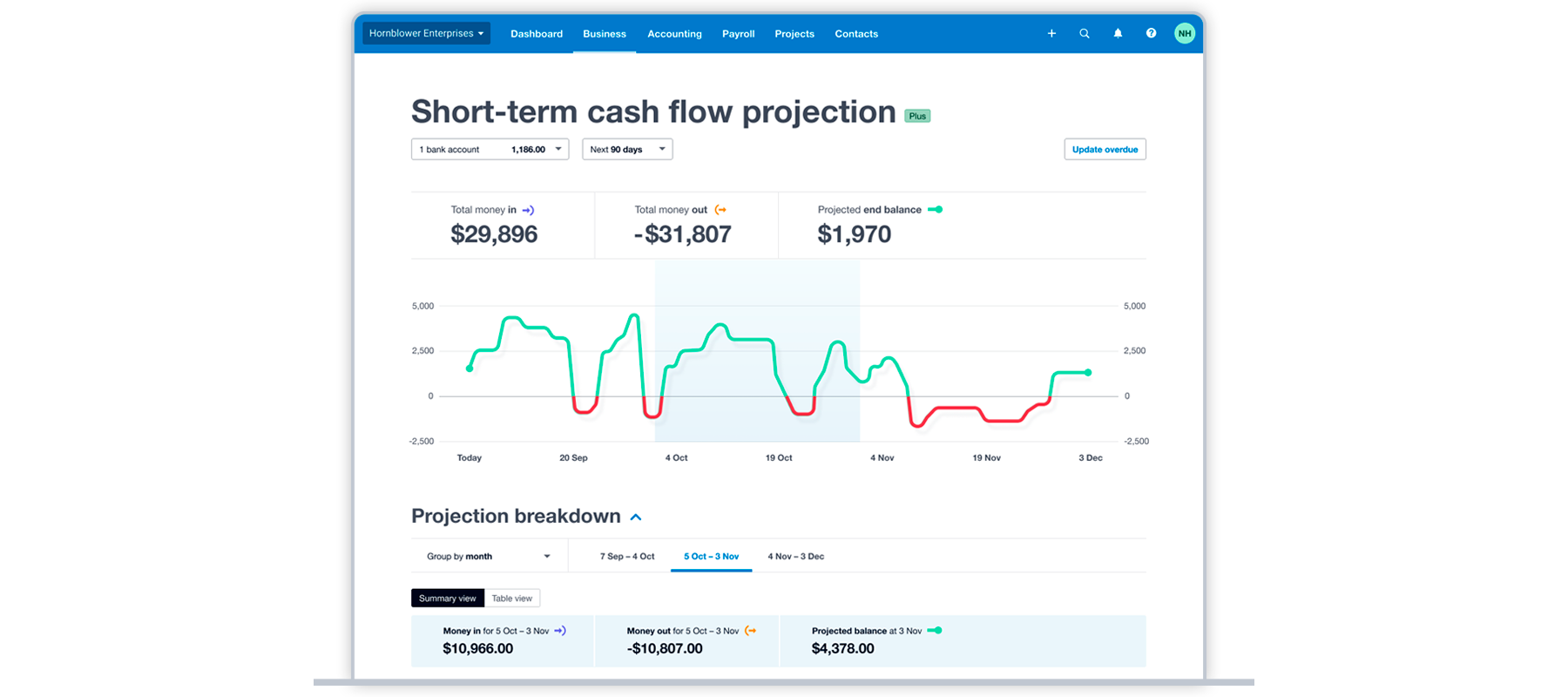
A cash flow dashboard shows how cash balances will rise and fall in response to expected transactions.
Both approaches work well. Spreadsheets offer flexibility and control, while software automates data collection and updates your projection in real time.
Types of cash flow projections
Different projection types suit different needs:
- Short-term projections: cover days or weeks ahead. Use these when cash is tight or you need to manage weekly payment cycles.
- Medium-term projections: cover one to three months. These work well for most small businesses handling regular expenses and seasonal fluctuations.
- Long-term projections: extend six to twelve months or more. Use these for strategic planning, loan applications, or investor presentations.
You can also choose between two methods:
- Direct method: tracks actual cash movements by listing specific inflows and outflows. This is the approach most small businesses use.
- Indirect method: starts with net income and adjusts for non-cash items. This method is common in formal financial reporting, with recent IFRS amendments clarifying that operating profit is the starting point for the indirect method.
For day-to-day cash management, the direct method with a medium-term timeframe works best for most small businesses.
Create a projection using a spreadsheet
To create a projection in a spreadsheet, follow these steps:
- Choose your forecasting period and note your starting cash balance. Most small businesses project four to 12 weeks ahead.
- List all expected income with dates. Include sales receipts, grants, tax refunds, loan proceeds, and any other cash hitting your bank.
- List all expected expenses with dates. Capture regular costs like rent and wages, plus irregular items like annual fees, quarterly taxes, or planned repairs.
- Calculate your running balance by adding income and subtracting expenses from your starting balance. This shows how much cash you'll have at any point during the period.
Create a projection using software
A cash flow dashboard shows how cash balances will rise and fall in response to expected transactions.
Accounting software automates much of the projection process by pulling real-time data from your bank feeds and invoices. Xero, for example, tracks your incomings and outgoings automatically, letting you generate a projection with a few clicks.
For longer-term or more detailed forecasting, accounting software integrates with specialist apps:
- Spotlight Reporting: provides scenario planning and board-ready reports
- Fathom: offers financial analysis and KPI tracking
- Calxa: handles budgeting and cash flow forecasting
Example of a cash flow projection
Here's how a cash flow projection helps with a real business decision.
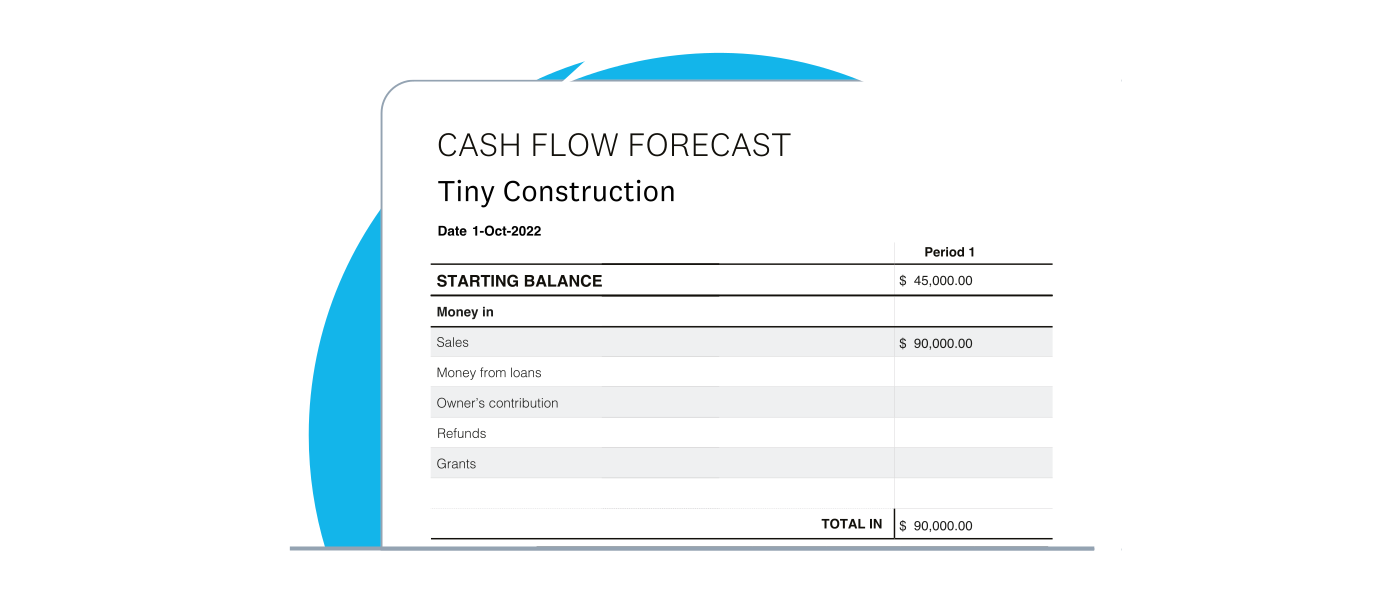
The scenario:Tiny Construction wants to buy equipment costing $20,000 next month. The finance manager needs to know if there's enough cash.
Starting position: The business has $45,000 in the bank. Based on outstanding invoices and sales forecasts, $90,000 in payments should arrive within 30 days. No other income is expected.
So the "money in" part of the cash flow projection will look like this:
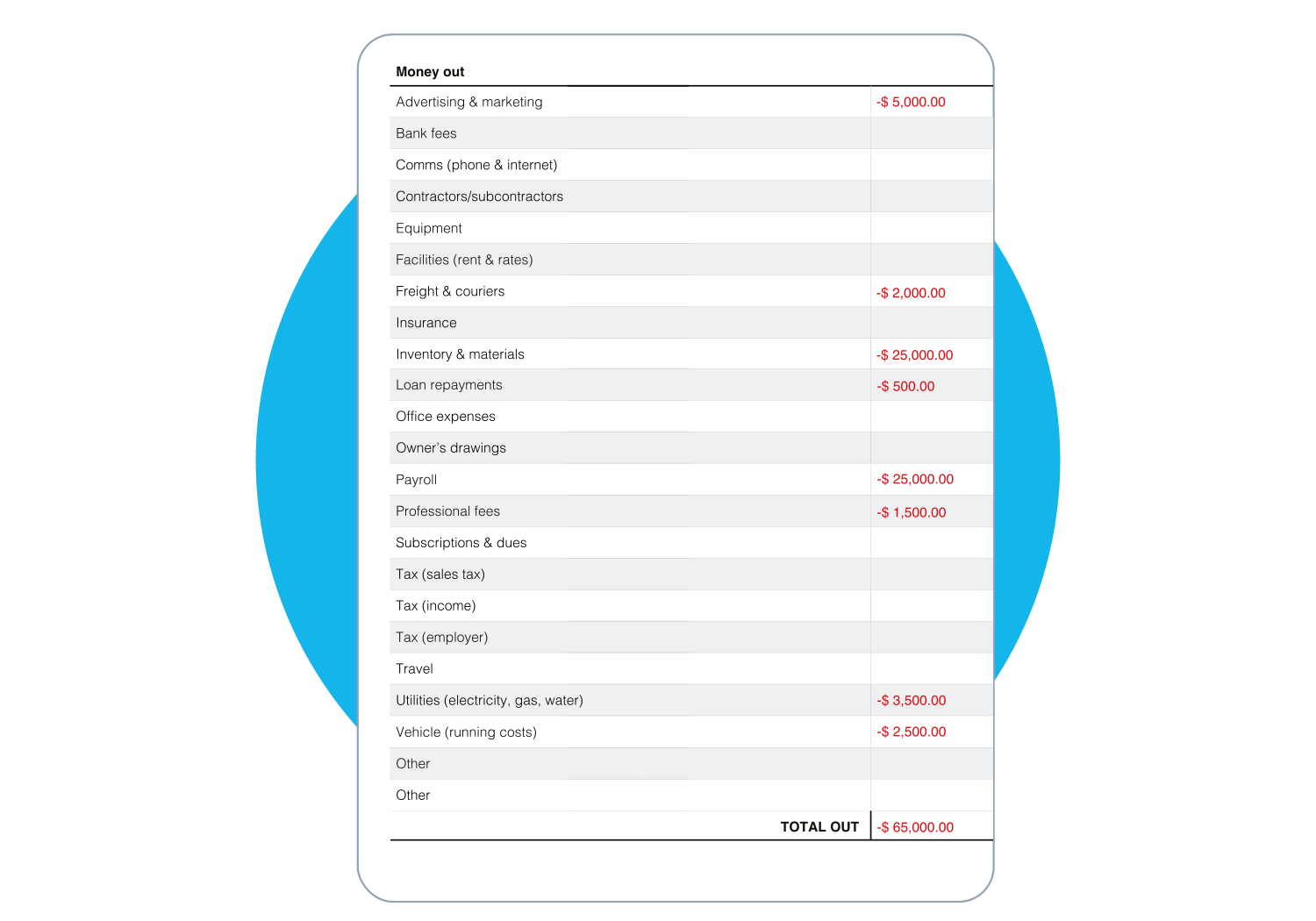
The "money out" part of the cash flow projection will look like this:
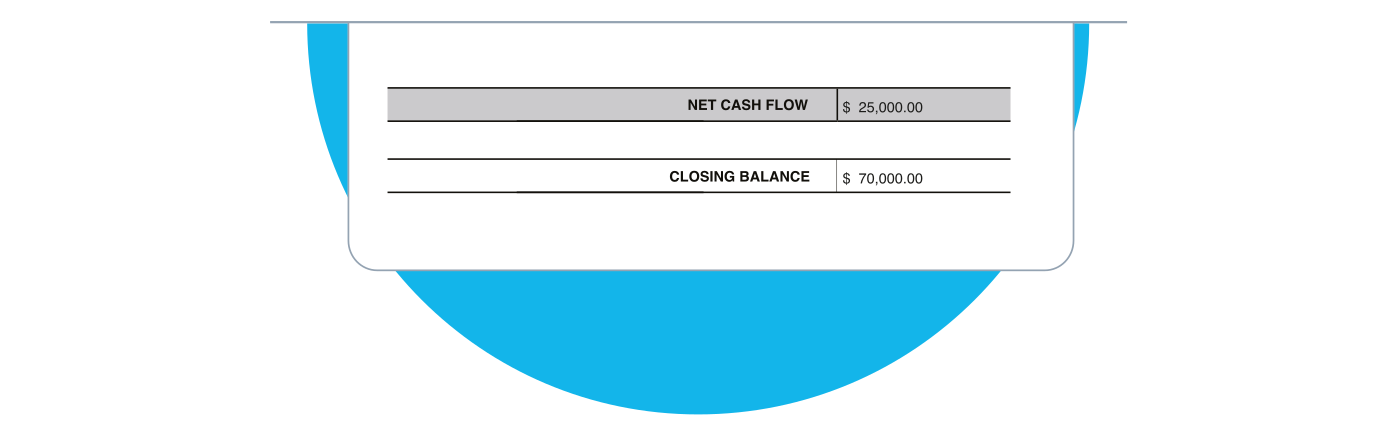
The result: With $90,000 coming in and $65,000 going out, net cash flow is $25,000. Adding that to the $45,000 starting balance leaves $70,000 at month end.
The decision: If Tiny Construction buys the $20,000 equipment with cash, they'll start next month with $50,000. The projection shows they can afford the purchase without financing.
The takeaway: Cash flow projections help you make investment decisions with confidence. You can see whether you'll have enough cash, or whether you need to explore financing options.
How to analyse your cash flow projection
Analysing your projection helps you understand your financial position and improve future accuracy. Focus on three key metrics:
- Closing balance: shows the cash you expect to have at the end of each period. If it drops below zero or your comfort level, you need to act.
- Net cash flow: indicates whether your cash position grew or shrank. Negative net cash flow over multiple periods signals a problem.
- Projection vs. actual: compare what you predicted to what happened. When projections miss, identify whether you overestimated income or underestimated expenses, then adjust your assumptions.
Each comparison teaches you something about your business and makes your next projection more reliable.
Common mistakes to avoid
Even simple projections can go wrong. Watch out for these common errors:
- Being too optimistic about payment timing: customers often pay later than invoices suggest, so build in realistic delays based on your actual payment history
- Forgetting irregular expenses: annual insurance premiums, quarterly taxes, and one-off repairs can drain cash unexpectedly. Review the full year for non-monthly costs.
- Confusing profit with cash flow: a profitable month can still leave you short on cash if customers haven't paid yet. Track actual cash movements, not just revenue.
- Letting projections go stale: outdated projections lose value quickly, preventing you from managing your cash conversion cycle, a key metric tied to firm performance. Update yours at least monthly, or more often if cash is tight.
- Ignoring seasonal patterns: many businesses have predictable slow periods. Research has identified four phases of seasonality (shoulder up, busy, shoulder down, and slow), so factor these into your projections rather than assuming steady income.
How often should you update your cash flow projection?
Update your cash flow projection at least once a month for most small businesses. More frequent updates make sense when cash is tight or your business is growing quickly.
The further ahead you project, the less accurate your estimates become. That's why rolling projections work well: each month, drop the oldest period, add a new one to the end, and review everything in between.
For a 12-month projection, this means refreshing monthly. Check whether your assumptions still hold, update any figures that have changed, and adjust for new information about upcoming income or expenses.
Simplify cash flow forecasting with Xero
Managing your cash flow shouldn't take hours of manual work. Xero's accounting software pulls data from your bank feeds and invoices automatically, giving you real-time visibility into your cash position.
With Xero, you can generate cash flow projections in a few clicks, spot potential shortfalls before they happen, and spend less time on spreadsheets.
Get one month free and see how Xero simplifies your cash flow management. If you're not ready for software, download our free cash flow projection template to get started.
FAQs on cash flow projection
Common questions about cash flow projections.
What's the difference between a cash flow projection, forecast, and statement?
These terms are often used interchangeably. Technically, a projection estimates future cash movements, a forecast may cover broader financial predictions, and a statement records historical cash flows.
How far ahead should I project my cash flow?
Most small businesses project four to 12 weeks ahead for operational planning. Extend to six to 12 months for strategic decisions, loan applications, or investor discussions.
What if my projection doesn't match what actually happens?
Variance is normal and expected. Compare projections to actuals each month, identify where your assumptions were off, and adjust future estimates accordingly. Each cycle improves your accuracy.
Do I need accounting software to create cash flow projections?
No. You can start with a spreadsheet and manual data entry. Software makes the process faster and more accurate by automating data collection and calculations.
Can I create a cash flow projection for a brand-new business?
Yes. Use industry benchmarks, conservative revenue estimates, and research from similar businesses. Expect wider variance in your first year as you learn your actual cash patterns.
Disclaimer
Xero does not provide accounting, tax, business or legal advice. This guide has been provided for information purposes only. You should consult your own professional advisors for advice directly relating to your business or before taking action in relation to any of the content provided.
Start using Xero for free
Access Xero features for 30 days, then decide which plan best suits your business.