Gearing Ratio Guide: Definition, How to Calculate, Examples
Learn how gearing ratio guides smarter debt choices, and see examples of how to calculate it.

Written by Shaun Quarton—Accounting & Finance Content Writer and Growth Marketer. Read Shaun's full bio
Published Friday 20 February 2026
Table of contents
Key takeaways
- Calculate your gearing ratio quarterly using the debt-to-equity formula (Total Debt / Total Equity × 100) to monitor your business's financial health and make informed borrowing decisions.
- Maintain a gearing ratio between 30% and 50% for most small businesses, as this range balances growth opportunities with financial stability while remaining attractive to lenders and investors.
- Use debt-to-equity ratios for quick financial assessments and comparisons, but apply broader gearing ratio analysis when you need deeper insights for strategic planning and long-term financial management.
- Recognise that ratios above 50% indicate high financial risk and potential difficulty securing loans, while ratios below 30% suggest strong stability but may limit growth opportunities through strategic borrowing.
Gearing ratio definition
Understanding the key terms helps you interpret gearing ratios correctly.
Gearing is the balance between debt and equity a company uses to fund its operations.
- Debt is borrowed money, such as loans and lines of credit, that must be repaid with interest
- Equity is the owner's investment in the business, including retained earnings and share capital
A gearing ratio is a financial metric that compares a business's debt to its equity. It shows how reliant a company is on borrowed funds relative to its intrinsic worth, helping you understand financial health.
Lenders, investors, and stakeholders use gearing ratios to assess financial stability:
- Higher ratio: Signals greater reliance on debt, which means increased financial risk but also potential for higher returns
- Lower ratio: Suggests a stronger equity position, reducing risk but potentially limiting growth opportunities
Why does your gearing ratio matter?
Your gearing ratio matters because it indicates your business's financial health. Tracking and managing it effectively helps you make smarter financial decisions and plan for sustainable growth.
- Borrowing decisions: Judge whether you can take on more debt without straining your cash flow or increasing financial risk
- Attracting investors and lenders: Signal financial stability with a balanced ratio, making your business more appealing to potential funders, as banks typically prefer gearing ratios below 60% for commercial loans.
- Strategic planning: Align your debt-to-equity structure with your growth goals, whether aiming for rapid expansion or steady, low-risk growth
- Cash flow stability: Free up more cash for reinvestment with a lower ratio, or allocate more funds toward debt repayments with a higher ratio
- Risk management: Spot financial vulnerabilities early and take corrective action by reviewing your ratio regularly
Types of gearing ratios
Here are gearing ratios typically used by small and medium-sized businesses (SMBs) and their advisors to measure financial leverage and risk. Each examines different aspects of your business's stability and how much risk you face.
- Debt-to-equity ratio: Compares total debt to total equity, showing how much of the business is funded by creditors versus owners. This ratio is often used to assess financial leverage and risk.
- Debt-to-capital ratio: Measures the proportion of total capital (debt + equity) funded by debt. Higher ratios suggest greater reliance on borrowing.
- Equity ratio: Represents the share of total assets financed by equity. Higher ratios indicate stronger financial stability and lower risk.
- Times interest earned (TIE) ratio: Assesses your ability to cover interest payments with pre-tax earnings. A higher ratio reassures lenders that you can meet your debt obligations, with ratios between 2.5 and 3 often seen as a signal of solid ability to handle interest payments.
Debt to equity ratio vs gearing ratio
The debt-to-equity ratio and gearing ratio are related but serve different purposes. While both measure financial leverage, they're often used interchangeably despite their distinctions.
- Debt-to-equity ratio: Specifically compares long-term debt to shareholders' equity
- Gearing ratio: A broader measure that uses various formulas to consider different types of debt relative to capital structure
Both ratios help evaluate financial risk. Use the debt-to-equity ratio for quick financial assessments and the gearing ratio for deeper insights into long-term planning.
When to use the debt-to-equity ratio vs the gearing ratio
When deciding which metric to use, consider your business's needs:
- Use the debt-to-equity ratio when: You need quick financial assessments and standardised comparisons, or want a snapshot of how much debt your business has relative to equity
- Use the gearing ratio when: You need deeper analysis for strategic planning and long-term financial management, or want a comprehensive view of your debt position across different types of debt
How to calculate the gearing ratio
Follow these steps to calculate your gearing ratio and understand your business's financial leverage:
- Calculate total debt: Include all financial liabilities, such as loans, bonds, and credit lines.
- Determine total equity: Add retained earnings and share capital to calculate the owner's total investment in the business.
- Apply a gearing ratio formula: Use one of these common formulas:
- Interpret the result:
Example gearing ratio calculations
Here's a practical example showing how to calculate a gearing ratio. Imagine a business with:
- Total debt: $50,000
- Total equity: $100,000
Using the debt-to-equity formula
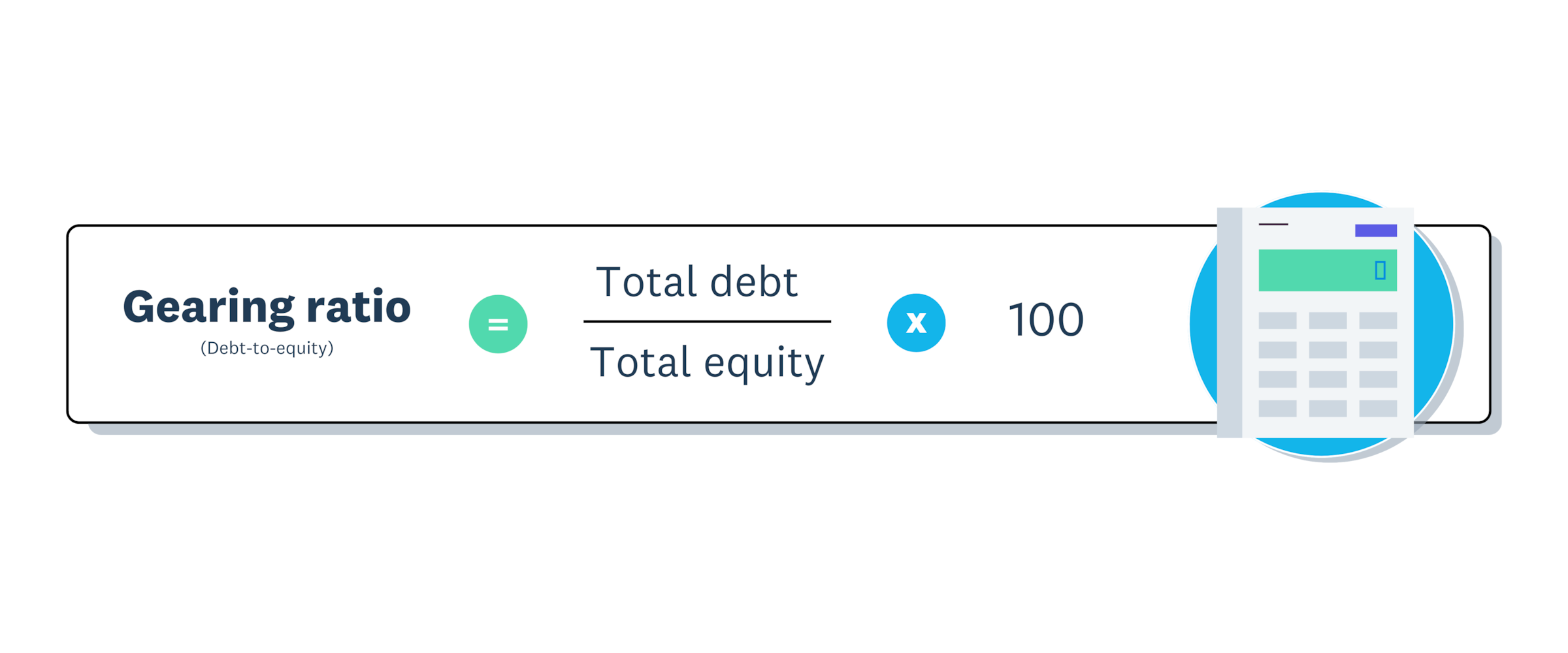
Gearing ratio = (Total debt / Total equity) × 100
Gearing ratio = ($50,000 / $100,000) × 100Gearing ratio = 50%
Using the debt-to-capital formula
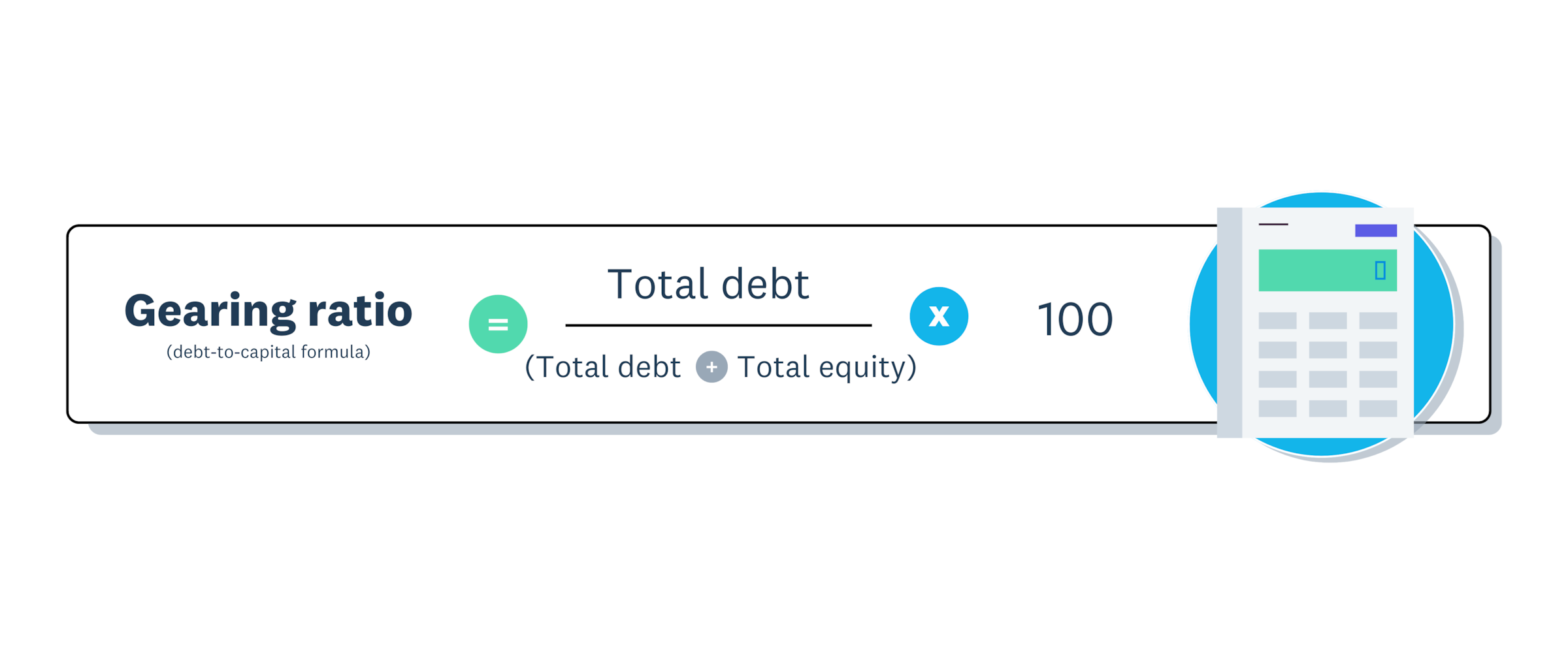
Gearing Ratio = (Total Debt / (Total Debt + Total Equity)) × 100
Gearing Ratio = ($50,000 / ($50,000 + $100,000)) × 100Gearing Ratio = ($50,000 / $150,000) × 100Gearing Ratio = 33.3%
Gearing ratio analysis
Analysing your gearing ratio helps you understand your company's financial position.
Gearing ratio analysis reveals the balance between debt and equity and how that balance impacts your company's risk and stability. Interpreting this ratio helps you assess your business's financial health.
- Moderate gearing (approximately 50%): Represents a balanced financial approach for most small and medium-sized businesses
- High gearing (above 50%): Indicates heavier reliance on debt and increased financial risk, as a ratio above this level is often considered high-risk and makes a company more susceptible to default.
- Low gearing (below approximately 30%): Suggests a strong equity position with lower risk and greater stability
Typical gearing ratios vary significantly by industry, growth stage, and risk tolerance. Different sectors maintain vastly different healthy gearing ratios. For example, biotechnology companies average just 16%, while thermal coal operations typically run at 23%.
Many SMBs maintain a 30% to 50% debt mix, using borrowed funds to support growth while relying on equity for stability. Striking the right balance is key to managing financial risk and growing your business steadily.
High vs low gearing: what's the difference?
The difference between high and low gearing comes down to how you balance debt and equity funding sources.
High gearing means relying more on debt than equity. For example, a retail store taking out a large loan to buy inventory and renovate its premises would have a high gearing ratio.
High gearing can work well when:
- Your business has stable cash flow that can service debt
- You're in a high-growth industry where revenues are increasing
- You need to borrow to grow quickly
The risk: If revenues drop or interest rates jump, high gearing becomes dangerous.
Low gearing means using more equity and less debt. For example, a family-owned cafe expanding by using saved profits may grow more slowly than if they'd borrowed, but they keep financial risk to a minimum.
Low gearing works well when:
- You want to prioritise long-term security over rapid growth
- Market conditions are unstable
- You want to protect your credit rating
The downside: Growth may be slower than competitors who borrow to expand.
This helps your business manage financial risk while staying ready to grow.
Take control of your finances with Xero
Manage your business's finances simply and efficiently with Xero. With automated calculations, helpful features, and real-time financial reports, you can track gearing ratios, simplify accounting tasks, stay compliant, and report clear, up-to-date information to your stakeholders.
Ready to take control of your finances? Get one month free and see how Xero can help your business grow.
FAQs on gearing ratios
Here are answers to common questions about gearing ratios and financial leverage.
What is a good gearing ratio for a small business?
A gearing ratio between 30% and 50% is generally considered healthy for most small businesses. Experts agree that a range of 25% to 50% is optimal or normal for well-established companies. However, the ideal ratio varies by industry, growth stage, and risk tolerance.
How often should I calculate my gearing ratio?
Calculate your gearing ratio quarterly or whenever you're considering taking on new debt. Regular monitoring helps you spot financial vulnerabilities early and make informed borrowing decisions.
Can my gearing ratio be too low?
Yes. While low gearing reduces financial risk, it may also limit growth opportunities. If your ratio is very low, you might be missing chances to use debt strategically to expand your business.
How does gearing ratio differ from leverage ratio?
Gearing ratio and leverage ratio are often used interchangeably. Both measure how much debt a company uses relative to equity. The main difference is regional: 'gearing' is more common in the UK and Australia, while 'leverage' is preferred in the US.
Start using Xero for free
Access Xero features for 30 days, then decide which plan best suits your business.